- Microservices: Spring IO
- Spring Boot is open-source: GitHub - spring-projects/spring-boot: Spring Boot helps you to create Spring-powered, production-grade applications and services with absolute minimum fuss.
- Spring Boot Guides / Academy: Spring Guides / Spring Academy
- Quickstart Spring Boot project: Spring quickstart
Historical notes:
Projects:
- Reference project: Spring Boot: H2 DB and Thymeleaf – albertprofe wiki
- ApartmentPredictor: ApartmentPredictor github
The product goal is to help learners, developers, and non-technical professionals to accurately identify their current coding/programming profile so they can build a clear, personalized learning roadmap with confidence.
Users answer a short, guided questionnaire focused on two core dimensions: whether they already know how to program and whether they want to learn (or deepen) programming skills.
Based on their answers, the system maps them to one of four well-defined profiles drawn from the course matrix (as example):
- Experienced developers who want to level up in architecture, DDD, best practices and controlled AI use
- Practitioners who already code but prioritize speed and want to leverage AI to ship projects faster
- Absolute beginners seeking solid foundations in logic, algorithms and computational thinking
- Non-developers (product managers, designers, founders, etc.) who only need enough architectural literacy to communicate effectively with technical teams
Once the profile is determined, the application presents a clear description of the user’s situation, recommended learning focus, and a high-level roadmap tailored to that profile. This removes ambiguity and helps users stop guessing which course, content path or skill investment is right for them.
Technically the solution consists of a Spring Boot backend that stores the profile logic, questionnaire rules and user results, and a modern frontend that guides the user through the assessment, displays the resulting profile and recommended next steps in an intuitive, mobile-friendly interface. The overall aim is simple: give every user an honest, actionable picture of where they stand so they can choose the most effective path forward instead of wasting time on mismatched content.
Spring Boot Goal #1
Create a Spring Boot project with a clean data model using H2 in-memory database. Implement entities, repositories and basic configuration only. No controllers (except restController), no Thymeleaf/views, no frontend integration in this version — pure backend foundation for the profile assessment system (exposing REST endpoints).
Here, we manage the code project.
Spring Initializrmakes bootstrapping a Spring project fast and predictable.
Here’s a practical guide to create a Spring Boot web project with the dependencies we need, using Maven, Java 21, and a smooth path to IDE import (IntelliJ IDEA) and initial setup steps.
Start by choosing the right project setup:
- Type:
MavenProject - Language:
Java - Java:
21 - Spring Boot: pick the latest stable 3.x line (for example 3.5.x or newer)
- Project Metadata: groupId (com.example), artifactId (demo), version (1.0.0), packaging (jar)
- Dependencies: add Spring Web MVC, Spring Data JPA, Thymeleaf, H2 Console, DevTools, and test stubs as you listed
spring-boot-starter-webmvcspring-boot-starter-thymeleafspring-boot-starter-data-jpaspring-boot-devtoolscom.h2database:h2 (runtime)spring-boot-starter-thymeleaf-test (test)spring-boot-starter-webmvc-test (test)
Generate and import:
- Click Generate to download a zip, then unzip.
- In
IntelliJ IDEA, choose Import Project, select thepom.xml, and let IDEA resolve dependencies. At first run, Maven will download all required artifacts, including transitive dependencies. This may take a few minutes on first setup.
Project structure overview:
src/main/java: your Java sourcesrc/main/resources: configuration files, templates, static resourcessrc/test/java: testspom.xml: Maven configuration and dependency management
Configure application.properties:
src/main/resources/application.properties(or application.yml)- Common settings to start with:
- spring.datasource.url=jdbc:h2:mem:testdb
- spring.datasource.driver-class-name=org.h2.Driver
- spring.datasource.username=sa
- spring.datasource.password=
- spring.jpa.hibernate.ddl-auto=update
- spring.h2.console.enabled=true
- server.port=8080
These enable an in-memory H2 database and the web-based console at /h2-console.
Create a simple data model and repository:
- Define an entity, for example, a
User/Customerwith id, name, and email. - Use
JPAannotations:@Entity,@Id,@GeneratedValue, etc. - Create a
Spring Data JPArepositoryinterface, e.g.,UserRepositoryextendsJpaRepository<User, Long>. - This provides
CRUDoperations out of the box.
Expose domains with @RestController:
- Create a Spring REST controller to handle HTTP requests, e.g., show a list of users and a form to add a new user.
- Use
@RestControllerand@GetMapping,@PostMapping. - Update
@Serviceto handle business logic. - Update
@Repositoryto handle data access logic.
Expose a minimal controller with Thymeleaf views:
- Create a Spring MVC controller to handle HTTP requests, e.g., show a list of users and a form to add a new user.
- Use
@Controllerand@GetMapping,@PostMapping. - Add a
Thymeleaftemplate undersrc/main/resources/templates, such asusers.html, to render pages without manual HTML assembly. Thymeleafis included via thethymeleafstarter; use standardth:*attributes to bind data.
Enable H2 Console:
- Access
http://localhost:8080/h2-consoleafter the app starts, usingJDBCURLjdbc:h2:mem:testdb, with default credentials (sa/empty), to inspect the in-memory database during development.
Watch for common pitfalls:
- Ensure your
pom.xmlaligns withJava 21compatibility. If you see dependency resolution issues, refresh Maven in IDEA and reimport. - If the H2 console reports missing schema, verify that
spring-boot-starter-data-jpapulls in a compatibleJPAprovider and that your entities are properly scanned (package structure). - When running tests, include spring-boot-starter-test or specific test dependencies; the current list includes test siblings, so expect a clean test harness.
package com.example.demo;

import jakarta.persistence.Entity;
import jakarta.persistence.Id;

@Entity
@Data
@Builder
@NoArgsConstructor
@AllArgsConstructor
public class Customer {

  @Id
  private String id;
  private String firstName;
  private String lastName;
  private String email;
  private String phone;
  private String address;

  // ....
}

@Entity
public class RoadMap {

    //fields
    @Id
    @GeneratedValue(strategy = GenerationType.UUID)
    private String id;
    private String name;
    private String description;
    private int steps;
    private boolean completed;

    //...
}

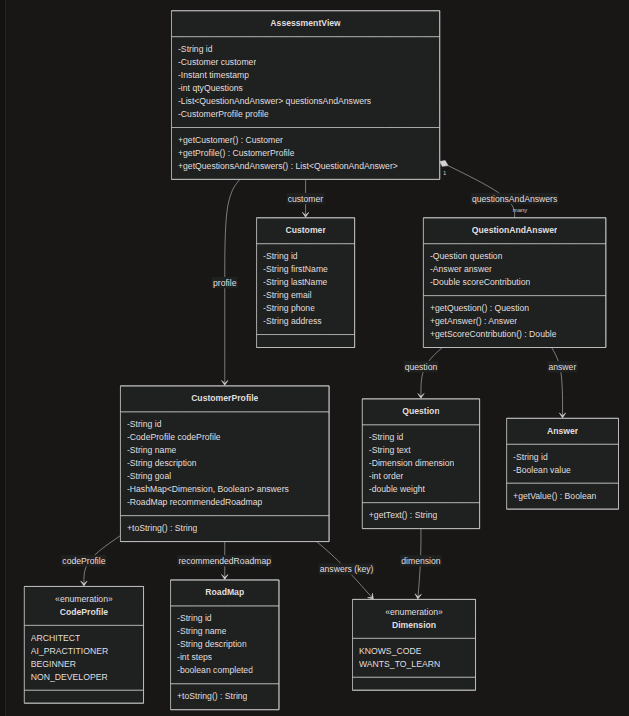
//... you can check all the classes at model, next section- dataModel: diagrams folder
- dataModel: 2 approaches
- dataModel: v1
- dataModel: mermaid-text
- dataModel: JSON-txt
Project Lombok is a Java library that plugs into the compiler and generates boilerplate code at build time via annotations — getters, setters, constructors,
toString(),equals()/hashCode(), builders, and more.
Why we use it: entity and model classes need a lot of repetitive code that adds no business value. With Lombok, Customer stays readable and focused on its fields; changing a field doesn't require updating getters, constructors, or toString() by hand.
Dependency (already included in pom.xml, managed by the Spring Boot parent):
<dependency>
    <groupId>org.projectlombok</groupId>
    <artifactId>lombok</artifactId>
    <optional>true</optional>
</dependency>
Annotations used in this project:
| Annotation | Generates |
|---|---|
@Data |
getters, setters, toString(), equals(), hashCode() |
@Builder |
fluent builder API (e.g., Customer.builder().firstName("...").build()) |
@NoArgsConstructor |
no-argument constructor (required by JPA) |
@AllArgsConstructor |
constructor with all fields (used by @Builder) |
Official docs and setup guides for IDEs: https://projectlombok.org/
- Java Faker
- 6 approaches
- Apartment example: Populate / CommandLineRunner
Using CommandLineRunner + Java Faker to seed an H2 test database is highly relevant and useful for Spring Boot development, testing, and demos.
CommandLineRunnerruns automatically after theSpringcontext starts and beans (including repositories) are ready. This makes it ideal for one-time data initialization: you inject the repository, create entities, and save them before the application fully serves requests. In the next exampleApartmentPredictorApplication, it seeds three sample apartments so the in-memory H2 database is never empty on startup. This is especially valuable with H2 because the database is ephemeral—data vanishes when the JVM stops—so you need reliable, automatic population every time the app launches.
Key benefits:
- Immediate usability: Controllers, services, and prediction logic can query real data right away without manual SQL scripts or external setup.
- Reproducible demos & development: Developers and stakeholders always see consistent sample apartments (price, area, bedrooms, furnishing status, etc.) instead of an empty database.
- Testing support: Integration tests and exploratory work have data available without extra configuration or
@Sqlscripts. - Zero external dependencies: Works purely in-memory with H2; no need for a real database during local runs.
Adding Java Faker elevates this further. Instead of hard-coding a few static records, Faker generates realistic, varied synthetic data (random but plausible prices, areas, bedroom counts, “yes/no” features, furnishing statuses). You can produce dozens or hundreds of apartments in a few lines of code, covering edge cases and volume that static samples cannot.
This improves:
- Model training / prediction experiments (more diverse training-like data).
- UI and API testing under realistic load.
- Avoidance of over-fitting to a tiny hand-written set.
(1) Realistic test data reveals edge cases, performance limits, and UX issues that simplified mocks miss, enabling reliable validation before production.
(2)
- Synthetic: Generated (e.g., via Faker) to mimic real names without privacy risk.
- Seed: Fixed, curated starter set for consistent demos and tests.
- Production: Live user data—never used in testing due to sensitivity and variability.
(3) Minimum dataset for the customer domain: ~100–1000 customer entities.
The ApartmentPredictorApplication implements
CommandLineRunner, which executes code after the Spring Boot application starts.
The CommandLineRunner serves as a data initialization mechanism, populating the database with test data upon application startup.
package com.example.apartment_predictor;

import com.example.apartment_predictor.model.Apartment;
import com.example.apartment_predictor.repository.ApartmentRepository;
import org.springframework.beans.factory.annotation.Autowired;
import org.springframework.boot.CommandLineRunner;
import org.springframework.boot.SpringApplication;
import org.springframework.boot.autoconfigure.SpringBootApplication;

@SpringBootApplication
public class ApartmentPredictorApplication implements CommandLineRunner {

    @Autowired
    private ApartmentRepository apartmentRepository;


    public static void main(String[] args) {
        SpringApplication.run(ApartmentPredictorApplication.class, args);
    }

    @Override
    public void run(String... args) throws Exception {
        System.out.println("Creating apartment objects...");

        // Create apartment objects based on your sample data
        Apartment apartment1 = new Apartment(
                13300000L,    // price
                7420,         // area
                4,            // bedrooms
                2,            // bathrooms
                3,            // stories
                "yes",        // mainroad
                "no",         // guestroom
                "no",         // basement
                "no",         // hotwater
                "yes",        // heating
                "yes",        // airconditioning
                2,            // parking
                "yes",        // prefarea
                "furnished"   // furnishingstatus
        );


        // Create additional sample apartments
        Apartment apartment2 = new Apartment(
                8500000L,     // price
                5200,         // area
                3,            // bedrooms
                2,            // bathrooms
                2,            // stories
                "yes",        // mainroad
                "yes",        // guestroom
                "no",         // basement
                "yes",        // hotwater
                "no",         // heating
                "yes",        // airconditioning
                1,            // parking
                "no",         // prefarea
                "semi-furnished" // furnishingstatus
        );

        Apartment apartment3 = new Apartment(
                6200000L,     // price
                3800,         // area
                2,            // bedrooms
                1,            // bathrooms
                1,            // stories
                "no",         // mainroad
                "no",         // guestroom
                "yes",        // basement
                "yes",        // hotwater
                "no",         // heating
                "no",         // airconditioning
                0,            // parking
                "yes",        // prefarea
                "unfurnished" // furnishingstatus
        );

        apartmentRepository.save(apartment1);
        apartmentRepository.save(apartment2);
        apartmentRepository.save(apartment3);

        int index = 0;
        System.out.println("\n=== Apartments in the Database ===");
        for (Apartment apartment : apartmentRepository.findAll()){
            index++;
            System.out.println("#" + index);
             System.out.println(apartment);
        }

        //apartmentRepository.findAll().forEach(System.out::println);
    }


}spring.application.name=demo
spring.datasource.url=jdbc:h2:/home/albert/MyProjects/SpringProjects/compassMap/db/compassmapdb
##spring.datasource.url=jdbc:h2:mem:testdb
#spring.datasource.url=jdbc:h2:~/test
spring.datasource.driverClassName=org.h2.Driver
spring.datasource.username=albert
spring.datasource.password=1234
spring.jpa.database-platform=org.hibernate.dialect.H2Dialect
spring.jpa.show-sql=true
spring.jpa.hibernate.ddl-auto=updateCustomerRepository
public interface CustomerRepository extends CrudRepository<Customer, String> {}This Spring Data interface provides full CRUD operations for the
Customerentity using aStringprimary key.
By extending CrudRepository, it automatically offers methods to save, find by ID, find all, count, and delete customers without writing any implementation code.
In the current version of the project it serves as the persistence layer for users who complete the programming-profile assessment. Spring Data JPA will generate the concrete repository at runtime and connect it to the H2 in-memory database. No custom query methods are defined yet; the interface remains minimal and ready for future extensions such as finding customers by profile type.
package com.example.demo;

import org.springframework.data.jpa.repository.JpaSpecificationExecutor;
import org.springframework.data.repository.CrudRepository;

public interface CustomerRepository extends CrudRepository<Customer, String> {}
REST(Representational State Transfer) is an architectural style that uses standard HTTP methods and URIs to perform operations on resources. Responses are typically JSON.Rest is the method for applications to communicate to each other.
The CustomerRestController provides a RESTful API for the Customer entity:
- Base path:
/api/v1/customers - Thin controller: delegates all work to
CustomerService - Uses Spring annotations:
@RestController– returns data (JSON) instead of views@RequestMapping("/api/v1/customers")– common path prefix@PostMapping,@GetMapping,@PutMapping,@DeleteMapping– bind HTTP verbs@RequestBody– deserialize JSON input@RequestParam– read query parameters
HTTP method mapping:
-
POST /create,POST /createAll→ Create -
GET /getAll,GET /byId,GET /count→ Read -
PUT /update→ Update -
DELETE /byId,DELETE /all→ Delete
@RestController
// RequestMapping is a annotation that maps HTTP requests to handler methods
// it is used to map the HTTP requests to the methods in the controller
@RequestMapping("/api/v1/customers")
public class CustomerRestController {
    // Autowired is an annotation that marks the field as a dependency
    @Autowired
    private CustomerService customerService;

    //----------------------------- CREATE -----------------------------
    @PostMapping("/create")
    public Customer createCustomer(@RequestBody Customer customer) {
        Customer newCustomer = customerService.createCustomer(customer);
        System.out.println("Service createCustomer: " + newCustomer);
        return newCustomer;
    }

    @PostMapping("/createAll")
    public Iterable<Customer> createAllCustomers(@RequestBody Iterable<Customer> customers) {
        Iterable<Customer> newCustomers = customerService.saveAll(customers);
        System.out.println("Service createAllCustomers: " + customers);
        return newCustomers;
    }

    //----------------------------- UPDATE -----------------------------
    @PutMapping("/update")
    public Customer updateCustomer(@RequestBody Customer customer) {
        if (customer.getId() == null || customerService.getCustomerById(customer.getId()) == null) {
            return null;
        }
        Customer updatedCustomer = customerService.updateCustomer(customer);
        System.out.println("Service updateCustomer: " + updatedCustomer);
        return updatedCustomer;
    }

    //----------------------------- GET -----------------------------
    @GetMapping("/getAll")
    public Iterable<Customer> getAllCustomers() {
        // call service to get all customers and return them
        Iterable<Customer> customers =  customerService.getAllCustomers();
        System.out.println("Service getAllCustomers: " + customers);
        return customers;
    }

    @GetMapping("/byId")
    public Customer getCustomerById(@RequestParam String id) {
        Customer customer = customerService.getCustomerById(id);
        System.out.println("Service getCustomerById: " + customer);
        return customer;
    }

    @GetMapping("/count")
    public long countCustomers() {
        long count = customerService.countCustomers();
        System.out.println("Service countCustomers: " + count);
        return count;
    }

    //----------------------------- DELETE -----------------------------
    @DeleteMapping("/byId")
    public Customer deleteById(@RequestParam String id) {
       Customer foundCustomer = customerService.getCustomerById(id);
       if (foundCustomer == null) return null;
       else {
           customerService.deleteCustomer(id);
           return foundCustomer;
       }

    }

    @DeleteMapping("/all")
    public void deleteAllCustomers() {
        customerService.deleteAllCustomers();
    }
}Apache Maven is a build tool for Java projects. Using a project object model (
POM), Maven manages a project's compilation, testing, and documentation.
<?xml version="1.0" encoding="UTF-8"?>
<project xmlns="http://maven.apache.org/POM/4.0.0" xmlns:xsi="http://www.w3.org/2001/XMLSchema-instance"
         xsi:schemaLocation="http://maven.apache.org/POM/4.0.0 https://maven.apache.org/xsd/maven-4.0.0.xsd">
  <modelVersion>4.0.0</modelVersion>
  <parent>
    <groupId>org.springframework.boot</groupId>
    <artifactId>spring-boot-starter-parent</artifactId>
    <version>4.1.1</version>
    <relativePath/> <!-- lookup parent from repository -->
  </parent>
  <groupId>com.example</groupId>
  <artifactId>demo</artifactId>
  <version>0.0.1-SNAPSHOT</version>
  <name/>
  <description/>
  <url/>
  <licenses>
    <license/>
  </licenses>
  <developers>
    <developer/>
  </developers>
  <scm>
    <connection/>
    <developerConnection/>
    <tag/>
    <url/>
  </scm>
  <properties>
    <java.version>21</java.version>
  </properties>
  <dependencies>
    <dependency>
      <groupId>org.springframework.boot</groupId>
      <artifactId>spring-boot-h2console</artifactId>
    </dependency>
    <dependency>
      <groupId>org.springframework.boot</groupId>
      <artifactId>spring-boot-starter-thymeleaf</artifactId>
    </dependency>
    <dependency>
      <groupId>org.springframework.boot</groupId>
      <artifactId>spring-boot-starter-webmvc</artifactId>
    </dependency>
    <dependency>
      <groupId>org.springframework.boot</groupId>
      <artifactId>spring-boot-starter-data-jpa</artifactId>
    </dependency>

    <dependency>
      <groupId>org.springframework.boot</groupId>
      <artifactId>spring-boot-devtools</artifactId>
      <scope>runtime</scope>
      <optional>true</optional>
    </dependency>
    <dependency>
      <groupId>com.h2database</groupId>
      <artifactId>h2</artifactId>
      <scope>runtime</scope>
    </dependency>
    <dependency>
      <groupId>org.springframework.boot</groupId>
      <artifactId>spring-boot-starter-thymeleaf-test</artifactId>
      <scope>test</scope>
    </dependency>
    <dependency>
      <groupId>org.springframework.boot</groupId>
      <artifactId>spring-boot-starter-webmvc-test</artifactId>
      <scope>test</scope>
    </dependency>
    <dependency>
      <groupId>org.projectlombok</groupId>
      <artifactId>lombok</artifactId>
      <optional>true</optional>
    </dependency>
    <dependency>
      <groupId>com.github.javafaker</groupId>
      <artifactId>javafaker</artifactId>
      <version>1.0.2</version>
    </dependency>
  </dependencies>

  <build>
    <plugins>
      <plugin>
        <groupId>org.springframework.boot</groupId>
        <artifactId>spring-boot-maven-plugin</artifactId>
      </plugin>
    </plugins>
  </build>

</project>
-
IDE: IntelliJ IDEA 2026.2.3 (Community Edition)
- Descargar IntelliJ IDEA
- With Installing snap on Ubuntu | Snapcraft documentation:
sudo snap install intellij-idea-community --classic
-
Java 21 (or 25, 17, 11, 8) open-jdk
-
JUnit 3.8.1
-
Create project by Sprint Init
-
Lombok, Java Faker, Thymeleaf, H2, JPA
- Alternative: Maven Project:
maven-archetype-quickstartarchetype- https://maven.apache.org/
- mvn --version Apache Maven 3.8.7 Maven home: /usr/share/maven Java version: 21.0.8, vendor: Ubuntu, runtime: /usr/lib/jvm/java-21-openjdk-amd64 Default locale: en_US, platform encoding: UTF-8 OS name: "linux", version: "6.8.0-83-generic", arch: "amd64", family: "unix"
- Alternative: Maven Project: