What a speed test run measures and records, the Ookla and iperf3 engines, when tests run, how an Ookla server is chosen, and what changes for iperf3 inside a container.
A run records download, upload, ping, jitter, (best-effort) packet loss,
and bufferbloat, plus the bytes used and the connection it ran on (public IP,
ISP, DNS resolver). A run also records two facts that used to be
invisible: the address family the transfer actually used (IPv4, IPv6, or
mixed when one run genuinely used both) - read back from the run's own
connections, never guessed - and which direction its
loss/jitter probe sampled. Not every field is present on every run: a download-only
or upload-only run has no figures for the direction it skipped, ping and jitter
are blank on an Ookla run whose server answered its latency requests with HTTP
errors and still served its files (the time to an error answer is not a
latency; the log says what was answered), packet loss is
optional and not always measurable, family and probe direction are recorded
only when the run really established them (the engine notes below say when
that is), and bufferbloat is absent when a transfer
phase was too short to sample, returned too few samples, the latency target
was unreachable, or too few idle probes survived the retransmit filter to leave a
baseline. That last case drops the figure on purpose: a single retransmit in the
idle number is worth about a second, enough on its own to cancel real bloat down
to zero, so a polluted baseline would report a clean link instead of an
unmeasurable one. Missing is stored as missing rather than as a zero, so charts
and thresholds can tell "not measured" from "measured, and it was bad". A run
that failed outright isn't a measurement at all: it is kept only as a flagged
data-usage row, which every measurement view filters out (see the data-usage
bullet under Metrics). Turn on Record failed tests (Speedtest
settings, off by default) and that same row also records why the run failed,
and the all-runs table and its CSV list it as a failed test. It still never
reaches a chart, an average, a threshold verdict, the latest run in
/api/status or the latest-run gauges on /metrics (see
Failed tests).
The ping shown is the engine's own number, a mean over ten samples, so it
keeps matching what speedtest.net would report. A mean has no defence against an
outlier, though: one stalled handshake among nine fast ones reports several times
the real latency (and lands in jitter, which is their standard deviation, as a
much larger distortion still). So the run also keeps the fastest of those
same samples - no extra probes - and everything that decides on latency uses
that floor instead: which city wins the race for the centre, which server every
automatic run ranks first (and whether last run's server keeps its seat within
the max(2 ms, 15 %) band), which server wins a best-of round, which server the
very first run picks, and whether your ping threshold breached. A pothole shouldn't
pick your server or page you, but a genuinely distant link has a high floor too
and still breaches. iperf3 exposes no per-sample values of its own, so a run
measures the latency itself: five bare TCP handshakes to the server before the
transfer, reported as their median (if none of them land, iperf3's own
min_rtt, and failing that the idle baseline). There is no separate fastest
figure on those runs, so that median is both what is shown and what decides.
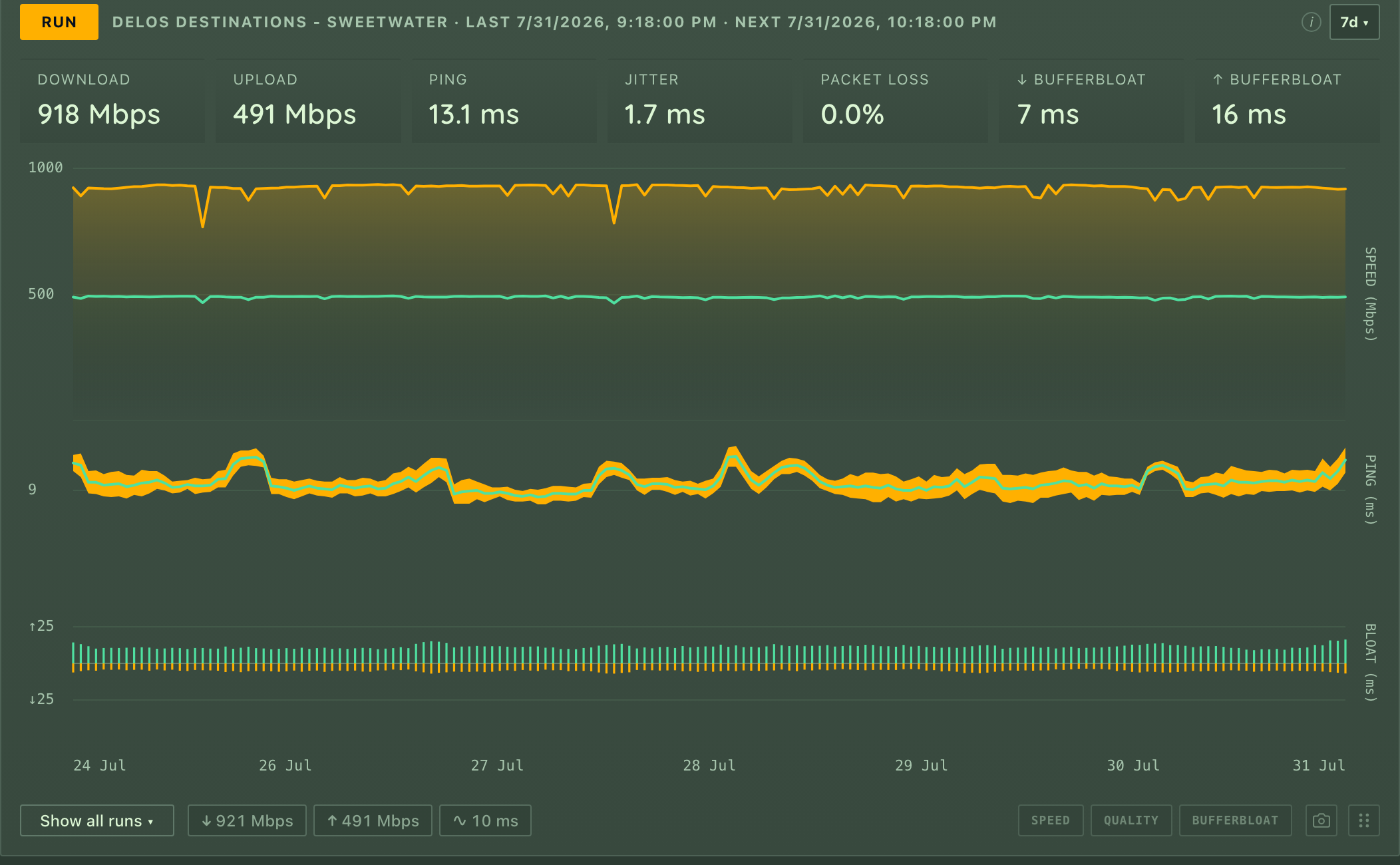
Bufferbloat is the extra lag that appears only while the line is busy - the
reason a video call breaks up the moment a big download starts. Pingularity
measures it by pinging before the test (idle) and during it (loaded) - both
against a fixed target of its own (one.one.one.one, Cloudflare) rather than
the speedtest server, so only the gap between them is meaningful, and the idle figure will not match the ping
recorded above. When the idle burst before an Ookla test finds no path - a test
fired seconds after a long outage can meet a link that is not fully back - the
baseline is taken again after the test, once the line is quiet: an idle link
after the transfers is as idle as one before them. A test that follows an
outage of ten minutes or more also waits a minute before it starts, so it does
not walk into that half-restored link at all; a test after a shorter blip
starts at once, as before:
flowchart LR
  idle["idle link<br/>ping 24 ms"] --> load["speedtest saturates<br/>the connection"]
  load --> queued["your packets now wait in the<br/>modem's queue: ping 190 ms"]
  queued --> bloat["bufferbloat = 190 - 24<br/>= +166 ms under load"]
Both figures are medians of their probes - the idle one over only the probes
that survive a retransmit filter, since on an unloaded link a sample more than
500 ms above that burst's own minimum is an OS retry rather than latency. A burst
whose own fastest probe is already at or above a second holds no honest sample to
measure the rest against, and yields no baseline at all. The loaded phases keep
theirs, where a near-second sample is the bloat itself. The headline bufferbloat
number - the one the tiles show and the one your max bufferbloat threshold is
compared against - is median(loaded) - median(idle). The chart also plots a
p95 per direction, the sustained bad end of the distribution. p95 is
deliberately not the maximum: these are TCP-connect probes, and a single worst
sample on one is usually a SYN retransmission (a fixed ~1000 ms OS retry, and
~2000 ms for a second one) rather than queue delay, so a max-based number
reports round figures that say more about packet loss than about buffering. The
probes go to a fixed dual-stack name, and the address family that wins their
connection race is not taken on trust - a path that drops half its handshakes
still wins races constantly, and its retries would land in the baseline. So the
winner is graded with a short burst first, and only if that burst comes back
lossy is the other family resolved and measured, taking the job only if it grades
cleaner. A host reachable in just one family keeps it however lossy: lossy data
beats none.
There are two engines, picked in the settings drawer:
- Ookla (speedtest.net) - the default. Numbers match speedtest.net; no setup.
Its own knobs: parallel connections (
0= auto, which is one per logical CPU for downloads and at most 8 for uploads; a value you set instead applies to both directions, up to 16 - worth raising on a fast or high-latency link, or in a small VM that can only see two cores) and the packet-loss probe. - iperf3 - opt-in, run against your own
iperf3 -sbox (LAN, homelab, or VPS). It measures what Ookla can't: internal/LAN links and honest upload. Used only when theiperf3binary is installed (otherwise it falls back to Ookla) - present on a native install once you've installed iperf3 (a Homebrew, MacPorts or Linuxbrew one is found even though the service starts with a barePATH), and in the container only in the-iperfimage variant, not the default image. Its own knobs: parallel streams, duration, warm-up, TCP window, congestion control, MSS, DSCP, the loss/jitter UDP pass, and - per server - IP version, bind source, and optional RSA auth. Congestion control and MSS are Linux (and FreeBSD) knobs: macOS and Windows cannot set either, so the daemon runs with the system default there and says so once in the log. The TCP window is the kernel's to grant, not iperf3's - about 8 MB on stock macOS (kern.ipc.maxsockbuf), a few hundred KB on stock Linux untilnet.core.rmem_max/wmem_maxare raised - and a window past that fails the run with a message naming the setting, the KB it asked for and the sysctl to raise. In a bridged container several of those knobs point at things only the host has - see iperf3 in a container below.
Direction (both / download / upload, plus iperf3's simultaneous --bidir) and
retries (default 1, at most 3) are kept per engine: the Ookla and iperf3
tabs each carry their own pair, so tuning one never disturbs the other, and
switching engines switches which pair is in force. Releases before 0.100 shared
a single pair: an iperf3 field with no value of its own followed Ookla's. So
the first start after upgrading writes the values iperf3 had been taking from
Ookla under iperf3's own names and says so on stderr (a start that cannot write
to the database runs with those values anyway, warns that it could not record
them, and tries again at the next settings load) - nothing about your runs
changes, and an older build reads those same values back if you step down. A
field that was following an Ookla value nobody had saved - the shipped default -
has nothing to carry and stays unwritten, and there the two releases part company
once Ookla's direction or retries move, on either of them: an older build hands
that field Ookla's value at every start, this one keeps iperf3's default. So if
you step down to a release before 0.100, check the iperf3 direction and retries
after the step and again after coming back up. A database created by 0.70 or
later that 0.100.0-rc.1 has already started is past the carry: that release took
the database's record of its own birth to mean the pair was already split, so
an iperf3 field still following Ookla's came up at the shipped default there
and stays there until you set it. Restoring a settings backup taken before
0.100 is not an upgrade either: an iperf3 field that was still following Ookla's
is in the file only as Ookla's, so that is where the restore puts it and the
iperf3 field keeps whatever this install already had. When the backup names
the release that wrote it, the restore says which of those values differ from
what iperf3 runs here, and what this install keeps instead. A field the backup
holds a value of its own for - a save from the settings drawer on those releases
wrote one whenever the value iperf3 was running differed from the shipped
default - restores like any other setting. On Ookla, retries are also what
let a very slow uplink finish at all: when parallel upload streams are too slow for
any of them to complete inside the capture window, the retry falls back to a single
stream. Set Ookla's retries to 0 and that fallback cannot run, so on a link that
slow the upload always fails and records nothing. The run's download half is kept
either way - a "both" run that loses only its upload stores its download, ping and
jitter as a partial result, with the upload shown as unmeasured (the same contract
iperf3 has always had) - and the warning in the log says why and names the setting.
That UDP pass needs the iperf3 port open for UDP as well as TCP - the same
port, both protocols (ufw allow 5201/tcp and ufw allow 5201/udp, or the
equivalent security-group rules). Allowing only TCP is the usual reason a server
reports throughput perfectly while loss and jitter stay blank forever: the
control connection and both transfers are TCP and connect fine, and the UDP
datagrams are dropped without a refusal, so the pass waits out its window and
gives up. The daemon logs iperf3 udp pass failed, loss and jitter unrecorded
each time, and when the run's TCP transfers succeeded it names the firewall as
the likely cause. Nothing is retried later, so runs taken while the port was
closed have no loss or jitter to recover.
For iperf3, the separate UDP loss/jitter pass probes the same direction you
test: downstream normally, upstream for an upload-only run - so a one-direction
test on an asymmetric line reports loss for the direction you asked about. That
also means loss and jitter describe one direction per run, never both, and
loss on an asymmetric path genuinely differs by direction - so each sample now
records which way its probe ran. The loss and jitter readouts name the path on
hover, the run tooltip carries it in its Quality line, and it's exported as
udp_direction (down/up) in the API and CSV. An Ookla run records a
direction too: its packet-loss probe sends the datagrams from the client to
the server, so a probe that succeeded is recorded as up. Runs that never
measured loss/jitter - either engine's - and rows recorded before the field
carry no direction and are shown unlabeled rather than guessed at.
A bridged container (the default docker run/compose network) has its own
network namespace: its own localhost, its own interfaces and addresses, its
own /etc/hosts, and NAT between it and everything else. Several iperf3
settings are host-referential - they name things that exist on the host but
not inside that namespace. All of them fail loudly rather than mismeasure
quietly, and when the daemon knows it runs in a container, most of the failures
carry a container-specific explanation in the error itself (natively the same
errors mean exactly what they say, and get no such note):
- A loopback server address (
localhost,127.0.0.1,::1) - inside a bridged container that is the container, so the connection is refused by the container's own (empty) loopback before it ever reaches theiperf3 -son the host. The settings drawer warns as soon as a saved server points at loopback while the daemon runs bridged (a host-network container's loopback is the host, so it never warns there; it never blocks saving either - the operator may really mean the container), and a failed run's error explains the same thing. Usehost.docker.internal(see the compose file below) or the host's LAN IP. - Server names the host resolves privately - entries in the host's
/etc/hostsand mDNS.localnames resolve natively but not in a bridged container, which has its own hosts file and no mDNS responder. The run fails with iperf3's own name-resolution error (no container-specific hint for this one - the daemon can't tell a host-private name from a typo). Use an IP, or a name the container's DNS resolves. - Bind source = a host IP (
--bind) - the address doesn't exist in the container's namespace, so the bind fails ("cannot assign requested address"), and the error says so. Bind a container address instead, or use host networking. - Bind source = a host interface name (
--bind-dev) - interface names don't cross network namespaces, so it fails ("no such device"), and the error says so. Separately, on kernels older than 5.7SO_BINDTODEVICEneedsCAP_NET_RAW, which the-iperfimage'siperf3deliberately does not have (the capability is stamped on thepingularitybinary alone - see docs/security-model.md) - so on those kernels--bind-devfails in the container even for an interface that does exist inside it. Native installs are unaffected: the deb/rpm unit's ambientCAP_NET_RAWcarries into the iperf3 child. - IP version = IPv6 - the default Docker bridge carries no IPv6 (unless
you've enabled it in the daemon config), so a forced IPv6 run fails outright
("network unreachable"), and the error says why. The quieter half of the
same problem is Auto: it doesn't fail, it silently measures IPv4 where a
dual-stack native install would measure IPv6. That is why a run records the
family its transfers actually used - shown beside the server in the runs
table and run tooltip, exported as
ip_family(4/6/mixed) in the API and CSV. iperf3 reads it back from each direction's own connection report, andmixedmeans the download and upload really landed on different families (dual-stack DNS can do that) - labeledIPv4+IPv6in the UI rather than picking a side. Ookla runs record it from the transfer's real connections; a run with no recordable connection - for example one carried entirely through an operator's proxy, where only the hop to the proxy is visible - stays empty, never guessed, like rows recorded before the field existed. An Ooklamixedclaims less than an iperf3 one: a single recorder spans both directions and every retry there, so it means both families showed up somewhere in the run's transfers - a retried attempt landing on the other family is enough, and the two directions need not have differed.
Two more things a bridged container changes without any error at all:
- MTU. The Docker bridge defaults to an MTU of 1500 no matter what the uplink uses, so over a tunnel or PPPoE uplink with a smaller effective MTU, full-size packets fragment along the way. The UDP loss/jitter probe now sends 1200-byte datagrams (1200 + 8 UDP + 40 IPv6 = 1248, under the 1280-byte IPv6 minimum MTU), so the probe itself can't fragment on any sane path - container or not - and its loss figure can't be fabricated by dropped or late fragments. An oversized MSS setting doesn't error here either: the kernel silently clamps it to what the interface takes.
- LAN line rate. Bridged traffic crosses a veth pair and conntrack NAT, which costs real CPU per packet - against a fast LAN server the measured TCP rate can sit measurably below native line rate, most visibly at multi-gigabit speeds. The number honestly describes the container's network path; it just isn't the host's.
And one setting empties rather than fails: the congestion control
dropdown's suggestions come from
/proc/sys/net/ipv4/tcp_allowed_congestion_control, which exists only in the
host's initial network namespace - a bridged container can't see it, so the
dropdown arrives with no suggestions, and the UI now says why instead of
letting the empty list read as "this host supports no algorithms". An
algorithm you type or import is still passed to iperf3 unchanged.
--network=host makes nearly all of this go away on Linux Docker Engine:
the container shares the host's namespace, so loopback is the host, host IPs
bind, IPv6 works, multicast reaches the wire, and LAN tests measure at native
line rate. Two caveats survive it: .local name resolution still depends on
the image's own resolver (debian-slim has no mDNS module - prefer an IP or
host.docker.internal), and on kernels older than 5.7 an interface-name bind
still fails in the container (the capability note above). It is already the recommended way to run the container (see
Docker - including why Docker Desktop can't provide it).
The canonical compose file for the iperf3-enabled image lives at install.pingularity.dev/compose-iperf.yaml - fetch it from there rather than copying a block from this README: the served file is pinned to the image version it was published with and carries the current comments, so it cannot drift from the daemon the way an inline snapshot here could. Three of its pieces are the ones this section is about:
- It defaults to
network_mode: host, for all the reasons above. - Its
extra_hosts: ["host.docker.internal:host-gateway"]mapshost.docker.internalto the host's gateway address, so aniperf3 -srunning on the host is reachable from the container by that name on Linux Docker Engine too (Docker Desktop resolves the name on its own). - If you must stay bridged (published ports, Docker Desktop without host
networking, an orchestrator that owns the network), it keeps the fallback
as a commented pair -
ports: ["9000:9000"]together withenvironment: ["PINGULARITY_ACCESS=network"]. Uncomment both or neither: a published port alone answers403, because every install starts private (see Docker) - and set a login when you opt in.
One honest caveat either way: a test against an iperf3 -s on the same
machine measures the container-to-host virtual path (or loopback, under
host networking), not any real network - fine as a smoke test, useless as a
line measurement.
Scheduled speedtests are off by default - turn them on in the Speedtest
settings (or with -speedtest). Once enabled, they run on startup and on a
schedule (-speedtest-interval, default 1h). Two extra triggers are governed
separately: a test runs after a reconnect (on by default;
-speedtest-on-reconnect=false to disable) - spaced out so a flapping line
cannot fire tests back to back: at most one reconnect test per
-speedtest-interval, or per 15 minutes when that interval is shorter. There is
also an optional while degraded
toggle in the Speedtest settings (off by default, needs scheduled tests on) that
fires a test when latency stays high without the link fully dropping - above
Degraded above (default 150 ms, 0 = off) for two probe rounds in a row,
re-arming once latency recovers. Rounds taken while a test runs are skipped
there: the test itself raises latency. Run now (or POST /api/speedtest) always
works.
Only one speedtest runs at a time, and the triggers do not queue behind each
other. If a scheduled slot comes due while any other test is already
running, that slot is skipped and the schedule advances to the next one - it
is not retried, and not run late (the counter
pingularity_stat_total{stat="speed.scheduled_skipped"} records it). A slot
held back by a closed window or a busy link behaves the opposite way:
nothing was measured, so it keeps polling and fires as soon as the condition
clears. "Busy" is traffic on the busiest interface above Busy above (default
5 Mbps) - and unlike the alert thresholds, 0 is not "off" here: it makes any
measurable traffic count as busy, so scheduled tests stop firing. Only scheduled
runs consult it; reconnect, degraded and Run now go regardless.
A speedtest fills the line on purpose, and while it does, the probe rounds
taken beside it read slow or fail for that reason alone. So a failed round
that overlapped one of our own tests - any trigger, any engine - does not count
toward Down after. It is still stored, drawn as a failed round on the
latency chart and counted in monitor.bad_rounds; it just can't start an
outage.
- The hold has a limit. It lasts at least two minutes and at least one round, measured from the first failed round. After that, failed rounds count again even if the test is still running, because a test does not keep the line full that long on its own, and a dead line can keep a test hanging.
- Real outages keep their start. If the failures carry on after the test, the outage is confirmed once Down after rounds have failed outside the hold, and is dated where it would have been without the test: at the round where the failing run first reached Down after. Uptime, the heatmap and the outage log get the same figures; only the alert arrives later, by up to the hold plus Down after rounds. The alert text carries no time, but the recovery alert's duration is right.
- The degraded check skips those rounds. A test neither starts a brownout nor ends one; a brownout that outlasts it is still measured afterwards.
- The latency chart's tooltip names the test. The chart draws nothing for it, but hovering a point taken while a test that produced a result was using the network adds "During a speedtest". A test that ended without one gets no note (like every chart, the latency chart never shows a failed test), though its rounds were held all the same. The record of when tests ran follows the latency retention, goes with Delete now for latency, and is not exported: a restored backup has its history without the notes.
What counts as "using the network" is the whole engine run: for Ookla that includes the server race, the pings and the packet-loss probe, which barely load the line, and an iperf3 test to a server on your own network holds rounds too. The only cost of that is a later alert.
Some limits, so none of them surprise you:
- On a default install scheduled tests are off and reconnect tests are on, so the hold mostly applies to the test that starts right after a short outage ends. A second drop during that test is alerted up to the hold plus Down after rounds late, still with the right start time.
- A long enough test can outlast the hold: Best of with many servers, or the most retries (above all with a 30-second iperf3 run), can keep the line full for longer than two minutes. A badly bloated line can then still log a false outage.
- A test that is stopped, or cut short by its own time limit, can keep moving data for up to 15 seconds after it ends; rounds in that tail are neither held nor noted in the tooltip.
- A gap inside the hold - a pause, a suspend, a skipped round, a restart - ends the held run like any failing run. If the line is still down after it, the outage starts after the gap, where a build without the hold would already have written it from before.
- A digest sent while failures are being held reports that stretch as up. If the outage is then confirmed, its early part can fall between two digests.
/metrics shows whether any of this ever mattered on your line, split by what
started the test (see Did speedtests cause false outages?).
A test that ends without a result - every server it tried failed, the server list could not be fetched, iperf3 could not start - is not a measurement. By default it leaves only the flagged data-usage row described above, and nothing on the dashboard lists it.
Turn on Record failed tests (Speedtest settings, off by default) to keep a
row for each one in the Show all runs table and its CSV. The row shows when
the test ended, what started it, the engine, the server the failure was about
when one is known, the data it used, a red failed badge in the Health column,
and the reason in plain words. The speed and latency cells stay blank. It is
the same row as the data-usage one, so its bytes are counted once. It never
reaches a chart, an average, a stat tile, a threshold verdict, an alert, the
adaptive cadence, the degraded trigger, the digest, the latest run in
/api/status or the latest-run gauges on /metrics.
| Reason shown | fail_stage |
What happened |
|---|---|---|
| couldn't get the server list | server_list |
The Ookla server list could not be downloaded, usually because the connection or DNS was down. |
| couldn't look up the pinned server | server_fetch |
The pinned Ookla server could not be looked up. |
| no usable server | no_servers |
No Ookla server was left to test against. |
| server didn't answer the ping | ping |
The server failed the latency check before the test. |
| server gave no result | na |
The server finished the test but reported no speed. |
| download failed | download |
The download part of the test failed. |
| upload failed | upload |
The upload part of the test failed. |
| two-way test failed | bidir |
iperf3's test that moves both directions at once failed. |
| see the log for details | other |
Anything else, for example no iperf3 server set, or iperf3 authentication failing. The speedtest failed log line has the error. |
When a Best-of round or an automatic run's fallback tried more than one server, the reason is the first server's failure and the server named is that one. When the failure was not about a particular server (no server list, no iperf3 server set), the server is left blank rather than guessed.
Not recorded: a test you stop yourself, a test cut short by the daemon shutting down, a run where one direction measured (that is a result, with the other direction blank), a Best-of round where at least one server measured, and a scheduled test that never started (schedule window closed, link busy, another test already running).
A scheduled test that fails while the line is down is recorded like any other, so an outage adds a row each time a test comes due: once an hour on the default schedule, or every one to five minutes while Test more often while failing has shortened the interval. The Downtime panel shows the outage for the same time.
Turning the switch off stops new rows. The ones already recorded stay listed
until you delete them (the bin on each row), clear speed data (Data tab), or
speed retention removes them. The failure counters on /metrics
(pingularity_speed_failures_total{stage}) count every failed test whether the
switch is on or not.
For Ookla, choose a server (Find by place or Ookla ID, then pick its row) or
leave Auto - fastest near you. A row badged Unsupported cannot be
chosen: that server's HTTP speedtest endpoint (Ookla's legacy upload path)
answers errors, so tests against it fail, or measure speed with no ping -
clicking it says so in the footer instead of selecting it, and typing its ID
into Find lists it with the badge rather than pinning it (hover the badge for
the reason). Such a server can still be starred, and a server that is already
chosen keeps its radio even if it later earns the badge, so the picker never
hides what the next run will use. That badge comes from a cheap check -
fetching the server's latency file - which a host whose upload endpoint
refuses everything still passes. (The reverse also exists, rarely: a server
that refuses only its latency file and serves everything else. That check
badges it all the same, and a run against one that is already chosen stores
the speeds the server delivers, with the ping left blank.)
A host with a dead upload endpoint only reveals itself when a run tries it, so
when one refuses every upload the daemon stops offering it to automatic
selection for twelve hours, and remembers that across a restart. A server
that comes back and refuses everything again earns a longer rest each time -
twelve hours, then a day,
then three - because re-admitting a still-broken server costs a whole
measurement turn to rediscover. It is never permanent: a repaired server is
back within three days on its own, and one that has behaved for a week starts
over at twelve hours. Auto isn't just "nearest": every server that's effectively equidistant gets to race
(in a big city, a dozen providers all sit "0 km away" - one of each is pinged
rather than an arbitrary few, and the same rule seeds each candidate city's
six in the city race that picks the centre, with distance ties broken by the
echo the server list itself came back with) and the lowest latency wins -
judged on the floor of each server's ten probes, not their mean, because one
stalled probe among nine fast ones moves a mean by 20 ms and a floor by nothing
(the city race and the Best-of verdict use the same floor, so the three
decisions agree). Your own ISP's
server, when Ookla lists one nearby and the sponsor name can be matched to
your ISP, is guaranteed a place in the race - traffic to it never leaves your
provider's network, so it's the most likely winner - but it still has to win on
ping like everyone else. (That match is a name heuristic: if your ISP is unknown
or trades under a different name than it sponsors servers under, its server
simply competes on distance like any other.) Two ties are broken deliberately
rather than by jitter: a run keeps the server the last automatic run
measured while it is still among the servers this run pings (the winning
city's list, seeded as above) and still pings within max(2 ms, 15 %) of the
fastest (win reason incumbent when that kept it ahead of a faster server;
plain fastest_ranked when it was the fastest anyway), and failing that prefers your
ISP's own server inside the same band (on_net) - so the history compares
like with like instead of flipping between equivalent servers, while a server
that has gone bad loses its seat the run it goes bad, because the seat is
re-pinged every run rather than remembered - and an incumbent the winning
city's list does not carry is not pinged at all, and loses the seat the same
way. A server that still pings well but can no longer be measured - it
answers, then moves no bytes - is the one case pinging cannot see, and a
failed run records no winner for the next run to learn from, so it would hold
its place indefinitely, hourly, with nothing to alert you: the next ranked
candidate rides behind whichever server an automatic run leads with, is
measured when that one cannot be, and takes the place itself (win reason
fallback, counter speed.head_failed). The run after it leads with the
server that answered, so the failure usually costs one wasted attempt and no
more - though only while that server pings within the same hair of the fastest
that the paragraph above describes. Further out it cannot be preferred over a
faster-pinging server, so the wasted attempt repeats each run until the broken
one recovers or slows down; either way a real measurement is now recorded every
time, where before there was none. A pinned server has no fallback: the pin is
your answer to this question. Ping alone
never learns whether a rival is faster to transfer, so after every twelve
automatic tests (any unpinned Ookla run counts; the challenge itself lands on
the next scheduled single-server run, and with Best of above 1 it never
does, because every round already measures rivals) the run measures the
incumbent's strongest rival instead - one server, no extra data - and the
rival takes the seat only if its one score clears a bar set by the
incumbent's own last dozen same-direction runs: their median plus 15 %, or
their second-best hour if that is higher. So on a steady wired line the rival
needs a clear 15 % win; on a link whose runs swing by a fifth it has to beat
what the incumbent itself reaches on a good hour, or one lucky hour would
steal the seat and the next challenge would steal it back - nobody has to
know their link's noise as a number, the record already says it. A score that
lands more than three times the incumbent's good hour is not treated as a win
at all: one reading has no round to be disbelieved against, and a server that
buffers and acknowledges an upload without delivering it can report several
times the line - so it is judged as the record's median instead and keeps the
seat where it is. The reading itself is still recorded as the test's result;
what the daemon declines to do is hand a seat to a number the line cannot
carry. A fresh seat
needs three runs of record before it is challenged at all, and changing the
test direction starts that record afresh. There is nothing to set: the
cadence is speed_challenge_every on the settings API (default 12; 0 turns
the challenger off) and is deliberately not in the drawer. If the rival cannot be measured the incumbent is measured as the
fallback and the attempt still counts. Win reasons challenger (tried,
lost), challenger_won and challenger_failed record it; the
speed.challenge / speed.challenge_won / speed.challenge_failed counters
count it. The centre of that search is
measured, not guessed: the candidate cities your connection names - your
ISP's exit-router city (found by traceroute), the city your IP's
geolocation puts you in, the cities of any servers you have starred, the
city that won the last race (so a lookup going dark cannot make Auto
forget where its servers are - it is a candidate like the others, and still
has to win), and the one speedtest.net itself places you in -
each enter six of their nearest servers (at most five of the cities with a
coordinate of their own are fetched, in the order listed - with the exit and
ISP cities both known that leaves room for stars in three cities, and past it
the last race's city is dropped first, then further starred cities;
speedtest.net's own placement is never displaced) - seeded the way a run's own ranking
is, so a metro whose servers all sit "0 km" apart contributes one per provider
and your ISP's box rather than six by chance - into one deduplicated ping race, and the
city whose server answers fastest becomes the centre. (Ookla returns the
servers around a coordinate, so a different centre yields a genuinely
different list rather than the same one reordered - picking the wrong city can
hide the fast servers entirely, which is why it's raced. The lists usually
overlap, and where two candidate cities are close enough to be
interchangeable they collapse, so a server never gets to race twice.) The race
does the run's homework as it goes: the winning city's list and the pings the
race already took are what the run ranks, so it fetches nothing twice and only
pings the servers the race did not reach. Its verdict - which cities raced,
each one's fastest answer, which won and why - is recorded on the run (the
Centre column of the runs table; hover it for every city) so a surprising
city is explainable afterwards - and the muted tag after the server name
(incumbent, challenger won, pinned, …) says why that server was the one
measured; hover it for the rule. Searching a place in the picker only moves
the list you are looking at; nothing but a pinned server overrides the race.