
A stateful test world for AI agents.
An SDK, CLI, HTTP service, and MCP server that give agents a local ticket system with real state transitions, permissions, and repeatable success checks.


Why · Quick start · Usage · Architecture · Docs
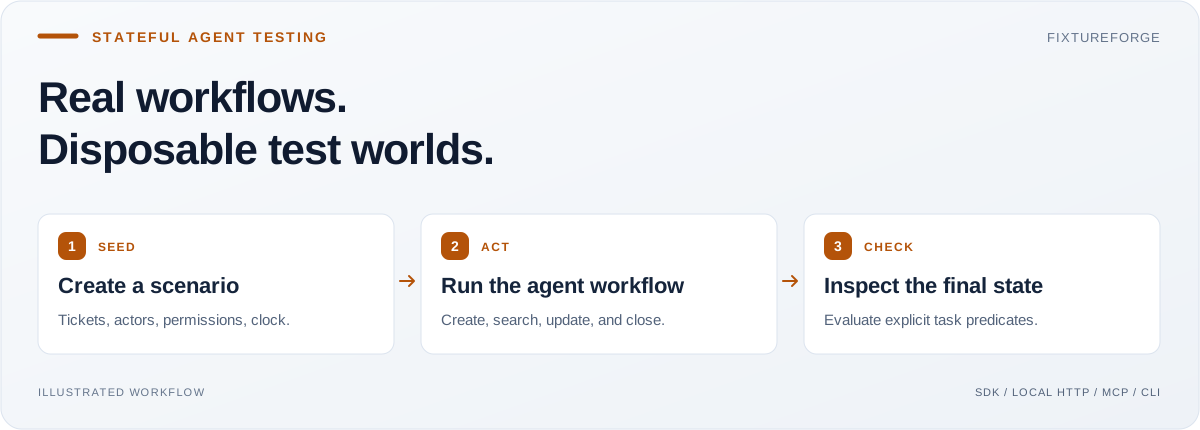
I built FixtureForge because AI engineering needs repeatable environments where an action changes what happens next. A fixed JSON response can show that a tool was called. A stateful fixture can show whether a ticket was created, found, assigned, and closed correctly.
The goal is to make agent behavior testable without connecting a real support account. It is useful for developers building agent workflows, MCP tools, and evaluation suites that need known starting states and observable outcomes.
An agent says, “I assigned the payment issue to Bob and closed it.” A mock response can say success even when the later search still returns an open, unassigned ticket.
FixtureForge keeps the state consistent across calls and checks it against explicit task predicates. The verdict comes from tickets and events, not the agent's explanation.
| What makes agent testing hard? | What FixtureForge provides |
|---|---|
| Each mock call is disconnected from the previous one | Create, search, update, assign, and close one shared ticket state |
| Runs start from different data | Seeded scenarios, deterministic time, and resettable snapshots |
| A tool lets the wrong actor access a ticket | Actor permissions and namespace-scoped credentials |
| A fluent answer hides an unfinished task | PASS / FAIL checks with state and event evidence |
- Stateful ticket workflows: optimistic versions, legal transitions, and operation-key deduplication.
- Repeatable scenarios: seeded data and known-solution traces that are validated before use.
- Isolated persistent runs: one SQLite file per namespace, plus reset, restore, and explicit cleanup.
- Multiple interfaces: an in-process SDK, CLI, authenticated local HTTP API, and actor-bound stdio MCP server.
- Inspectable results: task predicates, before/after diffs, event timelines, and HTML reports.
Requires Node.js 22.18+ for built-in SQLite. Install in your Node project or an empty working directory. No model API key or live customer account is required.
npm install fixtureforge@0.2.1

demo_root="$(mktemp -d)"
npx fixtureforge run \
  --scenario node_modules/fixtureforge/examples/scenarios/ticket-triage.json \
  --output "$demo_root/triage.html"
Expected result: evaluation.verdict: "PASS". The seeded payment ticket is renamed “Payment resolved,” assigned to Bob, and closed. Open the generated triage.html to inspect the state changes.
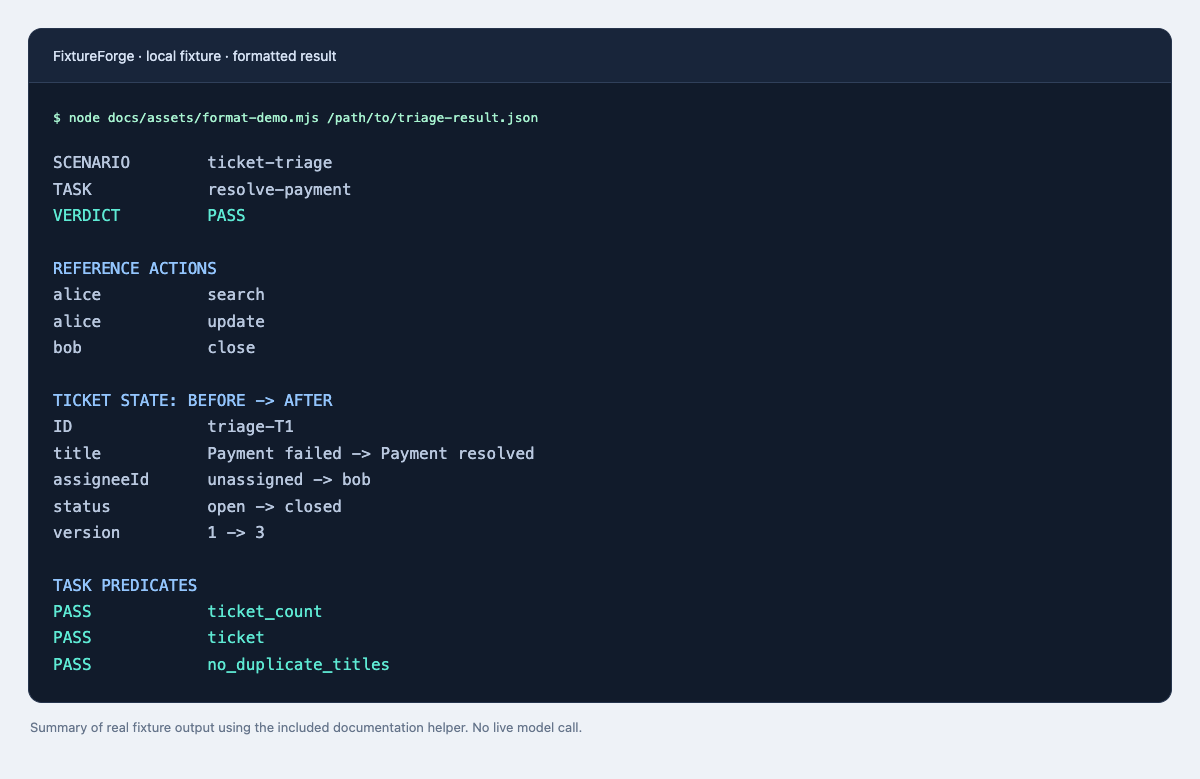
Formatted summary of the included reference trace, generated with the documentation helper. This is a local fixture demonstration, not a live model performance result.
Try the intentionally impossible reopening scenario:
npx fixtureforge run --scenario node_modules/fixtureforge/examples/scenarios/impossible.jsonExpected result: FAIL, exit 1. Invalid input or an infrastructure error exits 2; a passing task exits 0. An “impossible” label describes the fixture's intended test case, not a general proof of unsolvability.
The fixtureforge package contains compiled ESM JavaScript, TypeScript declarations, the CLI, and example scenarios. Save this as an .mjs file, or use a project with "type": "module":
import { TicketEnvironment } from 'fixtureforge';

const tickets = new TicketEnvironment({ alice: 'member' }, 'example');
try {
  const ticket = tickets.create('alice', 'Payment failed', 'payment-1');
  const closed = tickets.closeTicket('alice', ticket.id, ticket.version);
  console.log(closed.id, closed.status, closed.version);
  // example-T1 closed 2
} finally {
  tickets.dispose();
}
Use EnvironmentManager when runs need SQLite persistence and scoped credentials. The usage guide includes the persistent SDK, local HTTP API, snapshots, reset, restore, and evaluation recipes.
Create a run first, retain its credentials privately, and set FIXTUREFORGE_ACTOR_TOKEN to that run's chosen actor token. Configure your MCP client to launch:
npx --yes fixtureforge@0.2.1 mcp \
  --dir /absolute/fixture-runs --run trial
The six tools are ticket_create, ticket_search, ticket_get, ticket_update, ticket_transition, and ticket_close. For the triage fixture, ticket_search({"query":"Payment"}) finds triage-T1 when connected as Alice.
The server binds one actor and namespace at startup. Tools cannot switch either or perform owner operations such as reset and destroy. Follow the setup and credential guide; the HTTP service is a separate interface, not an HTTP MCP transport.
| Component | Responsibility |
|---|---|
src/domain.ts |
Ticket rules, permissions, versions, time, and snapshot validation |
src/storage.ts |
SQLite transactions, run ownership, credentials, and cleanup |
src/scenarios.ts |
Scenario loading, task predicates, reference traces, and reports |
src/http.ts |
Local HTTP routes and bearer-credential handling |
src/mcp.ts |
Six tools bound to a single run and actor |
src/cli.ts |
Composition of runs, services, and owner operations |
Read the HLD and LLD for storage contracts, transaction boundaries, lifecycle rules, and design tradeoffs.
FixtureForge simulates a small ticket service. Passing its tasks does not establish competence on real services. The SQLite store serializes validated snapshots and is intended for local test workloads, not a hosted production backend.
Credentials are excluded from canonical snapshots. Reset and restore rotate actor tokens; graceful transient shutdown cleans up its run, while crashes need explicit cleanup. The legacy serve PORT command is an insecure in-memory demo; use the documented credential-bound interfaces for agent tests. See security guidance.
| Start here | Go deeper |
|---|---|
| Usage and integration recipes | Architecture: HLD and LLD |
| Example scenarios | Persistence decisions |
| Implementation and verification status | Contribution guide |
git clone https://github.com/Balaji91221/fixtureforge.git
cd fixtureforge
npm ci
npm run typecheck
npm run build
npm test
To test a local package, run npm pack and install fixtureforge-0.2.1.tgz in an empty consuming project. Publishing is a separate release action.
Tests cover state transitions, version conflicts, namespace isolation, deterministic replay, restore validation, credential rotation, HTTP, MCP, and cleanup. The CI badge links to current hosted results.
Contribute through issues and pull requests after reading CONTRIBUTING.md. Original code is available under the MIT license.
Explore more of my work: latest open-source tools · recent projects.