

Pack a PS5 game you own into one .p5z file, about half its size, and play it straight from that file on the console, without unpacking it.




Download · User guide · MaxPack for the console · Compatibility

- Played on a real PS5. Three games started straight from their
.p5zon firmware 13.60, from the internal SSD and from an external M.2 SSD over USB-C (results). - 40–70 % smaller on the games tested: 7.8 → 2.3 GiB, 69.0 → 33.2 GiB and 124.4 → 74.1 GiB.
- Ready in seconds. Only the small loose files are copied to the console, once (213 MB in 3.4 s,
337 MB in 6.4 s); the packs are read from the
.p5zwhile you play. - Checked and reversible. A
.p5zholds the SHA-256 of every file:maxpack verifychecked a 35.5 GB one in 70 s, andmaxpack unpack --originalgives the dump back bit for bit. - Repair data, if you want it. A
.p5zcan carry standard PAR2 repair data next to it (1, 5 or 10 % of its size), and MaxPack repairs a damaged.p5zwith it back to the exact bytes it was made with.
Note
Status: first public release, help us test. MaxPack 1.0.0 is the first public release. It has been tested on one console (firmware 13.60) with a handful of games, so expect rough edges. Testing on other firmwares, games and drives is the most useful help right now: here is how.

❤️ Free and open source, and it will stay free. If it saves you time, a coffee helps keep it going.
MaxPack packs a PS5 game you own into zstd packs that the console reads while you play: the game
is never decompressed to full size, not on the PC and not on the PS5. You get one .p5z file per game
(or a folder ready to play), you can keep it on a USB drive and play it straight from there with
MaxPack for the console, and you can always turn it back
into the original dump, bit for bit.
This repository is the PC side and the hub of the project: the desktop app for Windows, macOS
and Linux, the maxpack command line, the complete user guide and the
.p5z format. New here? Start with the quick start below.
- Why MaxPack exists
- Quick start
- Why .p5z
- How playing a .p5z works
- Tested on a real PS5
- Compressed and playable at once
- The MaxPack family
- Features
- Numbers
- Requirements
- Download
- What goes on the internet
- Documentation
- FAQ
- Status
- Build from source
- Help test MaxPack
- Legal and disclaimer
- Credits and licence
The goal was to make PS5 games take less space and still play them. It went like this:
- Dumps are huge. A PS5 game dump is often 70–130 GB, and the console's SSD fills up after a handful of them.
- Measure first.
maxpack analyzesorts every file of a dump into what the console must load as a plain file (eboot.bin, modules,sce_sys/,fakelib/) and what can be packed, measures how well a sample compresses at each zstd level, and finds duplicate blocks and files. - zstd, read while playing. zstd decompresses fast enough to feed a running game, and
ampr-emu-ng, quer3q's replacement for the system's
libSceAmpr, serves the packs from inside the game: they are never decompressed to disk. - One file per game. The
.p5zholds the packs and the SHA-256 of every file, and is 40–70 % smaller on the games tested. - Play it as it is. MaxPack for the console, built on quer3q's Kraken Mount, plays the
.p5zfrom its drive, and a new p5z mode in ampr-emu-ng reads the packs from inside the file. - Test on a real PS5. A mechanical USB hard drive was too slow; an SSD was fine, at about 2 ms per read. Some dumps' backport libraries, or a bundled emulator, stopped a game at a black screen or at its add-on check on newer firmware: hence the per-game Fakelib setting.
- Download MaxPack for your PC and
maxpack.elffor the console (see Download). - Pack your dump. Open MaxPack, drop the dump on Compress, leave Made for on MaxPack
installer and press Compress. The game is verified when it finishes and ends up as
<Title> [<TITLE_ID>].p5z. - Copy the
.p5ztohomebrew/on the console's internal SSD (/data/homebrew, over FTP in binary mode) or on an exFAT SSD that you plug into the PS5. - Load
maxpack.elfon the PS5: with kstuff loaded, send it to your ELF loader on port 9021. - Play. MaxPack copies the game's loose files to its cache and puts the game on the home screen.
Start it there, or press Play on
http://<PS5 IP>:8095from the PS5 browser or your phone.
Step by step, with every screen and the common problems: the guide. Using ShadowMountPlus or Kraken Mount instead? Choose Play from the USB in step 2 and follow way C of the guide.
A .p5z is one game in one file: compressed, checked and still playable. Compared with the usual ways
of keeping a dump:
| Dump folder | .exfat image |
.ffpkg image |
.p5z |
|
|---|---|---|---|---|
| Files per game | A folder, often thousands of files | One | One | One |
| Size | The dump's full size | The dump's full size | The dump's full size | 40–70 % smaller on the games tested |
| Checks its own contents | No | No | No | Yes: the SHA-256 of every file, checked by maxpack verify |
| Played on the PS5 with | MaxPack for the console, ShadowMountPlus or Kraken Mount | ShadowMountPlus | ShadowMountPlus | MaxPack for the console, straight from the file |
A game kept in any of these goes to a .p5z in one step: MaxPack packs a dump folder or any image
ShadowMountPlus mounts (.exfat, .ffpkg, .ffpfs and the compressed .ffpfsc), reading it itself,
with nothing to mount, no other tool and no temporary space, and with no need to dump the game again.
What a .p5z gives you:
- One file per game, easy to back up, copy and carry on the PC or on a USB drive.
- About half the size: 40–70 % smaller on the games tested (results).
- Checked: it records the SHA-256 of every file of the dump, and
maxpack verifychecks them all. - Complete, or it says so: when a dump carries the original package's list of its files
(
sce_sys/playgo-hash-table.dat), MaxPack tells before packing, in Details and in Verify whether any is missing, and leaves out what dump tools leave behind once that list proves it is not the game's; without it, it checks the copy against the list its dump tool wrote (ampr_emu.index) and tells a copy cut short or damaged. - Repairable: with standard PAR2 repair data next to it, a damaged
.p5zis repaired back to its exact bytes (the PC window makes and uses it; any PAR2 tool can too). A cut or damaged.p5zis detected as soon as it is opened. - Plays without unpacking: only the small loose files (
eboot.bin, modules,sce_sys/...) are copied once to the console's cache on the internal SSD; the packs are read from the.p5zwhile you play. - Never a dead end:
maxpack unpack --folderturns it into a packed folder, andmaxpack unpack --originalinto the original dump, bit for bit, whenever you want.
Keep in mind:
- A
.p5zis played by MaxPack for the console, not by ShadowMountPlus or Kraken Mount. For them, unpack it on the PC (--folder), or let the installer of MaxPack for the console turn it into a packed folder on the console (it also works while ShadowMountPlus runs). - A
.p5zover 4 GiB needs an exFAT drive or the internal SSD: FAT32 cannot hold it.
flowchart LR
    subgraph PC["On your PC"]
        PACK["MaxPack packs the dump<br/>into one .p5z"]
    end
    subgraph PS5["On your PS5: maxpack.elf"]
        SCAN["Scan<br/>finds the .p5z and checks it"]
        CACHE["Cache<br/>copies only the loose files,<br/>once, to the internal SSD"]
        REG["Register<br/>the game goes on<br/>the home screen"]
        LAUNCH["Launch<br/>mounts the .p5z's folder<br/>read-only inside the game"]
        PLAY["Play<br/>ampr-emu-ng in p5z mode reads<br/>the zstd volumes from the .p5z"]
        SCAN --> CACHE --> REG --> LAUNCH --> PLAY
    end
    PACK -->|"internal SSD or exFAT SSD"| SCAN
- Pack, on the PC. The zstd volumes go into the
.p5zraw, as they are; the loose files and the indexes go in compressed frames, with the SHA-256 of every file (format). - Scan.
maxpack.elffinds the.p5zinhomebrew/of the internal SSD, an M.2 or a USB drive (or in a USB drive's root), and checks it. A damaged one is listed apart, never as a game. - Cache. Only the loose files (
eboot.bin, modules,sce_sys/, the indexes) are copied, once, to/data/maxpack/caches/<TITLE_ID>on the internal SSD, which needs their size plus 256 MiB free. A smallmaxpack.imagenext to them says where each volume sits inside the.p5z. - Register. The game goes on the home screen like any other. If you move the
.p5zto another drive, MaxPack recognises it and copies nothing again. - Launch and play. MaxPack mounts the folder that holds the
.p5zread-only inside the game, with MaxPack's ampr-emu-ng in itsfakelib/. It starts in p5z mode (ampr-emu-ng: v0.5.1 (p5z) running), checks the.p5z, and reads the zstd volumes from inside it, decompressing each 256 KiB block only when the game asks for it.
24 November 2026, one PS5 on firmware 13.60, with MaxPack for the console. Each game was played straight
from its .p5z, without unpacking it:
Original → .p5z |
Smaller by | Volumes | Drive | Loose files in the cache | Result | |
|---|---|---|---|---|---|---|
| Game A | 7.8 → 2.3 GiB | 70 % | 1 | Internal SSD | 213 MB, ready in 3.4 s | Plays, saves and loads |
| Game B | 69.0 → 33.2 GiB | 51 % | 9 | External M.2 SSD over USB-C | 337 MB, ready in 6.4 s | Played without problems |
| Game C | 124.4 → 74.1 GiB | 40 % | 19 | The same M.2 SSD | Reaches the main menu and opens its saves, with only ampr-emu-ng in its fakelib/ (what Fakelib Off does) |
Sizes in GiB, as the console page shows them.
- On the PC, game B (74 GB) became a 35.5 GB
.p5zin 14.5 minutes at zstd 19 on a 32-thread PC, andmaxpack verifychecked it in 70 s. - Reads from the
.p5ztook about 2 ms each on average on the M.2 SSD. A launch reads about 1.5–2.5 GB in its first 20 s. - A mechanical USB hard drive is far too slow for a large
.p5z: the game never got past its first screen. Use the internal SSD, or an SSD on a 10 Gbps USB port. - Game C needed Fakelib Off. With the backport libraries its dump carries, or with a bundled
emulator, it did not get that far on this console. During the test its
fakelib/was set by hand to hold only ampr-emu-ng, which is what the per-game Fakelib setting Off, new in 1.0.0, does for you.
Every game tried, with firmware, mounter and result, goes into the compatibility list. Tried one? On the console page, open the game's sheet, press Copy report (it has the row ready) and paste it in a Game report, whether it worked or not.
PS5 games are huge. A single modern game can take well over 100 GB, the console's internal SSD fills up after a handful of them, and every extra terabyte of fast storage costs money.
Plain compression (a .zip, a .7z) does not help: the console cannot play from it, so you would
have to unpack the whole game again before every session. What is needed is a way to keep a game
compressed and playable at the same time:
- small on the PC, as a single file that is easy to store, copy and verify;
- small on the console, where only the few files the system must load directly (executables,
sce_sys/,fakelib/...) are stored as they are, and everything else stays packed; - decompressed only when the game reads it, a block at a time, by a runtime that lives inside the game;
- reversible: the original dump can always be rebuilt and checked, file by file, with SHA-256.
MaxPack does exactly that. It builds on the zstd pack format that
ampr-emu-ng already reads on the console, squeezes it harder
(zstd level 19 by default instead of the usual low levels, every packable file packed), wraps the
result in a single verifiable .p5z file and adds the tools to play that file directly on the PS5.
MaxPack is made of three projects that work together. Each one lives in its own repository and has its own releases. This one is the hub: the guide, the downloads for the PC and the quick start.
flowchart TD
    subgraph PC["On your PC"]
        DUMP["Your PS5 game dump<br/>folder or image<br/>.exfat .ffpkg .ffpfs .ffpfsc"]
        APP["MaxPack<br/>window or maxpack command line"]
        P5Z["One .p5z file per game"]
        FOLDER["Packed folder<br/>homebrew/TITLE_ID"]
        DUMP --> APP
        APP --> P5Z
        APP --> FOLDER
    end
    subgraph PS5["On your PS5"]
        MPC["MaxPack for the console<br/>maxpack.elf: finds, registers,<br/>mounts, launches and installs"]
        ALT["ShadowMountPlus or Kraken Mount<br/>(packed folders only)"]
        RT["ampr-emu-ng, inside the game<br/>libSceAmpr.sprx serves the packs<br/>and decompresses them on the fly"]
        MPC --> RT
        ALT --> RT
    end
    P5Z -->|"USB drive or FTP"| MPC
    FOLDER -->|"USB drive or FTP"| MPC
    FOLDER -.->|"alternative"| ALT
| Repository | Runs on | What it does |
|---|---|---|
| DeLFuS77/maxpack | PC: Windows, macOS, Linux | Compresses a dump into zstd packs (one .p5z or a ready-to-play folder), verifies it and gives back the original bit for bit. Hosts the user guide. |
| DeLFuS77/maxpack-ps5 | PS5, as a payload | maxpack.elf: finds games, puts them on the home screen, mounts and launches them, plays a .p5z without unpacking it and installs games, from a web page on port 8095. |
| DeLFuS77/ampr-emu-ng | PS5, inside each game | libSceAmpr.sprx: answers the game's reads from the packs and decompresses them on the fly. MaxPack's copy adds the p5z mode. |
Why three pieces?
- Compress on the PC, where it is fast. Packing is heavy, multi-threaded work: a desktop CPU packs and checks a 133 GB game in under half an hour. It is done once, and the console never compresses anything.
- The console only mounts and plays. The payload finds games, registers them on the home screen
and mounts them when they start. It does not rewrite the game, so a
.p5zcan stay on its USB drive as it is. - The runtime must live inside the game. A PS5 game asks the system library
libSceAmprand the file system for its data. Only a library loaded into the game's own process, from itsfakelib/folder, can answer those reads from compressed packs. That library is ampr-emu-ng, and it is a project of its own so that it also works under ShadowMountPlus and Kraken Mount. - Each piece follows its upstream. The payload is based on quer3q's Kraken Mount and the runtime on quer3q's ampr-emu-ng. Keeping them apart keeps their history and their licences, and makes it easy to merge what upstream improves.
Drop your dumps on the window, choose what they are for and press Compress. Everything the command line does is there, without typing a command.
| Light theme | Dark theme |
|---|---|
 |
 |
- Five sections: Compress (dumps to
.p5zor folder), Decompress (.p5zback to a dump), Verify (.p5zfiles and folders), Details (title, ID, version, sizes, files, packs) and Rename (names.p5zfiles, dump folders and images by what each holds, shown before anything changes). - Two outputs, chosen in Made for: MaxPack installer (one
.p5zper game, the smallest) or Play from the USB (a folder inhomebrew/<TITLE_ID>, ready for ShadowMountPlus or Kraken Mount). - Compression level 1 to 22 (19 by default), with the shortcuts Light, Medium and Maximum. Compare the levels on this PC compresses a sample of a game at levels 3, 9, 15 and 19 and shows the size, the saving and the time of each here, to choose one from the table.
- Folders, images and packages as input: dump folders, the images ShadowMountPlus mounts
(
.exfat,.ffpkg,.ffpfs,.ffpfsc) and PS5 debug packages (.pkg, decrypted with their passcode as they are read), each told by its contents, with the space counted as the game's size, not the file's; Add folder takes several folders at once, and each one can be a game or a folder full of games. Games added to a section while its queue runs join the queue. - File names by a template (Settings > File names):
{title} [{id}]by default, or with the version and the region ({title} [{id}] [{region}] [v{version}]), with a preview. - Low priority (Settings): the engine runs below the other programs, so the PC stays usable.
- Measure this PC (Settings): about half a minute, with no game, to find the fewest threads that compress as fast as all of them, and the speed of the destination's disk; Compress then uses them.
- Copy report (Details, the end of a queue, Settings > About): a text for an issue with the versions, the system and the settings, and no game names.
- Eleven languages (English, Russian, Chinese, German, Spanish, French, Japanese, Portuguese, Italian, Korean and Arabic, written right to left), starting in your system's language.
- In the Windows Explorer, if you want (Settings or the installer, each off until you turn it on,
for you only): Compress with MaxPack on a right click of a folder or an image, Verify with
MaxPack and Details on a
.p5z, Send to › MaxPack, and a double click on a.p5zthat shows its card in Details, with Verify and Decompress. The portable version writes nothing in Windows. - Covers in the file manager: with
.p5zfiles opened with MaxPack, the Explorer shows each.p5zwith its game's cover as its thumbnail. On Linux,install.shadds a freedesktop thumbnailer, for file managers that run thumbnailers outside a sandbox, such as Thunar; GNOME Files (whose sandbox cannot see~/.local) and KDE Dolphin (which does not use them) show no covers with it. - Light and dark themes, a single window (opening more games adds them to it, from the Explorer too), progress on the Windows taskbar or the macOS Dock, a system notification when it ends, and the PC kept awake while there is work.


Left: work in progress, with speed and time left. Right: the summary at the end. The games in the screenshots are made-up samples.
- Verified when it finishes. Each game is read back and checked as soon as it is packed.
- Cancel is clean. It stops the game in progress, deletes what was written and leaves the destination as it was.
- Every output is written apart. The new
.p5zor folder is written as<name>.maxpack-tmp(hidden on Windows) and verified there; only then does it take its name. With Replace, only then is the old one deleted. If anything fails, nothing is left half made, and what a crash leaves apart is offered for deletion the next time MaxPack opens. - Originals deleted only once checked, if you turn it on (off by default): each one goes to the recycle bin, or for good if you choose so, only after its new copy is made, verified and in its place, and never when decompressing or verifying. A folder is listed with its size before the queue starts, and what was removed is written to a log.
- Repair data (Compress, off by default): each
.p5zcan get a standard PAR2 set next to it, of 1, 5 or 10 % of its size, made bymaxpack-par2(par2cmdline-turbo, which comes with MaxPack) once the.p5zis made, verified and in its place. Verify then says how much each one can repair, offers Repair on a damaged one and repairs it back to the exact bytes it was made with, checks the repaired one before it replaces the damaged one, and leaves the.p5zas it was when it cannot. It can also add repair data to.p5zfiles you already have. A set is only ever used for the.p5zit was made for, and is renamed with it. See Repair data. - The space of the whole queue is checked before anything starts, drive by drive, with the numbers.
- Warnings before trouble: a FAT32 destination for a game over 4 GiB, too little free space, a
destination inside the game itself, two games going to the same place, and a
libSceAmpr.sprxthat cannot read zstd packs. - The source is never touched. MaxPack never writes to the dump it reads, refuses an output that is not empty, and refuses games that are already packed.
.p5z file (Made for: MaxPack installer) |
Packed folder (Made for: Play from the USB) | |
|---|---|---|
| What you get | One file, <Title> [<TITLE_ID>].p5z |
A folder, homebrew/<TITLE_ID> |
| Size | The smallest: loose files and indexes are compressed too | Slightly larger: loose files stay as they are |
| Played with | MaxPack for the console, straight from the file, or installed by it | MaxPack for the console, ShadowMountPlus or Kraken Mount |
| Rebuild the original dump | Yes, bit for bit, every file checked against its SHA-256 | No, but verify --against compares it with the original |
| Needs exFAT for big games | Yes, if the file is over 4 GiB | No: every part fits FAT32 |
The same engine, for scripts and for measuring a game before you pack it.
| Command | What it does |
|---|---|
maxpack analyze <dump> |
Measures, from a sample or the whole game, what each zstd level, deduplication, small-file grouping and the .p5z would save, without writing anything. How to read it. |
maxpack analyze <dump> --levels |
Compares levels (3, 9, 15 and 19, or the ones given) on this PC: a sample packed with pack's own code tells the .p5z and folder sizes and the time to pack the whole game. |
maxpack pack <dump> -o <out> |
Packs into a folder (--folder, the default) or a single file (--p5z). Options for the level, threads, the runtime to put in fakelib/, files to keep loose, a size cap for FAT32 and the game's DLC to put inside (--dlc). |
maxpack unpack <game.p5z> |
--folder gives the folder for the console; --original rebuilds the original dump bit for bit and checks every SHA-256. |
maxpack add <game.p5z> --dlc <DLC> |
Puts DLC that come out later into a .p5z already made, by appending to it. |
maxpack update <game.p5z> <new dump> |
Makes a .p5z a new version of its game: only the files that changed are compressed and appended; a cut leaves it as it was. |
maxpack compact <in.p5z> -o <out.p5z> |
A copy without the room add and update leave, with nothing compressed again. |
maxpack verify <game.p5z or folder> |
Checks every file; --against <dump> also compares a folder with the original. |
maxpack info, info --json, icon |
Title, ID, version, files, packs and sizes, for people or as JSON (which also says the content ID, whether it is a DLC and the DLC a game carries); extracts the game's icon. |
maxpack measure [<folder>] |
Measures this PC with no game: packing speed at 25, 50, 75 and 100 % of its threads, the threads to use, and the disk of a folder (a temporary file, deleted). |
--version, --capabilities |
The engine and library versions; what this build can do, as JSON. |
- Any source: a dump folder, an image or a PS5 debug package (
--passcodefor one made with a passcode other than the default), read by the engine itself with nothing to mount or install. - Deterministic: the same input and options give the same bytes with any number of threads.
- Made to be driven:
--progress jsonprints one JSON line per event and--control stdincancels cleanly. Exit codes: 0 success, 1 error, 2 wrong usage, 130 cancelled. - Full reference, with examples: the guide, section 6.
One file per game: a 64-byte header, the zstd volumes stored raw (so installing them is copying,
and the console can read them in place), the loose files and indexes in independent zstd frames, a
compressed index with the SHA-256 of every file of the original dump, and a footer written last,
so a truncated or damaged file is detected as soon as it is opened. A .p5z can grow (a DLC that
comes out later, a new version of the game) by appending to it, with a journal that undoes an append
cut short. Fully documented in docs/p5z-format.md.
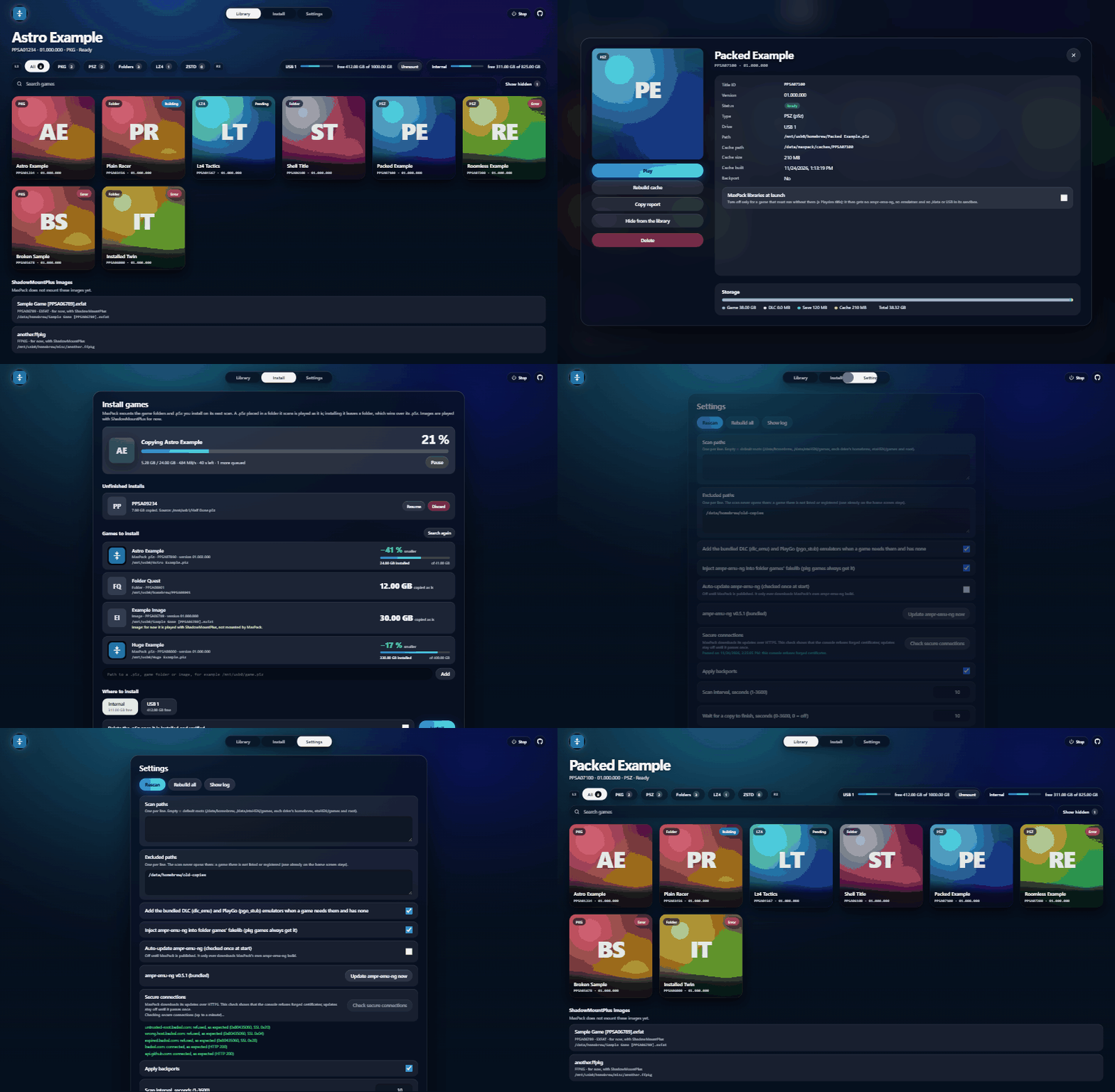
On the PS5, MaxPack for the console finds your .p5z
files and folders, puts them on the home screen and plays them. A .p5z stays on its USB drive or
disk: only its few loose files are copied to the internal SSD, and the packs are read from the file
itself (how). The same C engine as this repository is built into it, for
the installer and for reading .p5z files. If a game shows a black screen or stalls while checking
add-ons, its Fakelib setting, new in 1.0.0,
chooses which libraries go into it.
Measured on the PC with real dumps, at the default level (zstd 19), on Windows 11 with a 16-core / 32-thread desktop CPU and an NVMe drive:
| Game | Original | Packed by MaxPack | Saved | Packing time |
|---|---|---|---|---|
| An indie game (2,165 files) | 8.39 GB | 2.33 GB as one .p5z |
−72 % | 128 s (95 s as a folder) |
| A large AAA game (49 files, the biggest 72 GB) | 133.59 GB | 79.32 GB as one .p5z |
−41 % | about 24 minutes |
- Both were verified with zero failures: 2,168 files for the first, every stored and packed file against its SHA-256 for the second.
- The first was also rebuilt to the original dump, and every file matched an independent SHA-256.
maxpack analyze, from a small sample, predicted the result within 2.7 % and 0.9 %.- How much you save depends on the game: already-compressed video and audio shrink little, while
textures, levels and data often shrink a lot. Run
maxpack analyzeto know before you pack.
The full measurements are in docs/reports/phase1.md. What happened when
.p5z files were played on a console is in Tested on a real PS5, and every
game tried is in the
compatibility list.
On the PC
- 64-bit Windows; macOS 13 or later (Apple silicon or Intel); or 64-bit Linux with GTK 3 and WebKitGTK 4.1.
- Your own game dump, as a folder, as an image ShadowMountPlus mounts (
.exfat,.ffpkg,.ffpfsor.ffpfsc) or as a PS5 debug package (FPKG,.pkg) (source-images.md). Retail packages cannot be compressed. - Free space at the destination. MaxPack warns you before it starts when the queue may not fit.
- Nothing else for the runtime: the window comes with
MaxPack's ampr-emu-ng (
libSceAmpr.sprx) and puts it in thefakelib/of games that do not carry one that reads zstd.
On the PS5
- A jailbroken PS5 with kstuff and an ELF loader on port 9021 (elfldr, etaHEN or a payload manager).
- MaxPack for the console to play a
.p5z, or ShadowMountPlus or Kraken Mount for packed folders. - For a
.p5z, a fast drive: the internal SSD, or an SSD on a 10 Gbps USB port, formatted exFAT for any.p5zover 4 GiB (FAT32 cannot hold files that big). A mechanical hard drive is too slow for a large.p5z.
Packages are in Releases.
| System | File |
|---|---|
| Windows | maxpack-windows-x64-setup.exe (installer, no administrator rights) or maxpack-windows-x64-portable.zip |
| macOS, Apple silicon (M1 or later) | maxpack-macos-apple-silicon.dmg |
| macOS, Intel | maxpack-macos-intel.dmg |
| Linux | maxpack-linux-x64.tar.gz, with an install.sh |
The programs are not signed: Windows shows "Windows protected your PC" (press More info, then
Run anyway) and on macOS you open them the first time with a right click, Open.
The guide explains each system. For the console, download
maxpack.elf from the maxpack-ps5 Releases.
SHA256SUMS. Every release has one:sha256sum -c --ignore-missing SHA256SUMSchecks the files you downloaded (on Windows, compare withGet-FileHash <file>).- Build attestation. Each file also has one, signed through GitHub, which proves it was built by
this repository's workflow from the tagged commit:
gh attestation verify <file> -R DeLFuS77/maxpackchecks it. - Immutable releases. Once a release is published, its files cannot be replaced.
- On the console, the self-update of MaxPack for the console only takes that repository's
releases, checks the download against their
SHA256SUMS, and stays off until the console has passed Check secure connections (it must refuse forged certificates).
Nothing, from MaxPack itself:
- The window makes no connection of its own. It does not look for new versions, sends nothing about you or your games, and loads its page from inside the program. That is why Settings has no switch for it: there is nothing to turn off.
- The command line (
maxpack, the engine) never goes on the internet. - The links of the window (Settings > About: Report a bug, Report a game) open in your browser, and only when you click them.
- Windows only: the window is drawn by Microsoft's WebView2, which Windows 10 and 11 already have. If it is missing or too old, MaxPack asks before its window opens whether to install it; only if you say yes does Microsoft's installer, which comes inside MaxPack, download it from Microsoft.
MaxPack for the console is another program, with its own self-update: see maxpack-ps5.
| Document | What is in it |
|---|---|
| docs/guide.md | The complete user guide: download, the PC window, the console, ShadowMountPlus and Kraken Mount, the command line, common problems, what is tested. |
| docs/pc-window.md | The PC window section by section, with every warning it can show. |
| docs/p5z-format.md | The .p5z file format, byte by byte. |
| docs/analyze-report.md | How to read the maxpack analyze report. |
| docs/test-on-ps5.md | Trying a packed game by hand on the console. |
| docs/design/ | The design documents: goals, constraints, the window, the installer. |
| CHANGELOG.md | What changed in each version. |
| SECURITY.md | How to report a vulnerability, and what to keep in mind. |
The console side has its own documents in maxpack-ps5, and the runtime's p5z mode is in ampr-emu-ng.
Is the game decompressed on the console?
No. Only the files the system must load as plain files stay loose: executables and modules
(eboot.bin, *.elf, *.self, *.prx, *.sprx), sce_sys/, sce_module/, fakelib/ and .ini
files. Everything else stays in the packs, and ampr-emu-ng decompresses each 256 KiB block only when
the game reads it.
Does a compressed game load slower?
zstd decompresses about as fast at level 19 as at low levels, so the high level costs time on the PC,
not on the console. On a real PS5, reads from a .p5z on an external M.2 SSD took about 2 ms each,
and two of the three games tested played without problems (results). What
matters most is the drive: see the next question. A side-by-side timing of the same game as a packed
folder and as a .p5z has not been done yet.
Which drive should I play a .p5z from?
- The internal SSD is the best.
- An external SSD or M.2 over USB 3, on a 10 Gbps port, works well: games of 33 and 74 GiB ran from an M.2 SSD over USB-C.
- A mechanical hard drive is not recommended for a
.p5z: with a large game it was far too slow to get past the first screen. - Format external drives exFAT: FAT32 cannot hold a file over 4 GiB.
Wherever the .p5z is, its loose files go to the internal SSD, which needs their size plus 256 MiB free.
A game shows a black screen or stalls while checking add-ons
Open its sheet on the console page and change Fakelib (new in 1.0.0): try Emulators only, then
Off. The backport libraries a dump carries, or a bundled emulator, may not suit every console;
Off keeps only ampr-emu-ng, which a .p5z, a .pkg or a packed folder needs.
More.
Can I get my original dump back?
Yes. Decompress a .p5z to "Original dump (bit for bit)", or run
maxpack unpack game.p5z --original -o <folder>. Every file is checked against the SHA-256 recorded
when it was packed. An image (.exfat, .ffpkg, .ffpfs, .ffpfsc) comes back as a folder with its
files, not as an image.
Does MaxPack touch my saves or trophies?
No. A game dump contains no saves, and MaxPack only reads the dump and writes the packed copy. On the console, saves and trophies are kept by the console's own services, outside the game files, so packing or unpacking a game does not change them. Back up your saves anyway: see the disclaimer.
Does it work with ShadowMountPlus or Kraken Mount?
Yes, for packed folders ("Play from the USB"): the game must carry MaxPack's ampr-emu-ng in its
fakelib/ (the window puts the one that comes with it there by itself), and with ShadowMountPlus you
leave its auto_update_ampr option off (why).
Playing a .p5z without unpacking it needs MaxPack for the console, which can also run next to
them: it simply waits while another mounter is running.
FAT32 or exFAT?
exFAT. FAT32 cannot hold a file over 4 GiB, and most .p5z files are bigger. MaxPack warns you before
it starts; you can switch to a packed folder (every part fits FAT32) or go on, and MaxPack stops and
cleans up if the file reaches the limit.
Which games work?
The ones tested so far, with firmware, mounter and result, are in the
compatibility list. If a
game opens a file with mmap, that file cannot be packed: pack again with --keep-loose "<pattern>".
Tried a game? Please report it, whether it worked or not.
Can it compress PKGs or ShadowMountPlus images?
ShadowMountPlus images, yes: .exfat, .ffpkg (UFS2), .ffpfs (PFS) and .ffpfsc (a PFS container,
usually compressed), in the window and on the command line. MaxPack reads them itself, read-only, with
nothing to mount, no other tool and no temporary space, and the .p5z is the one of the same game as a
folder; only the files' dates can differ, as the image gives them
(source-images.md). MaxPack for the console can also install the images as
they are.
PS5 debug packages (FPKG, the "fake PKGs" homebrew tools make from a dump), yes too: MaxPack decrypts
them with their passcode as it reads them (32 zeros unless whoever made one chose another: give it
with --passcode or in Settings › FPKG passcode). The .p5z has the files the package holds, which
its builder changed a little (it fake-signs the executables, adds a few sce_sys files and dates
everything when it built the package). Retail packages need keys MaxPack does not have, and PS4
packages and patches are refused: only a full PS5 game
(source-images.md). A DLC goes inside its game, as a
package or a dumped folder, with pack --dlc or next to the game in Compress
(guide).
MaxPack 1.0.0 is the first public release. Honestly, this is where it stands:
| Area | State |
|---|---|
| Packing, verifying and rebuilding on the PC | Tested with real dumps (from 8 GB to 133 GB, zero failures) and on every change in GitHub Actions, on Windows, Linux and macOS. |
| A packed folder on a real PS5 | Tested: firmware 13.60, ShadowMountPlus 1.7beta12, with MaxPack's ampr-emu-ng; the game boots, saves and loads. The first build of MaxPack for the console mounted, launched and cleaned up that game 3 times. |
Playing a .p5z without unpacking it |
Tested on a real PS5: firmware 13.60, three games with 1, 9 and 19 volumes, from the internal SSD and an external M.2 SSD over USB-C (results). Still to do: a side-by-side timing against a packed folder, and more games, firmwares and drives. |
| The console's library, Play, installer, hide, crash report, self-update | Done and tested on the PC; their pass through the console checklist is still under way. |
| The Windows installer | Tested automatically, not yet by hand with the wizard. If it fails, use the portable zip. |
The console checklist still to go is in docs/console-tests.md (maxpack-ps5). Always keep your original dump until a packed game has worked for you.
You need git, CMake 3.20 or later and a C compiler. zstd 1.5.6 and zlib 1.3.1 come as submodules, so
clone with --recursive (or run git submodule update --init after cloning).
git clone --recursive https://github.com/DeLFuS77/maxpack.git
cd maxpack
Windows
Visual Studio 2022/2026 (or Build Tools) with the Desktop development with C++ workload, including the Windows 11 SDK component: without the SDK, CMake says "No CMAKE_C_COMPILER could be found". Python 3 is also needed for the tests.
cmake -S . -B build
cmake --build build --config Release
ctest --test-dir build -C Release --output-on-failure
The executable ends up in build\Release\maxpack.exe.
Linux
sudo apt install build-essential cmake python3
cmake -S . -B build -DCMAKE_BUILD_TYPE=Release
cmake --build build -j
ctest --test-dir build --output-on-failure
macOS
xcode-select --install
brew install cmake python
cmake -S . -B build -DCMAKE_BUILD_TYPE=Release
cmake --build build -j
ctest --test-dir build --output-on-failure
The window is a Wails app in gui/ that drives this same engine
(maxpack-core) next to it, and maxpack-par2 for the repair data: par2cmdline-turbo, a submodule
(third_party/par2cmdline-turbo) that the CI builds with its own build files (MSBuild on Windows,
autotools on Linux and macOS: see .github/workflows/build.yml).
Continuous integration. GitHub Actions, on every change: builds the engine and runs all its tests
(ctest) on Windows and Linux; builds maxpack, maxpack-par2 and the window on Windows, Linux and
macOS (Apple silicon and Intel), runs the window's Go tests with that engine and maxpack-par2 and makes
the packages; and, with a
vX.Y.Z tag, puts them in a draft release with their SHA256SUMS and a build attestation for each.
Tests. ctest generates synthetic exFAT images (tests/tools/make_exfat.py) with long and emoji
names, fragmented files, a ValidDataLength smaller than the size, truncated images and a looping FAT.
tools/exfat_ref.py is an independent exFAT reader in Python, used to cross-check the C reader against
real images (tests/tools/compare_ranges.py). The UFS2 and PFS images come from MaxPack's own
generators (tests/tools/make_ufs2.py, make_pfs.py, with 45 damaged ones) and from
MkPFS, which made the .ffpfs and .ffpfsc images in tests/data;
the window's tests pack them through its queue with the real engine. The PS5 packages come from
tests/tools/make_fpkg.py, a builder that follows ProsperoPkgTool's (stored and Kraken-compressed,
another passcode, the kinds MaxPack refuses and 21 damaged ones), and the ciphers are checked against
the test vectors of FIPS-197, SP 800-38A, IEEE 1619, FIPS-202 and RFC 4231.
MaxPack has run on one console so far. Every report from another firmware, game or drive helps, and a game that works is as useful to know as one that does not. English or Spanish are both fine.
- Tried a game? Open a Game report. On the console page, the game's Copy report fills most of it and has the row ready for the compatibility list, where the result goes.
- Found a bug? Open a Bug report where it happens: on the PC, on the console (paste the game's Copy report: it fills most of the form) or in the runtime.
- Always say which firmware, drive (internal SSD, USB SSD, hard drive, M.2) and loader you used, and the mounter if it was not MaxPack.
An idea? Open a feature request. Security problems go privately: see SECURITY.md.
Important
MaxPack is for backups of games you own. Piracy is not supported.
- Your own games only. MaxPack (the PC app, MaxPack for the console and MaxPack's copy of ampr-emu-ng) is meant for backups of games you own, dumped from your own console, and for homebrew.
- No content included. It includes and distributes no games, firmware, keys or other copyrighted content, and it does not help you obtain any.
- No circumvention. It does not bypass, remove or weaken encryption, keys or DRM, and it has no keys of any kind. It compresses, stores and serves the files of a dump. The only encryption it reads is that of a debug package (FPKG), the kind homebrew tools make from a dump, with the passcode its maker chose: the keys come from the package's own content ID and that passcode, as the tool that made it derives them. Retail packages are refused.
- Piracy is not supported. Issues, reports and questions about pirated content will not be answered.
- No warranty. It is free software provided "as is", without warranty of any kind, under the GNU General Public License v3.0 or later (see its sections 15 and 16). You use it at your own risk.
- No liability. The authors and contributors are not responsible for data loss, lost or damaged saves, damage to your console or your storage, bans of accounts or consoles, or any other problem that comes from using it. Keep your original dumps and back up your saves.
- Not affiliated. MaxPack is not affiliated with, endorsed or sponsored by Sony Interactive Entertainment. "PlayStation" and "PS5" are trademarks of their respective owners, as are any other names mentioned.
MaxPack is free software by DeLFuS77 under the GPL-3.0-or-later licence (LICENSE). The
third-party software that the packages include (zstd, zlib, the code ported from ProsperoPkgTool,
ampr-emu-ng, Wails and the window's Go libraries, and par2cmdline-turbo as maxpack-par2) and its
licences are in
THIRD_PARTY_NOTICES, regenerated with
python tools/gen_third_party.py.
MaxPack stands on the work of others:
- quer3q: Kraken Mount (the base of MaxPack for the console), ampr-emu-ng (the runtime that DeLFuS77/ampr-emu-ng follows) and PS5 Dump Forge (whose zstd pack format MaxPack writes).
- drakmor: ShadowMountPlus and
ampr_emu, where the ampr-emu-ng runtime and the
ampr_emu.indexformat come from. - pearlxcore: ProsperoPkgTool (MIT), where MaxPack's reading of PS5 debug packages comes from: the package layout, the keys from the content ID and the passcode, the block map of the inner image and the Kraken decoder are ported from it, with Alembic (fthdgn-gh, GPL-3.0-or-later), which ports the same, as a second reading; the test packages follow its builder.
- zstd (Meta) and zlib (Jean-loup Gailly and Mark Adler), the compression.
- Wails and the window's Go libraries (full list in
THIRD_PARTY_NOTICES). - par2cmdline-turbo (Anime Tosho, on
par2cmdline), the repair data of a
.p5z. - MkPFS (PSBrew), the tool the
.ffpfsand.ffpfsctest images intests/datawere made with (none of its code is in MaxPack). - The PC window follows the design of NXPress, by the same author.