

Play a PS5 game you own straight from one compressed .p5z file, about half its size, without unpacking it. It also mounts, launches and installs your other backups.



Download maxpack.elf · User guide · MaxPack for the PC · Compatibility

- Played on a real PS5. Three games started straight from their
.p5zon firmware 13.60, from the internal SSD and from an external M.2 SSD over USB-C (results). - 40–70 % smaller on those games, with nothing unpacked: 7.8 → 2.3 GiB, 69.0 → 33.2 GiB and 124.4 → 74.1 GiB.
- Ready in seconds. Only the small loose files go to the internal SSD, once (213 MB in 3.4 s,
337 MB in 6.4 s); the packs are read from the
.p5zwhile you play. - Fakelib per game, new in 1.0.0: Full, Emulators only or Off, for a game that shows a black screen or stalls while checking add-ons (more).
- Recommended settings, new in 1.0.2: a game known to need a Fakelib mode gets it by itself, and a game that takes minutes on a black screen says so when it starts (more).
Note
Status: early release, help us test. MaxPack 1.0.2 is the current release (1.0.0 was the first public one). It has been tested on one console (firmware 13.60) with a handful of games, so expect rough edges. Testing on other firmwares, games and drives is the most useful help right now: here is how.

❤️ Free and open source, and it will stay free. If it saves you time, a coffee helps keep it going.
MaxPack for the console is a payload (maxpack.elf) for a jailbroken PS5. It finds your games on
the internal SSD, the M.2 drive and USB drives, puts them on the home screen, mounts them when they
start and installs them, all from a web page you open on the PS5 browser, your phone or your PC.
It is based on quer3q's Kraken Mount, keeps its history and
its licence, and adds what only MaxPack does: playing a MaxPack .p5z in place, an installer
with space checks and resume, a richer library page, a Fakelib setting per game, and the
ability to live next to ShadowMountPlus and Kraken Mount.
New to MaxPack? Start at the hub, DeLFuS77/maxpack: it has
the PC app that makes the .p5z, the quick start,
the complete guide and the short story
of why MaxPack exists.
- Why it exists
- Why .p5z
- Tested on a real PS5
- Storage advice
- Requirements
- Quick start
- The MaxPack family
- Features
- Fakelib per game
- Recommended settings
- Trust and updates
- Documentation
- FAQ
- Status
- Building
- Help test MaxPack
- Legal and disclaimer
- Credits and licence
PS5 games are huge and the console's storage is not. MaxPack for the PC
already shrinks a game into zstd packs, often to a fraction of its size, as a single .p5z file. But
a compressed game is only useful if the console can play it while it stays compressed.
That needs someone on the console to:
- find the games, wherever they are (internal SSD, M.2, any USB drive) and whatever form they have
(a folder, a debug FPKG, a
.p5z); - register them on the home screen like any other game, and mount them at launch;
- feed the game its files from the packs, through the runtime (ampr-emu-ng) loaded inside the game;
- for a
.p5z, do all that without unpacking the file: copy only its few loose files to the internal SSD and read everything else from the.p5zwhere it is.
MaxPack for the console does all of that, and adds an installer for when you want the game on the console's own storage.
- One file per game, 40–70 % smaller on the games tested, with the SHA-256 of every file inside
(
maxpack verifychecks them all on the PC). - Plays without unpacking. Only the small loose files (
eboot.bin, modules,sce_sys/...) are copied once to the cache on the internal SSD; the packs are read from the.p5zwhile you play. - Easy to keep and move on the PC, and never a dead end:
maxpack unpack --folder|--originalturns it back into a packed folder or the original dump, bit for bit, whenever you want. - Played by MaxPack for the console. ShadowMountPlus and Kraken Mount do not read a
.p5z; for them, the Install tab turns it into a packed folder on the console. - Over 4 GiB (most are), a
.p5zneeds an exFAT drive or the internal SSD: FAT32 cannot hold it.
The full comparison with dump folders, .exfat and .ffpkg images is in the hub:
Why .p5z.
24 November 2026, one PS5 on firmware 13.60, with MaxPack for the console. Each game was played straight
from its .p5z, without unpacking it:
Original → .p5z |
Smaller by | Volumes | Drive | Loose files in the cache | Result | |
|---|---|---|---|---|---|---|
| Game A | 7.8 → 2.3 GiB | 70 % | 1 | Internal SSD | 213 MB, ready in 3.4 s | Plays, saves and loads |
| Game B | 69.0 → 33.2 GiB | 51 % | 9 | External M.2 SSD over USB-C | 337 MB, ready in 6.4 s | Played without problems |
| Game C | 124.4 → 74.1 GiB | 40 % | 19 | The same M.2 SSD | Reaches the main menu and opens its saves, with only ampr-emu-ng in its fakelib/ (what Fakelib Off does) |
Sizes in GiB, as the console page shows them.
- On the PC, game B (74 GB) became a 35.5 GB
.p5zin 14.5 minutes at zstd 19 on a 32-thread PC, andmaxpack verifychecked it in 70 s. - Reads from the
.p5ztook about 2 ms each on average on the M.2 SSD. A launch reads about 1.5–2.5 GB in its first 20 s. - A mechanical USB hard drive is far too slow for a large
.p5z: the game never got past its first screen. See Storage advice. - Game C needed Fakelib Off. With the backport libraries its dump carries, or with a bundled
emulator, it did not get that far on this console. During the test its
fakelib/was set by hand to hold only ampr-emu-ng, which is what Fakelib Off, new in 1.0.0, does for you.
Every game tried, with firmware, mounter and result, goes into the compatibility list. Tried one? Open the game's sheet, press Copy report (it ends with the row, which names no game) and paste that row in a Game report, whether it worked or not. How much MaxPack for the PC saves on other games, measured on the PC, is in the engine's report.
Where the .p5z sits decides how fast the game can read it:
| Drive | For a .p5z |
|---|---|
Internal SSD (/data/homebrew) |
The best. |
| External SSD or M.2 over USB 3, on a 10 Gbps port | Works well: games of 33 and 74 GiB ran from an M.2 SSD over USB-C, at about 2 ms per read. |
| Mechanical USB hard drive | Not recommended: a large .p5z was far too slow to get past its first screen. |
- Format external drives exFAT: FAT32 cannot hold a file over 4 GiB, and most
.p5zfiles are bigger. Packed folders (MaxPack's "Play from the USB") split their packs into parts that fit FAT32. - Wherever the
.p5zis, the packs never leave it: the internal SSD holds only the loose files, and needs them plus 256 MiB free.
- A jailbroken PS5 with kstuff loaded and an ELF loader on port 9021 (elfldr, etaHEN or a payload manager). Tested so far on firmware 13.60.
- Games you own: dump folders, debug FPKGs, or
.p5zfiles made by MaxPack for the PC. - For a
.p5z, a fast drive: the internal SSD, or an SSD on a 10 Gbps USB port, formatted exFAT for any.p5zover 4 GiB (storage advice). - To open the page: the PS5 browser, or a phone or a PC on the same network.
- Not needed: ampr-emu-ng, the DLC emulator and the PlayGo stub are all inside
maxpack.elf.
- Download
maxpack.elfandSHA256SUMSfrom Releases and check the file:sha256sum -c SHA256SUMS, or its build attestation (how). - Put your
.p5zfiles on the console: inhomebrew/of the internal SSD (/data/homebrew, over FTP in binary mode), or in the root orhomebrew/of an exFAT SSD plugged into the PS5. - With kstuff loaded, send
maxpack.elfto the ELF loader:nc -w 3 <PS5 IP> 9021 < maxpack.elf, or use your payload loader. - Open
http://<PS5 IP>:8095in a browser, or the MaxPack tile on the home screen. - Open a game and press Play, or start it from the home screen. The first time, MaxPack copies its loose files to the cache (seconds on the games tested).
MaxPack keeps a copy of itself in /data/maxpack/maxpack.elf, so later the home-screen tile starts it
by itself. Step by step, with troubleshooting:
the guide, section 5.
Upgrading from the old phase-2
maxpack.elf? It used the same name and port but cannot hand the port over. Remove it from every autoload list and restart the console first, or the new one stops with "port 8095 busy".
MaxPack is made of three projects that work together. Each one lives in its own repository and has its own releases. The hub is DeLFuS77/maxpack: start there.
flowchart TD
    subgraph PC["On your PC"]
        DUMP["Your PS5 game dump<br/>folder or .exfat image"]
        APP["MaxPack<br/>window or maxpack command line"]
        P5Z["One .p5z file per game"]
        FOLDER["Packed folder<br/>homebrew/TITLE_ID"]
        DUMP --> APP
        APP --> P5Z
        APP --> FOLDER
    end
    subgraph PS5["On your PS5"]
        MPC["MaxPack for the console<br/>maxpack.elf: finds, registers,<br/>mounts, launches and installs"]
        ALT["ShadowMountPlus or Kraken Mount<br/>(packed folders only)"]
        RT["ampr-emu-ng, inside the game<br/>libSceAmpr.sprx serves the packs<br/>and decompresses them on the fly"]
        MPC --> RT
        ALT --> RT
    end
    P5Z -->|"USB drive or FTP"| MPC
    FOLDER -->|"USB drive or FTP"| MPC
    FOLDER -.->|"alternative"| ALT
| Repository | Runs on | What it does |
|---|---|---|
| DeLFuS77/maxpack | PC: Windows, macOS, Linux | Compresses a dump into zstd packs (one .p5z or a ready-to-play folder), verifies it and gives back the original bit for bit. Hosts the user guide. |
| DeLFuS77/maxpack-ps5 | PS5, as a payload | maxpack.elf: finds games, puts them on the home screen, mounts and launches them, plays a .p5z without unpacking it and installs games, from a web page on port 8095. |
| DeLFuS77/ampr-emu-ng | PS5, inside each game | libSceAmpr.sprx: answers the game's reads from the packs and decompresses them on the fly. MaxPack's copy adds the p5z mode. |
Why three pieces?
- Compress on the PC, where it is fast. Packing is heavy, multi-threaded work: a desktop CPU packs and checks a 133 GB game in under half an hour. It is done once, and the console never compresses anything.
- The console only mounts and plays. The payload finds games, registers them on the home screen
and mounts them when they start. It does not rewrite the game, so a
.p5zcan stay on its USB drive as it is. - The runtime must live inside the game. A PS5 game asks the system library
libSceAmprand the file system for its data. Only a library loaded into the game's own process, from itsfakelib/folder, can answer those reads from compressed packs. That library is ampr-emu-ng, and it is a project of its own so that it also works under ShadowMountPlus and Kraken Mount. - Each piece follows its upstream. The payload is based on quer3q's Kraken Mount and the runtime on quer3q's ampr-emu-ng. Keeping them apart keeps their history and their licences, and makes it easy to merge what upstream improves.
Put a .p5z made by MaxPack for the PC in the root of a USB drive, or in homebrew/ of a USB drive,
the M.2 drive or the internal SSD, and it shows up as one more game, ready to play:
- Scan. MaxPack finds the
.p5zand checks it. - Cache. It copies only the game's loose files (executables,
sce_sys/,fakelib/...), once, to the internal SSD, into/data/maxpack/caches/<TITLE_ID>, with a smallmaxpack.imagethat says where each volume sits inside the.p5z. - Register. The game goes on the home screen like any other.
- Launch. The folder that holds the
.p5zis mounted read-only inside the game, and MaxPack's ampr-emu-ng, in p5z mode, reads the zstd volumes from inside the file.
The whole flow, from packing on the PC: How playing a .p5z works.
- Space is checked first. The loose files plus 256 MiB must fit on the internal SSD. If they do not, the game shows "Error" with how much is missing, and mounts by itself once you free that space.
- Damaged files are caught. A cut or damaged
.p5z, or one with more than 256 volumes, is listed apart under ".p5z files that cannot be played", with a notification. A USB drive that resets for a moment is retried, not reported as damage. - Moving is fine. Move the
.p5zto another drive and MaxPack recognises it ("moved to...") without preparing it again. - Any name. File names with accents, ™ or Japanese work, as MaxPack for the PC writes them.
- Its own runtime. It always runs with MaxPack's ampr-emu-ng, the only one that knows this mode.
At launch the console says
ampr-emu-ng: v0.5.1 (p5z) running.

- Every source in one grid: debug FPKG (
.pkg), folders (unpacked, or packed with zstd or LZ4) and.p5zfiles, each card with its type and state (Ready, Building, Pending, Error). - Type filters (L2/R2 to move between them), drive pills with free space that filter the grid, and Unmount on a USB pill to unplug it safely.
- Search by any part of the name or the
TITLE_ID(case and accents ignored). - Hide games you do not want to see: they stay mounted and on the home screen; Show hidden brings them back, dimmed.
- ShadowMountPlus images (
.exfat,.ffpkg...) are listed apart, so you know they are there.

- Play starts the game on the console, even from your phone. It is off while another game runs, while the game is not Ready, or while another mounter is running.
- Copy report gives a ready-to-paste text for an issue: MaxPack's version, the firmware, the mounter, the game, its source and state, ampr-emu-ng, the last crash if the game closed by itself, the last lines of the log and a row for the compatibility list (the row names no game).
- Rebuild cache redoes what MaxPack keeps for the game; Delete removes the game from the drive after asking you.
- Storage shows what the game, its DLC, its saves and its cache take.
- Fakelib chooses what goes into the game's
fakelib/: Full (the default), Emulators only or Off. See Fakelib per game. - Recommended setting shows beside Fakelib or the PlayGo stub when the recommended settings set its value, and a game that is slow to start shows its notice there.
- MaxPack libraries at launch can be turned off for an unpacked folder game that must run as it is.

- Installs
.p5zfiles (the packs are copied as they are, only the small loose files are decompressed), game folders, and.exfat,.ffpkg,.ffpfsand.ffpfscimages as they are. - Finds them on every USB drive and on extended storage (in the root and one level down), and in
/data/maxpack/; you can also type a path. - Checks space first: each drive says whether the game fits, and if it does not, the copy does not start.
- Pause and resume: an install cut by a removed USB drive or rest mode waits under Unfinished installs, with Resume and Discard.
- Replace safely: the page says what will be deleted and asks; the old copy goes only when the new one is installed and verified.
- Verify and uninstall what you installed, and optionally delete the
.p5zonce the game is installed and verified (it rereads the whole game first).

- Scan paths and excluded paths (the scan never opens those).
- The bundled DLC (dlc_emu) and PlayGo (pgo_stub) emulators, added to a game that needs them and has none; backports; cleaning up games whose source is gone.
- The bundled ampr-emu-ng (
v0.5.1-maxpack.2), with its own updater (off until MaxPack is published), checked like the self-update. - Download updated recommended settings (on by default): the latest list of recommended settings, once per start.
- Check secure connections: proves that the console refuses forged certificates. MaxPack's self-update, the ampr-emu-ng updater and the recommended settings download stay off until this check has passed once.
- Rescan, Rebuild all, Purge cache, Show log and Stop MaxPack.
- 11 languages (English, Russian, Chinese, German, Spanish, French, Japanese, Portuguese, Italian, Korean and Arabic): the page follows your browser or your choice, and the console notifications follow the console's language.

Open http://<PS5 IP>:8095 on any phone, tablet or PC on your network: browse the library, start a
game, install, copy a report. A MaxPack tile on the home screen opens the same page on the PS5,
and starts MaxPack if it is not running.
- It waits. While ShadowMountPlus or Kraken Mount is running, MaxPack mounts nothing and says so: the page and the installer keep working ("MaxPack only installs"), and what you install is registered in ShadowMountPlus. When the other one closes, MaxPack mounts again within seconds.
- It adopts. The first time, it imports the scan paths you had added by hand in them and adopts the games they had registered, without duplicates.
- It leaves them alone. It writes nothing in
/data/krakenmountor/data/shadowmount: press Stop MaxPack and start the other one to go back.
What its base, Kraken Mount 0.3.1, does, MaxPack does the same way: finding games in the usual roots,
a cache per game, registering on the home screen and mounting at launch, ampr-emu-ng, the DLC and
PlayGo emulators, backports, moved games, removing the ones that are gone, ejecting a USB drive, the
notifications and the settings. From later Kraken Mount versions it brings games that start an *.elf
on exit, the page coming back by itself after rest mode, the icon on FW 12+, the console fonts inside
the game, excluded paths and the payloads.json catalog for ps5-payload-manager.
- It never registers or mounts a title that is installed on the console.
- It never scans system or data folders, and never opens excluded paths.
- Port 8095 answers only the page opened at the console's IP (or
localhost), not other websites. - Updates come only from this repository's releases (ampr-emu-ng's from DeLFuS77/ampr-emu-ng's), are
checked against their
SHA256SUMS, and only after the console has proved it refuses forged certificates.
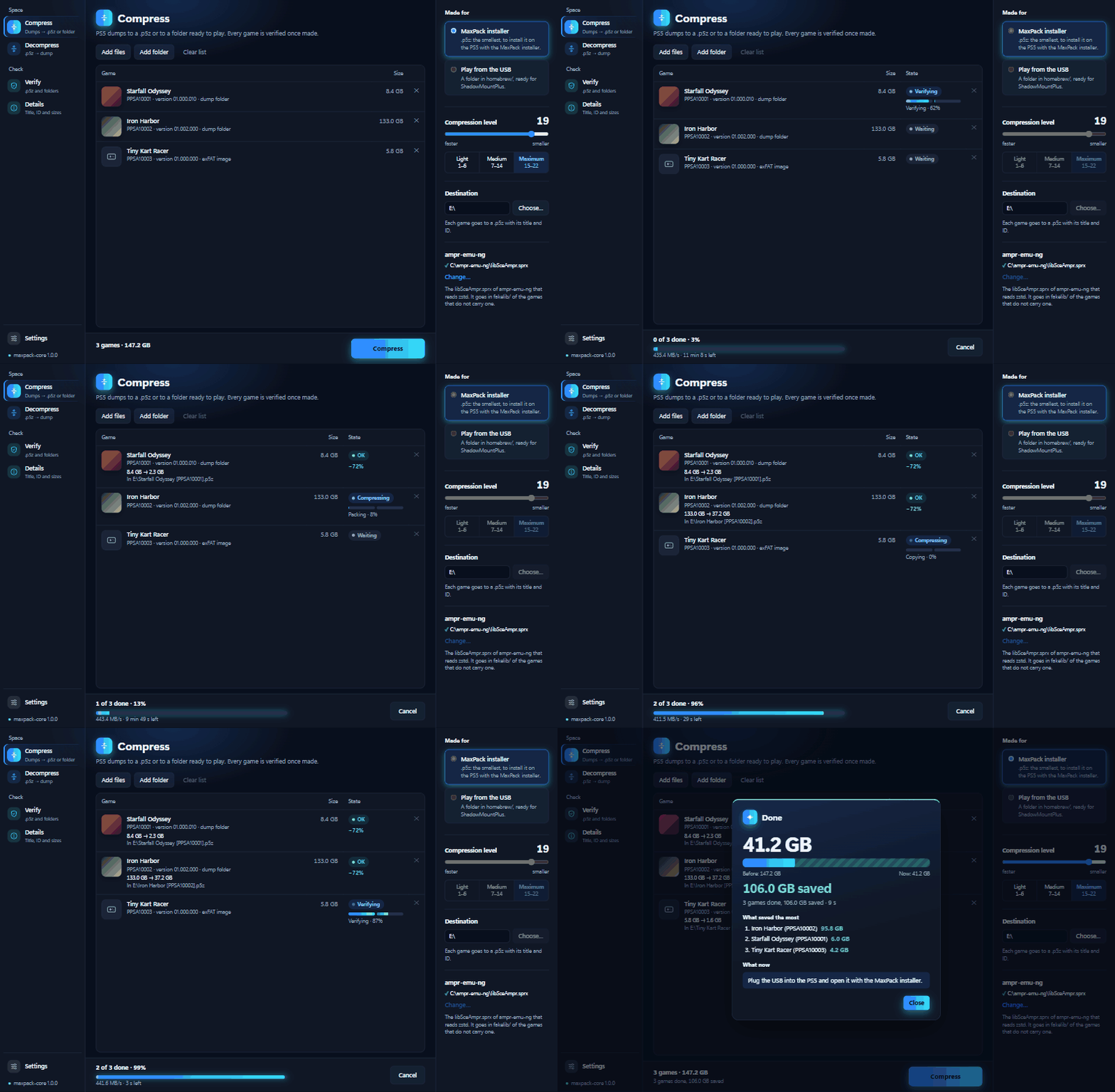
The .p5z files come from MaxPack for the PC: drop your dumps,
press Compress, and each game is packed and verified.
New in 1.0.0. A game's fakelib/ holds the libraries MaxPack lays over the game's system libraries
when it starts: ampr-emu-ng, the bundled DLC and PlayGo emulators when the game needs them, and the
libraries the dump or its backport carries. In the game's sheet, Fakelib chooses what goes in:
| Setting | What the game gets |
|---|---|
| Full (the default) | Everything, as always: the dump's or the backport's libraries, the bundled emulators it needs, and ampr-emu-ng. |
| Emulators only | None of the dump's or the backport's libraries: only the bundled emulators it needs, and ampr-emu-ng. |
| Off | Only ampr-emu-ng, which a .p5z, a .pkg and a packed folder cannot run without. On an unpacked folder game, nothing: MaxPack mounts nothing at its launch (no /data, USB, fonts or writable /app0 in the game's sandbox). |
When to use it. If a game shows a black screen, or gets stuck while checking add-ons, try
Emulators only, then Off. On newer firmware, the backport libraries a dump carries, or a
bundled emulator, may not suit that console. Game C of the console tests is
one: it reached its main menu only with ampr-emu-ng alone in its fakelib/, which is what Off does.
Only that game's fakelib/ is rebuilt, before its next launch; other games and their caches are not
touched. The choice is kept in config.toml (fakelib_emulators, fakelib_off) and shows in
Copy report.
New in 1.0.2. Some games need a setting to start: one only reaches its menu with Fakelib on Off, another stays on a black screen for minutes before it starts, which looks like a hang. MaxPack carries a list of recommended settings per game, so those games work the first time without you having to know what Fakelib is.
- A game's sheet shows Recommended setting beside Fakelib or the PlayGo stub when the list sets that value (only beside the one it sets). Copy report says so too.
- A game that is slow to start has a notice: its sheet shows it, and the console shows it as a notification, in its language, every time the game starts.
- What you choose wins. Change Fakelib or the PlayGo stub in a game's sheet and the list no longer
applies to that game (
manual_settingsinconfig.toml). Back to the recommended setting, in the same sheet, undoes it. A game you had set by hand before 1.0.2 keeps your setting. - The list comes inside
maxpack.elf, so it works offline. Once per start, when the console has passed Check secure connections (a check passed while MaxPack runs counts from its next start), MaxPack downloads the latest list from this repository (data/recommended.json): only data, checked whole before it is used, and used only when it is newer than the one it has. Nothing about your games is sent: the whole list is downloaded. Settings > Download updated recommended settings turns the download off. - The list names no game: each one is a code made from its title id with SHA-256, so it cannot be read at
a glance.
node tools/recommended_key.js <TITLE_ID>gives a title id's code. Found a game that needs a setting? Say so in an issue with its Copy report.
- Every release carries
maxpack.elfand itsSHA256SUMS, both with a GitHub build attestation that proves they were built by this repository's workflow from the tagged commit:gh attestation verify maxpack.elf -R DeLFuS77/maxpack-ps5checks a download. Releases are immutable once published: their files cannot be replaced. - The self-update only takes this repository's releases, checks the
maxpack.elfit downloads against that release'sSHA256SUMS, and stays off until the console has passed Check secure connections (it must refuse forged certificates). - The ampr-emu-ng updater (off by default) only takes DeLFuS77/ampr-emu-ng's releases, installs
their
libSceAmpr.sprxonly when it matches that release'sSHA256SUMS, and waits for the same Check secure connections (since 1.0.1). - The recommended settings (since 1.0.2) download only a data file from this repository, check it whole before using it (size, format and values: anything else is refused and the list in use stays), send nothing about your games, and also wait for Check secure connections.
At start, MaxPack looks at the latest release of this repository. When a newer one is out, the page
shows "MaxPack <version> is available": Update downloads its maxpack.elf, checks it against
that release's SHA256SUMS (nothing is sent when it does not match) and hands over to the new copy.
Close the running game first.
Before its first update, press Check secure connections in Settings: the console must refuse three test sites with bad certificates at badssl.com and still reach badssl.com and GitHub. Until that has passed once, nothing is downloaded or installed.
With ps5-payload-manager, add
https://github.com/DeLFuS77/maxpack-ps5/releases/latest/download/payloads.json as a custom
repository: every release carries that catalog, with the .elf and its SHA-256. The page's Update
does not change the manager's copy, so if the manager starts MaxPack at boot, update it there too.
| Document | What is in it |
|---|---|
| User guide | The complete guide, PC and console, from download to playing, with common problems. |
| docs/compatibility.md | Games tested, with firmware, mounter and result. Add yours. |
| docs/console-tests.md | The full checklist for testing MaxPack on a PS5. |
| DESIGN.md | How it works: sources, caches, registering, launching, the web API, the installer. |
| docs/dlcemu.md, docs/playgo.md | The bundled DLC and PlayGo emulators. |
| docs/publishing.md | How a release is made. |
| CHANGELOG.md | What changed in each version. |
| SECURITY.md | How to report a vulnerability, and the page's exposure on your network. |
Does MaxPack touch my saves or trophies?
No. Saves and trophies are kept by the console's own services, outside the game files, and MaxPack neither moves nor deletes them. Registering a game sets up its trophy data on the system the same way ShadowMountPlus does, and Delete in a game's sheet removes only the game and its cache. Back up your saves anyway: see the disclaimer.
Can I use it with ShadowMountPlus or Kraken Mount?
Yes, but only one of them mounts at a time. While ShadowMountPlus or Kraken Mount runs, MaxPack only
installs; when it closes, MaxPack mounts again. To go back to them, press Stop MaxPack and start
the other one: your games, caches and settings stay as they were. Playing a .p5z in place works only
with MaxPack.
Which drive should I play a .p5z from?
The internal SSD is the best; an external SSD or M.2 over USB 3, on a 10 Gbps port, works well; a
mechanical hard drive is not recommended for a .p5z. Format external drives exFAT. Details and the
measured numbers: Storage advice.
A game shows a black screen or stalls while checking add-ons
Open its sheet and change Fakelib: try Emulators only, then Off. The backport libraries a dump carries, or a bundled emulator, may not suit every console. See Fakelib per game. If it still fails, send a game report with its Copy report.
FAT32 or exFAT?
exFAT for .p5z files: FAT32 cannot hold a file over 4 GiB, and most .p5z files are bigger. Packed
folders (MaxPack's "Play from the USB") split their packs into parts that fit FAT32.
Should I play the .p5z in place or install it?
In place is the normal way: it takes the least space, and the internal SSD holds only the loose files. Install it when you want to unplug the USB drive: the installer copies the packs as they are, so the installed game is still compressed. If both exist, the installed folder wins.
The game closed by itself. What now?
Open its sheet: it says "Last crash". Press Copy report and paste it in a
game report. The whole
log is in /data/maxpack/maxpack.log and at the bottom of the page.
Is the page safe on my network?
It listens on port 8095 with no password, so use it on a network you trust and never forward that port to the internet. It answers only the page opened at the console's IP and refuses requests from other websites. Press Stop MaxPack when you are not using it. See SECURITY.md.
What does it mount, exactly?
Debug FPKGs (.pkg), game folders (unpacked, or packed with zstd or LZ4) and MaxPack .p5z files.
ShadowMountPlus images (.exfat, .ffpkg, .ffpfs, .ffpfsc) are listed and can be installed,
but MaxPack does not mount them: ShadowMountPlus plays them.
MaxPack for the console 1.0.2 is the current release (1.0.0 was the first public one). Honestly, this is where it stands:
| Area | State |
|---|---|
| Mounting a MaxPack-packed folder on a real PS5 | Tested on firmware 13.60: the first build of MaxPack for the console mounted, launched and cleaned up a packed game 3 times, and going back to ShadowMountPlus worked. The same game boots, saves and loads with MaxPack's ampr-emu-ng. |
Playing a .p5z in place |
Tested on a real PS5: firmware 13.60, three games with 1, 9 and 19 volumes, from the internal SSD and an external M.2 SSD over USB-C (results). Still to do: a side-by-side timing against a packed folder, and more games, firmwares and drives. |
| Fakelib per game | Done and tested on the PC. Game C reached its menu with the same fakelib/ that Off makes, set up by hand during the tests. |
| Recommended settings | Done and tested on the PC (the list's checks and the precedence in cargo test, the page in the mock); its pass through the console checklist (section 10) is still to do. |
| The library, Play, hide, Copy report, installer, excluded paths, living with ShadowMountPlus and Kraken Mount, the tile, the self-update | Done and tested on the PC; their pass through the console checklist is still under way. |
| Everything inherited from Kraken Mount 0.3.1 | Kept as in Kraken Mount, a released mounter; MaxPack's own pass through that part of the checklist (section B) is still to do. |
The full console checklist is docs/console-tests.md, and every game tried is in the compatibility list. Tried one? See Help test MaxPack.
ps5/build.sh
It needs Docker. It builds in two stages (the first is the copy the tile starts, the second embeds it)
and leaves target/ps5/maxpack.elf. The Docker image is maxpack-ps5 and uses the PS5 payload SDK
v0.45. Quick checks on the PC, without Docker:
cargo check --workspace --locked --target x86_64-unknown-freebsd
cargo test -p maxpack-logic
In CI, the check job also runs tools/check_identity.sh, which fails if an old name or path comes
back. How it is built, the rules for a change and the contract between modules are in
DESIGN.md.
Identity: files, IDs and ports
- Binary:
maxpack.elf; its own copy in/data/maxpack/maxpack.elf. - Data in
/data/maxpack/:config.toml,maxpack.log,caches/<TID>,ampr/,crashes.json,recommended.json(the last downloaded list of recommended settings), and the installer's (state/,installed/,tmp/). - Home-screen tile:
MXPK00001. Web page on port 8095. - Its own version, the one in
Cargo.toml: 1.0.0 is the first published one; 0.1.x and 0.2.x were test builds. It does not follow Kraken Mount's numbering, whose 0.3.1 is the base. - The part that talks to ampr-emu-ng keeps its upstream names (
kraken.image,/app0/kraken/,kraken.pkg,kraken_zero.dat), and the internal crate is still calledkraken-mount-pkg, to keep merges from the original easy. - The bundled components live in
vendor/: ampr-emu-ng, dlc_emu and pgo_stub (each withVERSIONandSHA256SUMS), and a pinned copy of the MaxPack engine.
MaxPack has run on one console so far, so every report from another firmware, game or drive helps, and a game that works is as useful to know as one that does not. English or Spanish are both fine.
- Tried a game? Open a Game report; you do not need to name the game. The row at the end of its Copy report fills most of it, and the result goes into the compatibility list.
- Found a bug? Open a Bug report and paste the game's Copy report in it: it has the version, the firmware, the source, the last crash and the last log lines.
- Always say which firmware, drive (internal SSD, USB SSD, hard drive, M.2) and loader you used, and whether another mounter was running.
Problems on the PC go to maxpack, problems with the runtime to ampr-emu-ng. An idea? Open a feature request. For a security problem, see SECURITY.md.
Important
MaxPack is for backups of games you own. Piracy is not supported.
- Your own games only. MaxPack (the PC app, MaxPack for the console and MaxPack's copy of ampr-emu-ng) is meant for backups of games you own, dumped from your own console, and for homebrew.
- No content included. It includes and distributes no games, firmware, keys or other copyrighted content, and it does not help you obtain any.
- No circumvention. It does not bypass, remove or weaken encryption, keys or DRM. It compresses, stores and serves the files of a dump, and never touches keys, encryption or DRM.
- Piracy is not supported. Issues, reports and questions about pirated content will not be answered.
- No warranty. It is free software provided "as is", without warranty of any kind, under the GNU General Public License v3.0 or later (see its sections 15 and 16). You use it at your own risk.
- No liability. The authors and contributors are not responsible for data loss, lost or damaged saves, damage to your console or your storage, bans of accounts or consoles, or any other problem that comes from using it. Keep your original dumps and back up your saves.
- Not affiliated. MaxPack is not affiliated with, endorsed or sponsored by Sony Interactive Entertainment. "PlayStation" and "PS5" are trademarks of their respective owners, as are any other names mentioned.
MaxPack for the console is free software under the GPL-3.0-or-later licence (LICENSE), with no warranty. The third-party notices, with the Corresponding Source of every bundled component, are in THIRD_PARTY_NOTICES.
- quer3q: Kraken Mount, the base of this project;
ampr-emu-ng, which MaxPack bundles as its own build,
DeLFuS77/ampr-emu-ng; and
PS5 Dump Forge, from which the Kraken decoder of
crates/kraken-mount-pkgis ported. - drakmor: ShadowMountPlus, whose ideas and code
behind the home-screen registration, the
fakeliboverlay and the backports are ported here; dlc_emu, the bundled DLC emulator; and pgo_stub, the bundled PlayGo stub. - ps5-payload-sdk: the PS5 toolchain and libraries.
- zstd and zlib, in the installer's engine, and SQLite.