


Static, ISC-themed front for the public status of the ISC services (HES-SO Valais-Wallis).
The monitoring itself runs on uptimepage; this repo only
owns the design: a Vite + vanilla TypeScript page built with Bun
that wears the shared ISC look (header, footer, tokens and theme of @isc-hei/design), is
rebuilt on GitHub Pages by a scheduled workflow and refreshes itself in the browser through a
small CORS relay. The page is in French.
- 90-day history — one strip per service on a shared month axis, coloured with the ISC petal palette
- Uptime percentage — per service and overall, computed from the incident timeline over the observed window
- Incidents and maintenance — active, recent and planned, with Swiss time and durations
- Light and dark theme — two-way toggle persisted under
isc.theme, the same key as the ISC Hub - Themes — fourteen palettes (the five orientations, high contrast, e-paper and a few improbable ones), each in light and dark; three clicks on the footer heart open the menu
- E-paper panel — a fixed 1872 × 1404 rendering of the content alone, for a TRMNL X, as
trmnl.htmlandtrmnl.png - Snapshot first, live after — the page paints the snapshot embedded at build time, then polls the relay every 30 s
# Install dependencies
bun install

# Refresh src/data/status.json from the live API
bun run snapshot

# Dev server with hot reload
bun run dev

# What CI runs before deploying
bun run typecheck
bun test
bun run build
While the DEV server is on, these fixture views can be tried:
http://localhost:5173/?demo=outagehttp://localhost:5173/?demo=maintenancehttp://localhost:5173/?demo=manyincidentshttp://localhost:5173/?demo=hasmoretruehttp://localhost:5173/?demo=nodata
These demo modes are only for development; the production build ignore the demo parameter.
.env is committed (it holds no secret) and read by Vite at build time. The uptimepage origin
is also hard-coded as STATUS_BASE in .github/workflows/deploy.yml for the snapshot script:
change both together.
# ── uptimepage (required) ─────────────────────────────────────────────
VITE_STATUS_BASE=https://isc3.uptimepage.dev   # public status page, no trailing slash

# ── Live refresh (optional) ───────────────────────────────────────────
VITE_STATUS_API=https://isc-status-relay.isc-hei.workers.dev # CORS relay, empty = snapshot only| Variable | Required | Default | Purpose |
|---|---|---|---|
VITE_STATUS_BASE |
yes | — | Origin of the uptimepage instance (permalinks, RSS, live fetch) |
STATUS_BASE |
no | VITE_STATUS_BASE |
Same origin, read by scripts/snapshot.ts; set in the workflow |
VITE_STATUS_API |
no | VITE_STATUS_BASE |
Origin of the CORS relay (relay/) for live refresh in the browser |
The public API sends no CORS headers, so a browser cannot call it directly. Two paths feed the page.
Snapshot, at build time. The workflow runs on push and on a */5 cron, which GitHub
executes every 10 to 20 minutes in practice:
snapshot— fetches/api/public/v1/statusintosrc/data/status.json- Builds — typecheck and unit tests, then Vite bundles the page with the snapshot embedded
- Deploys —
actions/deploy-pagespublishesdist/
Changes to main go through a pull request: .github/workflows/ci.yml runs typecheck, tests and build
on it, without deploying, and the branch requires that check and one approval.
GitHub disables scheduled workflows after 60 days without a commit; a trivial commit every couple of months keeps the cron alive.
Live, in the browser. The page polls the Cloudflare Worker in relay/ every
30 s. The Worker adds the CORS header and caches the JSON 60 s at the edge, so the displayed
state is at most about a minute old and uptimepage sees one request per minute whatever the
number of visitors. If the relay does not answer, the page keeps showing the snapshot.
To redeploy the Worker: bunx wrangler deploy from relay/.
flowchart LR
    A["🌐 uptimepage JSON"] -->|snapshot| B["📄 status.json"]
    B -->|vite build| C["📑 dist/"]
    C -->|deploy-pages| D["🚀 GitHub Pages"]
    A -->|"CORS + 60 s cache"| R["☁️ relay Worker"]
    R -->|"poll 30 s"| E["🖥️ browser"]
    D --> E
The custom domain status.isc-vs.ch is set in the repository's Pages settings; a deployment
through actions/deploy-pages does not read a CNAME file.
The app is not Vue, so it cannot import the components of @isc-hei/design. It vendors the
package's tokens and the CSS of the ported components in src/isc-design.css (ISCHeader, Footer,
.isc-fab, [data-tooltip]) and renders the same markup from src/render.ts.
When the package changes upstream, re-vendor those blocks by hand.
bun run build also writes dist/trmnl.html: the content alone (no header controls, no
footer, no script), pinned to 1872 × 1404 px for a TRMNL X in landscape,
in black, white and greys. A state is told by a shape first (icon, height of the bar), a grey
second. The file is self-contained, fonts and logo included, because a screenshot service may
load the HTML without its sibling files. The deploy workflow then screenshots it into
dist/trmnl.png with the runner's Chrome.
- https://status.isc-vs.ch/trmnl.png — for an image plugin; exact size, no rendering on the TRMNL side
- https://status.isc-vs.ch/trmnl.html — for a screenshot plugin
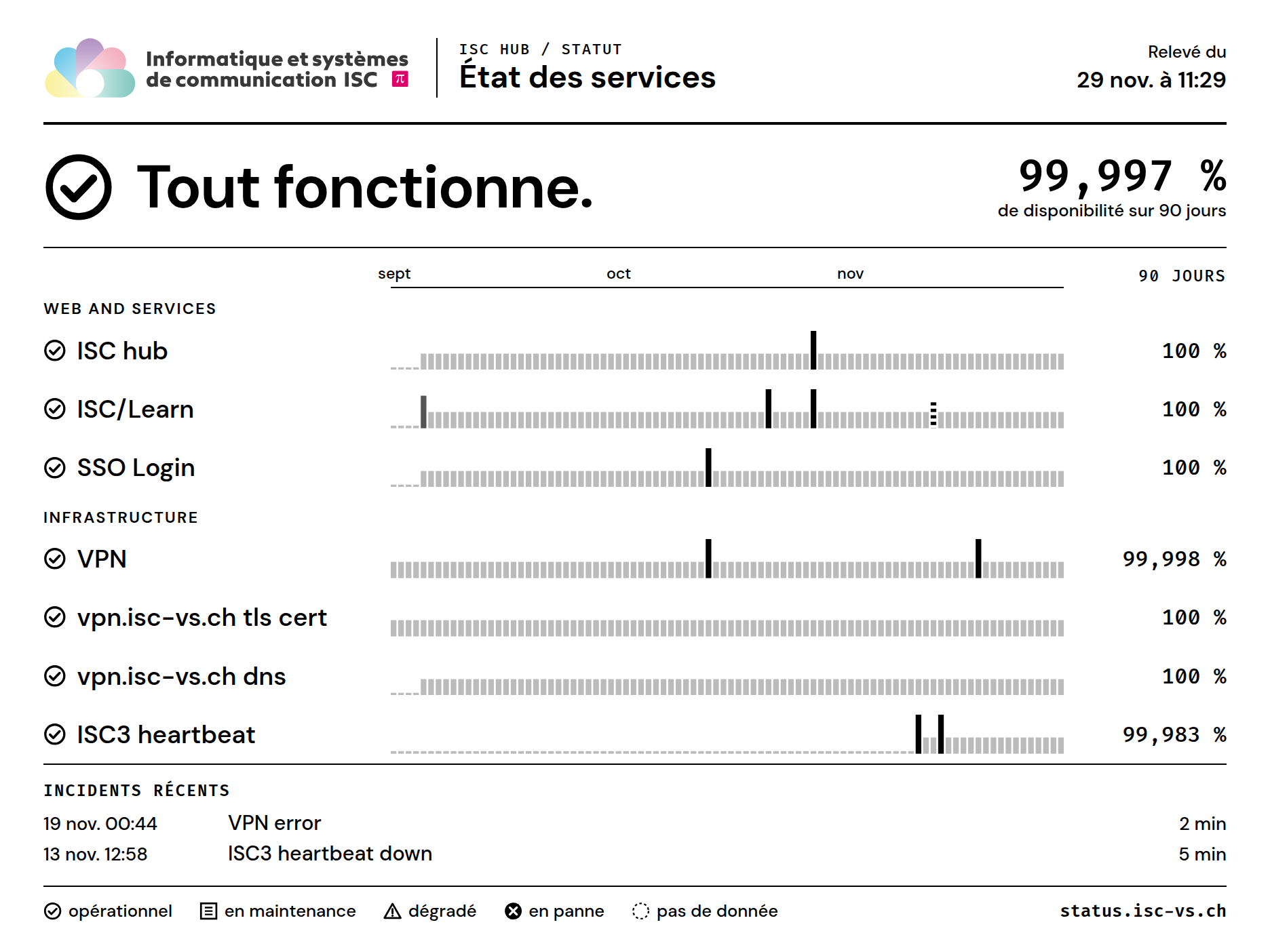
Both are rebuilt with every snapshot, so they are 10 to 20 minutes old at most.
bun run trmnl                                # dist/trmnl.html from src/data/status.json
bun scripts/trmnl.ts out.html --demo=outage  # any fixture of src/data/fixtures/
CHROME=/path/to/chrome scripts/trmnl-png.sh  # dist/trmnl.png
The layout is in src/trmnl.ts. Every length is in rem and 1 rem is 1/117 of the width,
so another panel only needs another size in TRMNL_X.
The look is set by two attributes on <html>: data-theme (light or dark) and data-palette
(the colour theme, stored under isc.palette). A palette is a set of CSS custom properties,
written twice in src/themes.css, once per mode. src/style.css only uses those tokens.
To add a palette:
- add an entry to
PALETTESinsrc/palettes.ts(id, label, hint, group); - write its two blocks in
src/themes.css, starting from a copy of an existing pair; - run
bun test(it fails if a block is missing) and look at it in both modes, with?demo=manyincidentsto see every status colour.
The four status colours must stay tellable apart in every palette. The default and the five orientation palettes keep the official petal colours; the "improbable" ones are free.
scripts/snapshot.ts   fetch public JSON → src/data/status.json
src/types.ts          payload types
src/format.ts         French labels, Zurich time, state normalisation
src/uptime.ts         availability from the incident timeline
src/uptime.test.ts    unit tests (`bun test`), one `*.test.ts` next to the file it tests
src/theme.ts          two-way theme, localStorage isc.theme
src/render.ts         HTML rendering (header, hero, axis, strips, uptime, incidents, footer)
src/isc-design.css    vendored @isc-hei/design subset
src/style.css         page styles on top of the design tokens
src/main.ts           paint snapshot, theme toggle, strip popovers, live refresh through the relay
relay/worker.js       Cloudflare Worker: CORS + 60 s edge cache for the status JSON
Copyright © 2026 P.-A. Mudry / ISC — HES-SO Valais. Released under the MIT License.
Made with ♥ by mui, 2026