Display your current NOW TRACK, Obsession or Top Track in GitHub README and landing pages.
Use the configurator to build your own badge: https://vlados-it.github.io/scrobcrd/
Copy the following code into your README.md and replace YOUR_USERNAME:
[](https://www.last.fm/user/YOUR_USERNAME)For ListenBrainz add &source=listenbrainz:
[](https://listenbrainz.org/user/YOUR_USERNAME/)| Parameter | Description | Default |
|---|---|---|
user |
Your username on the selected source (required) |
- |
source |
Data source: lastfm or listenbrainz |
lastfm |
bg |
Background color(e.g. ffffff), 'none' or transparent |
181818 |
width |
Width of the SVG in pixels (MIN = 120) | 400 |
mode |
Display mode: smart, obsession, top, recent, now, list, history |
smart |
range |
Date range: all, 7day, 1month, etc (Requires API Key) |
all |
theme |
Visual theme: default, retro, compact, osx, xorg |
default |
limit |
Tracks shown when mode=list/mode=history (1-10) |
5 |
accent |
Color for accents(e.g. ffffff) | provider |
- smart: Tries to show your Current Obsession. If not set, shows your Top Track (most recent).
Warning
- obsession: Only shows Current Obsession. Displays an error if none is set.
- recent: Shows your most recent track (Listening History).
- top: Forces the display of "Top Track" label.
- now: Shows now playing track.
- list: Shows your top N tracks by playcount as a small table (
limit,range). - history: Shows your last N listened tracks as a small table (
limit).


[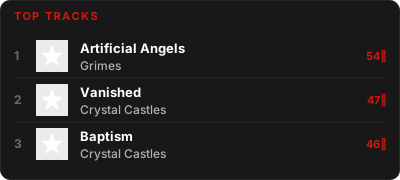](https://www.last.fm/user/vlados14311)[](https://listenbrainz.org/user/vlados14311/)

If you prefer to host it yourself.
-
Build the image:
podman build -t scrobcrd . -
Run the container:
podman run -d -p 3000:3000 --name scrobcrd scrobcrd
With Last.fm API Key (for Ranges on
source=lastfm):podman run -d -p 3000:3000 -e LASTFM_API_KEY=your_key --name scrobcrd scrobcrd
With a ListenBrainz token (optional, raises rate limits on
source=listenbrainz):podman run -d -p 3000:3000 -e LISTENBRAINZ_API_KEY=your_token --name scrobcrd scrobcrd
-
Access: Your API will be available at
http://YOUR_SERVER_IP:3000/api?user=YOUR_USERNAME.
Note
Creating Custom Themes
You can easily add your own themes
- Create a Template: Add a new
.jsfile inlib/templates/ - Create Styles: Add a
.cssfile inlib/styles/ - Use:
&theme=NEWin the URL
!Exists theme => Default
- Two sources: Last.fm and ListenBrainz, selected with
&source=. - Smart Fallback: Automatically switches to "Top Track" if no obsession is currently set.
- Fast: Uses Vercel Serverless Functions for low latency.
- No API Key Required: Works out of the box for both sources; keys/tokens only unlock extra features (ranges on Last.fm, higher rate limits on ListenBrainz).
- Top track in range (Last.fm API key required)
- Recent track mode
- ListenBrainz support
- Other designs
- Configuration improvements