


"You think you saved a list. You open it tomorrow, and it's a string."
deepcsv exists to fix that.

A messy Excel file with numbers saved as text, lists saved as strings and 3 outliers. data_details() finds all three, one line fixes each, and the second report comes back clean. The output in the GIF is real, not a mock-up.
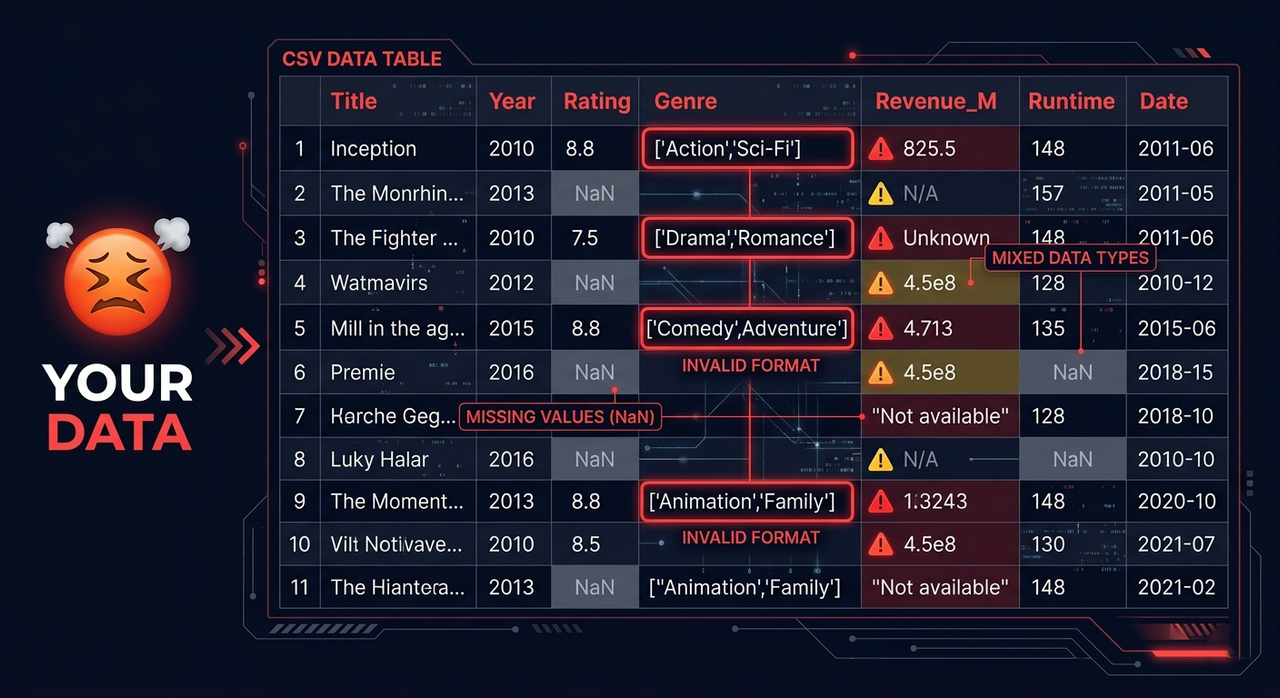
Your CSV files are lying to you.
- You save a list, open the file tomorrow, and it's a string
- You have lists and dicts stored as strings, nested inside other lists and dicts
- Your column looks like numbers but secretly holds 3 different data types
- You have 200 CSV files across 40 folders and process them one by one
- You load a file and spend 20 minutes just picking the right reader
- You have nulls scattered everywhere with no clean way to handle them
Small problems like these quietly break pipelines.
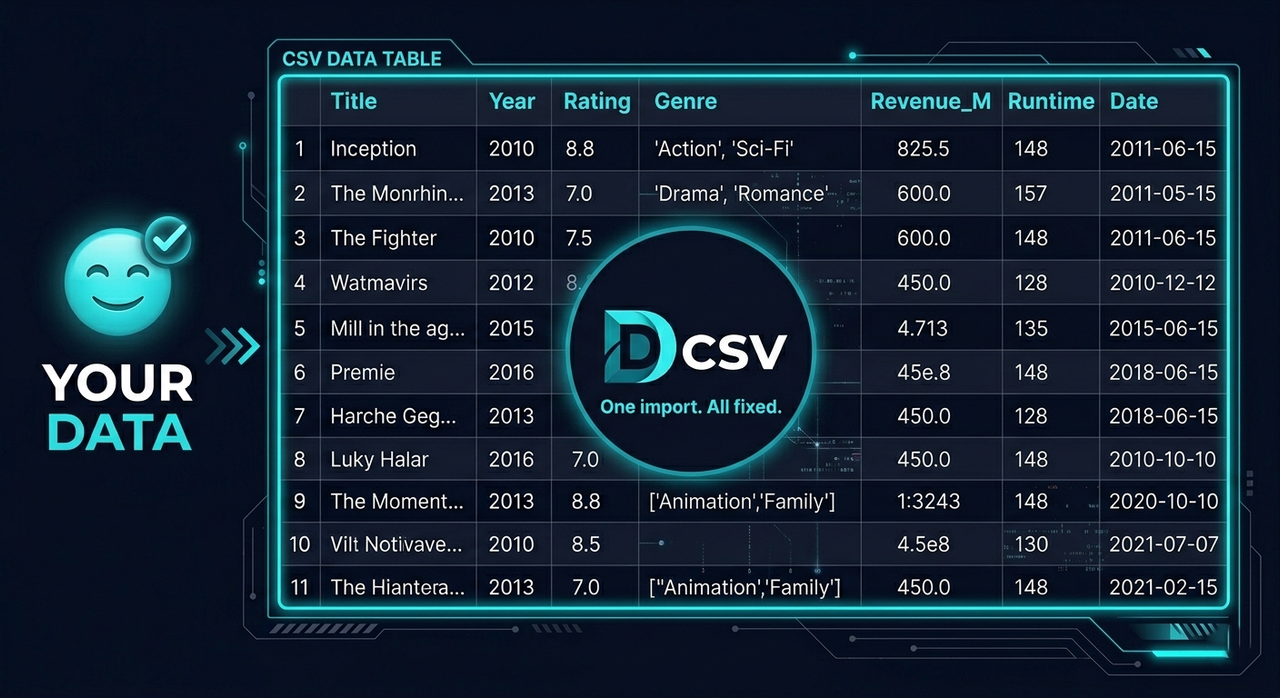
deepcsv handles all of it with one import.
- Walks through every folder and subfolder automatically
- Detects columns storing lists as strings and converts them to real NumPy arrays
- Catches mixed-type columns and fixes them automatically
- Saves in any format you choose, not just Parquet
- Reads any file format with one function, so there is no more picking the right reader
- Cleans nulls by column, row, index, value or type
pip install deepcsv

# with the ML tools (auto_fs, auto_outliers)
pip install deepcsv[ml]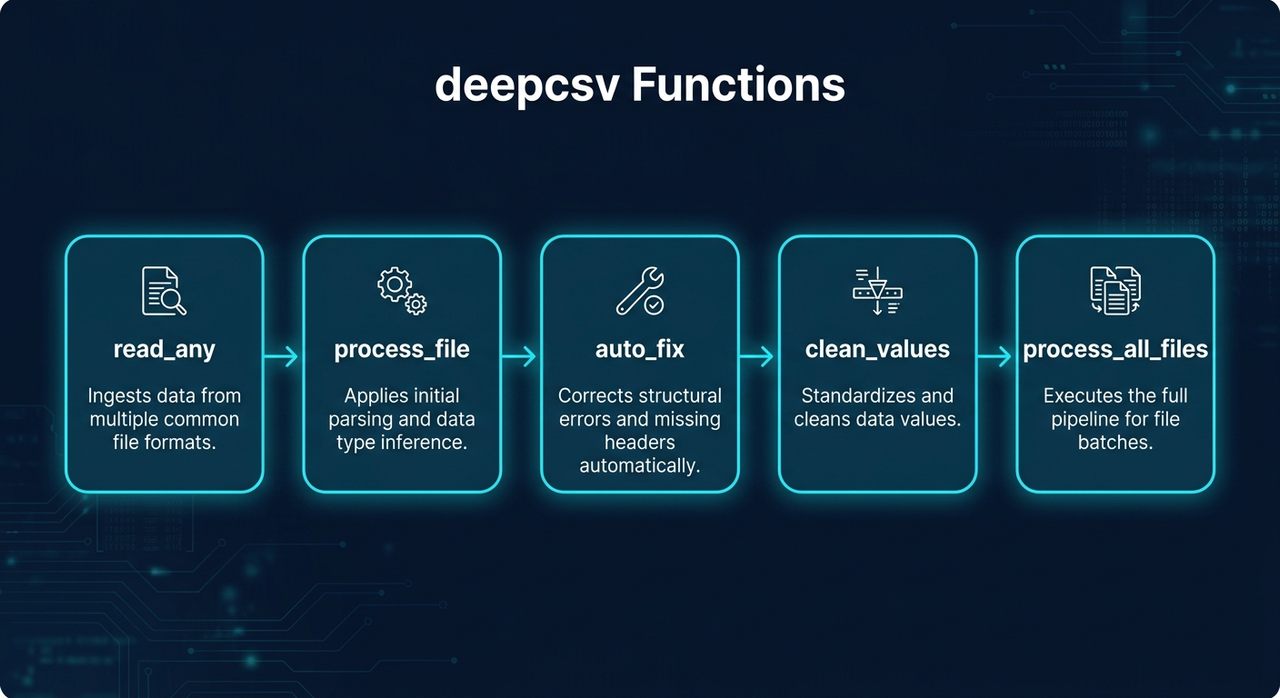
| Function | What it does |
|---|---|
process_file() |
Converts string lists to NumPy arrays, fixes mixed types |
process_all_files() |
Batch processes entire folder trees |
read_any() |
Reads any file format automatically |
clean_values() |
Cleans nulls, values and types |
auto_fix() |
Finds and fixes mixed data types and numbers stored as text |
auto_fs() |
Feature selection: keeps the columns that matter for your target |
auto_outliers() |
Detects outliers and removes their rows (IQR, Z-score or Isolation Forest) |
data_details() |
Report about your data (types, missing values, outliers), exportable as CSV or TXT |
merge_data() |
Merges two datasets (any format) by a specific column |
process_file(data_input, file_format=None, auto_fix=False, to_list=False, deep_check=False, col_name="all")
Reads a file or DataFrame, converts array-like strings to NumPy arrays, fixes mixed-type columns, and optionally saves the result.
import deepcsv

# Process only
df = deepcsv.process_file('path/to/file.csv')

# Process and save as parquet
df = deepcsv.process_file('path/to/file.csv', file_format='parquet')

# Process and convert to real Python lists
df = deepcsv.process_file('path/to/file.csv', to_list=True)

# Deep parse nested lists and dicts inside arrays
df = deepcsv.process_file('path/to/file.csv', deep_check=True)

# Only some columns
df = deepcsv.process_file('path/to/file.csv', col_name=["col1","col2"])| Parameter | Type | Default | Description |
|---|---|---|---|
deep_check |
bool |
False |
True: also parses lists and dicts nested inside the arrays. Slower on large datasets |
col_name |
str | list |
"all" |
Column name or list of names to process. The default "all" processes every column. Pass "genres" or ["genres", "tags"] to pick columns |
Supported save formats: .csv .tsv .txt .xlsx .json .parquet .pkl .feather .html .xml
process_all_files(directory_path, output_dir="All CSV Files is Converted Here", file_format="parquet", auto_fix=False, to_list=False, deep_check=False)
Walks through all folders and subfolders, applies process_file on every supported file, and saves results.
import deepcsv

# Default: saves as parquet
deepcsv.process_all_files('path/to/folder')

# Custom output folder
deepcsv.process_all_files('path/to/folder', output_dir='Converted Files')

# Save as CSV
deepcsv.process_all_files('path/to/folder', file_format='csv')
Supported input formats: .csv .txt .tsv .xls .xlsx .json .parquet .pkl .feather .db .sqlite
Reads any supported file format and returns a pandas DataFrame. One function for everything.
from deepcsv import read_any

df = read_any('data/users.csv')
df = read_any('reports/sales.xlsx')
df = read_any('warehouse/orders.parquet')
df = read_any('local.db')
Supported formats: .csv .txt .tsv .xls .xlsx .json .parquet .pkl .feather .db .sqlite
Cleans a DataFrame by removing nulls, specific values, specific types, or rows by index.
from deepcsv import clean_values

# Drop fully-null columns
df = clean_values('data.csv', cols=['age', 'salary'])

# Drop rows that have nulls in specific cols
df = clean_values('data.csv', cols=['age', 'salary'], ax_0=True)

# Drop rows by index
df = clean_values(df, index=[0, 5, 12])

# Remove rows where a specific value exists
df = clean_values(df, cols=['status'], finding_value='N/A')

# Remove rows where value meets a condition
df = clean_values(df, cols=['score'], finding_value='N/A', condition=['>=', 500])

# Remove rows by Python type
df = clean_values(df, cols=['age'], finding_type=str)

# Apply on all columns except some
df = clean_values('data.csv', all_cols_except=['id', 'name'])| Parameter | Type | Default | Description |
|---|---|---|---|
data_input |
str | DataFrame |
required | File path or DataFrame |
cols |
list |
None |
Columns to apply on |
ax_0 |
bool |
False |
True: drop rows with nulls. False: drop fully-null columns |
index |
list |
None |
Row indexes to drop |
condition |
list |
None |
[operator, value], for example ['>=', 500] |
all_cols_except |
list |
None |
Apply on all columns except these |
finding_value |
any |
None |
Find and remove rows containing this value |
finding_type |
type |
None |
Find and remove rows matching this Python type |
Supported operators: >= <= > < == !=
Automatically detects columns with mixed data types and fixes them by converting all values to the most dominant type. Logs every change made.
from deepcsv import auto_fix

df = auto_fix('data.csv')
df = auto_fix(my_dataframe)
from deepcsv import auto_fix
df = auto_fix('data.csv')
df = auto_fix(my_dataframe)
# Fix only specific columns
df = auto_fix('data.csv', col_name='age')
df = auto_fix('data.csv', col_name=['age', 'score', 'price'])| Parameter | Type | Default | Description |
|---|---|---|---|
data_input |
str | DataFrame |
required | File path or DataFrame |
col_name |
str | list |
"all" |
Column name or list of names to fix. Default "all" applies to every column |
Automatically selects the most important features for a given target column. Three modes, so you can pick speed or accuracy.
from deepcsv.ml import auto_fs

# Balanced mode (default): Ridge + cross-validation drops weak features
result = auto_fs(df, target='price')

# Accurate mode: GradientBoosting + cross-validation, slowest but most precise
result = auto_fs(df, target='price', mode='accurate')

# Fast mode: correlation threshold only, much faster on large datasets
result = auto_fs(df, target='price', mode='fast')

# Custom correlation threshold in fast mode
result = auto_fs(df, target='price', mode='fast', corr_threshold=0.4)| Parameter | Type | Default | Description |
|---|---|---|---|
df |
DataFrame |
required | Input DataFrame |
target |
str |
required | Target column name |
model |
model |
None |
Custom sklearn model. Defaults to auto-tuned Ridge |
mode |
str |
"balanced" |
"fast": correlation filter only. "balanced": Ridge + cross-validation loop. "accurate": GradientBoosting + cross-validation, slowest but most precise |
corr_threshold |
float |
0.3 |
Minimum correlation to keep a feature (used in fast mode) |
auto_fslives in thedeepcsv.mlsubpackage. Install the extras withpip install deepcsv[ml](scikit-learn and tqdm) to use it.
Detects outliers in numeric columns and removes their rows. A row is removed if it is an outlier in any checked column. Missing values are never counted as outliers.
from deepcsv.ml import auto_outliers

# IQR rule on every numeric column (default)
clean = auto_outliers(df)

# Check only some columns (keep your target column untouched)
clean = auto_outliers(df, cols=['age', 'salary'])

# Z-score with a stricter threshold
clean = auto_outliers(df, method='zscore', threshold=2.5)

# Look at all columns together, which catches rows that are only strange as a combination
clean = auto_outliers(df, method='isolation_forest', threshold=0.1)| Parameter | Type | Default | Description |
|---|---|---|---|
df |
str | DataFrame |
required | File path or DataFrame |
cols |
list |
None |
Numeric columns to check. Default: all numeric columns |
method |
str |
"iqr" |
"iqr": outside Q1 - t*IQR / Q3 + t*IQR. "zscore": abs(z) > t. "isolation_forest": looks at all columns together (needs scikit-learn) |
threshold |
float |
None |
t of the method. Defaults: 1.5 (iqr), 3.0 (zscore), 0.05 = share of outliers (isolation_forest) |
The original index is kept, so you can see which rows were removed.
Prints a report about your data: size, memory, missing values, duplicates, types, unique values, numeric stats and outliers. Each warning names the deepcsv function that fixes it.
from deepcsv import data_details

report = data_details('data/users.csv')            # print the report
report = data_details(df, export='csv')            # also save the columns table
report = data_details(df, export='txt')            # also save the full report
report = data_details(df, export=['csv', 'txt'], output_path='reports/users')

report['overview']   # dict with rows, columns, memory, duplicates, missing cells
report['columns']    # DataFrame, one row per column
report['warnings']   # list of problems found
============================================================
DATA DETAILS
============================================================
Rows : 6
Columns : 4 (numeric: 1, other: 3)
Memory : 0.001 MB
Duplicate rows : 0
Missing cells : 1 (4.17%)
------------------------------------------------------------
COLUMNS
------------------------------------------------------------
column dtype non_null nulls null_% unique
age int64 6 0 0.00 6
price object 6 0 0.00 6
tags object 6 0 0.00 1
city object 5 1 16.67 2
------------------------------------------------------------
NUMERIC STATS
------------------------------------------------------------
column mean std min 25% 50% 75% max outliers
age 74.167 110.671 25.0 27.5 30.0 32.5 300.0 1
------------------------------------------------------------
WARNINGS
------------------------------------------------------------
- (age) has 1 outliers - remove them with ml.auto_outliers().
- (price) stores numbers as text - fix it with auto_fix().
- (tags) has a single value - it carries no information.
- (tags) stores lists/dicts as strings - convert it with process_file().
============================================================
| Parameter | Type | Default | Description |
|---|---|---|---|
data_input |
str | DataFrame |
required | File path (any supported format) or DataFrame |
export |
str | list |
None |
"csv": columns table. "txt": full report. ["csv", "txt"]: both |
output_path |
str |
"data_details" |
File path without extension |
show |
bool |
True |
False: do not print, only return the report |
Merges two datasets on a column (or a list of columns). Each dataset can be a file in any supported format or a DataFrame, so you can merge a CSV with an Excel file directly.
from deepcsv import merge_data

df = merge_data('users.csv', 'orders.xlsx', on='user_id')
df = merge_data(users_df, orders_df, on='user_id', how='left')
df = merge_data('a.csv', 'b.csv', on=['country', 'year'], how='outer')| Parameter | Type | Default | Description |
|---|---|---|---|
left, right |
str | DataFrame |
required | File path or DataFrame |
on |
str | list |
required | Column name(s) that exist in both datasets |
how |
str |
"inner" |
"inner", "left", "right" or "outer" |
suffixes |
tuple |
("_x", "_y") |
Added to columns with the same name in both datasets |
A warning is printed when repeated keys can multiply rows.
process_file(data_input: Union[str, pd.DataFrame], file_format: str = None, auto_fix: bool = False, to_list: bool = False, deep_check: bool = False, col_name:  Union[str, list] = "all") -> pd.DataFrame
process_all_files(directory_path: str, output_dir="All CSV Files is Converted Here",file_format= "parquet",auto_fix=False, to_list=False, deep_check=False) -> None
read_any(file_path: str) -> pd.DataFrame
clean_values(data_input, cols=None, ax_0=False, index=None, condition=None, all_cols_except=None, finding_value=None, finding_type=None) -> pd.DataFrame
auto_fix(data_input: Union[str, pd.DataFrame], col_name: Union[str, list] = "all") -> pd.DataFrame
auto_fs(df: pd.DataFrame, target: str, model=None, mode: str = "balanced", corr_threshold: float = 0.3) -> pd.DataFrame
auto_outliers(df: Union[str, pd.DataFrame], cols: list = None, method: str = "iqr", threshold: float = None) -> pd.DataFrame
data_details(data_input: Union[str, pd.DataFrame], export: Union[str, list] = None, output_path: str = "data_details", show: bool = True) -> dict
merge_data(left: Union[str, pd.DataFrame], right: Union[str, pd.DataFrame], on: Union[str, list], how: str = "inner", suffixes: tuple = ("_x", "_y")) -> pd.DataFrame- Lists stored as strings become real NumPy arrays (or Python lists).
deep_checkalso handles lists and dicts nested inside them. - The cleaning functions work on one column, a list of columns, or all of them.
- Mixed-type columns and numbers stored as text are found and fixed, and every change is printed.
- Cleaning by null, value, type or index, with six comparison operators for conditions.
- One reader for 10+ formats, and saving to CSV, Excel, JSON, Parquet, Feather and more.
- Folder trees are processed recursively.
auto_fsselects features in three modes, andauto_outliersremoves outliers with three methods.data_detailsreports on your data and exports it as CSV or TXT, andmerge_datajoins files of different formats.
- Requires
pyarrowfor Parquet and Feather support process_all_filesonly saves files that contain converted list columns
- Python >= 3.7
- pandas
- pyarrow
- scikit-learn and tqdm (optional, only needed for
deepcsv.ml:pip install deepcsv[ml])