
| Package | Status |
|---|---|
| Ais.Net |  |
| Ais.Net.Models |  |
| Ais.Net.Models.Json |  |
| Ais.Net.Models.Json.Nats |  |
| Ais.Net.Receiver |  |
| Ais.Net.Receiver.Storage.Azure.Blob |  |
The AIS.NET project contains a series of layers, from a low-level zero allocation, high performance NMEA AIS sentence decoder, to rich high-level C# 9.0 models of AIS message types, and a receiver component that can listen to TCP streams of NMEA sentences and expose them as an IObservable<string> of raw sentences or a decoded IObservable<IAisMessage>. Ais.Net.Models.Json sits on top of Ais.Net.Models and turns the decoded messages into UTF-8 JSON and back, and Ais.Net.Models.Json.Nats is the top layer, adapting that serializer to NATS.Net so messages can be published and subscribed over NATS.
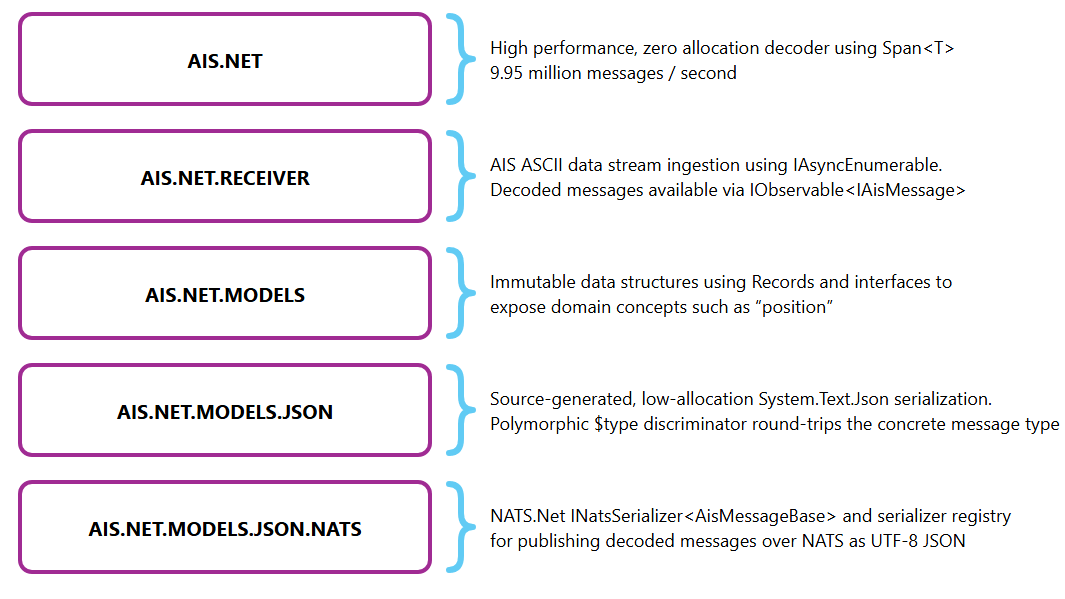
While Ais.Net aims for zero allocation, Ais.Net.Models and Ais.Net.Receiver aim for convenience of a higher level programming model, while still being efficient. Ais.Net.Receiver has run on a Raspberry Pi 4 as a systemd service robustly for many years, and uses very little CPU and Memory to ingest all the Norwegian Coastal Administration in real-time.
PID USER      PR  NI    VIRT    RES    SHR S  %CPU  %MEM     TIME+ COMMAND
679 root      20   0  287176  71536  43744 S   0.3   1.8  77:21.28 dotnet
:~ $ sudo systemctl status aisr
● aisr.service - aisr
   Loaded: loaded (/lib/systemd/system/aisr.service; enabled; vendor preset: enabled)
   Active: active (running) since Mon 2025-03-03 12:17:19 GMT; 6 days ago
 Main PID: 679 (dotnet)
    Tasks: 16 (limit: 4915)
   CGroup: /system.slice/aisr.service
           └─679 /home/pi/.dotnet/dotnet /home/pi/aisr/Ais.Net.Receiver.Host.Console.dll
It is also now available as a docker container for ease of install and management.
A simple .NET AIS Receiver for capturing the Norwegian Coastal Administration's marine Automatic Identification System (AIS) AIVDM/AIVDO NMEA message network data (available under Norwegian license for public data (NLOD)) and persisting in Microsoft Azure Blob Storage.
The Norwegian Coastal Administration provide a TCP endpoint (153.44.253.27:5631) for broadcasting their raw AIS AIVDM/AIVDO sentences, captured by over 50 base stations, and covers the area 40-60 nautical miles from the Norwegian coastline.
This project contains a NmeaReceiver which consumes the raw NetworkStream, a NmeaToAisMessageTypeProcessor, which can decode the raw sentences into IAisMessage, and ReceiverHost which manages the process and exposes an IObservable<string> for raw sentences and an IObservable<IAisMessage> for decoded messages. ReceiverHost can be hosted in a console application or other runtime environments like Polyglot Notebooks or even WASM.
The project also includes a demo console which shows how the various pieces can fit together, including subscribing to the IObservable<string> and IObservable<IAisMessage> streams and displaying the results or batch the AIVDM/AIVDO sentences and write them to Azure Blob Storage using the Append Blob feature, to create timestamped hour-long rolling logs.
The purpose of this application is to provide sample data for Ais.Net - the .NET Standard, high performance, zero allocation AIS decoder. The majority of raw AIS data is only available via commercial sources, and thus creating AIS datasets large enough to test / benchmark Ais.Net is almost impossible.
The Norwegian Coastal Administration TCP endpoint produces:
- ~2.9 KB per second
- ~10.3 MB per hour
- ~248 MB per day
- ~1.7 GB per week
- ~7 GB per month
- ~81.4 GB per year
The solution has grown from a library plus a console host into a small system, built around one rule:
there is a single decode path, and everything else subscribes to it. A source produces NMEA
sentences, ReceiverHost decodes them, and every capability — capture, telemetry, publishing,
visualisation — is a subscriber to its streams.
Any INmeaReceiver can feed the decoder: a live TCP or WebSocket (ws:///wss://) feed, a
recorded .nm4 file, or (in the demos) an hour the receiver previously captured to blob storage. ReceiverHost wraps the source in
retry (Corvus.Retry), decodes each sentence with
Ais.Net, and exposes the results as Rx streams:
RawSentences (bytes), Sentences (text), Messages (IAisMessage), Metadata (each message
paired with the station id and Unix timestamp parsed from its NMEA tag block), and Errors.
flowchart LR
    TCP["Live TCP feed<br/>NetworkStreamNmeaReceiver"] --> RH
    WS["Live WebSocket feed<br/>WebSocketNmeaReceiver"] --> RH
    FILE["Recorded .nm4 file<br/>FileStreamNmeaReceiver"] --> RH
    BLOB["Captured blob<br/>BlobNmeaReceiver (demo)"] --> RH

    RH["ReceiverHost<br/>Ais.Net decode + retry"] --> STREAMS["Rx streams<br/>RawSentences · Sentences · Messages<br/>Metadata · Errors"]

    STREAMS --> STORE["Storage capture<br/>batch → retry → hourly append blob<br/>+ dead-letter and replay"]
    STREAMS --> TEL["OpenTelemetry<br/>metrics · logs · traces"]
    STREAMS --> PUB["NATS publisher (opt-in)<br/>subject: ais.messages"]
    STREAMS --> TRK["TrackPipeline (demo)<br/>recording → vessel tracks"]
Subscribers never gate each other or the receive loop: storage runs on bounded dataflow blocks that shed load rather than grow without limit, and NATS publishing hands messages to a bounded queue instead of awaiting the broker on the receive path.
dotnet run on the AppHost starts the whole local system — no Azure account, no secrets; Docker
required:
flowchart LR
    FEED["Norwegian Coastal Administration<br/>tcp 153.44.253.27:5631"] --> W

    subgraph Aspire["Aspire AppHost"]
        W["worker"]
        N[("NATS<br/>tcp 4222 · ws 8080")]
        A[("Azurite<br/>blob emulator")]
        V["visualizer<br/>ASP.NET Core"]
        BC["broadcaster<br/>sample replay · tcp 15631 · ws 18080"]
    end

    BC -. "AisSource=broadcaster" .-> W
    W -- "capture: hourly .nm4 blobs" --> A
    W -- "publish: ais.messages (JSON)" --> N
    A -. "replay source" .-> V
    N == "websocket (nats-core)" ==> B["browser<br/>deck.gl + MapLibre"]
    V -- "bundle · /api/config · /api/tracks" --> B
The visualizer's two modes differ only in where vessels come from:
- Live (default): the worker publishes every decoded message to NATS as polymorphic JSON
(
Ais.Net.Models.Json.Nats), and the page subscribes straight from the browser over the websocket listener, correlating positions to names by MMSI as they arrive. The web host relays no vessel data — it serves the bundle and tells the page where the broker is. - Replay: the visualizer runs the same decode over a recording (a local file or a captured blob), builds geofenced, downsampled per-vessel tracks once, caches them, and serves one JSON document the page can scrub, play at up to 600×, and export to WebM.
Live is push over an unbounded stream — a rolling window in the browser. Replay is random access
over a bounded recording — a tracks document with a timeline. That difference in access pattern, not
a second decode path, is why Ais.Net.Receiver.Demo.Tracks exists.
| Project | Role |
|---|---|
Ais.Net.Receiver |
Core library: INmeaReceiver sources (TCP, WebSocket, file), ReceiverHost decode, resilience |
Ais.Net.Receiver.Storage.Azure.Blob |
Hourly append-blob capture for Azure Storage |
Ais.Net.Receiver.ServiceDefaults |
Shared hosting: OpenTelemetry, health checks, receive/storage pipeline wiring, shared NATS names |
Ais.Net.Receiver.Host.Console |
Interactive Spectre.Console host |
Ais.Net.Receiver.Host.Worker |
Long-running service host (systemd / Docker), with opt-in NATS publishing |
Ais.Net.Receiver.AppHost |
.NET Aspire orchestration for local development |
Ais.Net.Receiver.Demo.Tracks |
Demo library: recording → vessel tracks (geofence, downsample, deck.gl JSON) |
Ais.Net.Receiver.Demo.Visualizer |
Demo web host: serves the deck.gl page, /api/config, /api/tracks |
Ais.Net.Broadcaster |
Sink-side library: INmeaBroadcaster (TCP, WebSocket) and the BroadcastPipeline that paces, loops and injects faults |
Ais.Net.Broadcaster.Host.Console |
The ais-broadcaster dotnet tool: replay a recording or relay a live feed |
Ais.Net.Broadcaster.Tests |
Broadcaster unit and end-to-end tests, driven through the receiver's own connections |
- Sources are pluggable; decode is single. Everything that reads NMEA implements
INmeaReceiver; nothing decodes exceptReceiverHost. - Capabilities are opt-in by configuration. Storage capture activates when a storage connection
string is present; NATS publishing when a
natsconnection string is. A standalone worker on a Raspberry Pi behaves exactly as it always has. - Shared rules live in C#, once. The ship-type → category and colour mapping colours replayed
tracks at build time and is served to the live page via
/api/config, so the two views cannot drift apart. - Demos depend on the product, never the reverse. The
Demo.*projects are not packaged and do not ship in the container images.
The reliability behaviour of the storage path is documented in docs/production-reliability-plan.md, and the full metric and alert catalogue in docs/telemetry/observability-playbook.md.
The AIS data is stored using the following taxonomy
<USER DEFINED CONTAINER NAME>/raw/yyyy/MM/dd/yyyyMMddTHH.nm4
An example directory listing, with a user defined container name of nmea-ais would look as follows:
\---nmea-ais
    \---raw
        \---2026
            \---07
                +---12
                | 20260712T00.nm4 |
                | 20260712T01.mm4 |
                | 20260712T02.nm4 |
                | 20260712T03.nm4 |
                | 20260712T04.nm4 |
                | 20260712T05.nm4 |
                | 20260712T06.nm4 |
                | 20260712T07.nm4 |
                | 20260712T08.nm4 |
                | 20260712T09.nm4 |
                | 20260712T10.nm4 |
                | 20260712T11.nm4 |
                | 20260712T12.nm4 |
                | 20260712T13.nm4 |
                | 20260712T14.nm4 |
                | 20260712T15.nm4 |
                | 20260712T16.nm4 |
                | 20260712T17.nm4 |
                | 20260712T18.nm4 |
                | 20260712T19.nm4 |
                | 20260712T20.nm4 |
                | 20260712T21.nm4 |
                | 20260712T22.nm4 |
                | 20260712T23.nm4 |
                +---20260713
                | 20260713T00.nm4 |
Update the values in the appsettings.json file:
{
  "Ais": {
    "Connection": {
      "Transport": "Tcp",
      "Host": "153.44.253.27",
      "Port": 5631,
      "Retry": {
        "Attempts": 5,
        "Periodicity": "00:00:00:01"
      }
    }
  },
  "Storage": {
    "EnableCapture": true,
    "ConnectionString": "<YOUR AZURE STORAGE CONNECTION STRING>",
    "ContainerName": "nmea-ais",
    "WriteBatchSize": 500
  }
}
Ais:Connection:Transport selects the source: Tcp (the default, which uses Host and Port) or
WebSocket, which uses Url instead and ignores Host and Port. Url must be an absolute
ws:// or wss:// URL. To receive from a WebSocket feed:
{
  "Ais": {
    "Connection": {
      "Transport": "WebSocket",
      "Url": "wss://example.net/ais",
      "Retry": {
        "Attempts": 5,
        "Periodicity": "00:00:00:01"
      }
    }
  }
}
The WebSocket receiver accepts one sentence per message or several newline-delimited sentences in one
message, and it reconnects with the same Retry settings as the TCP receiver.
See Configuration for the full schema and every available setting.
From the command line, either host will do — the console host for interactive use, the worker for running as a service:
dotnet Ais.Net.Receiver.Host.Console.dll
dotnet Ais.Net.Receiver.Host.Worker.dllThe AppHost runs the worker alongside an Azurite container, so capture works on a fresh clone with no Azure account and no secrets. Docker must be running.
dotnet run --project Solutions/Ais.Net.Receiver.AppHostIt injects Storage__ConnectionString (pointing at the emulator) and Storage__EnableCapture=true
into the worker, and waits for Azurite to be ready first. Captured NMEA lands in the nmea-ais-dev
container and persists across restarts in the ais-azurite-data volume. Traces, metrics and logs
appear in the Aspire dashboard, whose login link the AppHost prints on startup.
EnableCapture is false in the tracked appsettings.json, because capture needs a connection
string to go with it. To capture against a real storage account outside the AppHost, keep that
connection string out of source control with user secrets rather than editing appsettings.json:
dotnet user-secrets set "Storage:EnableCapture" "true" --project Solutions/Ais.Net.Receiver.Host.Worker
dotnet user-secrets set "Storage:ConnectionString" "<connection string>" --project Solutions/Ais.Net.Receiver.Host.Worker
DOTNET_ENVIRONMENT=Development dotnet run --project Solutions/Ais.Net.Receiver.Host.Worker
User secrets are only loaded in the Development environment, so run the host with
DOTNET_ENVIRONMENT=Development as shown (the AppHost sets this for you). Without it the secrets
are silently ignored and capture stays off. For a production deployment use environment variables
instead — they take precedence over user secrets, so what a container or systemd unit injects
continues to win.
The broadcaster is the sink-side counterpart of the receiver: where the receiver connects to an NMEA feed, the broadcaster is one. It either replays a recording or relays a live feed, and serves the sentences to any number of clients over raw TCP (newline-terminated, the shape of the Norwegian Coastal Administration feed) and WebSocket (one sentence per message, or newline-delimited batches), on both at once if you like. A replay can be paced by the recording's NMEA tag-block timestamps, so it reproduces the original bursts and lulls, or at a fixed rate, or as fast as possible; it loops by default, so the feed never ends. Fault injection - dropped connections, silences, malformed and over-long lines - exercises a receiver's reconnect, idle-timeout and error paths on demand rather than waiting for the real feed to misbehave.
It ships as a dotnet tool, with a short sample recording in its samples folder:
dotnet tool install -g Ais.Net.Broadcaster.CliReplay the sample, paced by its timestamps, to TCP clients on port 5631 and WebSocket clients on port 8080:
ais-broadcaster replay samples/kystverket-20260511T00.nm4 --tcp 5631 --ws 8080Relay the live Norwegian feed to local WebSocket clients, so one upstream connection serves them all:
ais-broadcaster relay tcp://153.44.253.27:5631 --ws 8080Test a receiver's resilience: drop every client each minute, go silent for 90 seconds every ten minutes, and corrupt every 200th sentence:
ais-broadcaster replay samples/sample.nm4 --tcp 5631 --disconnect-every 60 --silence-every 600 --silence-for 90 --malformed-every 200ais-broadcaster replay --help and ais-broadcaster relay --help list every option: listener
address and path, WebSocket framing, line endings, per-client queue size and slow-client policy,
pacing rate and speed, and the faults. Press Ctrl+C to stop; the listeners close their clients and
the tool exits cleanly.
The Aspire AppHost always runs the broadcaster, replaying the sample recording. The worker reads the
live Kystverket feed unless the AppHost is started with AisSource set to broadcaster; then it
reads the broadcaster's WebSocket endpoint instead, which works offline. The quickest way is the
Ais.Net.Receiver.AppHost (broadcaster) launch profile, from the IDE or with
dotnet run --project Solutions/Ais.Net.Receiver.AppHost --launch-profile "Ais.Net.Receiver.AppHost (broadcaster)";
the setting is also honoured as an environment variable or on the command line
(dotnet run --project Solutions/Ais.Net.Receiver.AppHost -- --AisSource broadcaster).
Ais.Net.Receiver.Demo.Visualizer (with its Ais.Net.Receiver.Demo.Tracks pipeline) is an AIS
Visualizer: a deck.gl + MapLibre
map of vessel movement, served by ASP.NET Core and orchestrated by the same AppHost. It is a demo, so
neither project ships in the container images or as a package.
Running the AppHost starts it alongside the worker, Azurite and a NATS broker; the dashboard prints the URL.
dotnet run --project Solutions/Ais.Net.Receiver.AppHostLive is the default. The worker publishes every decoded message to NATS as JSON
(Ais.Net.Models.Json), and the page subscribes to that subject directly from the browser with
@nats-io/nats-core and decodes it. The ASP.NET Core host relays no vessel
data at all — it serves the bundle and tells the page where the broker is.
AIS splits a vessel across messages, so the page correlates them by MMSI: a vessel appears as soon as
it reports a position, labelled MMSI …, and gains its name and colour when its static message
arrives. The ship-type-to-colour mapping is not reimplemented in JavaScript — /api/config serves
the table generated from the same C# the replay pipeline uses, so live and recorded vessels are
coloured identically.
Replay plays a recorded day on a timeline, with the playback controls and WebM export from the original proof of concept. Point it at a local file:
dotnet run --project Solutions/Ais.Net.Receiver.Demo.Visualizer
# with Visualizer:Source=Replay and Visualizer:Replay:FilePath=<path to .nm4>
…or at an hour the receiver already captured, which needs nothing but the blob path because the storage connection string is already configured:
Visualizer:Source=Replay
Visualizer:Replay:BlobPath=raw/2026/07/28/20260728T06.nm4
An optional Visualizer:Replay:GeofencePath clips positions to a GeoJSON polygon. The visualizer's
full settings are documented under Configuration.
Two things to know before running it:
- Node is needed to build, not to run. An msbuild target runs
npm ciandvite buildforClientApp, emitting the bundle into the (git-ignored)wwwroot. Build with-p:SkipFrontendBuild=truewhere Node is unavailable and the bundle is already present. - The demo is loopback-only. The NATS websocket carries no TLS, and
/api/confighands the browser the broker credentials so it can connect for itself. That is fine onlocalhost; anything shared needs real credentials andwss://.
The basemap style is fetched from basemaps.cartocdn.com, so the map needs internet access.
To run the tests, use the following command:
dotnet test --solution Solutions/Ais.Net.Receiver.slnxThe test project is configured to use the Microsoft.Testing.Platform runner. Note that MTP does not
accept the older VSTest-era switches — passing --nologo, --logger or --test-adapter-path makes
the run report Zero tests ran rather than an unrecognised-argument error.
Tests categorised Integration run against a real Azure Blob Storage endpoint, provided by an
Azurite container started through
Testcontainers. They need a working Docker daemon. One
container is shared by the whole test process and started only on demand, so a unit-only run costs
nothing:
cd Solutions/Ais.Net.Receiver.Tests

dotnet run -f net10.0                                                  # everything
dotnet run -f net10.0 -- --filter "TestCategory=Integration"           # integration only
dotnet run -f net10.0 -- --filter "TestCategory!=Integration"          # unit only, no container
When Docker is unavailable these tests report as inconclusive rather than failing. Any other startup problem — an unresolvable image tag, a failed pull, a port conflict — fails the build, because a broken container reported as a skip is indistinguishable from having no coverage at all.
The following environment variables tune this:
| Variable | Default | Purpose |
|---|---|---|
AIS_TEST_REQUIRE_INTEGRATION |
unset | Truthy: never skip, so missing Docker fails. Set in CI. |
AIS_TEST_AZURITE_IMAGE |
mcr.microsoft.com/azure-storage/azurite:latest |
Pin the image, e.g. to work around a bad release. |
AIS_TEST_AZURITE_SKIP_API_VERSION_CHECK |
true |
Falsy: drop --skipApiVersionCheck (see below). |
AIS_TEST_AZURITE_STARTUP_TIMEOUT_SECONDS |
120 |
Bound a hung image pull. |
Azurite trails the newest storage service API version that the Azure SDK sends, and rejects otherwise
valid requests with 400 InvalidHeaderValue when it does. The container is therefore started with
--skipApiVersionCheck by default. Setting AIS_TEST_AZURITE_SKIP_API_VERSION_CHECK=false re-enables
the check, which is how you deliberately confirm whether a skew exists between the SDK version in
Directory.Packages.props and the Azurite image in use:
AIS_TEST_AZURITE_SKIP_API_VERSION_CHECK=false dotnet run -f net10.0 -- --filter "TestCategory=Integration"The receiver is instrumented with OpenTelemetry — traces for the connection lifecycle, message processing and storage operations; metrics for throughput, errors, connection health and storage performance; and logs that carry trace context so a log line can be pivoted to the trace it belongs to.
docs/telemetry/observability-playbook.md is the operational reference: every metric with its unit and
histogram buckets, example queries, alert definitions, and troubleshooting runbooks. It records measured
baselines rather than estimates, including the ~3–4% sentence error rate a live coastal feed produces
(the parser rejects !B1VDM/!B2VDM talker ids), so alert thresholds can be set above a feed's own
noise floor rather than permanently firing. docs/telemetry/testing-guide.md covers testing
instrumented code.
Nothing is exported unless an endpoint is configured. Set OTEL_EXPORTER_OTLP_ENDPOINT to enable the
OTLP exporters for logs, metrics and traces; without it the exporters are left unregistered rather than
defaulting to localhost:4317 and logging periodic connection failures into a deployment that has no
collector.
| Setting | Purpose |
|---|---|
OTEL_EXPORTER_OTLP_ENDPOINT |
Enables the OTLP exporters. Unset means no export. |
OTEL_TRACES_SAMPLER, OTEL_TRACES_SAMPLER_ARG |
Standard sampler selection. Takes precedence — when set, no sampler is configured in code, so this is the knob to reach for during an ingest-cost or backend-overload incident. |
OpenTelemetry:TraceSamplingRatio |
Ratio (0.0–1.0) used when the environment variables above are not set. Applied ParentBased, so a sampled upstream trace stays intact end to end. Ignored in Development, which always samples everything for the Aspire dashboard. |
OTEL_SERVICE_INSTANCE_ID |
Sets service.instance.id. Defaults to the machine name, which under Docker or Kubernetes is unique per replica and stable for that replica's life. |
Two health checks are registered: AIS connection state and storage accessibility. Connection health
reflects the live TCP state and, importantly, whether the feed is actually delivering — a server that
accepts a connection and then goes silent reconnects cleanly forever, so connect success alone is not
treated as healthy. ais.receiver.connection.consecutive_failures resets on the first delivered
sentence rather than on connect.
You have two options for running the AIS Receiver on a Raspberry Pi: using a Docker container or as a systemd service.
The combination of Windows Terminal, .NET and PowerShell make a Raspberry Pi a very productive environment for .NET Devs.
Install Windows Terminal. You can download Windows Terminal from the Microsoft Store or from the GitHub releases page.
Open Windows Terminal and use ssh pi@<Raspberry PI IP Address> to connect to your Pi.
These steps assume that you have configured passwordless authentication on your Raspberry Pi.
Set up the required environment variables on your Raspberry Pi:
ssh user@pi
nano ~/.bashrc
Add the following lines to the end of the file:
export AIS_NET_RECEIVER_AZURE_CONNECTION_STRING="<YOUR_CONNECTION_STRING>"Save & Exit nano. To load the environment variables, then run:
source ~/.bashrcInstall Docker & Docker Composer on your Raspberry Pi:
curl -sSL https://get.docker.com | sh
sudo usermod -aG docker $USER
sudo reboot
sudo apt install docker-compose
mkdir aisr
sudo apt-get update && sudo apt-get upgrade && sudo apt autoremove
exit
On your host machine, open Windows Terminal:
cd ./Solutions/Ais.Net.Receiver.Host.Console.RaspberryPi
scp .\docker-compose.yml user@pi:~/aisr/
ssh user@pi
cd aisr
docker-compose up -d
This will automatically pull the latest image from Docker Hub and run the AIS Receiver using the Azure Storage Connection String you configured as an environment variable. Use Azure Storage Explorer to browse to where files are captured. You should see entries added within the first minute of the service starting.
If you want to run the service as a daemon, you can use SystemD to manage the service.
Use the following commands to install .NET on your Pi.
curl -sSL https://dot.net/v1/dotnet-install.sh | bash /dev/stdin --channel Currentecho 'export DOTNET_ROOT=$HOME/.dotnet' >> ~/.bashrcecho 'export PATH=$PATH:$HOME/.dotnet' >> ~/.bashrcsource ~/.bashrcdotnet --version
Use the following commands to install PowerShell on your Pi.
- Download the latest package
wget https://github.com/PowerShell/PowerShell/releases/download/v7.5.0/powershell-7.5.0-linux-arm64.tar.gz - Create a directory for it to be unpacked into
mkdir ~/powershell - Unpack
tar -xvf ./powershell-7.5.0-linux-arm64.tar.gz -C ~/powershell - Give it executable rights
sudo chmod +x /opt/microsoft/powershell/7/pwsh - Create a symbolic link
sudo ln -s /opt/microsoft/powershell/7/pwsh /usr/bin/pwsh
use the command pwsh to enter the PowerShell session.
- From the solution root, open a command prompt and type
dotnet publish -c Release .\Solutions\Ais.Net.Receiver.slnx - Add your Azure Blob Storage Account connection string to
appsettings.json - Transfer (I use Beyond Compare as it has native SSH support) the contents of
.\Solutions\Ais.Net.Receiver.Host.Console\bin\Release\net10.0\publishto a folder calledaisrin thehome/pidirectory on your Raspberry Pi (assuming you still have the default set up.) - Copy
Solutions\Ais.Net.Receiver.Host.Console.RaspberryPi\aisr.serviceto/lib/systemd/system/aisr.service - run
sudo chmod 644 /lib/systemd/system/aisr.service - run
sudo systemctl enable aisr.service - run
sudo reboot
You can use journalctl -u "aisr" to view the console output of Ais.Net.Receiver.Host.Console.dll
You can use sudo systemctl restart aisr to restart the service.
If you need to look at / edit the deployed aisr.service use sudo nano /lib/systemd/system/aisr.service make your edits then use Ctrl+O and Ctrl+X to save the file and exit.
Use Azure Storage Explorer to browse to where files are captured.
Configuration is read from appsettings.json. The hosts use the standard .NET host configuration
pipeline, so values can be overridden — in increasing order of precedence — by
appsettings.{Environment}.json (selected by DOTNET_ENVIRONMENT, e.g. appsettings.Development.json),
user secrets (Development only), environment variables, and command-line arguments.
Environment variables use __ as the section separator, which is the most practical way to override
settings in a container without rebuilding the image:
Ais__Connection__Host=153.44.253.27 \
Storage__EnableCapture=true \
Storage__ConnectionString="UseDevelopmentStorage=true" \
ConnectionStrings__nats="nats://localhost:4222" \
  ./Ais.Net.Receiver.Host.Worker
Two connection-string conventions appear here, deliberately. Storage:ConnectionString is part of
the receiver's own Storage section — one property of the validated capture feature, alongside
EnableCapture and the batching settings — and is the stable contract existing deployments
(docker-compose, systemd) already use. ConnectionStrings:nats is the standard .NET slot that
Aspire's WithReference injects and the NATS client integration reads by convention; using the
platform's name is what lets its mere presence switch publishing on with no bespoke wiring.
The full schema, with every optional section present:
{
  "Ais": {
    "Connection": {
      "Host": "153.44.253.27",
      "Port": 5631,
      "Retry": {
        "Attempts": 5,
        "Periodicity": "00:00:00:01"
      }
    },
    "Receiver": {
      "Retry": {
        "Attempts": 5,
        "Periodicity": "00:00:00:01"
      }
    },
    "Telemetry": {
      "Verbosity": "Warning",
      "StatisticsPeriodicity": "00:00:01:00",
      "VesselInactivityTimeout": "00:30:00"
    }
  },
  "Storage": {
    "EnableCapture": true,
    "ConnectionString": "DefaultEndpointsProtocol=https;AccountName=<ACCOUNT_NAME>;AccountKey=<ACCOUNT_KEY>",
    "ContainerName": "nmea-ais-dev",
    "WriteBatchSize": 500,
    "BatchTimeoutSeconds": 10,
    "BoundedCapacity": 10000,
    "MaxDegreeOfParallelism": 1,
    "WriteRetryAttempts": 3,
    "DeadLetterPath": "/var/aisr/dead-letter",
    "DeadLetterReplayIntervalSeconds": 60
  },
  "ConnectionStrings": {
    "nats": "nats://localhost:4222"
  },
  "OpenTelemetry": {
    "TraceSamplingRatio": 1.0
  }
}Ais:Connection controls the connection to the feed.
Transport:Tcp(default) orWebSocketHost: IP address or FQDN of the AIS source (TCP only)Port: port number for the AIS source (TCP only)Url: absolutews://orwss://URL of the AIS source (WebSocket only)Retry:Periodicity: base delay between reconnection attempts. Backoff is linear —Periodicity × attempt.Retry:Attempts: caps how far the backoff delay grows, and does not limit the number of attempts. The receiver reconnects indefinitely; with the shippedAttempts: 5andPeriodicity: 1sthe delay climbs to 5 seconds and then stays there. A long-running receiver that gave up after N failures would need manual intervention to resume, which is why there is no cap on attempts. The idle-read timeout that detects a silently dropped connection is deliberately separate from these settings and defaults to 60 seconds.
Ais:Receiver:Retry controls the receive loop that sits above the connection, using the same shape.
Ais:Telemetry controls console output and derived streams.
Verbosity: a standardLogLevel(Trace,Debug,Information,Warning,Error,Critical,None), and cumulative — each level includes everything the less verbose levels emit:None— nothingWarning— periodic statistics, sampled atStatisticsPeriodicityInformation— the above, plus vessel names and positionsDebug— the above, plus raw NMEA sentencesTrace— the above, plus decoded messages and parse errors
StatisticsPeriodicity: how often to emit the statistics lineVesselInactivityTimeout: how long a vessel may go unheard before its tracking state is released. Defaults to 30 minutes.
These settings control the capturing of NMEA sentences to Azure Blob Storage.
EnableCapture: whether to capture NMEA sentences and write them to Azure Blob StorageConnectionString: Azure Storage account connection stringContainerName: container to capture the NMEA sentences into. Useful for separating a local dev container from production within the same storage account.WriteBatchSize: how many sentences to batch before writing (default 500)BatchTimeoutSeconds: flush a partial batch after this long, so a quiet feed still gets persisted (default 10)BoundedCapacity: how many sentences may be buffered awaiting a write (default 10000). When the buffer fills, sentences are shed rather than allowed to grow memory without limit, and the drops are counted byais.receiver.sentences.dropped.MaxDegreeOfParallelism: concurrent storage writes (default 1). Appends to a single blob are serialized regardless, so raising this only helps if writes are the bottleneck.WriteRetryAttempts: total attempts per batch, including the first (default 3)DeadLetterPath: optional local directory. When set, a batch that exhausts its retries is written here instead of being lost, and a background replayer returns it to storage once the backend recovers. When unset, an exhausted batch surfaces as an error instead.DeadLetterReplayIntervalSeconds: how often to attempt replaying dead-lettered batches (default 60)
The worker can publish every decoded message to a NATS subject, which is how the AIS Visualizer demo gets its live feed. There is exactly one setting:
ConnectionStrings:nats: the broker to publish to, e.g.nats://localhost:4222(ornats://user:pass@host:4222with credentials). Its presence is the switch: when set, the publisher runs; when absent, publishing is disabled and the worker behaves exactly as it always has — the same convention storage capture uses. Under the Aspire AppHost this is injected automatically.
What it publishes is not configurable by design. Messages go to the ais.messages subject as
polymorphic JSON (Ais.Net.Models.Json, with a
$type discriminator naming the concrete message type). The subject name is a shared constant
(AisNats.MessagesSubject) rather than a setting, because publisher and subscribers live in
different processes: a knob on one side could do nothing but silently break the other.
Publishing never slows the receive path: messages are handed to a bounded queue (10,000 entries) and a stalled broker causes the oldest queued messages to be dropped — the right ones to lose for a position feed — with the drops counted and logged rather than hidden.
The AIS Visualizer binds the Visualizer section. Live mode is the default and
needs no configuration under the AppHost; replay mode is selected like this:
{
  "Visualizer": {
    "Source": "Replay",
    "Replay": {
      "BlobPath": "raw/2026/07/12/20260712T00.nm4",
      "GeofencePath": "/data/skagerrak.json"
    }
  }
}Source:Live(default) orReplayReplay:FilePath: a local.nm4file to replay. Replay mode requiresFilePathorBlobPath; when both are set,BlobPathwins.Replay:BlobPath: a captured blob to replay, in the layout the receiver writes (raw/yyyy/MM/dd/yyyyMMddTHH.nm4)Replay:ConnectionString: storage connection string forBlobPath. Defaults toStorage:ConnectionString, so replaying what the AppHost's Azurite captured needs nothing extra.Replay:ContainerName: the container holding the capture (defaultnmea-ais-dev)Replay:GeofencePath: optional GeoJSON polygon; positions outside it are discardedNatsWebSocketUrl: thews://URL the page's own NATS connection uses in live mode. The AppHost supplies this (the port is assigned at run time); set it manually only when running live mode outside the AppHost.BasemapStyle: the MapLibre style URL (defaults to a CARTO dark style; the map needs internet access to fetch it)VesselInactivityTimeout: how long a vessel may go unheard before the live view drops it (default 15 minutes)ConnectionStrings:nats: used only to extract the credentials/api/confighands to the page; injected by the AppHost
OpenTelemetry:TraceSamplingRatio and the OTEL_* environment variables are documented in
Telemetry.
A Proof of Concept using componentize-dotnet and a custom WASI implementation of WasiSocketNmeaStreamReader enables the receiver to run as WASM via Wasmtime.

AIS.Net.Receiver is also available under the Apache 2.0 open source license.
The Data ingested by the AIS.Net.Receiver is licensed under the Norwegian license for public data (NLOD).
This project is sponsored by endjin, a UK based Technology Consultancy which specializes in Data & Analytics, AI & Cloud Native App Dev.
We help small teams achieve big things.
We produce three free weekly newsletters:
- Azure Weekly for all things about the Microsoft Azure Platform
- Power BI Weekly for all things Power BI
- Fabric Weekly for all things Microsoft Fabric
Keep up with everything that's going on at endjin via our blog, follow us on Twitter, YouTube or LinkedIn.
We have become the maintainers of a number of popular .NET Open Source Projects:
And we have over 50 Open Source projects of our own, spread across the following GitHub Orgs:
And the DevOps tooling we have created for managing all these projects is available on the PowerShell Gallery.
For more information about our products and services, or for commercial support of this project, please contact us.
This project has adopted a code of conduct adapted from the Contributor Covenant to clarify expected behaviour in our community. This code of conduct has been adopted by many other projects. For more information see the Code of Conduct FAQ or contact hello@endjin.com with any additional questions or comments.