
bpmn-server is a BPMN-based workflow engine that integrates easily into your Node.js app. It supports built-in state persistence, variable management, and concurrency across clusters—ideal for long-running processes, durable services, and scheduled tasks.
This repository holds the engine (bpmn-server), its web application (bpmn-web), its REST client (bpmn-client), the documentation and the sample application: see This repository.
Business processes are rarely just a sequence of API calls. Approvals can wait for days, timers must survive restarts, and teams need to understand what happened when something goes wrong. Hardcoding all of this into an application makes workflows difficult to change and test.
BPMN Server brings visual workflow design and durable execution into your Node.js application.
- Model the flow, not the plumbing. Use BPMN 2.0 to describe tasks, approvals, decisions, timers, and exceptions.
- Run long-lived processes reliably. Persist state and resume workflows across application restarts.
- Connect to your systems. Invoke application services and external REST APIs through delegates and OpenAPI connectors.
- Test before deploying. Verify models, automate scenarios with Gherkin, and inspect execution decisions when tests fail.
- Work with AI agents. Let AI-assisted tools create, validate, and test models using the server's integration interfaces.
- Choose how to deploy. Embed the engine in a Node.js app or run it separately from the web host.
Open source under the MIT license, BPMN Server is for developers who want BPMN capabilities without adopting a large workflow platform.
Choose how you want to start (Choose Your Journey):
| Journey | For | Start with |
|---|---|---|
| A. Online demo | Trying it with nothing installed | bpmn.omniworkflow.com |
| B. Build an application | A workflow application of your own, on bpmn-web | Build an application |
| C. Integrate an existing application | An application that keeps its own UI and users, and runs its processes here | Integrate an existing application |
| D. Embed the engine | Running processes from your own Node.js code | Embedding the engine |
The tutorials take one leave request from installing to automated testing, in nine steps: security, the employee's and the manager's tasks, the results, Node.js, the REST APIs, connectors and Gherkin tests.
The videos: one for each tutorial, and the features one at a time, such as testing a model (record scenarios, add checks, see what breaks when the model changes) and a connector to GitHub.
BPMN Server combines a workflow engine with optional web-based modeling, task management, REST APIs, connectors, and testing tools. Your application hosts the engine or connects to it as a separate service. See the Architecture guide for the component diagram and deployment options.
npx bpmn-server init my-app --memory   # first trial; no external MongoDB
cd my-app
npm start                        # http://localhost:3000
Open your browser to http://localhost:3000. The first page asks for the administrator, with the setup token the server printed when it started.
init installs the application dependencies, including bpmn-server, bpmn-web, and bpmn-mcp;
npx bpmn-server init --help lists its options, and --minimal creates a one-model Hello application
instead. For a persistent MongoDB installation, use npx bpmn-server init my-app --mongo mongodb://localhost:27017/my-app, start MongoDB if needed, and run npm run setup before npm start.
my-app/
  package.json      deps: bpmn-server, bpmn-web; scripts: start, dev, setup, cli, verify
  .env              generated keys, the database URL, what is served
  index.ts          starts bpmn-web with the settings, delegate and connectors below
  settings/         config.ts: only the settings you override; bpmn-web supplies the defaults
  processes/        the models: Hello, Buy Used Car, Leave Application, employee-onboarding, Business Rules, GitHub repository
  connectors/       the services service tasks call (appServices.ts), and element templates (*.json)
  delegates/        the app delegate (on bpmn-web's WebAppDelegate): services, data objects, events
On a new Linux server (Ubuntu 22.04 or 24.04), one line installs everything (Node.js, MongoDB, the application,
nginx, a service; HTTPS with --domain) and prints the address and a generated admin password:
curl -fsSL https://raw.githubusercontent.com/bpmnServer/bpmn-server/main/deploy/install.sh | sudo bashIt also works as a cloud server's launch script (AWS Lightsail's "Add launch script"). See deploy/.
npm install bpmn-client
npx bpmn-client-setup            # writes .env: set API_KEY to the server's, HOST and PORT to where it runs
npx bpmn-client-cli              # a console on the server: start processes, list and invoke items
import 'dotenv/config';
import { BPMNClient2 } from 'bpmn-client';
const client = new BPMNClient2(process.env.HOST, process.env.PORT, process.env.API_KEY);
const instance = await client.engine.start('Hello', { name: 'Ada' });See bpmn-client for its API.
import { BPMNServer, Logger } from 'bpmn-server';
import { configuration } from './configuration.js';

const server = await BPMNServer.create(configuration, new Logger({ toConsole: false }));

const result = await server.engine.start('invoice', { amount: 1200 });
console.log('Process started with instance id:', result.instance.id);
See Embedding the engine, the Engine API and the API reference.
bpmn-server provides a modeling tool based on bpmn.io with a customized property panel, eliminating the need to manually edit BPMN files.
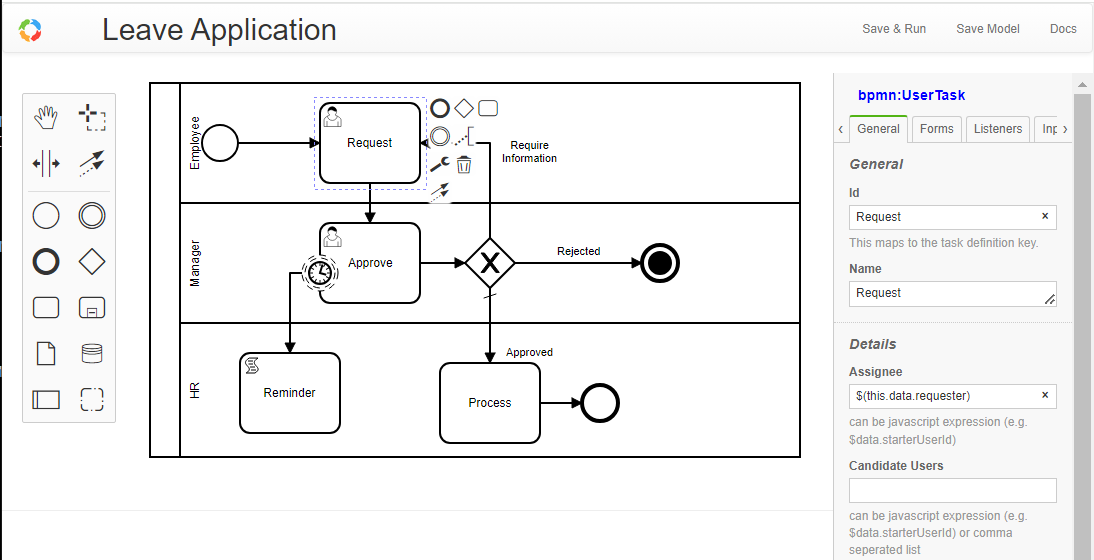
You can also import BPMN models from other tools.
Each model is defined in a BPMN XML file and consists of various elements. An element can be a node (such as events, tasks, or gateways) or a flow.
Models are managed by bpmn-server and can be queried using the Model API.
All BPMN 2.0 elements are supported. See Modeling Support
bpmn-server is primarily an execution engine for BPMN models.
Each time a model is started, an instance is created. For every element that is executed, an item is generated.
Execution follows the BPMN model logic and supports extensions such as scripting and application context access.
During execution, both Model Listeners and Application Listeners are invoked.
Access the execution engine via the Engine API.
Execution data, including instances and their items, are persisted to a datastore: MongoDB (the default), SQLite, or memory, through one storage port that you can also implement yourself.
You can query this data through the Data API.
Every call to the engine says which user it acts for, and the engine applies the model's rules to that user.
- Model designers assign tasks with
assignee,candidateUsersandcandidateGroups, as names or expressions ($(this.data.requester)). A task in a lane is also offered to the group with the lane's name. - bpmn-web signs users in and keeps their groups. A new server has no users: its first page asks for the administrator, with a setup token it prints where it runs.
- Another application keeps its own users: it calls the APIs with a key, and names the user and their groups on each call to the task API.
- Embedded, your code passes the user (
SecureUser) to each call.
REQUIRE_AUTHENTICATION and ENFORCE_SECURITY are on in a new application.
Explore the `bpmn-web` application.
Features include:
- Persistent modeling tool (based on
bpmn.io) - Property panel supporting all
bpmn-serverfeatures - Execution with input forms for defined fields
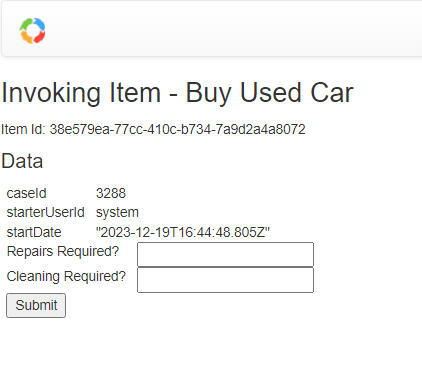
- Task and workflow lists
- Instance detail view
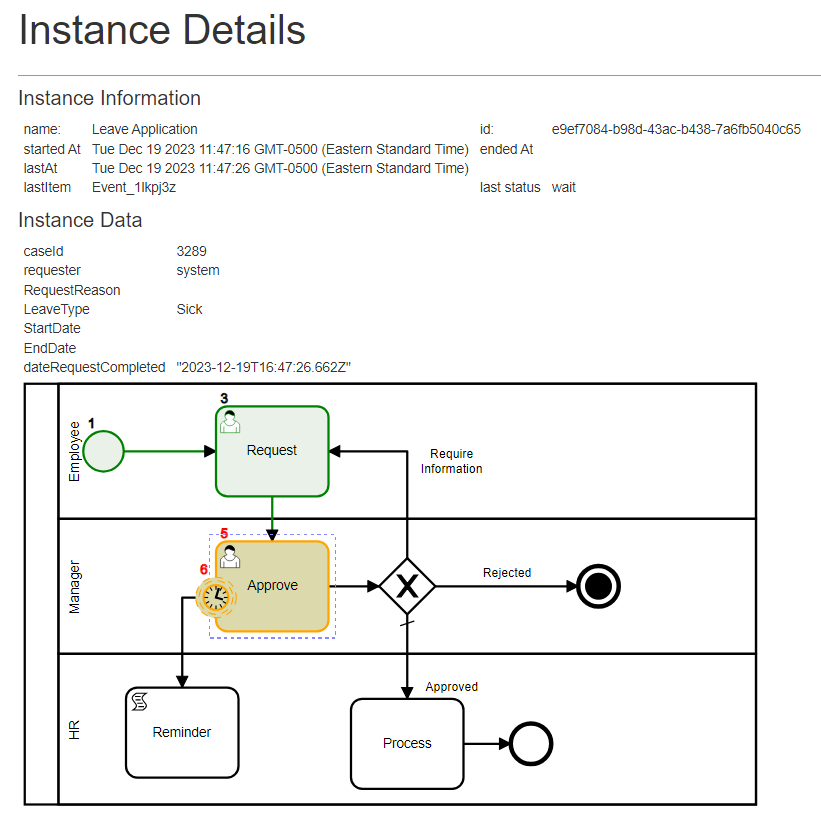
- Model specification viewer
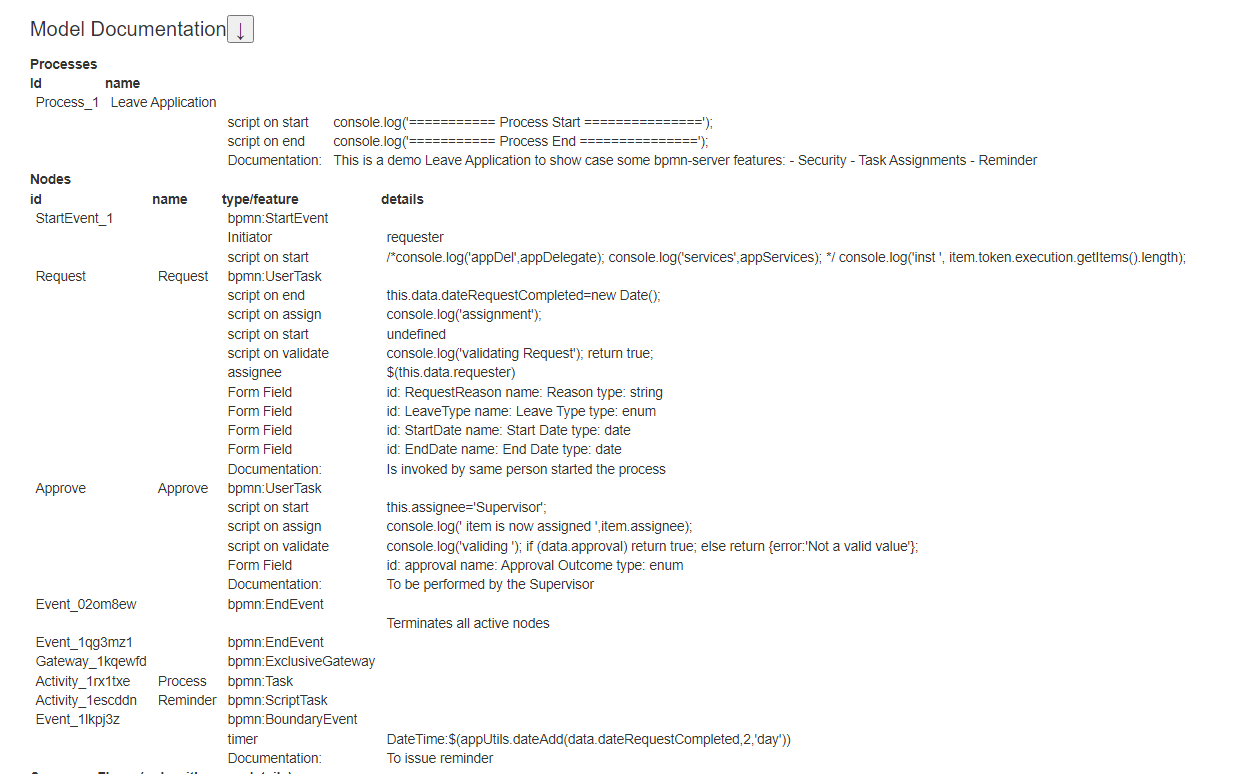
A live demo is available at: https://bpmn.omniworkflow.com
For the quickest local trial, use Create an application with --memory. For durable storage, initialize against MongoDB and run npm run setup before starting the application. For an Ubuntu server, use the native installer. For a container-based installation, follow the guided Docker setup below.
The supported Docker image is bpmnserver/bpmn-server:latest. The older ralphhanna/bpmn-web and ralphhanna/bpmn-server images are no longer updated.
For a guided installation on Linux, macOS, or WSL:
mkdir -p bpmn-server && cd bpmn-server
curl -fLO https://raw.githubusercontent.com/bpmnServer/bpmn-server/main/docker/docker-compose.yml
curl -fLO https://raw.githubusercontent.com/bpmnServer/bpmn-server/main/docker/setup.sh
sh setup.sh
The setup asks for a port, memory or persistent MongoDB, and a published or locally built image. It generates private API and admin keys in .env, then starts the application. Memory mode is for trials: users and workflow instances are lost on restart.
For Windows without WSL, or for updates and troubleshooting, see the Docker installation guide and Docker scripts. Do not use the old bpmn-web Compose image.
Use `bpmn-server` via CLI for common operations.
In your application:
npm run cli

server started..
Commands:
  q     quit
  s     start process
  lo    list outstanding items
  li    list items
  l     list instances for a process
  di    display instance information
  i     invoke task
  sgl   signal task
  msg   message task
  d     delete instances
  lm    list models
  lme   list model elements
  ck    check locked instances
  re    recover hung processes
  lu    list users
  spw   set user password
  ?     show this help menu
npx bpmn-server verify processes/ checks the models without running them.
npm update bpmn-server bpmn-webbpmn-server is designed to be embedded into your application. See customization guide
The documentation site, and its site map of every page.
- Getting started: Choose your journey, Installation, Settings, What's new in 3.6
- Tutorials: 1 to 9, and the videos
- Concepts: Invoking workflows, Execution, Data, Scripting, Security
- Modeling: Model editor, Checking models, Testing and debugging models, Connectors, Decisions (DMN), Examples
- Development: Embedding the engine, Engine API, API reference, Application integration, Custom persistence, Custom delegates, Architecture
packages/bpmn-server |
The workflow engine (npm bpmn-server), and npx bpmn-server init. |
packages/bpmn-client |
The REST client (npm bpmn-client). |
packages/bpmn-web |
The web host: tasks, instances, the model editor, administration, the REST APIs, start() (npm bpmn-web). |
packages/bpmn-mcp |
Connects AI clients to a running server over MCP, Codex and Claude Code among them (npm bpmn-mcp); npx bpmn-server init installs it. |
sampleApp |
The sample application (processes, connectors, delegates) on bpmn-web: what npx bpmn-server init creates. |
testSampleApp |
The working application: the models tests run on, beside their .feature files, the app to start and debug from, and the tests of bpmn-web, the engine and the models. |
docs |
The documentation site. |
docker |
Docker images. |
catalog |
The model catalog bpmn-web browses and imports from. |
git clone https://github.com/bpmnServer/bpmn-server.git
cd bpmn-server
npm install                      # every package, linked to each other (npm workspaces)
npm run build                    # bpmn-server, bpmn-client, bpmn-web

cd apps/testSampleApp
cp .env.example .env             # set MONGO_DB_URL
npm run setup                    # the database's indexes
npm start # or npm run debug (Node inspector); npm start at the root runs it toonpm run dev # at the root: testSampleApp from the sources, and the model editor's build, both watchingnpm run dev runs testSampleApp on the TypeScript sources of bpmn-server and bpmn-web (their bpmn-source
export condition, under tsx), with node --watch: a change to packages/bpmn-server/src,
packages/bpmn-web/src or the app's code restarts it, without a build. The model editor (modeler/src) is
rebuilt as it changes; refresh the browser. Views (.pug) and public/ need only a refresh. Models
(processes/) do not restart it (the editor saves there): a model changed outside the editor loads on the
next restart.
In testSampleApp alone: npm run dev, or npm run dev:debug with the Node inspector. In VS Code, testSampleApp:
dev (debug) does the same with breakpoints in the app and both packages; Test: current file runs the
open test file under the debugger (on the builds: npm run build first).
| Tests | |
|---|---|
npm test (root) |
bpmn-server, bpmn-client and testSampleApp |
npm test (testSampleApp) |
bpmn-web's unit, client, engine and web tests, the models' tests (test/custom) and the engine's scenarios |
npm run test:ui (testSampleApp) |
the browser tests (Playwright) |
npm run test:coverage (root) |
all of these with code coverage, and each model's saved scenarios with what they reach: the browsable report in coverage/, the summaries kept in reports/coverage/; fails if a suite fails or bpmn-server is under 90% of lines, functions or branches. The browser code is not measured |
npm run test:scenarios (testSampleApp) |
the engine's feature scenarios alone |
The tests use databases of their own on a local MongoDB (mongodb://localhost:27017; TEST_MONGO_URL and
BPMN_TEST_MONGO_URL change it): bpmn-web's tests one per run, dropped when they end; the scenarios
bpmn_scenarios, emptied before each run.
Publishing: npm publish -w bpmn-server, then -w bpmn-client, -w bpmn-web and -w bpmn-mcp, all with the same version (they
depend on each other's, and init installs them together); packing bpmn-server copies sampleApp into it as init's template.
Licensed under the MIT License.
bpmn-server builds upon bpmn-io/bpmn-moddle by bpmn.io, and is inspired by bpmn-engine.