


acli-py is a friendly command line for Jira Cloud. It is a Python port of the Jira side of
Atlassian's acli, redesigned around short,
predictable commands and a dry-run mode for every change.
acli-py issue create -p DEMO -t Bug -s "Login fails on Safari" -a @me -L web
acli-py issue transition DEMO-12 --to "In Progress" -m "On it"
acli-py issue edit --jql 'project = DEMO AND labels = legacy' --remove-label legacy --dry-run
acli-py issue search '@me is:open #web sort:-priority'
acli-py tui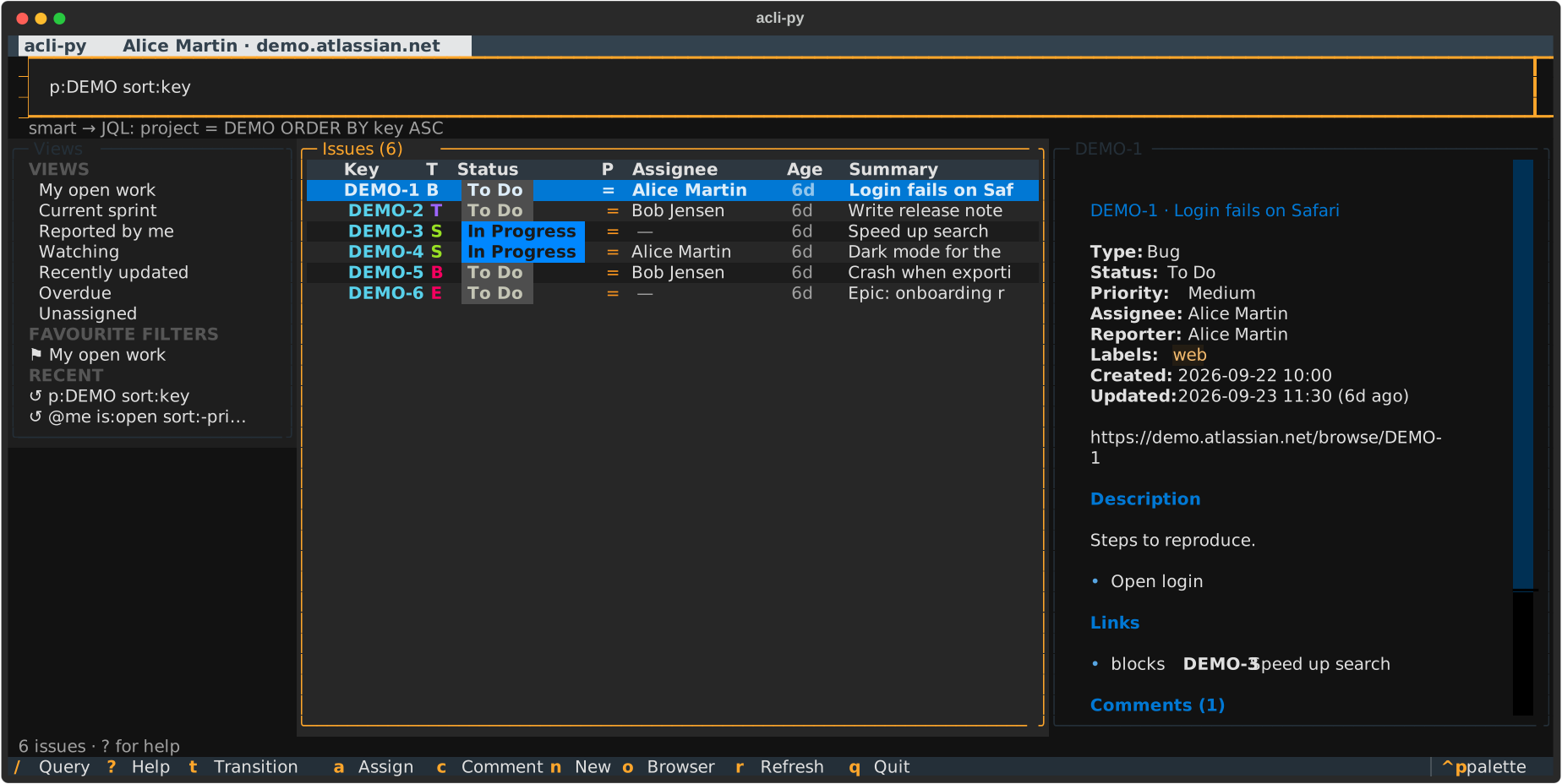
- A TUI and a shell.
acli-py tuiis a full-screen issue browser: type a query with completion from your site, read issues beside the list, then transition, assign, comment, relabel or create, one issue or many at a time.acli-py shellruns every command at a prompt that completes commands, options, issue keys, statuses, people and JQL. - Smart queries.
@me #web s:progress is:open updated:7d sort:-prioritycompiles to the JQL you meant, with names spelled the way your site spells them. Plain JQL still works. - Every Jira object you work with daily: issues (create, view, search, edit, assign,
transition, clone, archive, delete), comments, links, attachments, watchers, worklogs,
projects, boards, sprints, filters, custom fields, dashboards and users. There is also
acli-py apifor any other endpoint. - Dry run everywhere. Add
--dry-run(-n) to any command, or put it in front (acli-py -n …), or setACLI_PY_DRY_RUN=1. Reads still happen, so targets are resolved for real, but each write is printed instead of sent. The HTTP client enforces this, so no command can skip it. - Bulk by default. Commands that change issues take keys (
DEMO-1 DEMO-2),--jql,--filteror--from-file. They ask before touching more than one issue, report ✔/✘ per issue, and stop at the first failure unless you pass--ignore-errors. - Human input. Say
@me, an email or part of a name instead of account ids. Descriptions and comments are Markdown, converted to Jira's rich-text format. Any field is settable by name:-F "Story point estimate=5",-F "Team=Blue", or raw JSON with-F 'Team:={"id": "10042"}'. - Script-friendly. Lists print a table,
--jsonor--csv. Results go to stdout and messages to stderr. Prompts refuse to guess without a terminal (pass--yes). - Several accounts. Log in to as many sites as you like and switch between them. API tokens live in the system keyring, or in an owner-only file when there is no keyring.
It needs Python 3.11 or newer, on Linux, macOS or Windows. Until the first PyPI release, install it from the repository with uv or pipx:
uv tool install git+https://github.com/codeonym-oss/acli-py   # or: pipx install git+…
acli-py --version
That installs the acli-py command.
acli-py auth login                  # site, email and an API token (typed hidden)
acli-py config set project DEMO     # optional: the project used when -p is left out
acli-py issue search -a @me --open  # my unfinished issues
Create an API token at https://id.atlassian.com/manage-profile/security/api-tokens. For
scripts, echo "$TOKEN" | acli-py auth login -s team.atlassian.net -e me@example.com --token-stdin.
In CI, skip the login and set ACLI_PY_SITE, ACLI_PY_EMAIL and ACLI_PY_API_TOKEN.
Every command has --help with examples. The whole tree:
| Command | What it does |
|---|---|
acli-py auth login | logout | status | switch |
Manage accounts. status --check verifies the token. |
acli-py config show | set | unset | path |
Defaults: project, issue-type, board, editor. |
acli-py issue view KEY |
Details, description (rendered Markdown), subtasks, links, attachments, latest comments. --web, --json. |
acli-py tui [QUERY] |
The full-screen issue browser. --view NAME starts from a saved view. |
acli-py shell |
Every command at a prompt, with completion from your site. |
acli-py issue search [QUERY] |
Search with a smart query or JQL, and/or -p -a -s -t -L --text --open --filter --order. --all, --fields key,status,due, --format '{key} {summary}', --csv, --web, --syntax. Alias list. |
acli-py issue count [QUERY] |
How many issues a search finds, with the same options. |
acli-py issue history KEY |
Who changed which field, when, from what to what. --field status, --newest-first. |
acli-py issue create |
One issue from options, --editor or --from-file, or many from --from-json / --from-csv (--template prints an example). |
acli-py issue edit KEYS… |
Summary, description, type, priority, labels (--add-label, --remove-label), components, versions, parent, due date, any -F field. |
acli-py issue assign KEYS… --to USER |
Assign to @me, a person, default, or --unassign. |
acli-py issue watch | unwatch KEYS… |
Start or stop watching issues, yourself or --user someone else. |
acli-py issue transition KEYS… --to STATUS |
Move by status or transition name, with -m comment, --resolution and fields. Alias move. transitions KEY lists options. |
acli-py issue clone KEYS… |
Copy issues, in place, --to-project, or --to-site another account's site, linked to the original. |
acli-py issue archive | unarchive | delete KEYS… |
Archive, restore, or permanently delete (--with-subtasks). |
acli-py issue open KEY |
Open in the browser. |
acli-py issue comment list | add | edit | delete | visibility |
Markdown comments, on one issue or many (keys, --jql, stdin). Role/group visibility, --edit-last, --editor. |
acli-py issue link add A blocks B | list | delete | types |
Links read as a sentence, with inward phrases too ("is blocked by"). Bulk from JSON/CSV, or --jql Q blocks B for every issue found. |
acli-py issue attachment list | upload | download | delete |
Files on an issue. |
acli-py issue watcher list | add | remove |
Watchers (yourself by default). |
acli-py issue worklog list | add | delete |
Log time: acli-py issue worklog add DEMO-1 "1h 30m" -m "Pairing", or on many issues with --time. |
acli-py project list | view | create | update | archive | restore | delete |
Projects. create -T scrum|kanban|basic|tasks|process|service, or --from-project KEY to share one's configuration. components, versions. |
acli-py board list | view | create | delete | projects | sprints | backlog |
Boards. |
acli-py sprint list | view | issues | create | update | start | close | delete | add | remove |
Sprints, and moving issues in and out of them. |
acli-py filter list | search | view | create | update | delete | star | owner | columns |
Saved filters, sharing, favourites, navigator columns. |
acli-py field list | create | update | delete | restore |
Fields and their ids. create --type text|number|select|date|user…. |
acli-py dashboard list | view |
Dashboards. |
acli-py issue export [QUERY] |
Every issue a search finds, streamed as CSV, JSON, JSON lines or a Markdown table (--as, or from -o file.md). |
acli-py issue import FILE |
Update issues by key and create the rest, from CSV or JSON: the column mapping and each row's change shown first, asked once. |
acli-py log / acli-py undo [ID] |
The changes you made, and putting back what one replaced (edits, assignments, transitions). |
acli-py standup |
What you changed since the last working day, and what is next. |
acli-py sprint report [SPRINT] |
A sprint's issues by status and assignee, and how much is done. |
acli-py git branch | commit-msg KEY |
A branch name or commit message from an issue. |
acli-py alias set | list | delete |
Save a query or command line; run it as @name. |
acli-py user search | view |
Look people up (acli-py user view is you). |
acli-py meta statuses | priorities | resolutions | issue-types |
Site-wide lists. |
acli-py api METHOD PATH |
Any REST endpoint with your credentials: acli-py api GET myself, -d @body.json, -q key=value. |
Global options go before the command: --dry-run, --account EMAIL@SITE (use another saved
account once), and --debug (trace every HTTP request).
$ acli-py issue link add DEMO-2 "is blocked by" DEMO-3 --dry-run
╭─ DRY RUN POST /rest/api/3/issueLink ─╮
│ {                                    │
│   "type": {                          │
│     "name": "Blocks"                 │
│   },                                 │
│   "outwardIssue": {                  │
│     "key": "DEMO-3"                  │
│   },                                 │
│   "inwardIssue": {                   │
│     "key": "DEMO-2"                  │
│   }                                  │
│ }                                    │
╰──────────────────────────────────────╯
✔ DEMO-2 is blocked by DEMO-3 would be linked
DRY RUN 1 change planned, nothing was sent to Jira.
Rich text in a plan is shown as the Markdown you typed ("ADF: …"), not as raw ADF JSON.
Confirmation prompts are skipped during a dry run, because nothing will change.
Commands chain with shell pipes. Every list command can print --output keys or
--output jsonl, and every command that takes issues reads them from stdin when given -:
acli-py issue search '@me is:open #web' --output keys | acli-py issue transition - --to Done
acli-py issue search 'is:overdue' --output jsonl | acli-py issue edit - --priority High
Mid-pipe, the confirmation is asked on the terminal (/dev/tty). With no terminal at all, the
command refuses without --yes. A reader that stops early (| head) ends the command quietly.
See the pipes guide for more recipes.
issue transition, edit, assign, watch, unwatch, archive, unarchive and delete,
and the edits and deletes of comments, links, attachments and worklogs, say what they are about
to do and ask first (Move 2 issues (DEMO-1, DEMO-2) to Done? [y/N],
Edit DEMO-4: priority → High, labels +urgent? [y/N]), once for the whole batch, after a
preview of each issue's value now and after. delete over several issues asks you to type how
many (… This can't be undone. Type 3 to agree). create, clone, and adding a comment, link,
attachment or worklog go ahead for one, since nothing already there changes, and ask once for
several. --yes skips the question;
mid-pipe, they ask on the terminal (/dev/tty), and without any terminal to ask on (in a
script) they refuse unless given --yes. The TUI asks in a dialog.
Issues to create can come as JSON lines on stdin, created in order:
cat new.jsonl | acli-py issue create --from-json - -p DEMO --yesOver many issues it runs a few at a time (--concurrency), stops at the first failure unless
--continue-on-error, and refuses more than 200 issues without --force. It exits 0 when all
worked, 1 when some failed and 2 when nothing ran:
acli-py issue move --jql 's:review sprint:open' --to Done --continue-on-errorEach run is appended to audit.jsonl in the config directory: one JSON object per line with
the time, the command, the issues, each issue's fields before and after, and the issues it
failed on.
| acli | acli-py |
|---|---|
acli jira auth login --site S --email E --token < t |
acli-py auth login -s S -e E --token-stdin < t |
acli jira workitem view KEY-1 |
acli-py issue view KEY-1 |
acli jira workitem search --jql "…" --paginate |
acli-py issue search "…" --all |
acli jira workitem create --summary S --project P --type T |
acli-py issue create -s S -p P -t T |
acli jira workitem create-bulk --from-csv f.csv |
acli-py issue create --from-csv f.csv |
acli jira workitem edit --key K --summary S |
acli-py issue edit K -s S |
acli jira workitem transition --key K --status Done |
acli-py issue transition K --to Done |
acli jira workitem assign --key K --assignee @me |
acli-py issue assign K --to @me |
acli jira workitem comment create --key K --body B |
acli-py issue comment add K -b B |
acli jira workitem link create --out A --in B --type Blocks |
acli-py issue link add A blocks B |
acli jira workitem list-watchers --key K |
acli-py issue watcher list K |
acli jira project create --key K --name N |
acli-py project create -k K --name N |
acli jira board list-sprints --id 1 |
acli-py board sprints 1 or acli-py sprint list 1 |
acli jira sprint list-workitems --sprint 7 --board 1 |
acli-py sprint issues 7 |
acli jira filter add-favourite --filter-id 1 |
acli-py filter star 1 |
acli jira field delete --id customfield_1 |
acli-py field delete customfield_1 |
acli jira dashboard search |
acli-py dashboard list |
Every acli jira command of acli 1.3.39 has an acli-py equivalent: the
full table goes flag by flag. acli-py workitem … is a hidden alias of
acli-py issue …. Not ported: OAuth browser login (--web), which needs an Atlassian OAuth app,
and acli's Confluence, admin and Rovo Dev commands.
| Config file | acli-py config path. ACLI_PY_CONFIG_DIR moves it. Never holds tokens. |
| Tokens | System keyring, or credentials.json (0600) next to the config. Force one with ACLI_PY_CREDENTIAL_BACKEND=keyring|file. |
ACLI_PY_API_TOKEN |
Used instead of the stored token, never saved. |
ACLI_PY_SITE, ACLI_PY_EMAIL |
With ACLI_PY_API_TOKEN: run without logging in (CI). |
ACLI_PY_DRY_RUN=1 |
Every command is a dry run. |
views.json, query-history.json, shell-history |
Saved views and history for the TUI and shell, next to the config. The shell never records a line holding a token. |
VISUAL / EDITOR |
Used by --editor (or acli-py config set editor "code --wait"). |
See CONTRIBUTING.md. In short: uv sync, then uv run pytest. The
tests run the real CLI, the TUI (through Textual's pilot) and the shell over real HTTP against
tests/fake_jira.py, a stateful in-memory Jira. A parametrised test checks that every write
command sends nothing under --dry-run.
The TUI and shell send their reads and writes through a CQRS layer built on mediary. Queries are cached briefly, and each command announces the issue it changed so that the screens refresh. See Interactive.
MIT