


A command-line tool that renames files and directories to clean, ASCII-safe slugs.
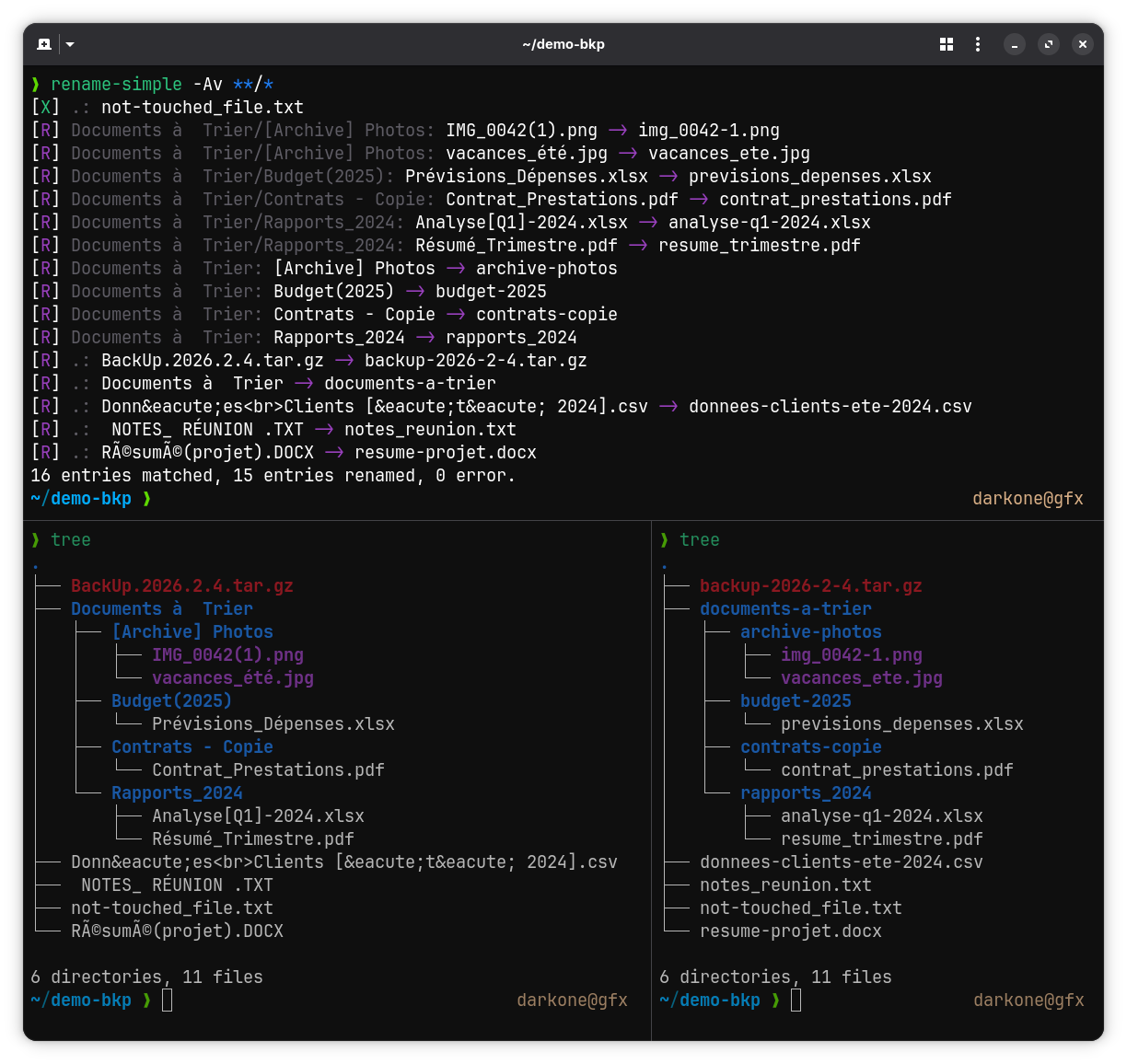
- Transliterates accented and extended Latin characters to ASCII (
é → e,ç → c,œ → oe,ß → ss…) - Expands typographic ligatures and compatibility forms (
fi → fi, fullwidthFile → file, superscripts² → 2,™ → tm,№ → no) - Romanises Greek and Cyrillic letters (
Ελληνικά → ellinika,Москва → moskva) - Lowercases everything
- Replaces spaces and special characters with
-; collapses consecutive separators - Preserves
_; cleans up_-and-_sequences to_ - Strips leading and trailing
-/_before the extension - Preserves known compound extensions (
.tar.gz,.tar.bz2,.tar.xz,.tar.zst) - Keeps extensions separate only when they are ASCII alphanumeric and ≤10 characters
(
.tétis absorbed as-tet,.abcdefghijklas-abcdefghijkl) - Skips hidden files (
.gitignore,.DS_Store…) and reports naming conflicts - Reports names that are not valid UTF-8 as errors and leaves them unchanged
- Optionally (
-D) deletes a source file when the existing target is a byte-for-byte duplicate with the same owner, group and permissions - Optional cleanup fixes: repairs mojibake (
-U), strips HTML tags and entities (-H), or both (-A)
Requires Rust 1.85+.
# From crates.io
cargo install --locked rename-simple

# Or from source
cargo install --locked --path .
--locked builds with the dependency versions of Cargo.lock, the ones the
release was tested and audited with.
Each GitHub release
provides a statically linked x86_64 Linux binary, rename-simple, and a Debian
package that installs it with its man page:
sudo apt install ./rename-simple_*_amd64.debThe repository is a flake, so no Rust toolchain is needed:
# Run without installing
nix run github:darkone-linux/rename-simple

# Or install into your profile
nix profile install github:darkone-linux/rename-simplerename-simple [OPTIONS] [files]...
Each argument is renamed itself, like with rename(1). Globbing is left to the
shell: rename-simple *.jpg, or rename-simple dir/**/*.pdf with zsh or bash
globstar. An entry named several times, by overlapping globs or as x and
./x, is handled once. When a directory and entries inside it are both given,
the entries inside are renamed first. ., .. and / are refused; dir/.
stands for dir. Files and directories are both renamed by default; -f /
-d restrict renaming to one type. Without arguments, rename-simple prints
its help.
A file name starting with - that a glob passes on, such as -D, would be
read as an option: an option that is also the name of an existing entry makes
the command line invalid. Put -- before the file names
(rename-simple -n -- *), or glob with ./* (rename-simple ./*).
| Option | Description |
|---|---|
[files]... |
Entries to rename (files and/or directories) |
-f, --files-only |
Rename files only |
-d, --dirs-only |
Rename directories only |
-U, --fix-unicode |
Repair mojibake (UTF-8 misread as Latin-1/CP1252) before renaming |
-H, --fix-html |
Strip HTML tags and decode HTML entities before renaming |
-A, --fix-all |
Apply every cleanup fix: -U and -H |
-D, --delete-duplicates |
Delete a source that is a byte-for-byte duplicate of an existing target |
-n, --dry-run |
Show what would be done without renaming or deleting anything |
-q, --quiet |
Print nothing, not even errors (the exit status still reports them) |
-v, --verbose |
Also list unchanged entries ([X]) |
-h, --help |
Print help |
-V, --version |
Print version |
Renamed entries are printed as [R] lines on standard output, deleted
duplicates ([W]) and errors ([E]) on standard error, followed by a summary
line. Marks are coloured when the output is a terminal. Control and bidirectional formatting characters in names are printed
escaped (\n, \u{1b}, \u{202e}): a name cannot drive the terminal or add a
line to the report. Output that cannot be written, for example once the reader
of a pipe has exited (| head), is dropped and every entry is still
processed.
The exit status is 0 when every entry is handled, and 1 when at least one
fails (an [E] line, with -n and -q too): the other entries are processed
all the same. It is 2 when the command line is invalid (unknown option, -f
with -d, option that is also the name of an existing entry…), and nothing is
renamed then.
$ cd ~/Downloads
$ rename-simple -n *
[R] .: 01_ Introduction au Projet.PDF -> 01_introduction-au-projet.pdf
[R] .: à faire .tét -> a-faire-tet
[R] .: backup.TAR.GZ -> backup.tar.gz
[R] .: Café Montréal.jpg -> cafe-montreal.jpg
[R] .: notes.cuicuicuicui -> notes-cuicuicuicui
[R] .: Réunion d'équipe (2024).docx -> reunion-d-equipe-2024.docx
6 entries matched, 6 entries would be renamed, 0 error.
Run the same command without -n to apply the renames.
$ rename-simple -f *    # files only, directories are ignored
$ rename-simple -d * # directories only, files are ignoredWith zsh, or bash with shopt -s globstar:
$ rename-simple ~/Documents/**/*.pdfNames from broken downloads or web pages may contain mojibake (UTF-8 read as Latin-1/CP1252) or HTML markup. The cleanup fixes repair the name before it is converted:
$ rename-simple -A *[R] .: <b>Été 2024.pdf -> ete-2024.pdf
[R] .: Café Montréal.jpg -> cafe-montreal.jpg
[R] .: Tom & Jerry.mp4 -> tom-jerry.mp4
3 entries matched, 3 entries renamed, 0 error.
-U only changes a name that decodes entirely, so a correct name (café.jpg)
is never altered; double mojibake (Café) is repaired too. -H decodes
named (é), decimal (é) and hexadecimal (é) entities.
Block tags (<br>, <p>, <div>, <li>, <h1> to <h6>…) become a space
(data<br>client → data-client); inline tags (<b>, <i>, <span>…) are
removed (client<b>s → clients). Text between < and > is a tag only if
each of its attributes takes a value (<a href="x.html">), so
if a<b and c>d.txt → if-a-b-and-c-d.txt. A decoded slash is converted like
any other character (Report / Final.txt → report-final.txt).
An existing entry is never overwritten. When the new name is taken, the entry is left unchanged and the error says whether both files hold the same bytes:
$ rename-simple *[E] .: IMG 9572.mov -> File name already exists (identical duplicate, use -D to delete the source)
[E] .: VID 20260819.mp4 -> File name already exists (2 different files)
4 entries matched, 0 entry renamed, 2 errors.
With -D, a source is deleted when the destination is a distinct regular file
with identical content, compared byte for byte, and the same owner, group and
permissions:
$ rename-simple -D *[W] .: IMG 9572.mov -> Identical duplicate, source deleted
[E] .: VID 20260819.mp4 -> File name already exists (2 different files)
4 entries matched, 0 entry renamed, 1 duplicate deleted, 1 error.
-A does not imply -D, and -D with -n only announces the deletion. Every
other conflict leaves both entries unchanged: different content, a different
owner, group or permissions, a directory, a symlink on either side, or two
names for the same file (hard links). Arguments that would get the same new
name are all left unchanged.
A name that only changes case is not taken: on a case-insensitive filesystem
(FAT, exFAT, NTFS, APFS), photo.jpg designates Photo.JPG itself, which is
renamed through a temporary name, .rename-simple-<pid>, in the same
directory.
The rename itself refuses to overwrite, atomically, on Linux and macOS. On
Windows, and on filesystems that refuse this atomic rename (NFS, sshfs,
ntfs-3g), the new name is checked and then the entry is renamed, as mv -n
does: an entry created by another program between the two steps is
overwritten.
-v also lists the entries left unchanged:
$ rename-simple -v *[X] .: notes.txt
[R] .: Mon Fichier.txt -> mon-fichier.txt
[R] .: Москва -> moskva
3 entries matched, 2 entries renamed, 0 error.
To rename everything in the current directory, run rename-simple ./*: with
the ./ prefix, no name can be read as an option. An alias in ~/.bashrc or
~/.zshrc makes it shorter:
alias rsa='rename-simple ./*'cargo testMIT