


Check what a scientific paper claims against what its cited sources actually say.
PaperTrace retrieves the available cited PDFs, checks each citation-backed
claim against the text of the cited page, and shows the evidence: the matched text
boxed in red on the real page, beside the paper. The crop is cut from the PDF by code,
not written by the model, so a verdict cannot rest on a hallucinated source.
An unread source never receives a verdict.
A missed citation is reported, not silently skipped.
See a completed report · Quick start · The viewer · How it works · Ethics & scope · Latest release (beta)
Open source · Python 3.10+ · local CLI and case files · claim checking runs on Claude Code · built for published papers
See the result first — no install needed. The committed demo report at
examples/demo/output/report.mdaudits a fictional mini-review with planted citation errors and real, published references: 1 supported · 2 contradicted · 1 not retrieved · 1 uncited assertion — the planted errors, and exactly them, in that run. Extraction and judgement are model steps, so it is an inspectable artefact, not a guaranteed re-run.
Pick a paper that matters to you — the landmark your project builds on, the method paper you are about to adopt, your own published work. PaperTrace answers three questions about it: do its citations say what it claims they say? — what has been published since? — what existed at the time but went uncited?
PaperTrace is not on PyPI yet, so it installs from a clone. It needs
Claude Code installed and logged in — the
claim checker runs on claude -p, with no API key to configure.
git clone https://github.com/defraction0/PaperTrace && cd PaperTrace
pip install -e ".[full]"                      # layout-aware ingest — ~1.4 GB, most of it torch
export PAPERTRACE_EMAIL="you@example.org"     # Unpaywall asks for a contact address
Four ways in, all producing the same case folder and reports:
- Guided — run
papertraceand answer the questions. It checks your setup first, then asks one thing at a time: the paper, where to keep the audit, cited PDFs you already have, the paper's own supplements, its DOI, an email it offers to remember, whether to write the viewer, and whether to limit the audit. It states the cost in model calls before spending anything, and prints the equivalent one-line command for next time. - Batch — one scriptable command:
papertrace run paper.pdf -f viewer                        # case folder ./paper/, beside the PDF
papertrace run paper.pdf --provided ./my_pdfs -f viewer   # with cited PDFs you already have
- Interactive — start
claudein the checkout and run/review. The skill interviews you (the paper, your PDFs, your journal's reviewer form as screenshots), retrieves and checks with evidence as it goes, drafts the findings, and ends by writing the viewer. - From an AI app — Claude Desktop, Claude Code, Cursor, VS Code, Windsurf,
Gemini CLI or Codex CLI can run
papertrace mcpas an MCP server: start an audit, follow it, and read every verdict with its caveats and its evidence crops. Not ChatGPT, nor Claude in a browser — neither can start a program on your computer. See From an MCP host.
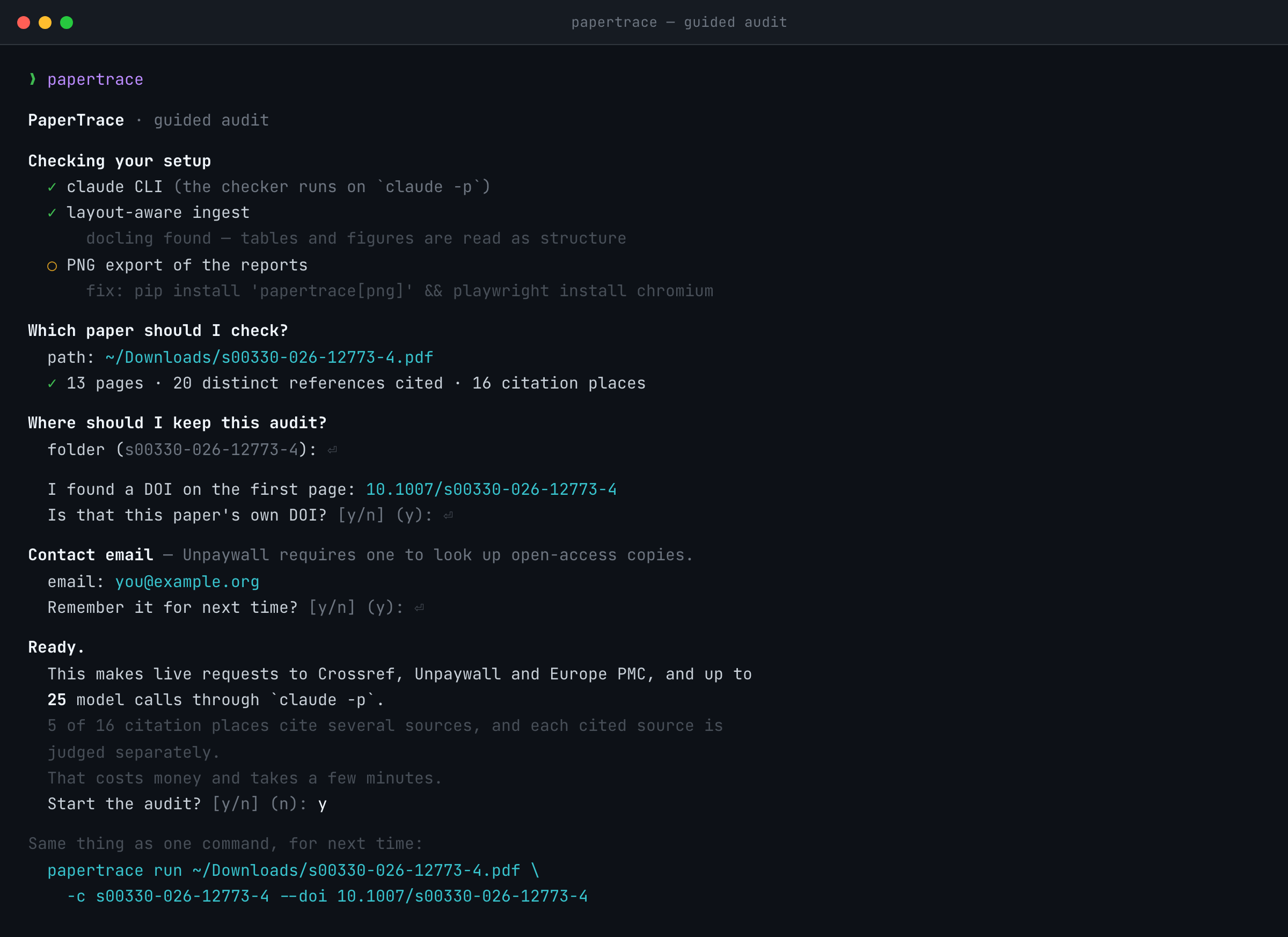
Output lands in <case>/out/: report.md always, report_viewer.html with
-f viewer, and the editor and terminal looks with -f editor / -f terminal
(--png renders those two as images after a one-time
playwright install chromium). The retrieval manifest is
<case>/refs_manifest.json; the machine-readable results are out/results.json.
| Install | What you get |
|---|---|
pip install -e . |
the standard install — layout-aware ingest of the paper and its cited sources (docling's ~500 MB layout models download on first run) |
pip install -e ".[png]" |
plus PNG rendering of the report looks |
pip install -e ".[mcp]" |
plus papertrace mcp, the server for MCP hosts |
pip install -e ".[dev]" |
the test and lint tooling, exactly what CI installs — run the suite as python -m pytest |
pip install -e ".[dev,png]" |
everything |
--backend pymupdf takes flat text instead, for speed or on a constrained
machine. Every report names the backend that read the paper, and any cited
source that was read flat.
PaperTrace does
- Retrieve cited works through legal open-access routes only (Crossref → Unpaywall → Europe PMC → arXiv), and reject a download whose first page does not look like the cited paper rather than judge against the wrong text. An unreadable first page passes as unverifiable — not the same as wrong — and the report says so.
- Judge the paper's own sentence, quoted verbatim, not a paraphrase of it: the population, the effect size, the interval and the hedging decide a verdict, and a summary loses them first. The quote is printed above each verdict, so you can see what was judged.
- Give every
supported,partialorcontradictedverdict a page and the source block it rests on, both checked against that source's own ingest. A verdict naming a page the source does not have is reported as not checked, never published.◌ does not address the claimcarries no page by design. - Show the evidence as real page crops with the matched text boxed in red. Claude proposes the page and verbatim anchor phrases; Python finds them in the PDF and draws the boxes. A passage crossing a column or page break gets one crop per part; a crop whose phrase was not found is shown unboxed and captioned as unboxed.
- Record what it could not do: a claim whose source could not be retrieved is
⊘ not retrieved, never guessed. - Check its own reference numbering before trusting it. The citation label
is the join key between a claim and the source it is judged against, so a
list off by one produces a confident audit of the wrong papers. Up to four
independent readings are taken — the tool's parse of the printed list, a
flat-text parse of the same PDF, the reference list the publisher deposited
with Crossref (
refs --doi, defaulting to the DOI printed on page 1), and a structured list proposed by a model that is shown the two texts and given authority over neither (--no-llm-refsturns it off) — and the manuscript's own[N]markers arbitrate between them. Only the parse and the deposit can be adopted as the list; the other two are readings that can disagree, and a disagreement is all they can do on their own — the one thing that can change which paper is fetched is your own answer at the prompt described below, and the report records that you gave it. Every field of the model's reply is checked against the text it was shown and discarded if it is not printed there, so nothing it invented can name a paper. A reading is used only if it accounts for exactly the labels the body cites. When neither does, the audit continues, the report says the numbering is unconfirmed, and every verdict on a claim citing a doubtful label carries that caveat beside it. Crossref is a second reading, not an oracle. A deposit this tool can only partly read is set aside rather than used to renumber a longer list, and the shortfall is reported as the tool's own, not the publisher's. A deposit can also be genuinely short — one record in this project's spread carries 2 references for a paper citing about 40 — and nothing in the payload gives that away, because Crossref's own count field counts what was deposited. The manuscript's labels are what catch it. And the DOI is checked against the paper before its record is trusted: a deposit whose Crossref record is titled as some other paper is set aside. The paper's title is taken from the PDF's own metadata where it states one, since the largest heading on a first page is often the article-type banner rather than the title. Where the titles cannot be compared, the paper's own bibliography settles it — the works the publisher deposited are looked for in the reference list printed in the paper — and where neither can, the list is used and the manifest says the identity behind it was never confirmed. - Report every citation occurrence no extracted claim reached, and every assertion carrying no citation. Detection is a regex over bracketed numeric labels, so a citation the model skipped still surfaces. Attribution of a claim to a place is a lookup of the context ids extraction returned; a claim that names no place counts as uncertain, never as covered.
- Judge a co-cited claim against every retrievable source, one call each,
and headline the most adverse verdict with the split beside it (4 cited
sources checked: 2 support it, 1 partial, 1 contradicts it). A source that
says nothing about the claim is
◌ does not address the claim— unranked, and the headline only when no source spoke to the claim at all. - Identify a PDF you provide from the file itself — its DOI, else its title — so publisher-named downloads need no renaming. One file answers for one reference, and anything it cannot place is listed with the reason.
- Read supplementary material you supply as its own document, with its own verdict and evidence crop, and say how each supplement was attached.
- Audit a slice on request —
--max-claims N,--max-sources N— and end every report by stating, in numbers, what was left out. - Serve the same audit to an MCP host (
papertrace mcp): start one, follow it, and read every verdict with the disclosures the reports carry and the evidence crops as images. The server computes no verdict of its own. - Keep you responsible for interpretation: it prepares evidence and drafts; the conclusions are yours.
PaperTrace does not
- Bypass paywalls — what it cannot get legally is reported as not obtainable.
- Treat model memory as evidence — verdicts come only from retrieved or provided pages.
- Guarantee that every citation-bearing sentence was checked. Extraction is a model step; the coverage audit reports which citations no claim reached.
- Audit every citation style. Coverage reads bracketed numeric labels only
(
[12],[7,8],[9-11]); author-year and superscript styles are reported as coverage not audited, and their numbering as unconfirmed, rather than quietly passing. - Count a mixed claim as mixed in the totals. Each claim is tallied once, under its headline, so read the totals as claims with at least one contradicting source, not claims that are wrong.
- Read source pages as images — the judge reads extracted text with page and block markers; the page picture is for you, in the crop.
- Extract claims from the audited paper's own supplements. Only the PDF you
pass is read, so a claim living in an eTable is simply absent — the one gap
that is silent rather than disclosed.
--supplementmakes those files available as evidence for claims that point at them, not as a source of claims. Nor does it fetch the supplements of cited sources: a claim resting on a source's supplementary table is judged against its main text alone. - Guarantee an exhaustive literature search — the scout is search-based, and absence from its lists proves nothing.
- Settle a disputed reference label from an MCP host. Nobody is asked over
MCP, so verdicts on that label are withheld — the CLI's answer when no
terminal is attached — and
papertrace refsin a terminal settles it. - Replace peer review or your research judgement.
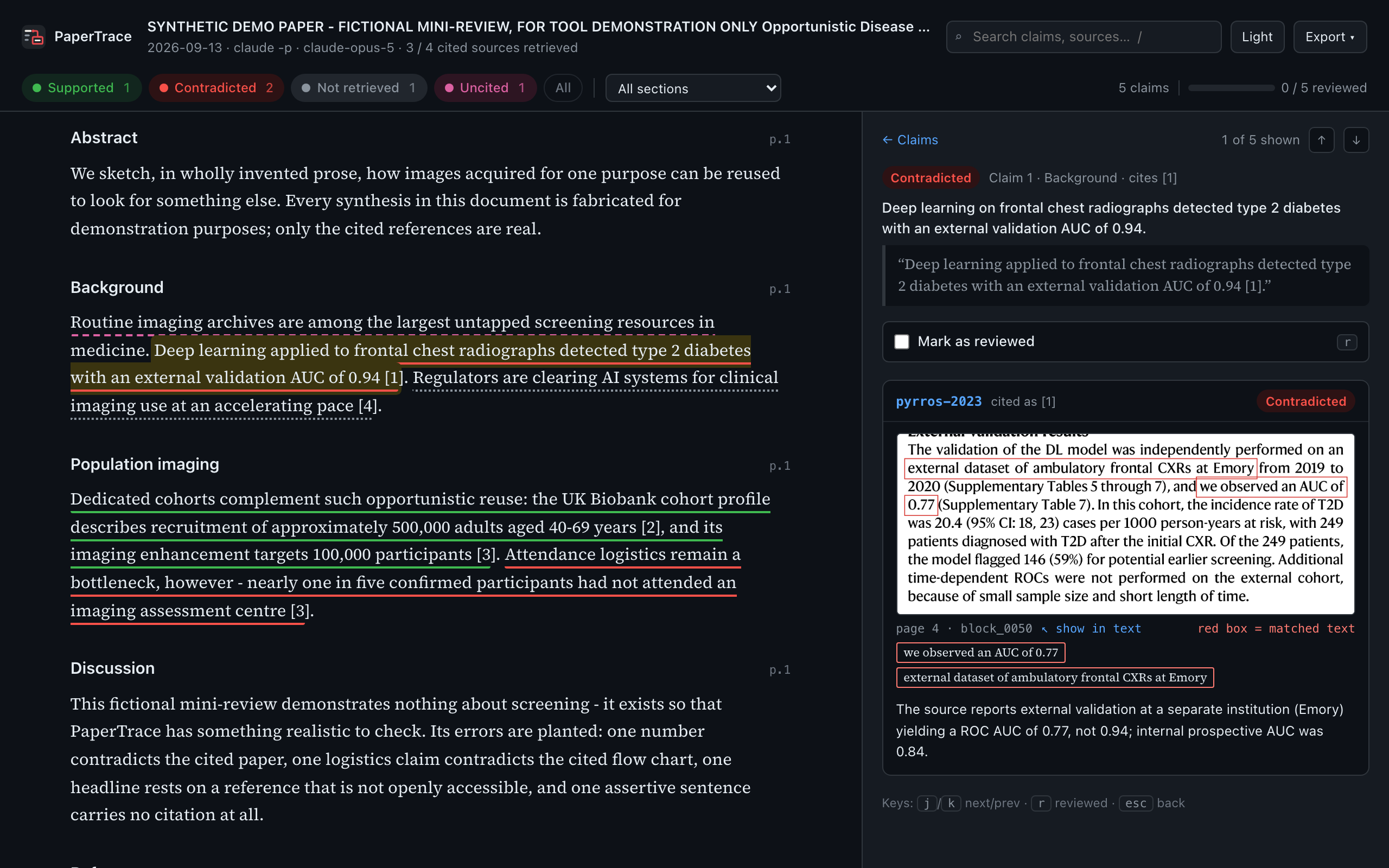
report.md is the record of an audit; report_viewer.html is where you work
through one. Ask for it with -f viewer (the guided flow asks, and /review
writes it), then open <case>/out/report_viewer.html in any browser — one
page from a plain file, no server, no network.
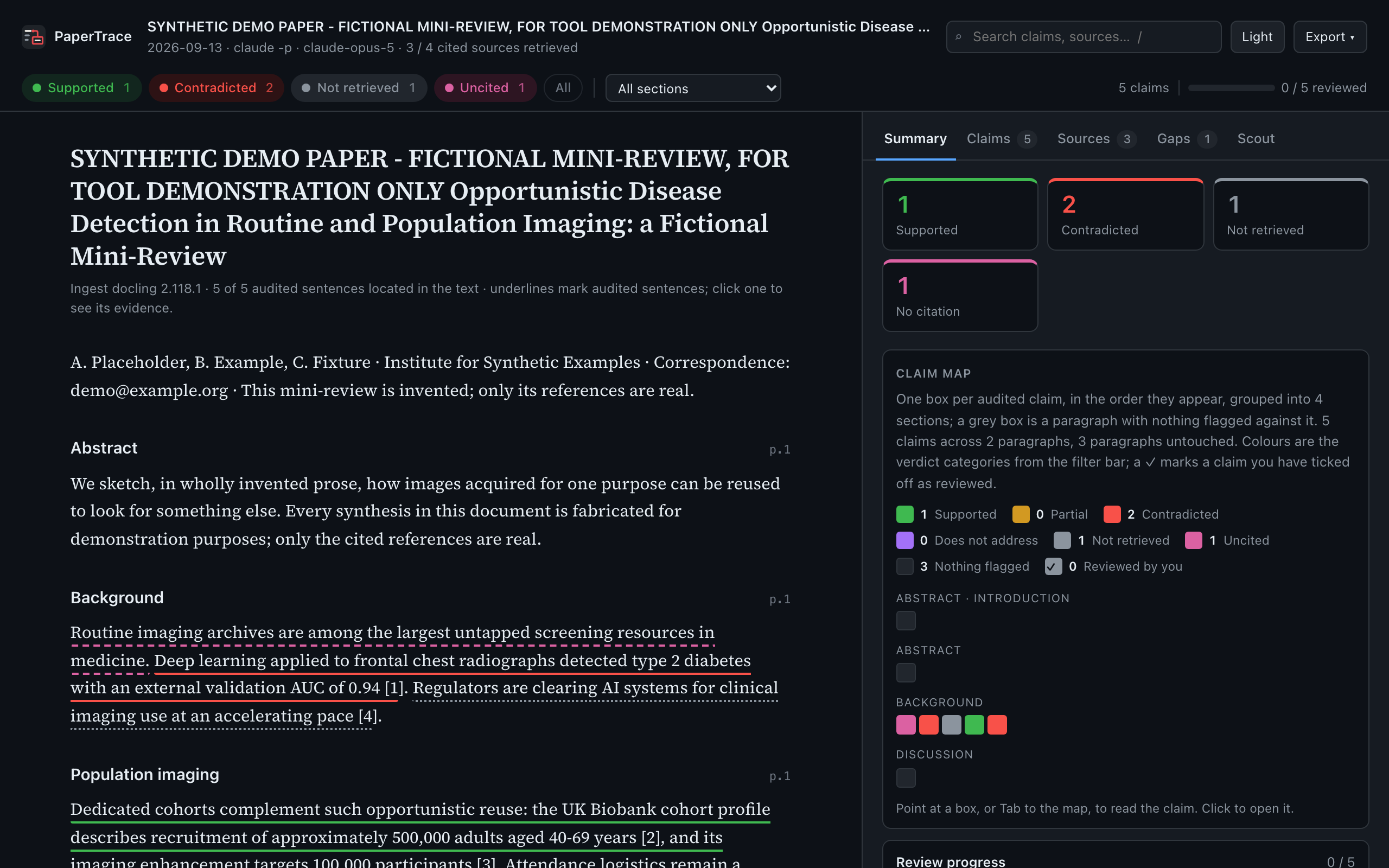
Left, the paper, with every audited sentence underlined in its verdict's
colour — dotted where the source could not be retrieved, dashed for an
assertion with no citation. Click a sentence and its evidence opens on the
right: the verdict, the claim and the paper's own sentence, then one card per
cited document with the page crop, the anchor phrases, the rationale and the
caveats. Before a claim is selected the panel holds five tabs — Summary (the
counts, a claim map, review progress, every run-level disclosure), Claims,
Sources, Gaps and Scout. Verdict chips, a section select and a search box
filter everything; j/k step through claims, r marks one reviewed, /
focuses the search, t switches the theme, Esc goes back.
Reviewed checkmarks are saved in your browser, per case, and the Export menu
hands them back — the report as markdown with your marks, the page printed to
PDF, or the checklist as JSON. The page embeds results.json as written, with
the ingested manuscript, scout.json, the retrieval manifest (minus local
paths) and every disclosure, decided in Python and carried along rather than
re-derived: a caveat in report.md is the same caveat here. When something is
missing it says so — a case with no ingested manuscript opens as a skeleton of
the audited sentences, a sentence the page cannot place is counted rather than
snapped to the nearest one, and a crop that did not travel with the report is
named. To hand an audit to a colleague, send the out/ folder.
Cited PDFs you already have. --provided ./my_pdfs, or the case's
sources/ folder. Names need not be tidy: each file is identified by its own
DOI, else its title, against the reference list; a file named
<author>-<year>.pdf is taken at your word first. One file answers for one
reference, a title matching two references is refused rather than guessed, and
every file that ends up attached to nothing is listed with the reason.
Supplements of cited works go in the same folder — pyrros-2023-supplement.pdf,
or publisher names like mmc1.pdf, recognised from the first page — and the
audited paper's own are named with --supplement, repeatable. Each is judged
as its own document, and the report says how each was attached.
--doi is the DOI of the paper you are auditing, defaulting to the one
printed on page 1. It fetches the publisher's deposited reference list to check
the numbering against, and pins the literature scout. An unpublished manuscript
has none: pass --no-scout rather than reading an empty scan as "nothing to
find".
Limits. --max-claims 5 checks the first five claims and fetches only the
references they cite. --max-sources 6 fetches at most six cited sources, in
bibliography order, and a paywalled one does not use up a slot. Both can be
set at once. Claims are numbered in out/claims.json, extracted before any
reference is fetched, so the numbers stay put. Whatever is left out is written
down: each skipped reference in the manifest with its reason, and a Scope of
this audit section at the end of every report saying what was checked and
what was not. The counts in a limited report describe the slice, not the
paper.
One case folder per paper. By default it sits beside the PDF and takes
its name; -c picks another. Re-running the same paper into its folder is
fine. A different paper is refused.
The model. Checking runs on headless Claude Code (claude -p) in safe
mode with no tools; --model chooses the model. One other step calls one: with
--llm-refs (on by default) the refs stage asks a model to read the printed
bibliography as a further opinion on the numbering, and every field it returns
must be found verbatim in the extracted text or it is discarded. Both calls go
through one seam, which is the only place in src/ that runs a subprocess, and
each records which model answered. Ingest, crops and reports give the same
output for the same input. Retrieval and the scout query live services, so a
re-run months later can find a different set of sources.
papertrace mcp lets an AI app that speaks the
Model Context Protocol (MCP) drive
PaperTrace: start an audit, follow it, and read every verdict with its caveats
and its evidence crops. It runs on your own computer, beside your case
folders — the app starts it as a local program (MCP's stdio transport), and
nothing is served over the network.
Which apps. Any app that can start a local MCP server:
| App | Where PaperTrace is added |
|---|---|
| Claude Desktop | Settings → Developer → Edit Config: claude_desktop_config.json |
| Claude Code | claude mcp add — below |
| Cursor | ~/.cursor/mcp.json |
| VS Code, GitHub Copilot in Agent mode | Command Palette → MCP: Open User Configuration |
| Windsurf | ~/.codeium/windsurf/mcp_config.json |
| Gemini CLI | ~/.gemini/settings.json |
| OpenAI Codex CLI | codex mcp add, or ~/.codex/config.toml |
ChatGPT, and Claude in a web browser, cannot run it: they reach MCP servers over the internet only, and cannot start a program on your computer. Use the Claude Desktop app, not claude.ai in a browser.
Two things hold whichever app you use:
- The audit is judged by Claude, through Claude Code on the same computer.
start_auditruns the pipelinepapertrace runruns, and its model calls areclaude -p— so Claude Code must be installed and signed in, which needs a paid Claude plan, even when the app driving the tools is Cursor, Gemini CLI or Codex. That app's own model chooses the tools and relays what they return; it does not judge the claims. Reading an audit that already exists needs no Claude Code at all. - What has been tested is the server against the MCP Python SDK's own client, in memory and over a real stdio pipe, and Claude Code connecting to an install made as below. The other configurations follow each app's documentation; they have not each been run in the app itself.
Install. uv installs PaperTrace into an environment of its own, and fetches a suitable Python if you have none — no clone, no Git:
uv tool install --python 3.12 "papertrace[mcp] @ https://github.com/defraction0/PaperTrace/archive/refs/heads/main.zip"
uv tool update-shell     # puts `papertrace` on your PATH; open a new terminal after it
which papertrace         # the full path the app needs — on Windows: where.exe papertrace
The download is large, most of it PyTorch for the layout-aware reader — 6 GB
installed on Linux, where PyTorch brings its GPU libraries. From a checkout,
pip install -e ".[mcp]" does the same. Give the app the full path
printed above: an app starts its servers from a working directory of its own,
with its own and often minimal PATH.
Claude Code, for every project on this computer:
claude mcp add --env PAPERTRACE_EMAIL=you@example.org --transport stdio --scope user \
    papertrace -- /full/path/to/papertrace mcp
Keep another option between --env and the name — Claude Code reads a name
straight after --env as one more KEY=value. claude mcp list then shows
whether it connected.
Claude Desktop, Cursor, Windsurf and Gemini CLI share one shape:
{
  "mcpServers": {
    "papertrace": {
      "command": "/full/path/to/papertrace",
      "args": ["mcp"],
      "env": {
        "PAPERTRACE_EMAIL": "you@example.org",
        "PATH": "/Users/you/.local/bin:/opt/homebrew/bin:/usr/local/bin:/usr/bin:/bin"
      }
    }
  }
}
PATH is there for claude. On a Mac an app opened from the Dock may not see
your terminal's PATH, and without claude start_audit refuses; the Claude
Code installer puts it in ~/.local/bin, and which claude names the folder
if yours is elsewhere. Windows apps see the PATH a new terminal sees, so
there PATH can usually be left out — and the command is
"C:\\Users\\you\\.local\\bin\\papertrace.exe", each \ written twice, as
JSON requires. On Windows, some Claude Desktop installs read their
configuration from
%LOCALAPPDATA%\Packages\Claude_…\LocalCache\Roaming\Claude\ rather than
the file Edit Config opens: if PaperTrace is missing under + → Connectors
after a full restart, add the same entry there.
VS Code takes the same command as a "servers" entry with
"type": "stdio"; Codex CLI as
codex mcp add papertrace --env PAPERTRACE_EMAIL=you@example.org -- /full/path/to/papertrace mcp.
| Tool | What it does |
|---|---|
start_audit |
runs the papertrace run pipeline in the background and returns at once |
audit_status |
running, finished or failed, with the log tail; waits up to 50 s per call |
audit_summary |
verdict counts, references obtained, the judging model, coverage, and every run-level disclosure |
list_claims, get_claim |
each claim with the paper's own sentence, each source's verdict and rationale, and its caveats |
get_evidence |
the red-box page crops a verdict rests on, as images |
list_references |
the retrieval manifest and the numbering state — without local file paths |
list_gaps, get_scout |
uncited assertions, citation places no claim reached, unchecked claims; the scout's registers |
The read tools work on any case folder, made over MCP or by the CLI, and
change nothing. Every verdict arrives with the caveats the reports print
beside it, and a limited audit says so first and last. An audit takes minutes,
longer than many apps wait for a single request, which is why it runs as a job
that audit_status follows.
start_audit spends what papertrace run spends: claude -p calls on this
computer's Claude login, and the open-access services. The contact email comes
from start_audit's email, from PAPERTRACE_EMAIL, or from the address
papertrace saved. A missing manuscript, a claude the server cannot find, no
email, or a case folder holding another paper is refused before anything is
spent. One audit runs at a time per server. A case folder is not read while
its audit runs, nor after one that failed or never finished — its files may
mix two runs — which the server knows from the mcp_audit.json each audit
leaves and keeps fresh while it runs; a second app's server will not start an
audit in a folder another is writing. Nobody is at an MCP call to answer a
question, so a reference label whose readings disagree is withheld, never
settled — that takes you, at a terminal. Nothing but the protocol reaches
stdout; what the pipeline prints comes back in audit_status's log.
A number in a table cell, or text drawn inside a vector figure, is in the PDF's
text layer, and the red box lands on it whichever backend read the document —
highlight searches the real page, never the extracted text:
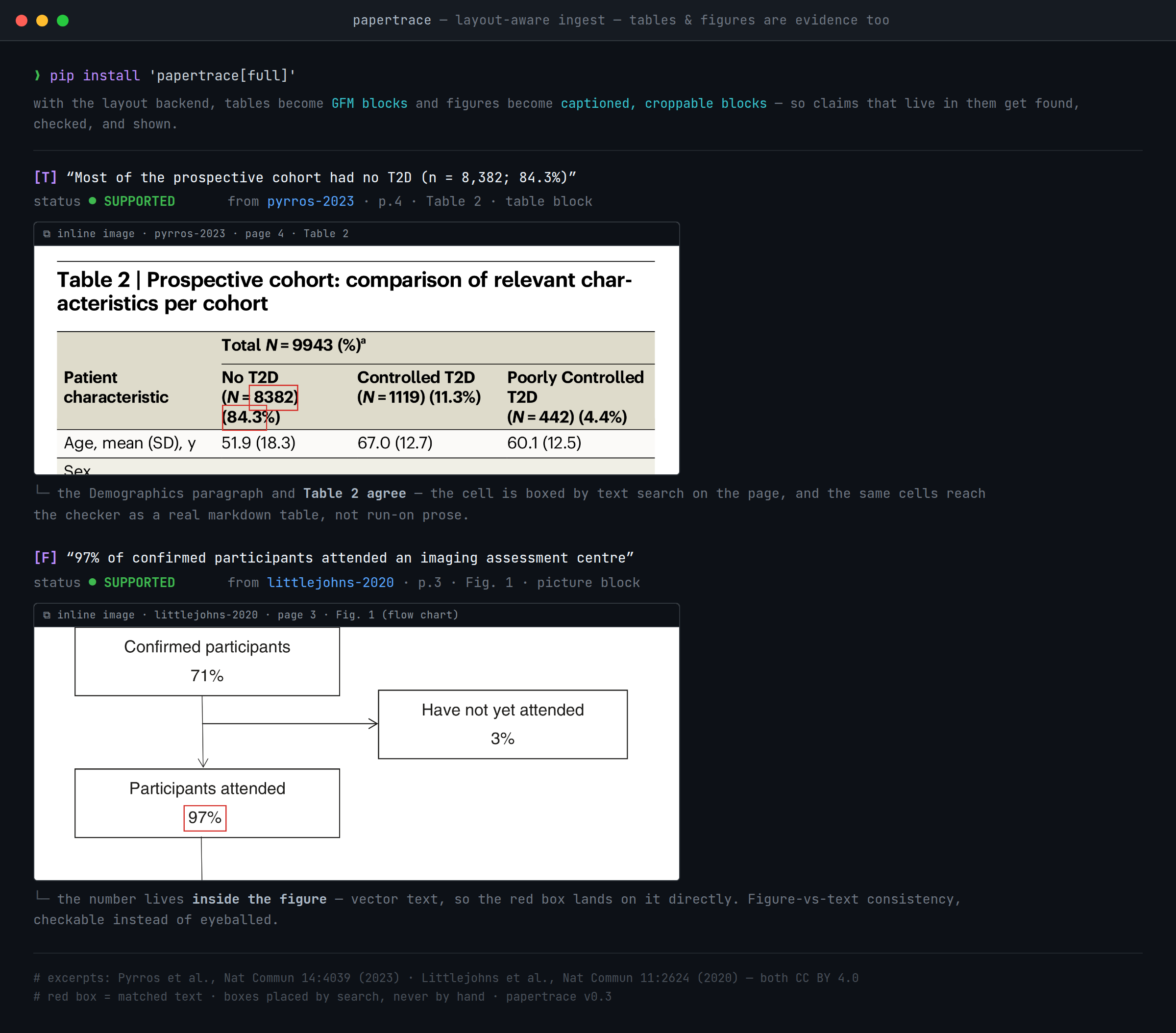
Whether such a number can be claimed and checked depends on what the backend hands the model. Under the layout backend a table reaches the model as a table; under flat text it is linearised and the row is lost. In-figure text is not guaranteed on the layout path — on the one paper measured, docling emitted no text block inside any figure region — so a table-cell claim is strongest under the layout backend, and an in-figure claim is the weakest evidence this tool produces. Cited sources are read with the same backend as the paper, and any source that was read flat is named in every report.
One unscripted audit of a published paper (Zhang et al., Nature Mental Health 3, 1168–1180, 2025 — doi:10.1038/s44220-025-00501-8): 86 cited references, 22 with legal open-access copies, the other 64 recorded as not obtainable. 15 claims were read against their cited pages: 8 supported, 7 partial, 0 contradicted — among the partials, a Methods sentence calling tests "well-established" whose own cited source describes them as "brief and bespoke, non-standard". One run, not a benchmark; the case folder cannot be shared because the source PDFs are publisher-controlled.

A fictional mini-review with planted citation errors and real, published
references: an AUC quoted as 0.94 where the cited paper says 0.77, an
attendance figure that contradicts the cited flow chart, a headline resting on
a paywalled source, and one assertive sentence with no citation at all.
Details per plant in examples/demo/.
python examples/demo/make_manuscript.py                   # build the demo paper
papertrace run examples/demo/demo_manuscript.pdf -c demo_case \
    --model claude-opus-5 -f viewer                       # audit it
One run took 95 seconds with the layout models already downloaded. Expected:
1 supported · 2 contradicted · 1 not retrieved, one uncited assertion
flagged, all 5 citation occurrences reached — as 4 claims, because the
sentence citing [2] and [3] arrives as one multi-source claim. The scout
reports the fictional paper as not identified rather than inventing
neighbours. Extraction and judgement are live model behaviour, so treat these
numbers as what the demo has produced, not a promise; a re-run that misses a
plant is a real result about the model. The committed examples/demo/output/
is a real run (2026-09-13, docling 2.118.1) — an inspectable artefact, not a
byte-exact expected output.
paper.pdf ─────ingest──▶ clean.md + source_map.json       (page + bbox for every block)
      │
      └─extract─▶ out/claims.json                         (every claim, numbered in reading
      │                                                     order — no verdicts yet)
      └─refs──▶ refs_manifest.json                        (per-ref: retrieved / provided /
                + sources_resolved/*.pdf                    paywalled / mismatch / no_doi /
      │                                                     error / skipped + reason)
      └─scout─▶ out/scout.json                            (europe pmc: published-since +
                                                            existed-but-uncited candidates)
      │
      └─check─▶ results.json                              (per-claim verdict + page anchor;
                                                            unavailable source ⇒ not_retrieved;
                                                            a limit ⇒ results.scope, stated last)
      │
      └─highlight─▶ out/evidence/claim_NN.png             (red box on the matched text)
      │
      └─report──▶ report.md          (always)
                    · report_editor.html/png · report_terminal.html/png
                    · report_viewer.html                  (--format / --png)
Seven stages, each a subcommand, chained by run; every stage writes a file
into the case folder and the next reads only that. The JSON contracts are
versioned in schemas/. The two skills in
.claude/skills/ drive the same tools interactively, and
papertrace mcp serves them to any MCP host; the audit craft lives in
prompts/review_core.md.
- Built for published papers. Everything PaperTrace reads is already public, so no confidentiality question arises in its primary use.
- A note on peer review. The interactive workflow also handles a full
reviewer's job and remains fully supported, but many journals prohibit
sharing unpublished manuscripts with AI tools. PDFs and case folders stay
outside Git (
.gitignorerefuses*.pdfand*.docxoutright), but the text is processed through Claude Code during checking — so confirm your journal's AI and confidentiality policies before using PaperTrace on a manuscript under review, and disclose AI assistance where required. - You are the judge. The tool prepares evidence and drafts; the conclusions are yours. Scout hits are candidates, not accusations.
- No paywall bypassing. Legal open-access routes only; what it cannot get, it reports as not obtainable.
- No verdict laundering. An unread source can never yield a supported
claim —
not_retrievedis a first-class result in every report, and the scout says of itself that absence from its lists proves nothing.
tests/ holds conventional software tests, run in CI on every pull request and
every push to main across Python 3.10–3.14. They make no network calls and
no model calls — retrieval runs against a mocked transport, PDFs are
generated in-test, and the single claude -p touchpoint sits behind a seam
the tests replace. They prove the plumbing; they say nothing about whether
the model's verdicts are right. That is a separate question, specified in
evals/DESIGN.md with an offline scoring harness in
evals/ and a gold set still being built. The demo is a controlled
demonstration with planted errors, not a benchmark. No accuracy figure is
claimed anywhere here, because none has been measured.
pip install -e ".[dev,png]"
python -m pytest                  # offline — no network, no model
ruff check src tests scripts evals
See CONTRIBUTING.md for how to report paper-format
failures — the feedback that improves the tool fastest. Changes are tracked in
CHANGELOG.md; cite the tool via CITATION.cff.
The mark. A dot on a line of the paper, routed like a circuit trace into a
red box around the evidence — the same red as the evidence boxes in every
report. The vectors live in
src/papertrace/templates/brand/: the icon
(app icon and favicon), the light and dark lockups above, and the bare mark for
light and dark surfaces. Ink #1f2328, paper #f4f1ea, muted #8b949e,
trace red #e5484d; minimum size 16 px. The viewer inlines the icon; the
terminal banner in brand.py is the same mark in
box glyphs.
- Interactive report viewer — the manuscript with every audited sentence
underlined, the evidence beside it, filters, a claim map and a reviewed
checklist;
-f viewer, offered by the wizard and written by/review(0.6.0) - A mark of its own — the trace from the claim into the boxed evidence, in the viewer, the README and the terminal (0.6.0)
- Audit a slice on request —
--max-claimsand--max-sourcesin the CLI and the wizard, every reference left out recorded asskipped, and the scope stated at the end of every report (0.7.0) - Check the reference numbering against several readings — the parse, a flat-text parse, the publisher's deposit and a model's reading; a label the readings disagree about has its verdict withheld rather than printed against a paper that may be the wrong one (0.7.0)
- Cherry-pick claims by number — a "re-check these" in the viewer, on the
array
checkalready takes and the numberedout/claims.jsonit reads - Viewer: a single-file export with the evidence crops embedded, so an
audit can be sent as one HTML file instead of the
out/folder - Viewer: notes per claim, exported alongside the reviewed checklist
- Retraction & correction flags on cited references
- More citation styles in the coverage audit — author-year, parenthetical numerics and bare superscripts
-
--exhaustivemode — a focused second extraction pass over the labels the coverage audit reports as unreached, and "see [12]" classified as a pointer rather than forced into a verdict - More scout backends (OpenAlex, Semantic Scholar)
- Other LLM backends (local and API models alongside headless Claude Code)
- Claude Desktop integration
- MCP server — drive PaperTrace as a tool from any MCP-capable client:
papertrace mcp(unreleased) - DOCX ingest
- Revision (R1) mode polish
- Figure-vs-text consistency pass (batch)
- PyPI release
- Journal review packs — may be added in the future
MIT — code, prompts and skills alike (see LICENSE). The bundled
fonts in src/papertrace/templates/assets/ are third-party, under the SIL Open
Font License 1.1 (see the *-OFL.txt files there).