

find the businesses. get their contacts. go shoot your shot.
pick an area, pick a business type, and mapscout pulls the local list from Google Maps into a clean Excel file: phones, websites, emails, socials, the whole lineup.
mapscout scrape "Thaltej, Ahmedabad" -c "software companies"no UI. no signup. no API keys. no "start your free trial". just a CLI that delivers.
free and open source, MIT licensed. full docs + troubleshooting live in docs/index.html (open it in a browser).
| you bring | mapscout handles | you get |
|---|---|---|
| An area and one or more business types | Area lookup, grid searches, category filtering, place details, website enrichment | A filtered Excel workbook with contact and business data |
| good to know | details |
|---|---|
| Cost | Free and open source |
| Accounts or API keys | None |
| Supported systems | Windows, macOS, Linux |
| Typical output | .xlsx workbook plus a reusable local database |
| Best first run | Add --max-places 20 and inspect the result |
- why this exists
- what you get
- how it behaves
- install it
- run it
- where your stuff lands
- how it works (tl;dr)
- real talk: google's limits
- leave it running
- when google moves stuff around
- don't be weird
- tech stack
- for devs
- license
job boards are a black hole and cold outreach actually works. but building the list? pain. copy-pasting 200 businesses out of Google Maps by hand is not it.
| who it is for | useful workflow |
|---|---|
| Job seekers | Find software companies in an area, then use their websites, emails and LinkedIn pages for focused outreach. |
| Freelancers | Scout cafes, gyms or clinics, filter the Website column for blanks, and find businesses that may need a site. |
| Outreach teams | Build a real list of businesses in a real place, ready to qualify and work through. |
you bring the pitch. mapscout brings the list.
| data group | included |
|---|---|
| Identity | Name, categories, rating and review count |
| Contact | Local and international phone numbers, website |
| Website enrichment | Emails and socials from the business's own website: Facebook, Instagram, LinkedIn, X, YouTube, TikTok and WhatsApp |
| Location | Street, area, city, postal code and coordinates |
| Operations | Opening hours, price range, owner status and booking links |
| Extra context | Attributes such as accessibility, amenities and payments, plus a few reviews |
all in one Excel file with clickable links and filters ready to go.
| behavior | what it means in practice |
|---|---|
| Asks, then runs | Type mapscout scrape, answer three questions, or pass every value up front. |
| Filters the results | Google can return loosely related businesses. mapscout uses Google's category labels to keep the kind you searched for. |
| Covers the area | Google caps a search at 120 results, so mapscout splits the area into a grid and searches each cell. |
| Reuses work | Recent business reads are reused, and repetitive search terms are dropped. |
| Runs in parallel | Searches, business pages and website checks work at the same time. |
| Resumes cleanly | Every step is saved as it happens. Stop with Ctrl+C and continue with mapscout resume. |
| Keeps a low profile | A few tabs, automatic slow-downs, no sign-in and no CAPTCHA solving. |
| Checks itself | mapscout check catches parser problems before a long run does. |
| requirement | details |
|---|---|
| Internet | Required for Google Maps, OpenStreetMap and business websites |
| Disk space | About 500 MB, mostly for Chromium |
| Operating system | Windows, macOS or Linux |
| Python | 3.12 or newer, installed automatically by uv |
uv sets up Python and every library for you. zero fuss.
Windows (PowerShell):
powershell -ExecutionPolicy ByPass -c "irm https://astral.sh/uv/install.ps1 | iex"macOS / Linux:
curl -LsSf https://astral.sh/uv/install.sh | shclose and reopen your terminal after, so it finds uv.
git clone https://github.com/<your-username>/mapscout.git
cd mapscout
(or download the ZIP from GitHub, unzip, and open a terminal in that folder.)
uv sync
uv run playwright install chromium
on Linux, if Chromium whines about missing libraries: uv run playwright install --with-deps chromium.
uv tool install --editable .open a new terminal and vibe check it:
mapscout --helpskipped this step? no stress: run everything from the project folder with uv run in front, like uv run mapscout scrape.
- update:
git pull, thenuv sync. changes apply instantly. only if dependencies changed, runuv tool install --editable . --reinstall. - uninstall:
uv tool uninstall mapscout, then delete the project folder. your results stay in the data folder (see below) until you delete that too.
mapscout scrapeit asks you three things:
What should I search?
Leave Business type empty for all 63 common types, or separate several with commas.

  Area                      e.g. Vesu: Thaltej
  City                      e.g. Surat: Ahmedabad
  Business type (optional)  e.g. software companies, tech companies: software companies
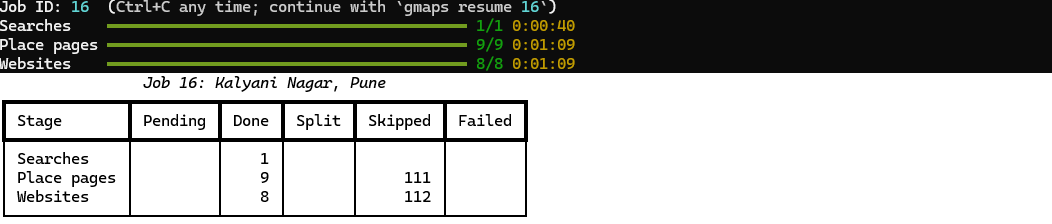
then it shows you the matched area and the plan, and gets to work. progress bars track searches, business pages and website checks. at the end: a run report and the path to your Excel file.
pro tips:
- use Google's name for the category: "software companies", "dentists", "hair salons". vague terms still work ("tech companies" gets read as Software company), and the run report shows what got skipped so you can add another term.
- test first:
--max-places 20stops after 20 businesses. run it again without the limit later: the 20 you already have get reused. - need to stop? ctrl+c. come back with
mapscout resume <job number>.
anything you pass on the command line won't be asked:
# zero questions
mapscout scrape "Thaltej, Ahmedabad" -c "software companies"

# a few business types at once
mapscout scrape "Koregaon Park, Pune" -c "cafes,restaurants,gyms"

# speedrun: skip the business pages, use what comes with the search results
# (no weekly hours or reviews, but several times faster)
mapscout scrape "Vesu, Surat" -c "software companies" --quick

# everything within 5 km of a landmark
mapscout scrape "Shivajinagar, Pune" -c dentists --radius-km 5

# business types from a file, one per line
mapscout scrape "Adajan, Surat" --categories-file types.txt| command | what it does |
|---|---|
mapscout scrape |
start a new search (asks for whatever you didn't pass) |
mapscout resume <job> |
continue a stopped or blocked job; failed stuff gets another shot |
mapscout jobs |
list your jobs and how far along they are |
mapscout report <job> |
what a job did and where the time went |
mapscout export <job> |
write the Excel file again |
mapscout grid "<area>" |
preview how an area gets split up, without searching |
mapscout check |
health check: is Google still serving pages mapscout understands? |
mapscout reparse <job> |
re-read saved page data after a parser fix, no new searching |
mapscout scrape --help has the full list.
| option | default | what it does |
|---|---|---|
-c, --categories |
asked | business types, comma-separated |
--max-places |
no limit | stop after this many businesses (for test runs) |
--quick |
off | skip business pages; use the details from search results (no weekly hours or reviews) |
--radius-km |
cover this many km around the area's centre instead of its boundary | |
--all-results |
off | keep every business Google returns, not just the kind you searched |
--reuse-days |
30 | reuse a business another job scraped within this many days |
--refresh |
off | scrape every business fresh, even recent ones |
--no-enrich |
skip the website check (emails and socials) | |
--concurrency |
3 | browser tabs working on Google at once |
--reviews |
50 | max reviews per business (Google only shows ~5, see below) |
--block-wait-hours |
2 | if Google blocks, wait this long and keep going (up to 3 times); 0 stops instead |
--keep-overlapping |
off | search every term fully, even one that mostly repeats another |
--no-early-stop |
scroll every result list to the very end | |
--cell-km / --max-depth |
3 / 3 | grid cell size, and how many times a busy cell can be split |
--include-outside |
off | also keep businesses just outside the area |
--show-browser |
off | watch the browser do its thing (for debugging) |
-v, --verbose |
off | log every search and business |
everything goes into one data folder, no matter where you run from:
- Windows:
C:\Users\<you>\mapscout-data - macOS / Linux:
~/mapscout-data
| inside | what it is |
|---|---|
exports\<area>_job<N>.xlsx |
your Excel files |
mapscout.db |
the database that remembers every job (powers resume and reuse) |
logs\ |
one log per job, plus checks.log from the health check |
snapshots\ |
raw data from each business page, for reparse |
it lives outside the project folder so your scraped data never ends up on GitHub. want it somewhere else? set MAPSCOUT_DATA_DIR or pass --data-dir.
| sheet | what's in it |
|---|---|
| Summary | what you searched, the counts (how many have a phone, website, email) and the run report |
| Businesses | one row per business, every field, clickable links. Data source says where it came from, Last updated says when |
| Reviews | the reviews collected: rating, date, text, owner's reply (no reviewer names) |
| Attributes | accessibility, amenities, payments and so on, one row each |
| Not read yet | businesses found but not scraped yet (limit hit, run stopped, or errors), with what's already known. mapscout resume finishes them |
| stage | what happens |
|---|---|
| Area | OpenStreetMap supplies the official boundary or bounding box. If a neighbourhood only exists as a point, mapscout covers 2 km around it. --radius-km overrides this. |
| Grid | The area becomes a grid. A packed square with 100+ results, mostly local results and at least 30% inside the square gets split into four smaller squares. |
| Filter | Google treats searches as keywords. mapscout keeps results whose Google category matches the term, such as restaurants matching Chinese restaurant, or the dominant category for a vague term such as tech companies matching Software company. |
| Details | Search results provide most fields. Business pages add weekly hours, reviews and more. --quick skips those pages; repeated failures fall back to search-result data. |
| Websites | The business website and up to two contact or about pages are checked for emails and social profiles. Email domains are checked for a mail server. |
| Excel | The workbook is written at the end and again while waiting out a block. |
all stages run in parallel: browser tabs grab the next business page or search, while website checks run alongside because they do not touch Google. repeat work is skipped, and every search and business is saved as soon as it finishes so you can always resume.
these are Google's rules, not mapscout's:
| limit | what to expect |
|---|---|
| Limited view | Google may show an automated, signed-out browser a limited page with no reviews, review count or price, and only today's hours. The Google view column records which view each business received. |
| Reviews | Signed-out visitors usually see 3-5 reviews per business. --reviews is an upper bound, not a promise. |
| Speed | With three tabs, a search takes about 20 seconds and a business page about 4 seconds. One business type in a neighbourhood usually takes 10-40 minutes. --quick is several times faster. |
| safeguard | behavior |
|---|---|
| Automatic slow-down | Failed requests stretch the pauses by 1.5x, up to 4x. Successful requests bring them back down. |
| Blocks | If Google shows an "unusual traffic" page, mapscout saves the workbook, waits two hours and continues, up to three times. There is no CAPTCHA solving. Ctrl+C during the wait is safe. |
| Run report | mapscout report <job> and the Summary sheet show time spent, searches per minute, skipped and reused businesses, failures, slow-downs and blocks. |
| Daily health check | mapscout check runs one search and one business-page read. Missing fields produce an exit code of 1, and every result is logged to logs\checks.log. |
run it every morning at 9 on Windows (once, in your own terminal):
schtasks /Create /TN "mapscout health check" /TR "%USERPROFILE%\.local\bin\mapscout.exe check" /SC DAILY /ST 09:00
undo it with schtasks /Delete /TN "mapscout health check". macOS / Linux: add 0 9 * * * mapscout check to your crontab.
Google reshuffles its pages every few months. when mapscout check fails:
| check first | where to look |
|---|---|
| Page elements and selectors | src/mapscout/selectors.py |
| Field positions in Google's data | parse_place_array in src/mapscout/parsing.py |
| Saved page data | snapshots; after a parser fix, run mapscout reparse <job> and mapscout export <job> without searching again |
mapscout is free for anyone, but what you do with the list is on you:
| principle | what it means |
|---|---|
| Reach out like a human | One thoughtful, personal message beats 500 copy-paste blasts. Nobody likes spam, and it can get your email flagged. |
| Respect the law | Some data can be personal, such as a sole trader's phone or email. Follow the privacy and anti-spam rules where you live, including GDPR or the DPDP Act. |
| Know Google's terms | Automated collection from Google Maps is not allowed by Google's terms. The official paid route is the Places API, with its own result, review and storage limits. |
| Leave reviewers alone | Reviewer names and profile links are never collected and are stripped from saved data. |
| Keep it chill on Google | Stick to the default few tabs with pauses. |
| part | tool |
|---|---|
| language | Python 3.12+ |
| project + dependencies | uv |
| browser automation | Playwright + Chromium |
| area boundaries | OpenStreetMap (Nominatim), Shapely for the grid |
| website crawling | httpx (async), selectolax, dnspython for mail-server checks |
| storage + job queue | SQLite via SQLModel / SQLAlchemy |
| data models | Pydantic |
| CLI | Typer + Rich (prompts, progress bars, tables) |
| Excel | pandas + openpyxl |
| tests | pytest + pytest-asyncio |
no API keys, no accounts, no paid services. ever.
uv sync          # installs the test tools too
uv run pytest    # run the tests
the tests never touch the internet: the pipeline runs against a fake Google, and the parsers against real captured data in tests/fixtures/ (reviewer details removed).
| file | what it does |
|---|---|
src/mapscout/cli.py |
the mapscout commands and prompts |
src/mapscout/pipeline.py |
runs a job: searches, business pages and website checks in parallel |
src/mapscout/discovery.py |
one Google Maps search, scrolled to the end |
src/mapscout/detail.py |
one business page: hours, reviews and the rest |
src/mapscout/categories.py |
which results are the kind of business you searched |
src/mapscout/parsing.py |
pulling fields out of Google's data |
src/mapscout/selectors.py |
everything mapscout looks for on Google's pages |
src/mapscout/enrich.py |
emails and socials from business websites |
src/mapscout/geo.py |
area lookup and the search grid |
src/mapscout/store.py |
the SQLite database and job queue |
src/mapscout/export.py, report.py |
the Excel file and the run report |
src/mapscout/check.py |
the health check |
PRs welcome. Open an issue for the problem, or a pull request with a test that proves the fix.
MIT: use it, copy it, change it, share it, even sell it. just keep the license notice. no warranty, no refunds, no drama.