
DeepFocus — Official Landing Website
A minimal, mobile-first landing website for DeepFocus, an Android productivity and focus application by Muhammed Omor.
"🌐 Live Website" (https://deepfocus.asf.run/) · "📱 Official Product Page" (https://www.supportkori.com/muhammedomor/extras/deepfocus-app-ts3g)
"DeepFocus" (https://pockethostbd.github.io/drive-one/picture/mockup-1.png)
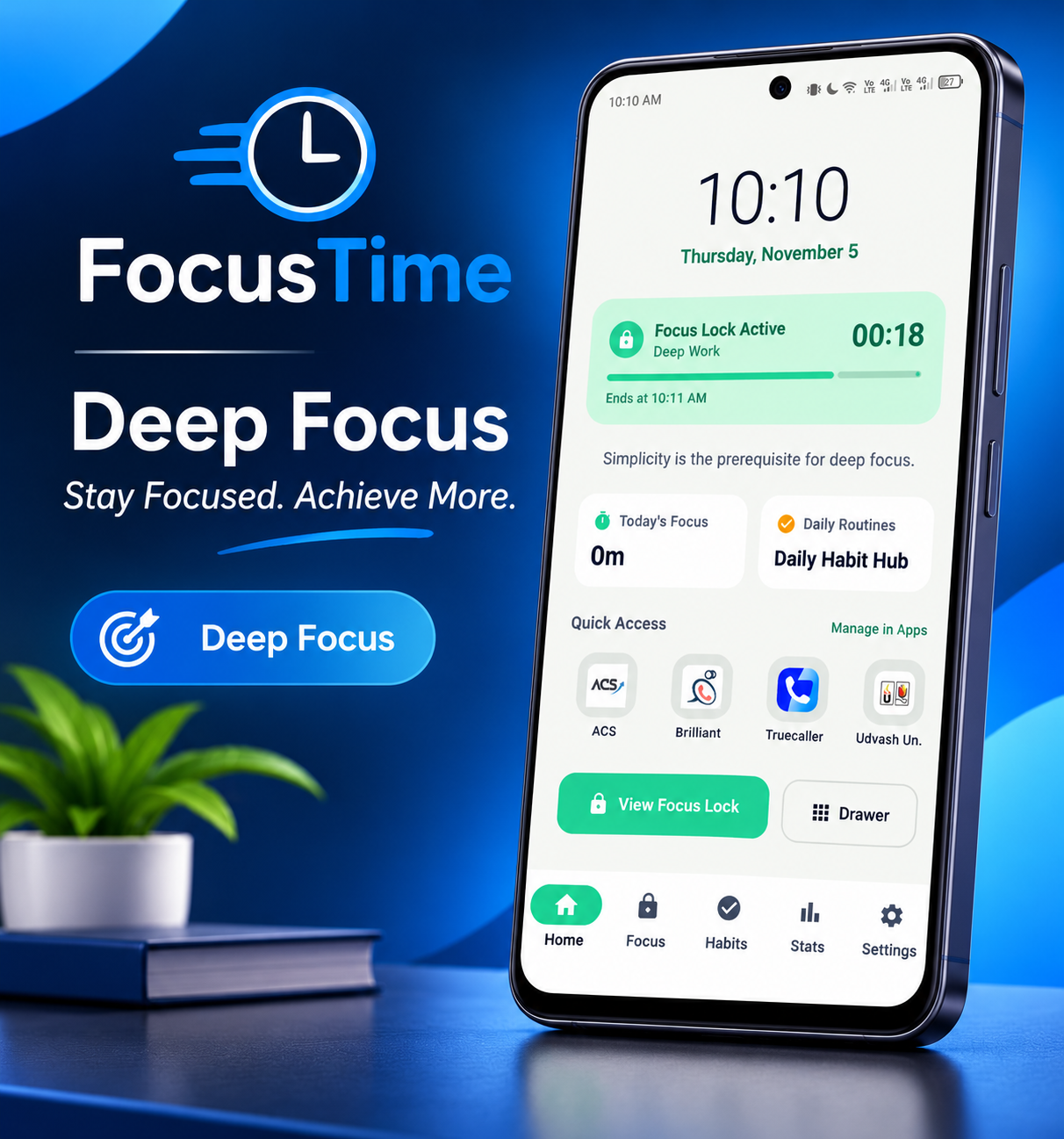
DeepFocus helps users build better study habits, manage focus sessions, reduce digital distractions, and maintain a more disciplined smartphone routine. This repository contains the official static landing website, with Bangla as the default language and English as an alternative.
📌 Table of Contents
- "Overview" (#-overview)
- "Website Features" (#-website-features)
- "Official App Screenshots" (#-official-app-screenshots)
- "Technology Stack" (#-technology-stack)
- "Project Structure" (#-project-structure)
- "Getting Started" (#-getting-started)
- "Deployment" (#-deployment)
- "SEO and Discoverability" (#-seo-and-discoverability)
- "Privacy and Security" (#-privacy-and-security)
- "Important Notes" (#-important-notes)
- "Links" (#-links)
- "Developer" (#-developer)
🚀 Overview
DeepFocus Official Landing Website is designed to introduce the app, explain its features, display official screenshots, answer frequently asked questions, and direct visitors to the official product listing.
Key Highlights
- Bangla-first experience with an English language option.
- Responsive, mobile-first layout.
- Dedicated pages for features, FAQs, privacy policy, and terms.
- Official app screenshots with an image lightbox.
- Mobile navigation menu.
- Search-engine-friendly metadata and structured data.
- Custom bilingual 404 page.
- Static hosting with no application backend required.
✨ Website Features
Feature| Description Bilingual Interface| Bangla is the default language, with an English switcher. Responsive Design| Designed for mobile phones, tablets, and desktop screens. Home Page| Introduces DeepFocus and links to its official product page. Features Page| Explains app functionality and Android platform limitations. FAQ Page| Includes 12 bilingual questions and answers. Privacy Policy| Explains the website's behavior and relevant privacy information. Terms & Conditions| Provides website and usage terms. Screenshot Gallery| Displays official app screenshots with a lightbox preview. Mobile Navigation| Provides navigation suitable for smaller screens. Custom 404 Page| Displays a bilingual page when a requested page cannot be found. SEO Support| Includes crawler rules, a sitemap, metadata, and relevant structured data.
📱 Official App Screenshots
Explore the actual DeepFocus app interface.
- Home Screen
"DeepFocus Home Screen" (https://pockethostbd.github.io/drive-one/picture/mockup-1.png)
The home screen showcases the app dashboard, focus information, daily habits, and quick-access shortcuts.
- Focus Lock
"DeepFocus Focus Lock" (https://pockethostbd.github.io/drive-one/picture/mockup-2.png)
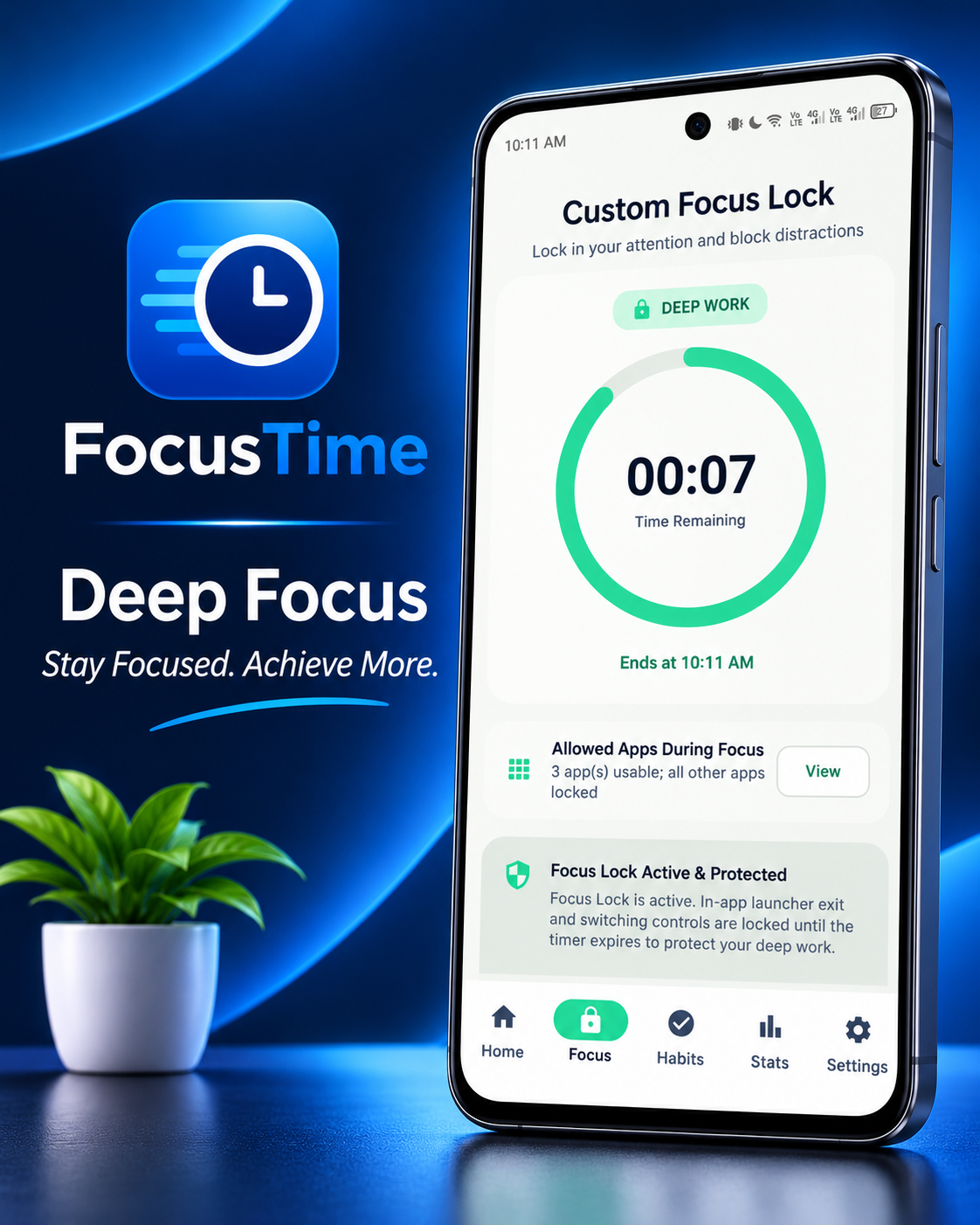
The focus interface displays the countdown timer and focus-session controls.
- Habit Tracker and Focus Statistics
"DeepFocus Habits and Statistics" (https://pockethostbd.github.io/drive-one/picture/mockup-3.png)
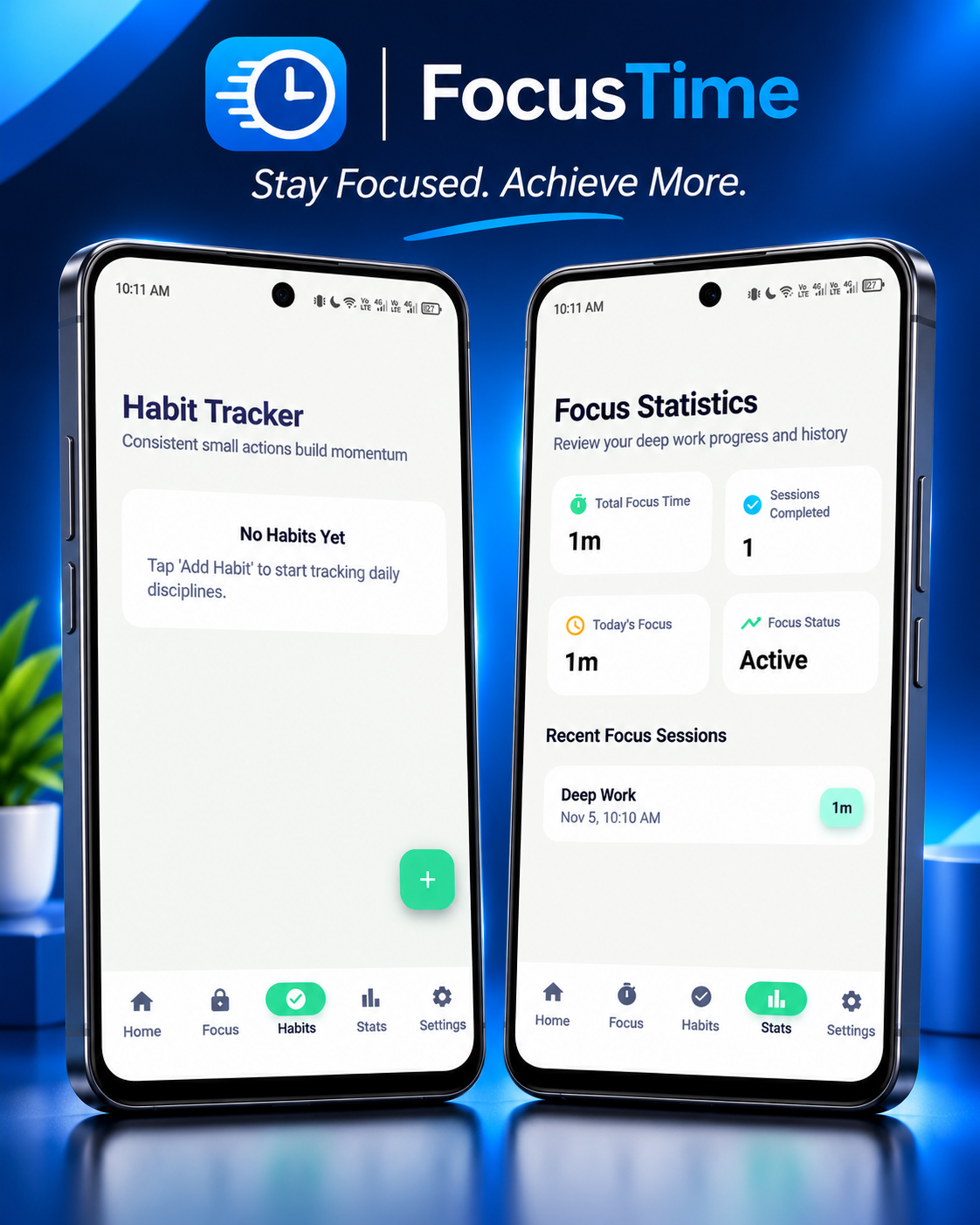
The interface presents daily habit tracking and focus-session statistics.
- Settings and Android Platform Architecture
"DeepFocus Settings" (https://pockethostbd.github.io/drive-one/picture/mockup-4.png)
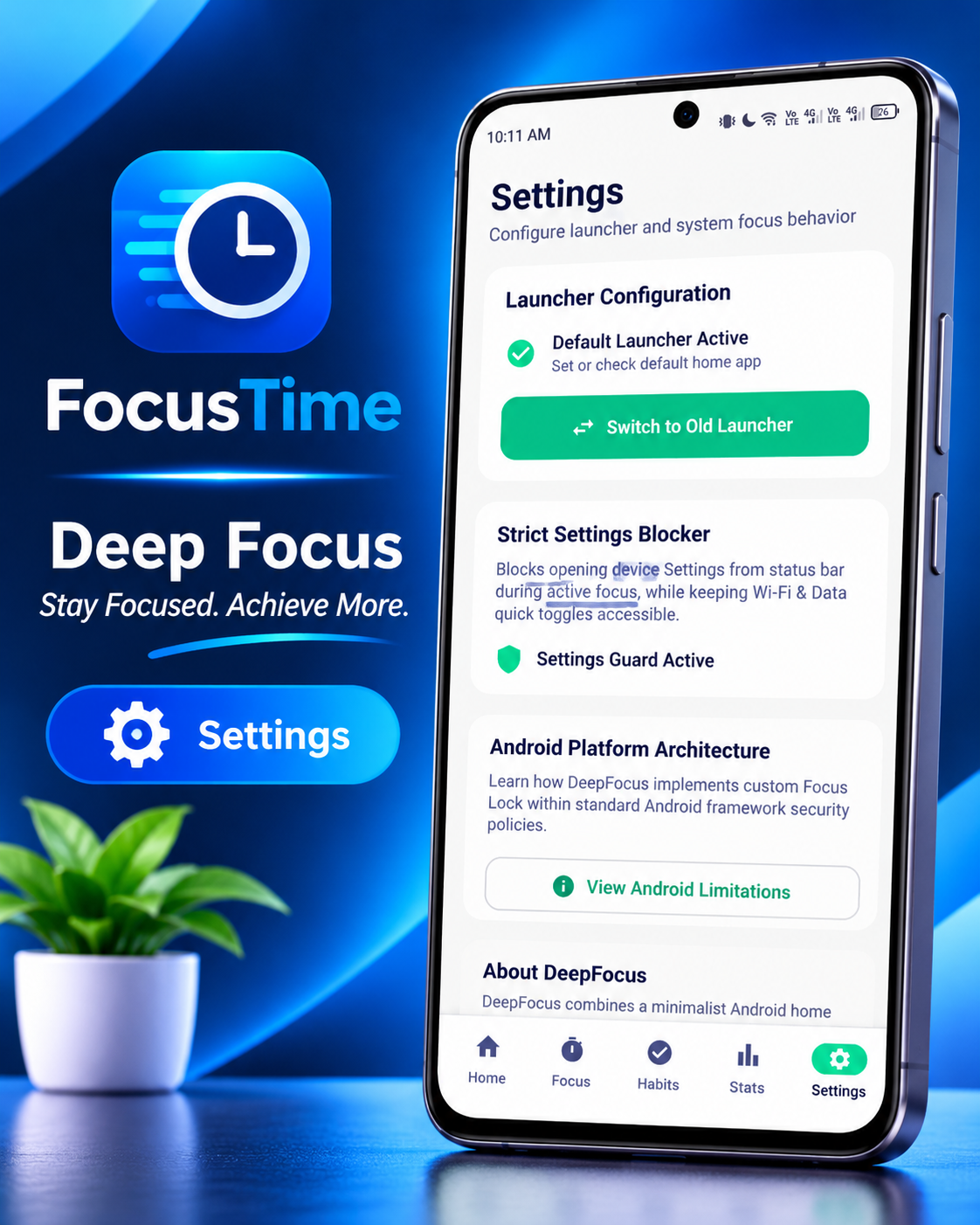
The settings interface includes launcher configuration, focus-related settings, and information about Android platform limitations.
🛠️ Technology Stack
This project uses standard web technologies without a runtime framework.
- HTML5 — Page structure and semantic markup.
- CSS3 — Responsive styling and visual presentation.
- Vanilla JavaScript — Language switching, mobile navigation, FAQ interactions, and screenshot lightbox.
- Schema.org JSON-LD — Structured data for supported pages.
- XML — Sitemap.
- robots.txt — Search-engine crawler guidance.
- GitHub Pages compatibility — Static hosting support.
Design Principles
- Mobile-first and responsive.
- Lightweight and simple to maintain.
- Bangla-ready system font stack.
- No runtime framework dependencies.
- No external CSS, JavaScript, or font CDNs.
- No website backend or online database required.
📂 Project Structure
. ├── .nojekyll ├── index.html ├── features.html ├── faq.html ├── privacy.html ├── terms.html ├── 404.html ├── robots.txt ├── sitemap.xml └── assets/ ├── css/ │ └── style.css └── js/ └── main.js
File Responsibilities
File| Purpose "index.html"| Main landing page, language options, and website introduction. "features.html"| Detailed feature descriptions and Android limitations. "faq.html"| Frequently asked questions and FAQ structured data. "privacy.html"| Privacy policy. "terms.html"| Terms and conditions. "404.html"| Custom bilingual error page. "robots.txt"| Search-engine crawling instructions. "sitemap.xml"| Sitemap for the live website. ".nojekyll"| Prevents GitHub Pages from applying Jekyll processing. "assets/css/style.css"| Website styles and responsive layout. "assets/js/main.js"| Language switcher and interactive behavior.
💻 Getting Started
Option 1: Open Locally
- Download or clone this repository.
- Keep the existing directory structure intact.
- Open "index.html" in a modern browser.
- Navigate through the pages and test the language switcher.
Some browser-dependent features may behave differently when opened directly using a "file://" URL. Use a static local development server if necessary.
Option 2: Clone the Repository
git clone YOUR_REPOSITORY_URL cd YOUR_REPOSITORY_DIRECTORY
Replace the placeholder values with your actual GitHub repository URL and directory name.
🌐 Deployment
The website is designed for static hosting and can be deployed from the repository root or from a "deepfocus-landing/" directory, provided the hosting configuration points to the correct folder.
GitHub Pages
- Push the project files to your GitHub repository.
- Open Settings → Pages.
- Select the appropriate deployment source and branch.
- Choose the repository root or configured publishing directory.
- Deploy the site and verify all pages and assets.
Custom Domain
The official website is:
When changing hosting providers or publishing paths, verify that CSS, JavaScript, page links, canonical URLs, and sitemap URLs continue to point to the correct locations.
🔎 SEO and Discoverability
The website includes SEO-oriented features intended to improve discoverability in search engines and AI-powered search experiences.
- Descriptive page titles and metadata.
- Semantic HTML structure.
- Schema.org JSON-LD on relevant pages.
- "FAQPage" structured data on the FAQ page.
- "robots.txt" with crawler guidance.
- XML sitemap for the official domain.
- Bilingual content for Bangla- and English-speaking visitors.
- Official product links and app screenshots.
- Mobile-responsive presentation.
Note: These features help search engines understand the website but do not guarantee indexing, rankings, rich results, or visibility in AI-generated answers.
🔐 Privacy and Security
The landing website is designed to work as a static website without its own application backend.
- No website login or registration system.
- No website database required.
- No external runtime CSS, JavaScript, or font CDNs.
- The language preference may be stored in browser "localStorage".
- The app's own privacy practices are separate from the landing website's behavior.
- Product access and transactions are handled through the official SupportKori listing.
For the complete information, read the "Privacy Policy" (https://deepfocus.asf.run/privacy.html) and "Terms & Conditions" (https://deepfocus.asf.run/terms.html).
- DeepFocus is an Android application; this repository contains its landing website, not the Android app's source code.
- Android behavior, permissions, and restrictions may vary by device manufacturer and OS version.
- Focus Lock should not be represented as a guarantee that every possible Android restriction can be bypassed or enforced on every device.
- Confirm current product availability, pricing, compatibility, and access instructions on the official product page.
- Keep the existing asset paths and file structure consistent when making changes.
🔗 Links
Resource| Link Official Website| https://deepfocus.asf.run/ Official Product Listing| https://www.supportkori.com/muhammedomor/extras/deepfocus-app-ts3g Features| https://deepfocus.asf.run/features.html FAQ| https://deepfocus.asf.run/faq.html Privacy Policy| https://deepfocus.asf.run/privacy.html Terms & Conditions| https://deepfocus.asf.run/terms.html
👨💻 Developer
Muhammed Omor Developer of DeepFocus
DeepFocus is built to help students, professionals, and everyday smartphone users develop healthier digital habits and maintain focus during study and work sessions.
DeepFocus — অফিসিয়াল ল্যান্ডিং ওয়েবসাইট
Muhammed Omor-এর তৈরি DeepFocus Android প্রোডাক্টিভিটি ও ফোকাস অ্যাপের অফিসিয়াল ওয়েবসাইট।
"🌐 অফিসিয়াল ওয়েবসাইট" (https://deepfocus.asf.run/) · "📱 অফিসিয়াল প্রোডাক্ট পেজ" (https://www.supportkori.com/muhammedomor/extras/deepfocus-app-ts3g)
"DeepFocus অ্যাপ" (https://pockethostbd.github.io/drive-one/picture/mockup-1.png)
DeepFocus ব্যবহারকারীদের পড়াশোনা ও কাজের সময় মনোযোগ ধরে রাখতে, ফোকাস সেশন পরিচালনা করতে, ভালো অভ্যাস গড়ে তুলতে এবং মোবাইলের অপ্রয়োজনীয় বিভ্রান্তি কমাতে সাহায্য করার জন্য তৈরি একটি Android অ্যাপ। এই রিপোজিটরিতে অ্যাপটির অফিসিয়াল স্ট্যাটিক ল্যান্ডিং ওয়েবসাইটের সোর্স কোড রয়েছে।
ওয়েবসাইটে বাংলা ডিফল্ট ভাষা এবং ইংরেজি ব্যবহারের বিকল্প রাখা হয়েছে।
📌 সূচিপত্র
- "প্রজেক্ট পরিচিতি" (#-প্রজেক্ট-পরিচিতি)
- "ওয়েবসাইটের ফিচার" (#-ওয়েবসাইটের-ফিচার)
- "অফিসিয়াল অ্যাপের স্ক্রিনশট" (#-অফিসিয়াল-অ্যাপের-স্ক্রিনশট)
- "প্রযুক্তি" (#-প্রযুক্তি)
- "প্রজেক্টের ফাইল কাঠামো" (#-প্রজেক্টের-ফাইল-কাঠামো)
- "ব্যবহার শুরু করুন" (#-ব্যবহার-শুরু-করুন)
- "ডেপ্লয়মেন্ট" (#-ডেপ্লয়মেন্ট)
- "SEO ও সার্চে দৃশ্যমানতা" (#-seo-ও-সার্চে-দৃশ্যমানতা)
- "গোপনীয়তা ও নিরাপত্তা" (#-গোপনীয়তা-ও-নিরাপত্তা)
- "গুরুত্বপূর্ণ তথ্য" (#-গুরুত্বপূর্ণ-তথ্য)
- "প্রয়োজনীয় লিংক" (#-প্রয়োজনীয়-লিংক)
- "ডেভেলপার" (#-ডেভেলপার)
🚀 প্রজেক্ট পরিচিতি
DeepFocus Official Landing Website হলো DeepFocus অ্যাপ সম্পর্কে বিস্তারিত জানার জন্য তৈরি একটি হালকা, আধুনিক ও মোবাইল-ফ্রেন্ডলি ওয়েবসাইট।
এখানে অ্যাপের পরিচিতি, ফিচার, স্ক্রিনশট, সাধারণ প্রশ্নের উত্তর, প্রাইভেসি পলিসি এবং ব্যবহারের শর্তাবলি পাওয়া যায়। ব্যবহারকারীরা এখান থেকে অফিসিয়াল SupportKori প্রোডাক্ট পেজেও যেতে পারেন।
প্রধান বৈশিষ্ট্য
- বাংলা ডিফল্ট ভাষা এবং ইংরেজিতে পরিবর্তনের সুবিধা।
- মোবাইল, ট্যাবলেট ও ডেস্কটপের জন্য রেসপনসিভ ডিজাইন।
- অ্যাপের ফিচারের জন্য আলাদা পেজ।
- ১২টি প্রশ্ন ও উত্তরসহ FAQ পেজ।
- প্রাইভেসি পলিসি ও Terms & Conditions।
- বড় করে দেখার সুবিধাসহ অফিসিয়াল স্ক্রিনশট গ্যালারি।
- মোবাইল নেভিগেশন মেনু।
- SEO-এর জন্য মেটাডেটা ও স্ট্রাকচার্ড ডেটা।
- নিজস্ব বাংলা ও ইংরেজি 404 পেজ।
- নিজস্ব ব্যাকএন্ড ছাড়াই স্ট্যাটিক হোস্টিংয়ের সুবিধা।
✨ ওয়েবসাইটের ফিচার
ফিচার| বিবরণ দ্বিভাষিক ইন্টারফেস| বাংলা ডিফল্ট; ইংরেজিতে পরিবর্তন করা যায়। রেসপনসিভ ডিজাইন| বিভিন্ন আকারের স্ক্রিনে ব্যবহারের উপযোগী। হোম পেজ| DeepFocus-এর পরিচিতি ও অফিসিয়াল লিংক। ফিচার পেজ| অ্যাপের কার্যকারিতা ও Android-এর সীমাবদ্ধতা। FAQ পেজ| ১২টি দ্বিভাষিক প্রশ্ন ও উত্তর। প্রাইভেসি পলিসি| ওয়েবসাইটের আচরণ ও গোপনীয়তার তথ্য। Terms & Conditions| ব্যবহারসংক্রান্ত শর্তাবলি। স্ক্রিনশট গ্যালারি| অ্যাপের ছবি বড় করে দেখার সুবিধা। মোবাইল মেনু| ছোট স্ক্রিনে সহজ নেভিগেশন। কাস্টম 404 পেজ| পেজ খুঁজে না পাওয়া গেলে দ্বিভাষিক বার্তা। SEO সুবিধা| Sitemap, robots.txt ও প্রাসঙ্গিক structured data।
📱 অফিসিয়াল অ্যাপের স্ক্রিনশট
নিচে DeepFocus Android অ্যাপের চারটি অফিসিয়াল স্ক্রিনশট দেওয়া হলো।
১. হোম স্ক্রিন
"DeepFocus হোম স্ক্রিন" (https://pockethostbd.github.io/drive-one/picture/mockup-1.png)
অ্যাপের ড্যাশবোর্ড, ফোকাস তথ্য, দৈনন্দিন অভ্যাস এবং দ্রুত অ্যাপ ব্যবহারের সুবিধা দেখায়।
২. Focus Lock
"DeepFocus Focus Lock" (https://pockethostbd.github.io/drive-one/picture/mockup-2.png)
ফোকাস সেশনের কাউন্টডাউন টাইমার ও সংশ্লিষ্ট নিয়ন্ত্রণ দেখায়।
৩. Habit Tracker ও Focus Statistics
"DeepFocus Habit Tracker ও Statistics" (https://pockethostbd.github.io/drive-one/picture/mockup-3.png)
দৈনিক অভ্যাস অনুসরণ এবং ফোকাস সেশনের পরিসংখ্যান পর্যালোচনা করতে সাহায্য করে।
৪. Settings ও Android Platform Architecture
"DeepFocus Settings" (https://pockethostbd.github.io/drive-one/picture/mockup-4.png)
লঞ্চার কনফিগারেশন, ফোকাস-সম্পর্কিত সেটিংস এবং Android প্ল্যাটফর্মের সীমাবদ্ধতার তথ্য প্রদর্শন করে।
🛠️ প্রযুক্তি
এই প্রজেক্টে সাধারণ ওয়েব প্রযুক্তি ব্যবহার করা হয়েছে।
- HTML5 — ওয়েবপেজের কাঠামো।
- CSS3 — ডিজাইন ও রেসপনসিভ লেআউট।
- Vanilla JavaScript — ভাষা পরিবর্তন, মোবাইল মেনু, FAQ এবং স্ক্রিনশট লাইটবক্স।
- Schema.org JSON-LD — প্রাসঙ্গিক পেজের structured data।
- XML — Sitemap।
- robots.txt — সার্চ ইঞ্জিনের crawler নির্দেশনা।
- GitHub Pages compatibility — স্ট্যাটিক হোস্টিংয়ের সুবিধা।
ডিজাইনের নীতিমালা
- মোবাইল-ফার্স্ট ডিজাইন।
- সহজ, পরিচ্ছন্ন ও রেসপনসিভ ইন্টারফেস।
- বাংলা-উপযোগী সিস্টেম ফন্ট।
- কোনো runtime framework নেই।
- কোনো external CSS, JavaScript বা font CDN নেই।
- নিজস্ব ওয়েবসাইট ব্যাকএন্ড বা অনলাইন ডেটাবেস প্রয়োজন নেই।
📂 প্রজেক্টের ফাইল কাঠামো
. ├── .nojekyll ├── index.html ├── features.html ├── faq.html ├── privacy.html ├── terms.html ├── 404.html ├── robots.txt ├── sitemap.xml └── assets/ ├── css/ │ └── style.css └── js/ └── main.js
ফাইলগুলোর কাজ
ফাইল| কাজ "index.html"| মূল ল্যান্ডিং পেজ ও অ্যাপের পরিচিতি। "features.html"| ফিচার ও Android-এর সীমাবদ্ধতার বিবরণ। "faq.html"| সাধারণ প্রশ্নোত্তর ও FAQ structured data। "privacy.html"| প্রাইভেসি পলিসি। "terms.html"| ব্যবহারের শর্তাবলি। "404.html"| কাস্টম বাংলা ও ইংরেজি 404 পেজ। "robots.txt"| সার্চ ইঞ্জিনের crawler নির্দেশনা। "sitemap.xml"| ওয়েবসাইটের sitemap। ".nojekyll"| GitHub Pages-এ Jekyll প্রসেসিং বন্ধ রাখতে সহায়তা করে। "assets/css/style.css"| ওয়েবসাইটের ডিজাইন ও স্টাইল। "assets/js/main.js"| ভাষা পরিবর্তন ও ইন্টারঅ্যাকটিভ ফিচার।
💻 ব্যবহার শুরু করুন
পদ্ধতি ১: সরাসরি চালানো
১. GitHub রিপোজিটরি থেকে প্রজেক্টের ফাইল ডাউনলোড করুন।
২. সব ফাইল ও ফোল্ডারের কাঠামো ঠিক রাখুন।
৩. ব্রাউজারে "index.html" খুলুন।
৪. পেজগুলো, ভাষা পরিবর্তনের সুবিধা এবং অন্যান্য ফিচার পরীক্ষা করুন।
কিছু ব্রাউজার-নির্ভর ফিচার "file://" থেকে সরাসরি খুললে ভিন্ন আচরণ করতে পারে। প্রয়োজন হলে লোকাল স্ট্যাটিক সার্ভার ব্যবহার করুন।
পদ্ধতি ২: Git দিয়ে ডাউনলোড
git clone YOUR_REPOSITORY_URL cd YOUR_REPOSITORY_DIRECTORY
এখানে "YOUR_REPOSITORY_URL" এবং "YOUR_REPOSITORY_DIRECTORY"-এর পরিবর্তে আপনার প্রকৃত রিপোজিটরি URL ও ফোল্ডারের নাম ব্যবহার করুন।
🌐 ডেপ্লয়মেন্ট
এই ওয়েবসাইট স্ট্যাটিক হোস্টিংয়ের জন্য তৈরি। সঠিক publishing directory নির্ধারণ করা থাকলে রিপোজিটরির root অথবা "deepfocus-landing/" ফোল্ডার থেকে ডেপ্লয় করা যাবে।
GitHub Pages-এ ডেপ্লয়
১. প্রজেক্টের ফাইল GitHub রিপোজিটরিতে আপলোড করুন।
২. রিপোজিটরির Settings → Pages-এ যান।
৩. উপযুক্ত deployment source ও branch নির্বাচন করুন।
৪. Repository root অথবা সঠিক publishing directory নির্বাচন করুন।
৫. ডেপ্লয় সম্পন্ন হলে সব পেজ, CSS, JavaScript ও ছবির লিংক পরীক্ষা করুন।
কাস্টম ডোমেইন
অফিসিয়াল ওয়েবসাইট:
হোস্টিং বা publishing directory পরিবর্তন করলে CSS, JavaScript, পেজের লিংক, canonical URL এবং sitemap-এর URL ঠিক আছে কি না যাচাই করুন।
🔎 SEO ও সার্চে দৃশ্যমানতা
সার্চ ইঞ্জিন এবং AI-ভিত্তিক সার্চে ওয়েবসাইটের বিষয়বস্তু সহজে বোঝার জন্য প্রাসঙ্গিক SEO সুবিধা রাখা হয়েছে।
- পেজ অনুযায়ী title ও metadata।
- Semantic HTML কাঠামো।
- প্রাসঙ্গিক পেজে Schema.org JSON-LD।
- FAQ পেজে "FAQPage" structured data।
- Crawler নির্দেশনার জন্য "robots.txt"।
- অফিসিয়াল ডোমেইনের XML sitemap।
- বাংলা ও ইংরেজি বিষয়বস্তু।
- অফিসিয়াল প্রোডাক্ট লিংক ও অ্যাপের স্ক্রিনশট।
- মোবাইল-ফ্রেন্ডলি ডিজাইন।
দ্রষ্টব্য: এসব ব্যবস্থা সার্চ ইঞ্জিনকে ওয়েবসাইট বুঝতে সাহায্য করে; তবে ইনডেক্সিং, সার্চ র্যাঙ্কিং, rich results বা AI-উত্তরে উপস্থিতির নিশ্চয়তা দেয় না।
🔐 গোপনীয়তা ও নিরাপত্তা
ল্যান্ডিং ওয়েবসাইটটি নিজস্ব অ্যাপ্লিকেশন ব্যাকএন্ড ছাড়া কাজ করার জন্য তৈরি।
- ওয়েবসাইটে নিজস্ব লগইন বা রেজিস্ট্রেশন নেই।
- ওয়েবসাইট চালাতে নিজস্ব ডেটাবেস প্রয়োজন নেই।
- কোনো external runtime CSS, JavaScript বা font CDN নেই।
- ভাষার পছন্দ ব্রাউজারের "localStorage"-এ সংরক্ষিত হতে পারে।
- অ্যাপের নিজস্ব গোপনীয়তা নীতি ওয়েবসাইটের নীতি থেকে আলাদা।
- অ্যাপ সংগ্রহ ও লেনদেন অফিসিয়াল SupportKori পেজের মাধ্যমে সম্পন্ন হয়।
বিস্তারিত জানতে পড়ুন "প্রাইভেসি পলিসি" (https://deepfocus.asf.run/privacy.html) এবং "Terms & Conditions" (https://deepfocus.asf.run/terms.html)।
- DeepFocus একটি Android অ্যাপ। এই রিপোজিটরিতে অ্যাপটির Android সোর্স কোড নয়, ল্যান্ডিং ওয়েবসাইটের সোর্স কোড রয়েছে।
- Android-এর আচরণ, অনুমতি ও সীমাবদ্ধতা ডিভাইসের নির্মাতা এবং OS সংস্করণ অনুযায়ী পরিবর্তিত হতে পারে।
- Focus Lock সব Android ডিভাইসে সব ধরনের বাইপাস বা সিস্টেম সীমাবদ্ধতা শতভাগ আটকাবে—এমন দাবি করা হয় না।
- অ্যাপের বর্তমান মূল্য, প্রাপ্যতা, সামঞ্জস্যতা এবং সংগ্রহের নির্দেশনা অফিসিয়াল প্রোডাক্ট পেজ থেকে যাচাই করুন।
- প্রজেক্ট আপডেট করার সময় বিদ্যমান ফাইল কাঠামো ও asset path ঠিক রাখুন।
🔗 প্রয়োজনীয় লিংক
রিসোর্স| লিংক অফিসিয়াল ওয়েবসাইট| https://deepfocus.asf.run/ অফিসিয়াল প্রোডাক্ট পেজ| https://www.supportkori.com/muhammedomor/extras/deepfocus-app-ts3g ফিচারসমূহ| https://deepfocus.asf.run/features.html FAQ| https://deepfocus.asf.run/faq.html প্রাইভেসি পলিসি| https://deepfocus.asf.run/privacy.html Terms & Conditions| https://deepfocus.asf.run/terms.html
👨💻 ডেভেলপার
Muhammed Omor
DeepFocus-এর ডেভেলপার।
DeepFocus-এর লক্ষ্য হলো শিক্ষার্থী, পেশাজীবী এবং সাধারণ স্মার্টফোন ব্যবহারকারীদের ডিজিটাল বিভ্রান্তি কমাতে, স্বাস্থ্যকর ফোন ব্যবহারের অভ্যাস গড়তে এবং পড়াশোনা ও কাজের সময় মনোযোগ ধরে রাখতে সাহায্য করা।
DeepFocus — Focus better. Build better habits.
DeepFocus — মনোযোগ বাড়ান, গড়ে তুলুন ভালো অভ্যাস।