







HBB2OBB converts horizontal (axis-aligned) bounding boxes (HBBs) into oriented (rotated) bounding boxes (OBBs) by using your existing HBB annotations as prompts for segmentation models from the SAM (Segment Anything Model) family. It targets object detection tasks where objects appear at arbitrary orientations, such as aerial imagery, satellite data, or traffic monitoring, producing OBBs that tightly encapsulate non-upright objects. Beyond conversion, it ships evaluation, hyperparameter optimization, and annotation format-conversion tools, with both a command-line interface and a Python API.

- 🎯 Accurate OBBs from HBBs: prompts SAM-family segmentation models with your existing horizontal boxes to fit tight oriented boxes around non-upright objects, with no re-annotation required.
- 🚗 No HBBs? Detect them:
hbb2obb-detectruns an Ultralytics detector over your images and writes the horizontal boxes the conversion consumes, confidence column included (details). - 🧩 Model ensemble: combines masks from multiple SAM variants through majority voting for more robust, accurate results (see Usage).
- 🛡️ Spatially constrained & safe: region-specific masking and contour refinement keep segmentation inside the object, a mask split by an occluder is fitted back together, and a fallback keeps the original HBB when no valid mask is found, counted and reported rather than left to be discovered afterwards.
- 🔎 Confidence-scored output: every OBB gets a quality score in
[0, 1]that flags silent fallbacks and low-confidence conversions, so you know which boxes to trust; your detector's own confidence can be carried through instead of, or on top of, that score (see Confidence scores). - 📐 Flexible scaling: positive or negative scale factors (optionally different for the short and long sides) recover cropped object parts or tighten overly conservative annotations.
- 📊 Evaluate & optimize: evaluation against ground truth on IoU, orientation error and the share of boxes above a high IoU bar, plus
hbb2obb-optimize, a hyperparameter search over SAM inference resolution × scale factors × opening kernel, driven by a config file so a whole benchmark is one reproducible command (details). - 🔬 Where the score comes from:
hbb2obb-analyzebreaks one evaluation down by the ground truth's orientation, size, frame edge, difficulty and class, and scores the conversion against emitting the horizontal prompt unchanged (details). - 🔄 Six annotation formats: read and write YOLO, DOTA, Pascal VOC, COCO and LabelMe, for horizontal and oriented boxes alike, with a check that proves every format encodes the same boxes (details).
- 🔍 Interactive viewer:
hbb2obb-viewpans and zooms over your annotations, in any format, coloring boxes by confidence and overlaying predictions against ground truth (details). - ⚙️ CLI + Python API:
hbb2obb,hbb2obb-detect,hbb2obb-eval,hbb2obb-analyze,hbb2obb-convert,hbb2obb-viewandhbb2obb-optimizecommands plus an importable API, with transparent visualizations of every step.
📋 Full Feature Overview
- HBB to OBB conversion: converts YOLO-format horizontal bounding boxes to oriented bounding boxes, in absolute px or, with
--normalize, relative to[0, 1]for Ultralytics training (details). - HBB detection: produce the horizontal boxes in the first place with any Ultralytics detector, local, from the Ultralytics catalogue, or from Hugging Face (details).
- Segmentation-based: uses state-of-the-art SAM models for accurate object boundary detection.
- Multiple model support: SAM, SAM2, SAM2.1, SAM3, Mobile SAM, and FastSAM families (details).
- Model ensemble: combine multiple models via majority voting for enhanced accuracy.
- Confidence scoring: a per-OBB quality score flags fallbacks and low-confidence conversions for triage, optionally combined with the detector confidence from the input, written as an extra column or to a side-car directory that leaves the label files standard (details).
- Polygon output: optionally save the segmentation contour behind each OBB, row-aligned with the OBB file, as a tighter object outline for downstream masking (details).
- Evaluation tools: assess OBB accuracy against ground truth on mean and median IoU, orientation error, and the share of matched boxes above IoU 0.5, 0.75, 0.85 and 0.9, overall and per class.
- Accuracy breakdown: cut one evaluation by ground-truth orientation, size, frame edge,
difficultflag and class, beside an identity baseline and the converted-to-reference side ratios, as a report, a YAML and a figure. - Hyperparameter optimization: search SAM inference resolutions, HBB scale factors and opening kernels for the best settings on your data, one sweep at a time or a whole benchmark from a config file.
- Provenance records:
--save_provenancewrites the command, the versions, a digest of the source that ran, the SHA-256 of every checkpoint and how many boxes fell back to their HBB, so a released annotation set can be regenerated rather than trusted. - Visualization tools: render HBBs, segmentation masks, derived contours, and resulting OBBs.
- Interactive viewer: pan and zoom over annotated frames, toggle each layer, and compare two annotation sets side by side.
- Format conversion utilities: convert between YOLO, DOTA, Pascal VOC, COCO and LabelMe annotations, in either direction, for both box kinds.
🚀 Planned Enhancements
- Improved morphological operations: more advanced operations for better mask refinement, beyond the signed opening/closing kernel.
- Support for other segmentation models: extend compatibility beyond the SAM/FastSAM families.
🔗 Related Projects
HBB2OBB integrates with and complements several specialized tools:
-
Geo-trax 🚀: georeferenced vehicle trajectory extraction pipeline for high-altitude drone imagery, built on YOLO detection and multi-object tracking. Its vehicle detector supplies the HBB inputs for vehicle use cases (car, bus, truck, motorcycle), and
hbb2obb-detectruns it by default (details). -
Stabilo ⚖️: Python library for video and trajectory stabilization using robust homography transformations. Supports various feature detectors, RANSAC algorithms, and user-defined masks.
-
Stabilo-Optimize 🎯: benchmarking and hyperparameter optimization framework for Stabilo. Evaluates stabilization performance through ground truth-free assessment using random perturbations.
Create and activate a Python virtual environment (Python 3.9–3.13), then install from PyPI:
python3.11 -m venv .venv
source .venv/bin/activate  # On Windows: .venv\Scripts\activate
pip install hbb2obb
Also works with uv (uv pip install hbb2obb) and conda.
Note
SAM model weights are downloaded automatically by Ultralytics on first use into a models/ directory relative to your current working directory. Detector weights for hbb2obb-detect land there too. To keep one copy wherever you run from, set HBB2OBB_MODELS_DIR once (e.g. export HBB2OBB_MODELS_DIR=~/.cache/hbb2obb), or pass --models_dir to hbb2obb, hbb2obb-detect or hbb2obb-optimize; the flag wins over the variable. The one exception is SAM 3, which must be downloaded manually (see below).
Every command checks PyPI once a day, in the background, for a newer HBB2OBB release and prints a one-line notice if one exists. The check never blocks, never fails a run, and is silent when offline. Set HBB2OBB_DISABLE_UPDATE_CHECK=1 to turn it off.
Alternatives: conda or uv
conda create -n hbb2obb python=3.11 -y
conda activate hbb2obb
uv (fastest; then uv pip install hbb2obb):
uv venv --python 3.11
source .venv/bin/activate  # On Windows: .venv\Scripts\activate
Install from source (development / editable)
git clone https://github.com/rfonod/hbb2obb.git
cd hbb2obb && pip install -e '.[dev]'
The -e flag makes your local changes take effect without reinstalling; the [dev] extra adds pytest and ruff. For a plain install, use pip install . instead.
SAM 3 model weights (manual download required)
Unlike other SAM models, SAM 3 weights (sam3.pt) are not auto-downloaded by Ultralytics. To use SAM 3:
- Request access on the SAM 3 model page on Hugging Face.
- Once approved, download
sam3.pt. - Place
sam3.ptin the models directory (models/relative to where you run the conversion, orHBB2OBB_MODELS_DIR/--models_dirif you set one).
See the Ultralytics SAM 3 documentation for more.
A small sample dataset ships in data/. From the repository root:
# The sample already ships with detected HBBs, so start here. To redo that step yourself:
#   hbb2obb-detect data/images --overwrite

# Convert the sample HBBs to OBBs (default single model) and save visualizations
hbb2obb data/images --save_img

# Higher accuracy with a model ensemble
hbb2obb data/images --sam_models sam_b sam_l sam2_b sam2.1_b

# Evaluate the converted OBBs against ground truth
hbb2obb-eval data/labels_obb_gt data/labels_obb -mp data/classes.yaml

# Break that score down by what the ground-truth box looks like
hbb2obb-analyze data/labels_obb_gt data/labels_obb -mp data/classes.yaml

# Look at the result: pan, zoom, step through frames, q to quit
hbb2obb-view data/images --compare data/labels_obb_gt
Converted OBB annotations are written to data/labels_obb/. Every command takes --help. For your own data you need only the images and horizontal boxes for them; data/README.md walks through what each file in the sample is and the command that produced it.
# Default single model (sam_b), HBBs read from <img_source>/../labels_hbb
hbb2obb /path/to/images --hbb_dir /path/to/hbb/annotations

# Model ensemble (majority voting across models)
hbb2obb /path/to/images --sam_models sam_b sam_l sam2_b sam2.1_b

# Scale HBBs: expand to recover cropped parts, or shrink conservative boxes
hbb2obb /path/to/images --scale_factors 0.1      # expand uniformly
hbb2obb /path/to/images --scale_factors -0.02    # shrink uniformly
hbb2obb /path/to/images --scale_factors 0.1 0.05 # short side / long side

# Save visualization images of the conversion
hbb2obb /path/to/images --save_img

# Also save the segmentation polygon of each object, a tighter outline than its OBB
hbb2obb /path/to/images --save_polygon --polygon_dir /path/to/save/polygonshbb2obb-eval /path/to/ground_truth /path/to/predictionsPredictions are paired with ground truth by oriented IoU and scored on three things:
Average IoU: 0.89642 ± 0.06834 (SEM 0.00483)
Median IoU: 0.91080
Matched Boxes Above Threshold: IoU>=0.50: 100.0%  IoU>=0.75: 98.0%  IoU>=0.85: 80.5%  IoU>=0.90: 57.0%
Orientation Error: p90 4.40°, median 1.04°, mean 2.11° ± 4.88°

=== Results by Class ===
     Class  GT  Pred  Matches IoU (mean ± std) IoU (median) IoU>=0.9 Angle p90 (°) Angle p50 (°)
       Car 185   186      185  0.8982 ± 0.0606       0.9106    57.3%          4.36          1.00
       Bus   6     6        6  0.9358 ± 0.0353       0.9390    66.7%          1.66          1.33
     Truck   8     8        8  0.8533 ± 0.1469       0.8884    50.0%         13.87          1.56
Motorcycle   2     1        1  0.6746 ± 0.0000       0.6746     0.0%          9.95          9.95
Mean IoU alone is a blunt instrument on tight boxes: it saturates, so two settings can tie on it while differing plainly in the heading they recover. The other two do not saturate. In the run above the mean hides a heavy orientation tail (median 1.04°, p90 4.40°) and a class that the conversion handles far worse than the rest.
Orientation is taken from each box's longer side and wraps at 180°, since a box turned end for end is the same box, so the largest possible error is 90°.
More CLI arguments
Run hbb2obb --help / hbb2obb-eval --help for the full list. Key conversion arguments:
--hbb_dir/-hd: directory of HBB annotations in YOLO TXT format (default:<img_source>/../labels_hbb).--obb_dir/-od: directory to save OBB annotations (default:<img_source>/../labels_obb).--sam_models/-sm: SAM model(s) to use (e.g.sam_b,sam_l,sam2_b,sam2.1_b,sam3,mobile_sam,FastSAM-s).--imgsz: SAM inference resolution (default: 1280).--scale_factors/-sf: factor(s) to scale HBBs (single value, or two values for short/long sides).--opening_kernel_percentage/-okp: morphological kernel size as a fraction of the mask's smaller dimension. Positive opens (erodes then dilates, removing thin protrusions), negative closes (dilates then erodes, filling holes and rejoining a fragmented mask),0disables it. Closing runs before the contours are taken, so it rejoins a vehicle split by glare or an occluding pole while the pieces are still close enough to bridge.--fragment_ratio/-fr: minimum area, as a fraction of the largest mask piece's, for another piece to be fitted together with it rather than discarded (default:0.1).0fits the largest piece alone.--save_confidence: append a per-OBB confidence score as a 10th column in the output TXT files.--confidence_dir/-cd: write those scores to their own directory instead, one score per line, row-aligned with the labels. Use it when the label files have to stay strictly standard, since Ultralytics and other YOLO OBB readers reject a 10th column. Give it bare forimg_source/../labels_confidence.--save_img,--viz_dir,--show_confidence, and--hide_hbb/--hide_obb/--hide_masks/--hide_segments/--hide_class_labels: visualization controls.--normalize/-n: write the coordinates relative to[0, 1]instead of in absolute px, which is what Ultralytics reads.--precision/-psets the decimals (default: 10). Applies to--save_polygonoutput too, so one run never mixes the two conventions.--fallback_warn_share/-fw: warn on stderr when more than this share of an image's boxes fall back to their HBB (default:0.5).0warns on any fallback,1disables the per-image warning. Every run also ends with the total fallback count and share, and--save_provenancerecords both.--fail_on_fallback_share/-ff: exit non-zero when more than this share of the run's boxes fall back. The annotations and the provenance are written either way (default: exit 0 regardless).--device: inference device for the SAM model(s), e.g.cpu,0,cuda:0,mps(default: Ultralytics picks).--model_kwargs/-k: any other Ultralytics inference arguments, passed through unchecked, askey1=value1,key2=value2; values are Python literals where they parse as one (classes=[0, 2]).--models_dir: where checkpoints are read from and downloaded to (default:HBB2OBB_MODELS_DIRif set, elsemodels/).
Key evaluation arguments:
--excluded_classes/-e: class IDs to exclude from evaluation.--iou_threshold/-t: IoU threshold for a match (default: 0.1).--class_agnostic/-ca: ignore class-label matching (useful for re-classified GT).--exclude_edge_cases/-exc,--edge_tolerance/-et,--img_width/-iw,--img_height/-ih: edge-case handling.--map_path/-mp: path to a label map YAML mapping class IDs to names.
Python API
Converting HBB to OBB: hbb2obb() processes a single image and returns the OBB annotations as a NumPy array:
from pathlib import Path
from hbb2obb.converter import hbb2obb, save_obb_annotations, save_polygon_annotations

img_path = Path("/path/to/images/img1.jpg")

# Single SAM model
obb_annotations = hbb2obb(
    img_path=img_path,
    hbb_dir="/path/to/hbb/annotations",
    sam_models="sam_b",
    imgsz=1280,
    scale_factors=0.05,
    opening_kernel_percentage=0.15,
    save_img=True,
    viz_dir="/path/to/save/visualizations",
)

# Model ensemble with per-side scale factors
obb_annotations = hbb2obb(
    img_path=img_path,
    hbb_dir="/path/to/hbb/annotations",
    sam_models=["sam_b", "sam_l", "sam2_b", "sam2.1_b"],
    scale_factors=[0.1, 0.05],  # short side / long side
)

# Writes <obb_dir>/img1.txt, deriving the filename from img_path
save_obb_annotations(obb_annotations, "/path/to/save/obb/annotations", img_path)

# Also return per-OBB confidence scores, and write them as a 10th column
obb_annotations, confidences = hbb2obb(img_path=img_path, sam_models="sam_b", return_confidence=True)
save_obb_annotations(obb_annotations, "/path/to/save/obb/annotations", img_path, confidences=confidences)

# Also return the segmentation contours, and write them as polygon annotations
obb_annotations, contours = hbb2obb(img_path=img_path, sam_models="sam_b", return_contours=True)
save_polygon_annotations(contours, obb_annotations, "/path/to/save/polygons", img_path)
Evaluating OBB predictions:
from pathlib import Path
from hbb2obb.evaluator import evaluate_obb, print_results

results = evaluate_obb(
    gt_dir=Path("/path/to/ground_truth_annotations"),
    pred_dir=Path("/path/to/predictions"),
    iou_threshold=0.1,
    class_agnostic=True,  # optional: match regardless of class label
    exclude_edge_cases=True,  # optional: drop boxes at the image edge
    img_width=3840,
    img_height=2160,
)

print_results(results, "/path/to/label_map.yaml")
End-to-end workflow, from someone else's annotation format
Starting from HBB annotations and OBB ground truth in whatever format you were given:
# 1. Bring both into YOLO TXT, whatever they arrived as (--from is detected if omitted)
hbb2obb-convert project/voc_hbb --to yolo -o project/labels_hbb -mp project/label_map.yaml
hbb2obb-convert project/gt.json --from coco --to yolo -o project/labels_obb_gt -mp project/label_map.yaml

# 2. Optimize hyperparameters to find the best settings (add -ok to also sweep the opening kernel)
hbb2obb-optimize project/images project/labels_obb_gt -sm sam_b sam_l sam2_b -n multi_sam

# 3. Inspect the best parameters, then convert with them
cat project/benchmark_results/multi_sam/summary.txt
hbb2obb project/images --hbb_dir project/labels_hbb --obb_dir project/labels_obb \
  --sam_models sam_b sam_l --imgsz 1280 --scale_factors 0.05 \
  --opening_kernel_percentage 0.15 --save_confidence --save_provenance

# 4. Evaluate against ground truth, then look at where it went wrong
hbb2obb-eval project/labels_obb_gt project/labels_obb -mp project/label_map.yaml
hbb2obb-analyze project/labels_obb_gt project/labels_obb -hd project/labels_hbb -i project/images -o project/analysis
hbb2obb-view project/images --compare project/labels_obb_gt --show_confidence

# 5. Ship the result in every format your consumers want
hbb2obb-convert project/labels_obb --to dota coco voc -o project/release -mp project/label_map.yamlhbb2obb-eval gives one number per metric. hbb2obb-analyze says where it came from:
hbb2obb-analyze /path/to/ground_truth /path/to/predictions -hd /path/to/labels_hbb -i /path/to/imagesTwo of the seven tables it prints, from the 50-frame tuning set of Songdo Vision OBB:
### By ground-truth orientation, interior and not difficult (3840 boxes)

                              Boxes   IoU (mean)   IoU (median)   IoU<0.75   IoU>=0.9   Angle p90   Angle mean
  axis-aligned (<0.005 deg)    2694       0.9265         0.9351       0.2%      82.3%        0.00         0.14
  rotated                      1146       0.8366         0.8554      13.5%      21.2%        5.35         2.82
  off-axis 0 to 5 deg          2941       0.9239         0.9328       0.2%      79.2%        1.22         0.29
  off-axis 5 to 15 deg          149       0.8479         0.8546       9.4%      25.5%        7.01         3.56
  off-axis 15 to 30 deg         665       0.8171         0.8339      17.3%      12.3%        5.84         3.02
  off-axis 30 to 45 deg          85       0.7966         0.8231      30.6%      12.9%        4.95         2.46

### Against doing nothing

                              Boxes   IoU as-is   IoU converted      Gain   Angle p90 as-is   Angle p90 converted
  all                          4245      0.8617          0.8868   +0.0251             22.69                  3.50
  axis-aligned (<0.005 deg)    2900      0.9816          0.9252   -0.0564              0.00                  0.00
  rotated                      1345      0.6032          0.8039   +0.2007             27.77                 16.00
  off-axis 0 to 5 deg          3159      0.9725          0.9228   -0.0498              0.00                  1.20
  off-axis 5 to 15 deg          162      0.7034          0.8421   +0.1387             13.57                  8.43
  off-axis 15 to 30 deg         820      0.5187          0.7745   +0.2558             25.68                 21.31
  off-axis 30 to 45 deg         104      0.4464          0.7495   +0.3031             43.50                 17.14
rotated is every box off the axes and overlaps the bands below it, which answer a different
question; axis-aligned and rotated alone partition the set.
Every cut is a property of the ground-truth box, never of the prediction. Matching is
hbb2obb-eval's own, so a pair scored here is the pair it scored.
Cuts reported: ground-truth orientation, orientation again on the interior boxes not flagged
difficult, ground-truth short side, frame edge, the difficult flag, and class. Beside them:
- The identity baseline. A horizontal box is already a valid oriented box, so
--hbb_dirscores the conversion against emitting the prompt unchanged. On a ground truth that is mostly square to the image, this is what separates the boxes the conversion earned from the boxes the prompt already had. - The side ratios. How wide and how long the converted box is against the reference, by how far the reference is turned off the image axes. A step confined to the short side, across a boundary the geometry crosses continuously, is a property of the reference rather than of the conversion.
--out_dir / -o writes analysis.md, analysis.yaml and a three-panel analysis.png as well as
printing the report. -i / --img_source supplies the frame sizes the edge cut needs; the
difficult flag is read from a .dota file beside the ground-truth .txt, if there is one, and
-bc / --boundary_classes holds the side-ratio table to one class.
No HBBs yet? hbb2obb-detect runs an Ultralytics detector over your images and writes exactly the YOLO TXT the conversion reads, with the detector confidence in the 6th column:
# geo-trax is the default detector, tuned for vehicles in high-altitude drone imagery (weights downloaded on first use)
hbb2obb-detect /path/to/images

# Any other Hugging Face model: all three parts, '<user>/<repo>/<file>.pt' (no "huggingface.co/" prefix)
hbb2obb-detect /path/to/images --model rfonod/geo-trax/geotrax_hbb_yolov8s_1920_v1.pt

# Then convert, carrying the detector confidence into the OBBs alongside the conversion score
hbb2obb /path/to/images --save_confidence --confidence_source combined
More about --model, class maps, and merging with hand-drawn boxes
--model takes a registered detector (geotrax today, the default), a local .pt file, a Hugging Face file as a link (https://huggingface.co/<user>/<repo>/resolve/<revision>/<path>.pt, or the /blob/ page link) or as <user>/<repo>/<path>.pt, any other http(s) link to a checkpoint, or an Ultralytics model name. An existing local file always wins, and a path that exists nowhere is an error rather than a guess. Only a registered name brings validated settings: the same weights given by link start from the Ultralytics defaults. Weights land in the models directory beside the SAM checkpoints (models/, HBB2OBB_MODELS_DIR or --models_dir). A registered detector brings the settings it was validated at: geotrax runs at --imgsz 1920 over its four reliable classes, while anything else starts from the Ultralytics defaults. --class_map renumbers a detector's classes to yours: --class_map '2=0,5=1,7=2,3=3' turns COCO's car, bus, truck and motorcycle into 0,1,2,3 and drops every other class.
Any other Ultralytics predictor argument passes straight through --model_kwargs, unchecked, so options Ultralytics adds later work too. Values are read as Python literals where they are one:
hbb2obb-detect /path/to/images --model_kwargs 'agnostic_nms=True,augment=True,classes=[0, 2]'An argument that also has its own flag (imgsz, conf, iou, classes, max_det, device) can be given one way or the other, not both, and a malformed string stops the run instead of falling back to defaults.
Detected boxes are a starting point, not ground truth. If you have hand-drawn boxes already and only want the confidence a detector would give them, --merge_with keeps your geometry untouched and only attaches the score of the detection covering each box:
hbb2obb-detect /path/to/images --merge_with /path/to/labels_hbb --extras_dir /tmp/extras --overwriteYour boxes stay exactly as they are, in their own order; a box no detection covers keeps 1.0. Detections that back no box of yours are counted and, with --extras_dir, written as their own set to review (hbb2obb-view /path/to/images --hbb_dir /tmp/extras); the merge never adds them for you. --overwrite is required before anything writes into a directory that already holds labels.
hbb2obb-view opens your annotations over the images they belong to, in a window that pans and zooms:
# Defaults: images in <dir>, boxes from ../labels_obb and ../labels_hbb
hbb2obb-view data/images

# Color the OBBs by confidence and print the score, to find the boxes worth checking
hbb2obb-view data/images --show_confidence

# Overlay ground truth in blue over the converted boxes in green
hbb2obb-view data/images --compare data/labels_obb_gt

# Pin the format to read, or write annotated images instead of opening a window
hbb2obb-view data/images --obb_format dota
hbb2obb-view data/images -o /path/to/annotated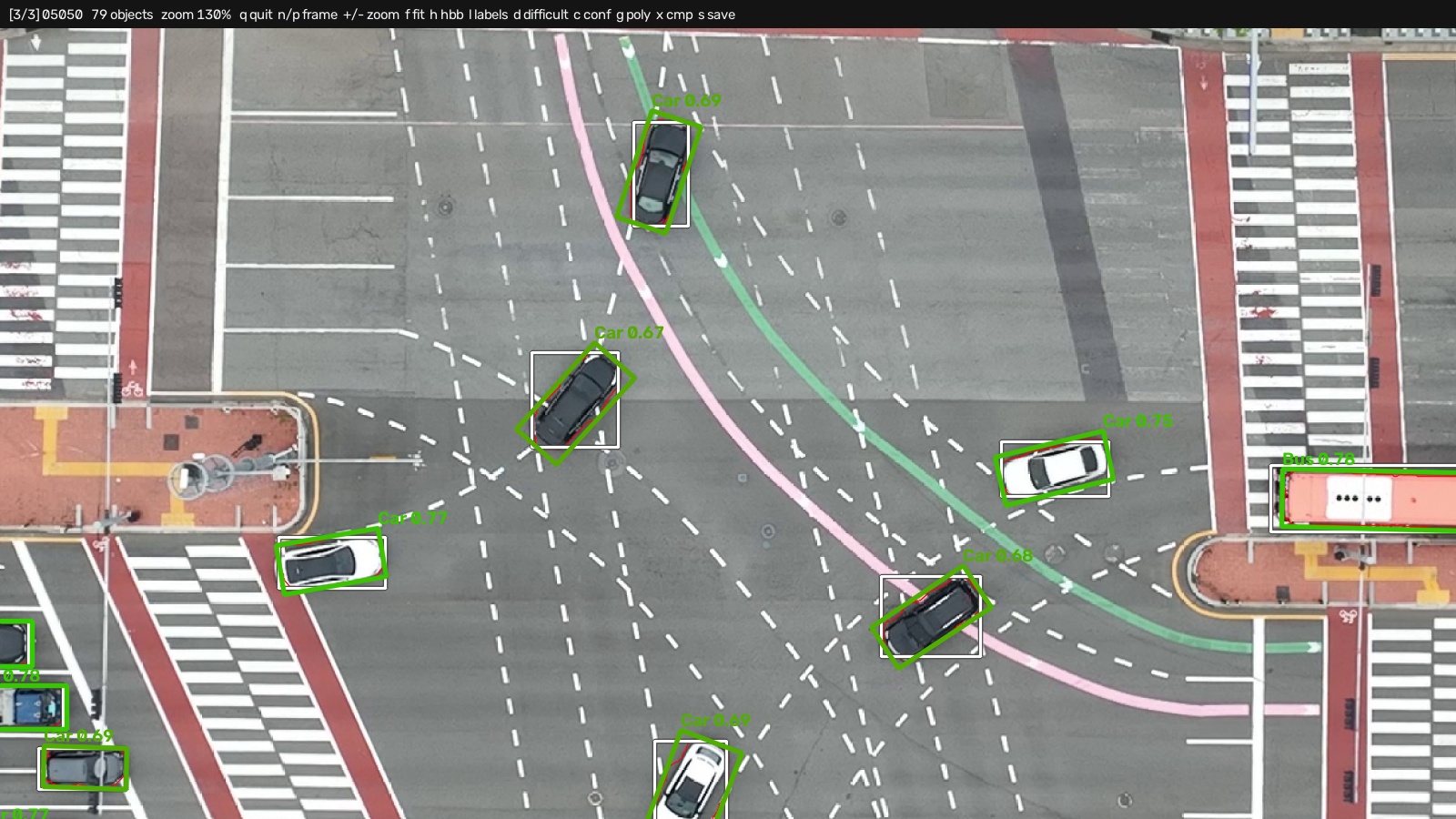
Color legend and keyboard shortcuts
Green is the OBB, white its source HBB, red the segmentation polygon it was fitted to, orange a box flagged difficult; with --show_confidence the OBB is tinted green→red by score, the same gradient --save_img uses. The last two need the conversion to have been run with --save_polygon and --save_confidence, as the sample data in data/ was (see data/README.md for the commands behind every file there). Labels with no confidence column still color by score when the scores sit in a side-car directory: the viewer reads labels_confidence/ beside them, or wherever --confidence_dir points, whether or not --show_confidence was given, so c always has something to show.
Where a set ships the same boxes in several formats, the status bar names the one on screen and t and y step the two layers through the rest. The canonical YOLO files are read by default, since the derived formats are rounded and cannot carry a confidence; a COCO record beside the label directory is offered too.
| Key | Key | ||
|---|---|---|---|
q / Esc |
quit | o |
show or hide the OBBs |
n / p, arrows |
next / previous frame | h |
show or hide the HBBs |
wheel, + / - |
zoom, about the cursor | l |
show or hide the class labels |
f / 0 |
fit the frame | d |
show or hide boxes flagged difficult |
1 |
zoom to 100% | c |
color by confidence, and print it |
s |
save the current view | g |
show or hide the segmentation polygons |
t / y |
read the OBBs / HBBs from the next format | ||
x |
cycle the comparison overlay |
Drag with the left mouse button to pan. --crops writes a contact sheet of the individual objects instead.
hbb2obb-convert moves annotations between the six formats below, in either direction, for horizontal and oriented boxes alike:
| Format | HBB | OBB | Shape |
|---|---|---|---|
yolo |
✅ | ✅ | one .txt per frame, with an optional trailing confidence column |
dota |
✅ | one file per frame, x1 y1 … x4 y4 name difficult, integer px |
|
voc |
✅ | one Pascal VOC .xml per frame, integer px |
|
coco |
✅ | ✅ | one .json for the whole set; the quad goes in segmentation, a confidence in score |
labelme |
✅ | ✅ | one LabelMe .json per frame |
# Write several formats in one pass; --from is detected from the files if omitted
hbb2obb-convert /path/to/labels_obb --to dota coco voc -o /path/to/release -mp label_map.yaml

# The reverse, into the YOLO TXT the tool consumes
hbb2obb-convert /path/to/instances.json --from coco --to yolo -o /path/to/labels_hbb --normalize

# Check that every format present under a directory encodes the same boxes
hbb2obb-convert /path/to/dataset --verify -mp label_map.yaml
Format details and edge cases
--verify compares the formats by exact equality after rounding, not by a tolerance: every format is one rounding of a single canonical source, so any disagreement is a real one.
Only DOTA and Pascal VOC can express a per-box difficult flag, so writing either one from YOLO or COCO resets it; --difficult_from dota carries the flags across. --difficult_from confidence instead derives the flag from the conversion score, flagging everything below --difficult_below (fallback boxes score 0.0, so they are always flagged); the scores come from a trailing column on the source labels, or from --confidence_dir when the labels are standard ones with the scores in a side-car. The scores themselves stay out of the output. Only YOLO and COCO can carry a confidence, so DOTA and Pascal VOC drop it. Image dimensions come from --images, or from --img_width / --img_height, and are needed to denormalize relative YOLO coordinates. LabelMe stores class names rather than ids, so pass -mp when round-tripping through it to pin the ids.
A COCO file is named coco_annotations_<kind>.json unless --coco_name says otherwise, which is also how --verify pairs one with its directory: labels_<name>/ goes with coco_annotations_<name>.json beside it. Where a directory holds the canonical YOLO files next to derived ones, --from is detected as yolo.
hbb2obb-optimize grid-searches inference resolution x scale factor x opening kernel for a set of SAM models, ranking each point by average IoU against ground-truth OBBs:
hbb2obb-optimize /path/to/images /path/to/ground_truth -sm sam_b sam_l sam2_b sam2.1_b -n multi_samGrid size, outputs, and sweeping the opening kernel
The grid is the full product of --imgsz x --scale_factors x --opening_kernels, and each grid point is a complete SAM pass over the whole image set, so the cost multiplies quickly: the defaults (3 image sizes, 12 scale factors, 1 opening kernel) already amount to 36 passes, and sweeping three kernels instead of one triples that to 108. --opening_kernels / -ok defaults to the single value 0.15, so omitting it leaves the two-axis sweep and its grid size unchanged.
# Add the morphological kernel as a third axis (2 x 3 x 5 = 30 grid points).
# Negative values close instead of open, so one axis covers both directions with 0 in the middle.
hbb2obb-optimize /path/to/images /path/to/ground_truth -iz 960 1280 -sf 0.03 0.05 0.07 \
    -ok -0.3 -0.15 0.0 0.15 0.3
A run writes run_config.yaml, results.yaml, summary.txt and plot.png into <output_folder>/<name>, and summary.md, comparison.png and PROVENANCE.txt into the output folder itself. The plot gives each series a hue by image size and, when more than one opening kernel was swept, a lightness of that hue and a marker shape by kernel, so no two of the swept combinations share a colour. Marker area is the execution time.
--device (e.g. cpu, 0, cuda:0, mps) applies to every run and overrides any device set in the config.
Plotting a metric other than the one being optimized
Every grid point records more than the score it is ranked by, and --plot_metric / -pm chooses which of them the figures draw:
| value | what it draws |
|---|---|
avg_iou |
mean IoU with ±std error bars (default) |
median_iou |
median IoU |
median_angle_error |
median orientation error, in degrees |
p90_angle_error |
90th percentile orientation error, in degrees |
iou_at_75, iou_at_90 |
share of matched boxes above that IoU |
A sweep draws p90_angle_error and iou_at_90 on its own, beside the metric it ranked by, since they are already recorded at every grid point and cost no SAM time. So plot.png, plot_p90_angle_error.png and plot_iou_at_90.png all land in each run folder, with a comparison_*.png and summary_*.md for each. Use --plot_metric only to draw one of the others, or to redraw after the fact:
# Redraw an existing sweep against a different metric, running no SAM passes at all
hbb2obb-optimize -c benchmark.yaml --refresh --plot_metric p90_angle_error
Every metric writes under its own name, so asking for one never overwrites the figures already in the folder. --refresh reads each run's results.yaml and nothing else, so it also works on a results folder copied away from the images, labels and checkpoints it was measured on.
The search itself always ranks by average IoU, so a sweep stays comparable with one measured before these existed. Only the figures change. A metric knows whether higher or lower is better, so the Pareto front flips for an error metric, and a run plot stars the grid point that metric prefers, which is worth looking at precisely when it is not the one that won.
This matters when the scores are tight. Average IoU saturates on well-fitted boxes, so a benchmark can put every configuration inside a few thousandths of the next and still be hiding a real difference in the headings they recover.
Two things to read alongside the ranking. sem_iou, recorded at every grid point, is the standard error of the mean; the ± beside a mean IoU is the box-to-box spread and is a different quantity. The comparison figure shades ±1 sem_iou around the leading run, and runs inside that band are tied. And where the ground truth is largely axis-aligned, as in an aerial survey flown square to a road grid, median_angle_error reads 0.00 everywhere while p90_angle_error still separates the settings.
A YAML lists the runs, and one command produces all of them:
hbb2obb-optimize -c benchmark.yaml             # all runs in benchmark.yaml
hbb2obb-optimize -c benchmark.yaml --resume    # continue one that was interrupted
Config file, dry runs, and refreshing plots
# benchmark.yaml
img_source: data/images
gt_dir: data/labels_obb_gt
output_folder: data/benchmark_results

defaults:
  imgsz: [640, 960, 1280]
  scale_factors: [0.03, 0.04, 0.05, 0.06, 0.07]

runs:
  - sam_models: [sam_b]
  - sam_models: [sam_l]
  - sam_models: [sam_l, sam_b, sam2_b, sam2.1_b]
hbb2obb-optimize -c benchmark.yaml --dry_run # the runs, the grid size, the total cost
hbb2obb-optimize -c benchmark.yaml --refresh # only redraw the plots and the summaryEach run takes the defaults and overrides whatever it names; a run with no name takes one from its models, so [sam_l, sam_b] writes into sam_l-sam_b. Every sweep writes summary.md and PROVENANCE.txt, and a config-driven benchmark also leaves a copy of the configuration in the output folder, so the results re-run on their own from wherever they end up. --resume skips runs that already hold a complete grid, and PROVENANCE.txt then names the runs this invocation measured and the ones it kept. --refresh redraws the plots and the summary from the results on disk and rewrites no provenance.
data/benchmark.yaml is a working example: it is the file behind data/benchmark_results/.
--save_provenance records what a run actually did, so a release can be regenerated rather than taken on trust. The file lands one level above the label directory: --obb_dir train/labels leaves train/PROVENANCE_obb.txt. hbb2obb-detect writes PROVENANCE_hbb.txt there instead, and hbb2obb-optimize writes PROVENANCE.txt inside its output folder.
hbb2obb /path/to/images --sam_models sam_l sam_b sam2_b sam2.1_b --save_confidence --save_provenanceWhat gets recorded
# Works the same for detection
hbb2obb-detect /path/to/images --save_provenance
The record holds the exact command, with every option that changes the files written, the settings the run used, the versions of ultralytics, torch, OpenCV, NumPy, Shapely and matplotlib, and the SHA-256 of every checkpoint used. A benchmark also hashes the label sets its numbers were measured against. When the weights are a Hugging Face Hub file (geotrax, a Hub link, or <user>/<repo>/<file>.pt), PROVENANCE_hbb.txt also records what the Hub itself declares for that repository at that moment: the licence, any DOI and arXiv paper, and the revision read. Nothing is copied from the model card's text or stored locally. A field the repository does not declare, or a Hub that cannot be reached, is recorded as such with a link to the model page, and the run still succeeds. Weights from anywhere else (a local file, another link, an Ultralytics name) are noted as needing credit by hand.
The code is pinned three ways: the release version, the commit with git describe when there is a checkout, and a SHA-256 over the package source. The record states whether that commit can be checked out to get the code that ran, judging by the package directory alone. A commit is recorded only when the repository actually tracks hbb2obb's source, so an install inside another project's checkout reads as no checkout rather than as that project's commit. Use the commit to find the change; use the digest to prove you have the same code.
HBB annotations (input): YOLO TXT, one file per image; coordinates relative (0–1) or absolute px:
class_id x_center y_center width height
An optional 6th column holds the detector confidence and can be carried into the output (see Confidence scores):
class_id x_center y_center width height confidence
Blank lines are skipped, and an empty label file (a frame with no objects) is valid input and produces an empty output file.
You bring your own HBB annotations. If you don't have any, hbb2obb-detect produces them with an Ultralytics detector and writes this exact format, confidence column included (see Detecting HBBs).
OBB annotations (output): YOLO TXT, one file per image; four corners in absolute px, or relative to [0, 1] with --normalize:
class_id x1 y1 x2 y2 x3 y3 x4 y4
Ultralytics requires the normalized form and rejects an absolute label file as corrupt, so pass
--normalizefor output you intend to train on. The default stays absolute, which is the convention DOTA and the wider OBB ecosystem use and what every other format here is derived from.
Normalized coordinates are written at 10 decimals, enough that reading them back lands on the pixel they came from for any frame size. --precision sets a shorter one, and warns when the value chosen is too coarse for the frame. Every reader in the toolkit detects the convention from the file, so a normalized set converts, views and evaluates like an absolute one, and a corner that falls outside the frame does not change that.
With --save_confidence, a 10th column holds the per-OBB confidence score:
class_id x1 y1 x2 y2 x3 y3 x4 y4 confidence
hbb2obb-eval ignores the trailing confidence column, so evaluation works on either variant.
Polygon annotations (optional output): with --save_polygon, the segmentation contour each OBB was fitted to is written to a parallel directory (labels_polygon by default), one file per image; a variable number of corners, in the same coordinate convention as the OBB file:
class_id x1 y1 x2 y2 ... xN yN
With --save_confidence, a trailing column holds the same per-object score written to the OBB file:
class_id x1 y1 x2 y2 ... xN yN confidence
The polygon is a tighter outline of the object than its OBB, useful as a mask for downstream work. It is row-aligned with the OBB file: line i of both files describes the same object. Objects that fell back to the HBB are written as a four-point rectangle identical to their OBB line, never skipped. --polygon_epsilon simplifies the polygons, the value being a fraction of the contour perimeter (0.01 typically drops about 90% of the vertices); the default 0 writes the raw contour.
Label map (optional): YAML mapping class IDs to names:
0: Car
1: Bus
2: TruckHBB2OBB fits each OBB by prompting SAM with your HBBs, refining the resulting mask, and wrapping it in a minimum-area rotated box.
Conversion pipeline
- Load HBB annotations from YOLO TXT.
- Scale bounding boxes: positive factors expand HBBs (recover cropped parts), negative factors shrink them (tighten conservative boxes); short and long sides can be scaled differently.
- Segmentation: run SAM model(s) with the HBBs as prompts.
- Mask aggregation: with an ensemble, combine masks by majority voting; clip to the scaled HBB region; apply the signed morphological step (positive opens, negative closes).
- Contour extraction: take the largest contour of the refined mask, plus any other piece holding at least
--fragment_ratioof its area, so a mask an occluder split is fitted as one object (optionally saved with--save_polygon). - OBB computation: fit a minimum-area oriented bounding box.
- Fallback: if no valid mask is found inside an HBB, keep the original HBB as the OBB (confidence
0.0). The run reports how many boxes this happened to, and names any image where it happened to more than--fallback_warn_shareof them. - Confidence: score each OBB in
[0, 1](see Confidence Scores). - Visualization (optional): overlay HBBs, masks, contours, and OBBs (colored by confidence).
Key characteristics:
- Label preservation: OBBs inherit the class label of their source HBB (no re-classification).
- Corrective effects: the transformation can recover cropped parts (positive scaling) and produce tighter boxes through precise segmentation.
Each OBB carries a heuristic quality score in [0, 1] that helps triage a converted dataset: high scores are trustworthy SAM fits, low scores warrant a look, and 0.0 marks a fallback where the original HBB was kept. It is a heuristic, not a calibrated probability. The detail crop below shows the score that --show_confidence prints next to each converted box.
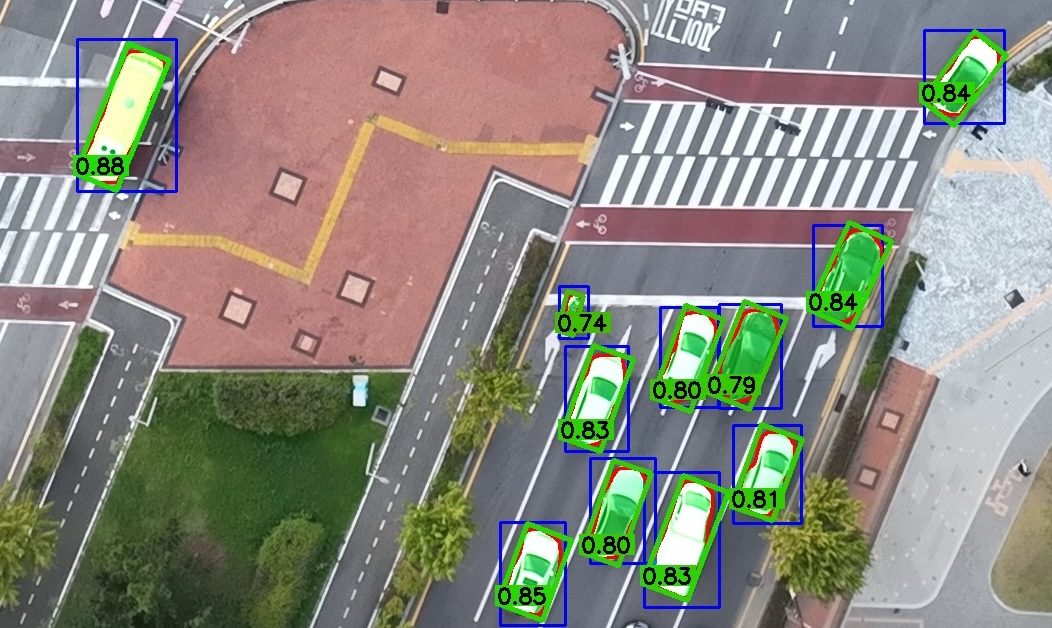
The score is the product of two factors:
- Rectangularity: the fitted contour area divided by the area of its minimum-area rotated rectangle, i.e. how tightly the OBB wraps the segmented shape (
1.0for a perfectly rectangular object). - Ensemble consensus: the fraction of the per-model mask union that survived the majority vote, i.e. how strongly the SAM models agree. This is
1.0for a single model and equals the mask IoU for two models.
Enable it with --save_confidence (writes a 10th column to each output file). In the visualization, OBBs are always tinted on a green→red gradient by score, and --show_confidence prints the numeric value next to each box. When using the Python API, pass return_confidence=True to hbb2obb() to get the scores back alongside the OBBs.
Choosing which score is reported. If your HBB files carry a detector confidence in a 6th column, --confidence_source (or the confidence_source argument of hbb2obb()) selects what the reported score means:
| Value | Reported score |
|---|---|
conversion (default) |
the heuristic conversion quality described above |
detector |
the detector confidence read from the HBB input |
combined |
the product of the two |
conversion says how well the OBB fits the segmented shape, detector how sure the detector was that there is an object at all. Boxes whose input line carried no confidence column fall back to the conversion score, so no output is left without one.
hbb2obb-detect writes that 6th column, for boxes it found itself or, with --merge_with, for boxes you drew by hand (see Detecting HBBs). The sample HBBs in data/ are detector output and carry it; the OBBs in data/labels_obb/ are scored combined.
- Try one strong model before an ensemble. On the 495-grid-point study below, measured over 4,245 reference boxes, a single
sam_ltied a five-model ensemble on mean IoU and beat it on the two scores that describe how a converted set fails, at 39% of the compute. - If you do ensemble, choose the vote threshold before the members. Masks are combined at
len // 2 + 1, so an even-sized set must be unanimous and behaves as an intersection, which can only erode the extent the box is fitted to. A weak member in a pair holds a veto; in a triple it is outvoted and costs almost nothing. - Experiment with scale factors and inference resolutions based on your dataset.
- Run
hbb2obb-optimizeto find the best settings for your data, and--save_provenanceto record the ones you settled on. - Use class-agnostic evaluation when comparing against manually annotated ground truth with different class labels.
- Visualize the conversion to understand how the model interprets your HBBs.
- Results depend on the quality of the input HBBs and the SAM models used; poor annotations or weak segmentation lead to inaccurate OBBs.
- Highly occluded or complex objects, where the HBB gives insufficient context, may not convert well.
- The error from a bad prompt is one-sided. The mask is clipped to the scaled prompt, so a prompt smaller than the object truncates it permanently, while one that is too large is trimmed back by the mask. On the study below, moving the scale factor from 0.02 to -0.01, which is 6% of prompt area, costs 0.033 mean IoU and drops the share of boxes above IoU 0.9 from 61.5% to 15.7% without producing a single gross failure. Note that the factor moves each edge by that fraction of its own side, so it changes each dimension by twice the factor. When in doubt, prompt loose.
- Small objects convert poorly. Below about 20 px across the shorter side there are too few pixels of width to fit an axis to.
HBB2OBB produced Songdo Vision OBB, the oriented-box release of the Songdo Vision v2 aerial vehicle dataset: 274,190 oriented boxes over 5,419 frames of 4K drone imagery from Songdo, South Korea, one per horizontal box in the source dataset and carrying its class and identifier.
The hyperparameters were selected by hbb2obb-optimize against 50 manually annotated frames that
share no image with the converted set: 11 SAM model sets over 495 grid points, 30.2 h on one 24 GB
card.
| Songdo Vision OBB | |
|---|---|
| 🎯 Selected configuration | sam_l alone, --imgsz 1024 -sf 0.02 -okp -0.1 -fr 0.1 |
| 📐 Mean / median IoU vs. manual OBBs | 0.88679 / 0.91759 |
| 📊 Share at IoU >= 0.75 / 0.90 | 92.06% / 61.51% |
| 🧭 Orientation error, 90th percentile | 3.50 deg |
| 🔁 Fallbacks to the source HBB | 0 of 4,245 on the validation frames, 0 of 274,190 in the release |
Two findings from that search are worth carrying to another dataset. Closing the mask beat both
alternatives in 165 of 165 comparable cells, on mean IoU and on the share above IoU 0.9 alike, so
-okp is worth setting negative before it is worth tuning. And majority-vote ensembling of SAM
variants did not improve the conversion: the objective could not separate five checkpoints from
one, and the accuracy-against-compute front had two points on it rather than a curve.
The full study, every grid point and the figures behind it ship with the dataset as
hbb2obb_benchmark/, and re-run from the config beside them without this repository.
If you use HBB2OBB in your research or software, please cite the archived release:
@software{fonod2026hbb2obb,
  author  = {Fonod, Robert},
  title   = {HBB2OBB: Horizontal to Oriented Bounding Box Conversion and Evaluation Tool},
  year    = {2026},
  license = {MIT},
  doi     = {10.5281/zenodo.15151143},
  url     = {https://github.com/rfonod/hbb2obb}
}
Each GitHub release is automatically archived to Zenodo via the Zenodo–GitHub integration; see CITATION.cff for the latest version and DOI.
Contributions are welcome! If you encounter issues or have suggestions, please open a GitHub Issue or submit a pull request.
This project is distributed under the MIT License. See the LICENSE file for details.