


Legion is an Elixir runtime for AI agents that live inside your application and get things done by writing code.
You give an agent some of your modules as tools. When it gets a task, the agent reads the tools' source, writes a Lua script, runs it in a sandbox, looks at the result and keeps going until the task is done. One step can loop and branch over your data instead of making an LLM round trip per tool call. Anthropic on why code execution beats tool calling.
You can run an agent two ways:
- In your app. Your code hands the agent a task, and Legion calls the LLM, runs the code it writes and gives you the answer.
- Over MCP. Claude Code, Cursor or another MCP client connects to your app. Its model writes the code and Legion runs it in the agent's sandbox, so your app needs no API key.
Both share your tools, the Lua sandbox, persistence and rate limits.
Legion isn't a coding agent - it won't edit your codebase. Use Claude Code or Codex for that.
# mix.exs
{:legion, "~> 0.6"}

# lib/my_app/application.ex - after your Repo, if you have one
children = [MyApp.Repo, Legion]

# config/runtime.exs - the default model is openai:gpt-5.6-luna
config :req_llm, openai_api_key: System.get_env("OPENAI_API_KEY")Wrap the code you want the agent to use in a tool:
defmodule MyApp.Tools.OrdersTool do
  use Legion.Tool

  @doc "The signed-in customer's orders, newest first"
  def my_orders do
    for order <- MyApp.Orders.list(Vault.get(:current_user)) do
      %{id: order.id, items: Enum.map(order.items, & &1.name)}
    end
  end

  @doc "Carrier tracking status of one of the customer's orders"
  def track(order_id), do: MyApp.Orders.tracking(Vault.get(:current_user), order_id)
end
Give the tool to an agent. The agent's @moduledoc is its job description:
defmodule MyApp.SupportAgent do
  @moduledoc "Helps a signed-in customer with their orders."
  use Legion.Agent

  def tools, do: [MyApp.Tools.OrdersTool]
end
Run it for the customer who's asking. Your tools find them in Vault, which comes with Legion:
Vault.init(current_user: user)

Legion.execute(MyApp.SupportAgent, "Where's the hoodie I ordered last week?")
#=> {:ok, "It shipped on Monday and should arrive tomorrow."}
To answer, the agent read the tool's source, then wrote and ran this script:
for _, order in ipairs(OrdersTool.my_orders()) do
  for _, item in ipairs(order.items) do
    if string.find(string.lower(item), "hoodie") then
      return OrdersTool.track(order.id)
    end
  end
end
return "no hoodie in recent orders"Serve the same agent to MCP clients. MCP support needs the optional
anubis_mcp dependency next to Legion:
# mix.exs
{:anubis_mcp, "~> 2.0"}

# lib/my_app/mcp.ex
defmodule MyApp.MCP do
  use Legion.MCP.Server, agent: MyApp.SupportAgent, name: "my_app", version: "1.0.0"
end

# lib/my_app/application.ex - after Legion
{MyApp.MCP, transport: {:streamable_http, start: true}}

# lib/my_app_web/router.ex - outside any pipeline
forward "/mcp", Legion.MCP.Plug, server: MyApp.MCP
Run mix phx.server and add http://localhost:4000/mcp to your client as an HTTP server. Its model gets two tools: help to read your tools' source, and repl to run Lua in the agent's sandbox.
Before you expose it, add authorization. Until then, tools see no user and anyone who reaches the endpoint can run code in your sandbox. The MCP guide shows how.
- Tools. Any module with
use Legion.Toolis a tool. The agent reads its source and docs, so there's no schema to keep in sync. Anything public is callable and its result can reach the LLM, so keep each tool a small facade that returns plain maps. SeeLegion.Tool. - Sandbox. Agents write Lua that runs on a Lua VM written in pure Elixir, each evaluation in its own process with time and memory limits. Your tools are the only way out. In-app agents can write Elixir instead, which gives them a richer standard library but runs against an allowlist that's much harder to make airtight. A Popcorn sandbox that runs in the browser is on the way. See the Sandboxes guide.
- Authorization. Tools read the current user from Vault and authorize each call themselves, as a controller would. Generated code can't read or change Vault, so it can't act as someone else or get at credentials kept there. It still picks the arguments, so check them:
track(order_id)above passes the user along soMyApp.Orders.tracking/2can refuse someone else's order. - Long-lived agents.
Legion.start_link/2starts an agent that keeps its conversation across calls toLegion.call/2. Agents are plain processes, so you can supervise them like any other. - Sub-agents. With
Legion.Tools.AgentTool, an agent's code hands subtasks to other agents, one at a time or in parallel. To split the work in your own code rather than leave it to the LLM,Legion.parallel/2runs several agents at once andLegion.pipeline/1feeds each agent's answer to the next. - Persistence. Conversations can be saved in Postgres through your Ecto repo, and
Legion.resume/2brings an agent back after a crash or deploy. SeeLegion.Store.Postgres. - Rate limiting. Each user, IP or tenant gets caps on agents, tokens and code evaluations per time window, and on concurrent turns. A turn is checked before it runs, so a denied one never reaches the LLM. See
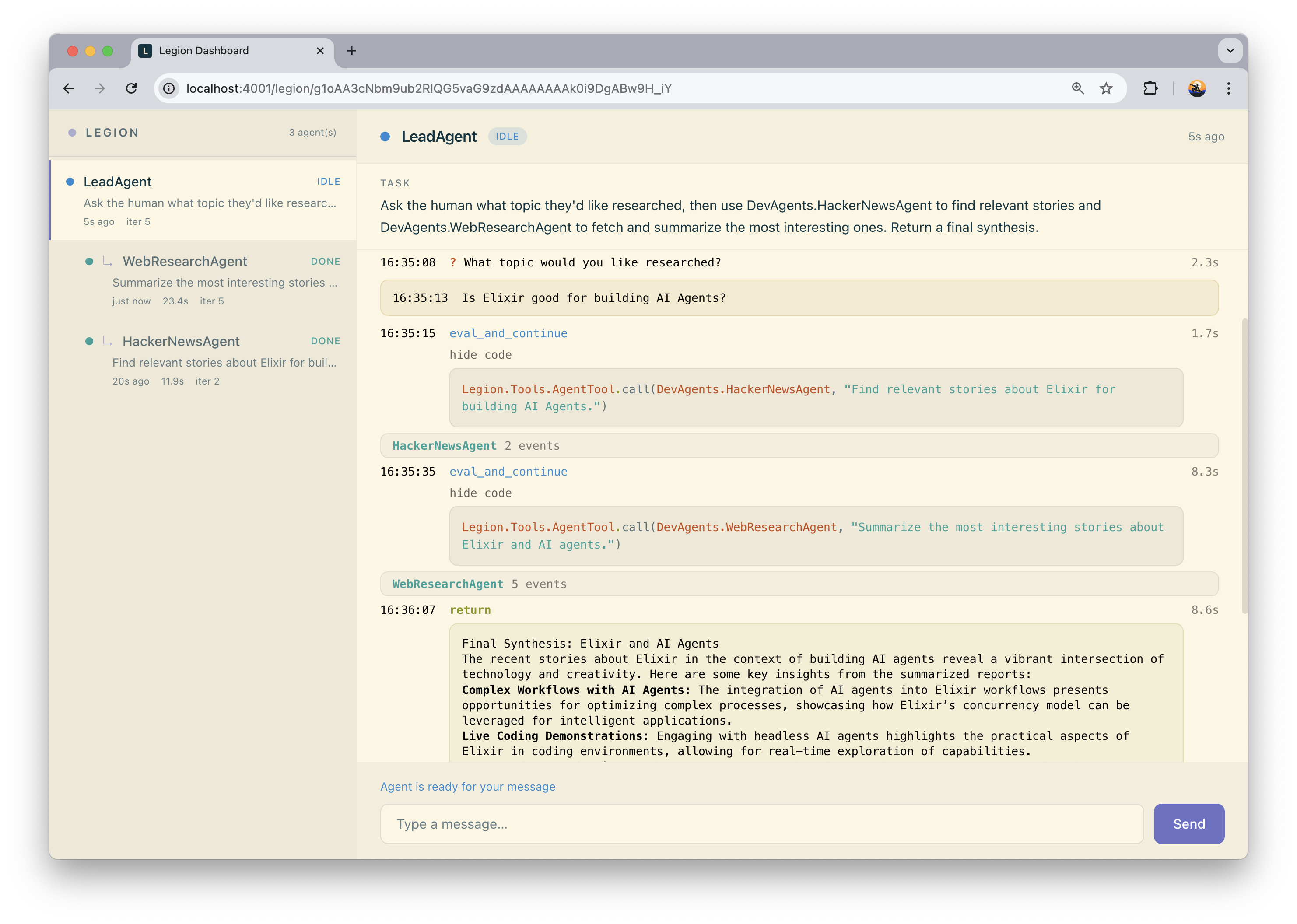
Legion.RateLimiter. - Observability. Legion emits telemetry events and ships a default logger. legion_web is a LiveView dashboard where you can follow every conversation step by step.
Defaults for all agents go in your config, and each agent can override them in config/0:
# config/config.exs
config :legion, :config, %{model: "openai:gpt-5.6-luna", max_iterations: 10}

# in an agent module
def config, do: %{model: "google:gemini-3.5-flash", max_iterations: 5}
model is a provider:model string, and any ReqLLM provider works, local models included. See Legion.Agent for the other options and callbacks, like system_prompt/0 and output_schema/0 (structured output).
- Installation
- Adding Legion to an existing app
- Sandboxes
- Using Legion with Ash
- Local LLMs
- Serving an agent over MCP
- Monitoring agents with Legion Web
Legion is created by Software Mansion.
Since 2012 Software Mansion is a software agency with experience in building web and mobile apps as well as complex multimedia solutions. We are Core React Native Contributors, Elixir ecosystem experts, and live streaming and broadcasting technologies specialists. We can help you build your next dream product – Hire us.
Copyright 2026, Software Mansion
MIT License - see LICENSE for details.