
Windows x64 Beta 1 · MSI 1.8.1.1
Windows 1.8.1.1 adds shared meeting imports for 31 source families, with 34 supported source/format pairs. Installed Windows Sandbox checks exercised preview, save and durable readback using public captures and fixtures, plus the documented Townlight handoffs. These checks do not establish automatic discovery on every live portal or a complete retest of every module.
- Townlight Code Manual
- Contents
- Using this manual
- Beta identity
- First run
- Daily workflow
- Connected workflows
- Architecture
- Cited questions summaries and local synchronization
- Technical specifications
- Configuration and administration
- API and integration examples
- MCP and automation boundary
- Security and permissions
- Backup recovery and maintenance
- Troubleshooting
- Verified workflows and limits
- Terms of service and license
- Glossary
- Alphabetical subject index
- Source and document control
Windows 1.8.1.1 adds shared meeting imports for 31 source families, with 34 supported source/format pairs. Installed Windows Sandbox checks exercised preview, save and durable readback using public captures and fixtures, plus the documented Townlight handoffs. These checks do not establish automatic discovery on every live portal or a complete retest of every module.
All 31 sources, formats and handoffs · Installed acceptance.
Windows 1.8.1.1 has fresh-install acceptance. An in-place upgrade to 1.8.1.1 was not exercised. The previous Windows 1.8.0.1 release tested upgrade from 1.7.2.1; that result applies to 1.8.0.1. Before an existing-city evaluation, back up city data and settings, close Townlight, keep the existing %LOCALAPPDATA%\CivicSuite profile, and use the same Windows account. Keep the prior installer and a restore path. Station continues to use its separately configured service.
The accepted MSI contains Townlight Runtime 0.3.1 and Meetings 1.0.6 distributions. Its health version strings still report Runtime 0.3.0 and Meetings 1.0.5. Default-branch source corrects those display strings; the signed MSI and its exact build source remain unchanged.
Townlight Beta 1 · Naming candidate documentation edition 2 November 2026
- Using this manual
- Beta identity
- First run
- Daily workflow
- Connected workflows
- Architecture
- Cited questions summaries and local synchronization
- Technical specifications
- Configuration and administration
- API and integration examples
- MCP and automation boundary
- Security and permissions
- Backup recovery and maintenance
- Troubleshooting
- Verified workflows and limits
- Terms of service and license
- Glossary
- Alphabetical subject index
- Source and document control
Townlight Code helps code custodians, clerks, legal reviewers and staff seeking cited authority. Code imports and preserves municipal code sources, supplies exact citations and version history, and connects proposed legislation to Meetings. Authorized staff separately record adoption evidence and codification.
Staff should begin with First run and Daily workflow. Administrators should also read Architecture, Technical specifications, Configuration, Security and Recovery. Developers should use the exact API/data dictionary and examples. The table of contents and alphabetical subject index link to the relevant sections in the HTML edition; the PDF preserves headings and searchable text. An editable Word edition is included with the same documentation companion.
| Identity | Value |
|---|---|
| Documentation | Townlight Beta 1 naming, Access and Notice candidate |
| Windows MSI version | 1.8.1.1 |
| Product component | townlight-code 1.0.9 |
| Principal import package | townlight_code |
| Native desktop source version | 1.8.1-1 |
| Candidate hashes | SHA-256 checksums and Windows acceptance summary |
| Current owned software license | AGPL-3.0-only |
| Acceptance composition | Windows 1.8.1.1: fresh-install acceptance; upgrade to this version unverified. Select the full profile. Station uses separate configuration. |
Start a new installation with an empty database and fresh Windows profile. For an upgrade from Windows 1.7.2.1, keep the existing profile. The approved profile path is %LOCALAPPDATA%\CivicSuite. Keep existing profiles and backups.
Windows 1.8.1.1 has fresh-install acceptance. An in-place upgrade to 1.8.1.1 was not exercised. The previous Windows 1.8.0.1 release tested upgrade from 1.7.2.1; that result applies to 1.8.0.1. Before an existing-city evaluation, back up city data and settings, close Townlight, keep the existing %LOCALAPPDATA%\CivicSuite profile, and use the same Windows account. Keep the prior installer and a restore path. Station continues to use its separately configured service.
Run the signed Windows 1.8.1.1 MSI and use an empty database and a new Townlight profile for first run.
- Download the signed MSI, matching source companion and checksums from the public Windows release.
- Verify the MSI hash and Authenticode publisher before installation. See the Windows acceptance summary for the tested setup.
- Launch Townlight under the intended named Windows account. Choose the storage folders. Select Townlight Inspections candidate (
inspections-preview) for the bounded desktop composition, including Access and Notice. A narrower default selection will not expose all workspaces. - Enter the city profile, time zone and contacts. Create the first named local administrator, sign in and choose protected backup storage. Continue without local AI is valid for the deterministic workflows.
- Run Health Check and wait for readiness. Open Townlight. In System Health select Finish Records Migration to activate the canonical Python/PostgreSQL runtime. Do not fabricate migration receipts or seed accounts.
- Create named staff through Settings. Import authorized sources using each product’s source library. All examples in this package are synthetic; they are not municipal authority.
- Provision Station separately if it is part of the beta exercise. Selecting the desktop composition does not start or configure Station. Configure vision explicitly only if automatic photo drafting is selected.
Inspect the complete bundle JSON for jurisdiction, section identifiers, source/effective dates, original name and hashes before selecting Import. Import submits directly; inspect the saved import and provenance afterward. There is no separate preview/confirmation step.
Search the topic and open the cited section. Check the requested as-of date and version. Keep explanatory wording separate from the retained source text.
Read import history, original source and section history. Export the exact cited source when it is needed for a staff workpaper or Records evidence.
Create the existing Code–Meetings connection for the actual proposal and agenda context. Retain the connection identifier and keep pending text distinct from adopted code.
Record the actual authorized meeting decision with its adoption context. An unrelated motion, packet or draft minutes does not establish that the proposal was adopted.
Review the adopted text and affected sections, then record the distinct codification closeout. Preserve prior versions and the link to adoption evidence.
Select permitted source evidence downstream. If visibility or source content changes, resolve the mismatch and select current evidence rather than accepting a stale cached citation.
Use your own named account and save before leaving a screen. A saved draft is durable; unsaved form text may not be. If a write has an unknown result, reopen its record before repeating it.
Read source jurisdiction, dates, citation, version and visibility. A copied source hash identifies exact bytes, not their legal applicability. If a source changes or permission is removed, resolve the source problem rather than substituting stale cached content.
Keep originals and derivatives separate. Review the intended audience before export. A public summary excludes private fields only through the applicable copy contract and your review. A renamed private packet is still private content.
Drafting, review, approval, attachment, export, fulfillment and publication are separate operations. A Townlight workpaper does not itself adopt law, issue a permit, impose a fine or release a records response. The responsible staff member records the applicable decision.
Receives Meetings decision evidence. Supplies permitted cited material to Records, Zoning, Permitting and Inspections. Planning’s selected installed evidence providers are Meetings and Zoning; no separate direct Code connection is implied.
| Direction | Material |
|---|---|
| Input | A complete supported source bundle, source and effective dates, original file hashes and actual meeting adoption evidence. |
| Output | Cited code text and history, exact exports, staff explanations with source references and an explicit adoption/codification trail. |
An imported document is not automatically adopted law. Local imports and orchestration do not establish a live agreement with every commercial codifier. Human approval and authoritative source applicability remain necessary.
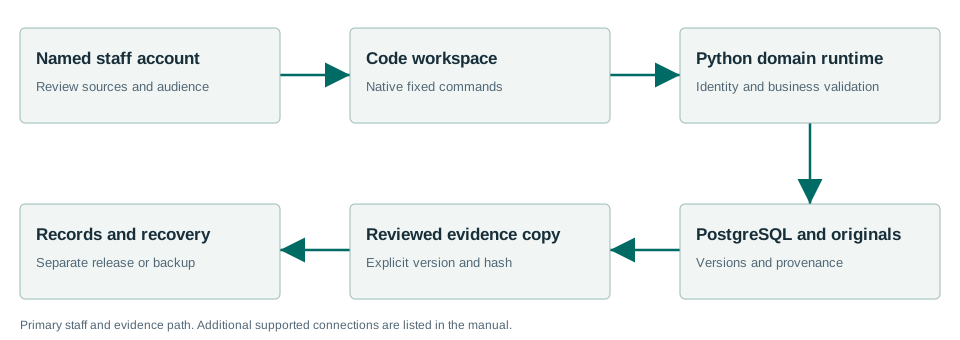
The drawing shows the principal staff/evidence path. Native commands carry trusted identity to Python business services; PostgreSQL and retained original files hold durable state. A downstream copy does not silently transfer decision authority. Station has its own configured authority/media boundary, database and mutable files. The connected-workflow text supplies the drawing’s reading order and accessibility alternative.
Import and inspect the complete source bundle first. Import submits directly; there is no separate preview/confirmation screen in this Code UI. Check the JSON source envelope before pressing Import, then inspect its saved import/provenance result.
Use the existing question control or authenticated POST /desktop/v1/code/questions. A synthetic body is:
{"question":"What does the retained synthetic section require?","section_number":"18.20.050","as_of":null}The section number must resolve in the imported source, and an optional as_of must be the intended effective date. Read the answer and cited retained version together. Missing or ambiguous authority is a review issue, not permission to invent a section. Save staff interpretation notes separately from official section text.
Obtain the actual section ID and version ID from lookup/history. Use POST /desktop/v1/code/sections/{section_id}/summaries with section_version_id, summary_text, optional language_code (default en) and draft status. For example:
{"section_version_id":"synthetic-replace-with-retained-version","summary_text":"Synthetic explanatory draft for staff review.","language_code":"en","status":"draft"}Reopen the section’s summaries, compare the draft with the cited version, and use the separate /desktop/v1/code/summaries/{summary_id}/approve operation only after review. The summary is explanatory material, not a change to adopted code. An approved summary does not record legislative adoption or complete codification.
The local synchronization orchestrator exists in the standalone Code application source. Its /api/v1/townlight_code/staff/sync/... routes and /staff/sync page are not mounted merely because the Townlight desktop Code workspace is enabled. Use them only in an already configured standalone deployment with genuine staff access. The role/actor headers in its source are a trusted deployment boundary, not credentials for an arbitrary client to invent. This guide does not ask you to deploy another server for the desktop beta.
- Register the actual official source through that application’s source registry, preserving its vendor, official URL and source identity. Retain the returned
source_id. - Configure
/api/v1/townlight_code/staff/sync/codifier-sourceswith that ID,sync_scheduleand reviewedallowlisted_hosts. Use a standard five-field cron expression no more frequent than every 15 minutes; for example0 3 * * *. A synthetic configure body is{"source_id":"replace-with-registered-synthetic-id","sync_schedule":"0 3 * * *","allowlisted_hosts":[]}. A reviewed intended on-prem host needs its explicit source-specific allowlist; this does not bypass URL safety. - Read the configured source list and
/staff/sync. Check host validation, circuit-breaker state, delta/cursor readiness and recorded run history. A configured source is not proof of a vendor network connection. - Submit a local complete import payload to
/api/v1/townlight_code/staff/sync/codifier-sources/{source_id}/run. The body is{"payload": <complete ImportBundleCreate>, "changed_since": null}. Use the full synthetic code-bundle example in the reference directory as the payload, replacing source identity only with a registered synthetic source from this exercise. - Retain the run/import identity, inspect import status, sections, source hash and recorded cursor/history, and resolve circuit/readiness refusals before another run. An unknown result requires readback, not blind resubmission. This operation does not itself fetch every commercial codifier or automatically codify an ordinance.
Source contracts: townlight_runtime/code_bridge.py, townlight_code/main.py, codifier_sync.py and staff_sync.py. Standalone request signatures and refusals remain in the Code API source supplement.
The Windows 1.8.1.1 package has fresh-install acceptance; an in-place upgrade to this version was not exercised. Its native shell uses Rust 2021, Tauri 2 and Microsoft WebView2; browser assets are JavaScript built with Vite 8.1.6. This describes the native desktop frontend; Station has a separate React operator, specified below or in its product manual. Canonical business workflows use bundled CPython 3.13.5, FastAPI, Pydantic, SQLAlchemy and Alembic, with PostgreSQL 17 / PostGIS and managed original files. The installed runtime tested here contains FastAPI 0.162.0. Package minimum Python requirements can differ from the bundled executable; the metadata reference preserves both. No stack rewrite is implied by the beta label.
The native transport is fixed to loopback 127.0.0.1:15480; PostgreSQL uses the configured local runtime port (default 15432). Optional local model service defaults to 127.0.0.1:15434. Those are deployment defaults, not internet endpoints. The runtime has health, module and readiness endpoints; readiness is stronger than process existence. The task queue is the existing local Core task infrastructure, not an assertion that a separate Redis service is required for this desktop composition.
The default native profile is %LOCALAPPDATA%\CivicSuite; the historical directory name remains part of compatibility. Do not rename it to Townlight. A configured TOWNLIGHT_PROFILE_ROOT must be absolute. Local configuration and secrets live under that profile; protected managed files and database state must be backed up coherently. Source/runtime identity is distinct from a product’s display label.
Source registry entries; import jobs and originals; sections and versions; effective-date citations; questions, notes and summaries; Meetings connections; adoption and codification closeout.
Versioned saves use expected prior revision identifiers where defined. Reopen and reconcile on conflict. Exact exports and handoffs use source IDs, current visibility, revision and SHA256. Review belongs to the saved revision and does not transfer silently to edited text. Database changes use the owning product’s migrations; a request or readiness check is not an authorization to mutate schema.
This beta has synthetic single-profile workflow evidence. It does not have a published benchmark for concurrent staff capacity, minimum RAM/CPU, large-source limits or a field SLA. Do not turn a developer machine’s specification into a supported minimum. The signed MSI is 2,081,316,864 bytes; allow additional disk for extracted runtime, database, originals, exports, media and backups. Select equipment/storage after sizing those actual workloads.
The exact runtime payload lock records pinned files, sizes and hashes. The component metadata records shipped dependency declarations. These references are more precise than a manually copied dependency list. Third-party and historical license notices must accompany their matching payloads.
Use Setup, Settings and System Health for supported staff operation. Administrators provision folders, backup storage, named accounts and the city profile. Select inspections-preview for the bounded desktop composition, including Access and Notice. Station remains a separate service boundary. Do not use a standalone product’s demo server as a substitute for the installed workspace.
Technical deployments use TOWNLIGHT_PRODUCT_PROFILE, TOWNLIGHT_PROFILE_ROOT, DATABASE_URL, TOWNLIGHT_RUNTIME_PORT, PORTAL_MODE and the runtime-managed secret files. Treat database URLs and native session proofs as secrets. The installed native domain runtime explicitly refuses non-loopback binding. PORTAL_MODE=private is the accepted posture; changing it does not by itself commission an internet portal, authentication provider or reverse proxy.
The isolated documentation exporter sets a fictional profile and unusable synthetic database origin only to read schemas; those values are not deployment configuration. Keep deployment values in the intended process/account scope. An already-running process does not automatically inherit later environment edits.
The following JavaScript belongs in the existing trusted Townlight frontend/development environment with invoke imported from @tauri-apps/api/core. It is not a command for an arbitrary web page or an instruction for nontechnical staff. IDs must come from records created in an isolated synthetic exercise.
import { invoke } from '@tauri-apps/api/core';
const result = await invoke('code_domain_request', {request: {operation: 'citation', section_number: '18.20.050', as_of: null}});
console.log(result);An administrator/developer can inspect an already-configured isolated runtime from a trusted local process. This PowerShell example reads the signed-in synthetic profile’s existing proof into memory; it does not create a user, seed a session, reveal the proof in output or bypass a permission check. Do not use real city data in development examples. A read response does not prove approval or publication.
$profilePath = Join-Path $env:LOCALAPPDATA 'CivicSuite'
$sessionPath = Join-Path $profilePath 'config\local-session.json'
$session = Get-Content -LiteralPath $sessionPath -Raw | ConvertFrom-Json
$headers = @{ 'X-Townlight-Session' = $session.session_hash }
Invoke-RestMethod -Uri 'http://127.0.0.1:15480/desktop/v1/code/sources' -Headers $headers
Remove-Variable session, headersThe synthetic Code bundle is the retained fixture used by the beta staff exercise. It includes the complete supported source envelope rather than a shortened pseudo-payload. Keep its fictional source labels. For Planning, wrap it as {"bundle": BUNDLE, "expected_previous_revision": null}; for Permitting use {"bundle": BUNDLE, "expected_revision": null}. Code and Zoning take their own complete import envelopes. Replace null with the current expected revision when revising an existing source, as the applicable schema requires. These are import examples, not legal authority or permission to load them into a live city profile.
This example demonstrates the existing Meetings HTTP contract in an isolated exercise. It is intentionally fictional. It does not start a service. Its authentication setup is included so it can be run independently under the signed-in synthetic account. If a write times out, inspect current records before repeating it.
$profilePath = Join-Path $env:LOCALAPPDATA 'CivicSuite'
$sessionPath = Join-Path $profilePath 'config/local-session.json'
$session = Get-Content -LiteralPath $sessionPath -Raw | ConvertFrom-Json
$headers = @{ 'X-Townlight-Session' = $session.session_hash }
$body = @{
  title = 'Synthetic documentation exercise'
  scheduled_start = '2026-11-05T18:00:00-07:00'
  location = 'Synthetic room'
  meeting_type = 'regular'
} | ConvertTo-Json
$meeting = Invoke-RestMethod -Method Post `
  -Uri 'http://127.0.0.1:15480/desktop/v1/meetings/meetings' `
  -Headers $headers -ContentType 'application/json' -Body $body
Invoke-RestMethod `
  -Uri ('http://127.0.0.1:15480/desktop/v1/meetings/meetings/' + $meeting.id) `
  -Headers $headers
Remove-Variable session, headers
This write requires Meetings to be enabled and the signed-in staff role to permit it. It is a cross-suite integration example; for this product’s request models, use the complete technical reference below.
Read the Code API reference for every documented operation, request field, constraint, response declaration and source supplement. Download the OpenAPI JSON for tools. For Station this is the suite-side schema only; its separate service contract is documented in the API supplement. The reference directory includes configuration/source inventories, dependency declarations, native command contracts, MCP signatures and candidate evidence.
No direct product MCP server is exposed by the accepted Townlight desktop or Station boundary. Do not configure an invented townlight mcp command or assume an AI client has staff permissions. The integration surfaces for this beta are native IPC, the documented HTTP APIs, source bundle imports, exact exports and the existing Station CLI.
The bundled transcription code includes a TextFlowKit MCP adapter as a separate source capability. It offers job-based transcribe_media, get_transcript, list_jobs, get_job_status and export_transcript, and additional tools declared in that adapter. It uses stdio first and optional Streamable HTTP, with the MCP SDK as an optional extra. It is not automatically launched, authenticated as Townlight staff or accepted as a Townlight product MCP deployment. This documentation does not add such a service.
For a transcription client already provisioned separately, an illustrative tool call is:
{"name":"get_job_status","arguments":{"job_id":"synthetic-existing-job-id"}}Use a job ID returned by that transcription service. This example does not create a Townlight record or bypass its review/Records handoff. The exact optional adapter tool signatures are supplied in the MCP source reference. Station meeting capture does not become live speech recognition because this optional donor adapter exists.
Use your own named account and save before leaving a screen. A saved draft is durable; unsaved form text may not be. If a write has an unknown result, reopen its record before repeating it.
Read source jurisdiction, dates, citation, version and visibility. A copied source hash identifies exact bytes, not their legal applicability. If a source changes or permission is removed, resolve the source problem rather than substituting stale cached content.
Keep originals and derivatives separate. Review the intended audience before export. A public summary excludes private fields only through the applicable copy contract and your review. A renamed private packet is still private content.
Drafting, review, approval, attachment, export, fulfillment and publication are separate operations. A Townlight workpaper does not itself adopt law, issue a permit, impose a fine or release a records response. The responsible staff member records the applicable decision.
The native session is validated and mapped to a persisted SQL identity. An editable actor/reviewer label is not authentication. Product/module permissions and source visibility apply at the server boundary. Revoked/unavailable authority fails closed for new Station operations; a previous permission result is not a perpetual authorization.
Use protected local folders, account permissions and credential storage. Never include the native session file, database passwords, provider keys or unredacted support bundles in a public issue or generated public documentation. A local public view is not automatically a secured internet deployment. Keep network exposure and real equipment acceptance specific to the chosen beta site.
Save work and use Core’s canonical Backup Now before maintenance. That operation stops writers. Preserve the coherent profile/database/document backup and its receipt, then use Start to resume. A source export is not a full backup.
Use Restore Latest Backup through the supported controls. If the result says Restore needs service start, use Start, then Check, and reopen a known record. Do not repeat restore merely because services need to start. The Windows 1.6.0.1 Beta 1 fresh-install acceptance verified that a fulfilled request survived restore and a post-backup marker did not.
Keep Station’s dedicated database and media evidence together in its own backup. Core’s native-profile backup must not be assumed to include an external Station data directory. Stop writers during a coordinated backup. Preserve failed media attempts and logs.
On failure, record the time, selected composition, component/installer versions and exact message. Check System Health for stopped, starting, ready or failed dependencies. Use the existing Retry control after readiness; do not create duplicate business records to refresh a stale view. Share only a redacted diagnostic bundle. Preserve secrets, original evidence, recovery material and unrelated installations.
| Symptom | Likely meaning | Next action |
|---|---|---|
| Workspace absent | Wrong product composition or unavailable canonical runtime. | Check selected composition; activate through Finish Records Migration; wait for readiness. |
| Cannot sign in / 401 | Missing or expired named account session. | Sign in normally; reopen a Station launch ticket if applicable. |
| Permission denied / 403 | Account, module, source or browser-origin permission. | Ask the authorized administrator to inspect the intended permission; do not invent role headers. |
| Save conflict / 409 | The saved revision, expected source hash or lifecycle changed. | Keep edits, reopen current state and reconcile deliberately. |
| Invalid input / 422 | Required field, format, geometry, source envelope or state is invalid. | Read the field detail and correct the input/source; preserve originals. |
| Service unavailable / 503 | Database, schema, connected source or configuration unavailable. | Inspect System Health and the named dependency. Preserve work; retry only after readiness. |
| Export refused | Missing exact review, approval, audience or source authorization. | Read the refusal and complete the owning product’s explicit decision. |
| Restore needs service start | The snapshot was restored but services have not resumed. | Use Start, then Check and verify a saved record; do not blindly repeat restore. |
The table records selected synthetic workflows from the original Windows 1.6.0.1 Beta 1 Sandbox run. Station’s later delivery has separate Windows 1.6.0.1 acceptance. See the Windows 1.8.0.1 acceptance summary for the workflows and upgrade path exercised on the previous 1.8.0.1 MSI.
| Product | Recorded result | Precisely exercised |
|---|---|---|
| Code | PASS | Synthetic official source import, exact citation/history/export; proposal into Meetings, recorded adoption and separately codified version; native connection readback. |
The Windows 1.8.0.1 acceptance covers the tested installation paths and selected synthetic workflows, including Boards & Commissions, Contracts, and Procurement. Earlier results apply to their original builds. City field acceptance, physical equipment and network commissioning, Station automatic provisioning, and comprehensive UI and role coverage remain outside the 1.8.0.1 checks.
These terms describe the Townlight Beta 1 software and this documentation package. This public Windows beta is for evaluation. No uptime commitment, support response time, indemnity, data-processing agreement or paid service is created by these documents. A separate signed agreement, if any, governs services it actually provides.
Current Townlight-owned distributions identified in this candidate use AGPL-3.0-only. The full license is supplied with this documentation and with the source companion. The license governs rights to run, copy, modify and convey the covered software; these operational terms do not add restrictions to those rights. Historical grants and dependency licenses retain their own terms. CivicCast remains a separate product and is not relicensed by this documentation work.
When conveying covered software, retain applicable notices and provide the corresponding source and installation/build information required by the license. For a modified version supporting remote network interaction, follow section 13’s source-offer requirement. The companion archive identifies the source for this candidate; a link to a different public branch is not a substitute for the matching source. Read the supplied license for the complete conditions. See the GNU license reference and GNU licensing FAQ.
Importing a document does not transfer its ownership or grant permission to publish it. The operating organization controls its accounts, access decisions, lawful source use, retention and review/release policy. Keep resident information, credentials, private notes and restricted evidence in their authorized locations. Documentation examples contain fictional data. No real city account, credential or record is required to exercise these examples in an isolated test environment.
The accepted beta workflow is local and uses named staff accounts. Station has separate storage and credentials. Configure backup destinations and optional model/network providers deliberately. A configured external provider may receive submitted prompts, images or audio according to that configuration and provider’s terms; this documentation does not promise that every optional configuration is offline. An email outbox or local public view does not establish external delivery or an internet deployment. This static documentation site has no analytics, account collection or remote font dependency.
Staff verify the jurisdiction, source currency, permissions, citations and proposed audience. Model output and generated guidance require review. No draft is automatically an official legal interpretation, zoning determination, permit approval, fee assessment, enforcement notice or records-release decision. Official permit fee authority remains with the adopted source and responsible organization; imported amounts do not become a new authoritative calculation.
Windows 1.8.0.1 was tested for fresh installation and in-place upgrade from 1.7.2.1. Upgrade paths from versions older than 1.7.2.1 are unverified. Station uses its separately configured service. Keep backups and original evidence. Test your physical equipment and network and service configuration before relying on them. See the acceptance summary for the tested paths.
The covered software’s warranty and liability conditions are those in sections 15–17 of the supplied AGPL and any applicable separate written undertaking. This documentation creates no additional warranty or limitation beyond those terms. Third-party software is subject to its retained license notices. Nothing here removes rights that applicable law makes nonwaivable.
Use the project’s existing SUPPORT and SECURITY guidance for its matching repository. Report reproducible behavior with the version, operation and redacted logs. Do not put credentials, resident records or unredacted evidence in a public issue. Coordinate sensitive reports through the channel designated in SECURITY. No new support address or service commitment is invented here.
When an organization ends testing, it controls retention/export and removes access according to its policy. Uninstall may retain data; back up and inspect the selected removal options. Ending an exercise does not revoke rights already granted by AGPL. Later software/documentation versions must identify their changed candidate and scope; historical receipts retain their original identities. These terms do not claim that a city has accepted a contract merely by reading a manual.
| Term | Meaning |
|---|---|
| Approval | An explicit authorized decision on the saved text/artifact. It is separate from saving or attachment. |
| Canonical record | The owning product’s retained identity and saved version, rather than an editable copied label. |
| Composition | The selected set of desktop modules; inspections-preview exposes the eight staff products. |
| Corresponding source | The source/build material matching the delivered covered program, subject to its license. |
| Derivative / Records copy | A separately prepared document with its own intended audience and hash. |
| Hash / SHA256 | A fingerprint of exact bytes. It detects change; it does not establish legal authority. |
| Idempotency | Repeating the same identified request has the same intended effect; changing its payload can be refused. |
| IPC | The native desktop command boundary between its browser interface and Rust host. |
| MCP | Model Context Protocol; no direct Townlight product server is enabled by this beta. |
| Original | Retained source bytes. A reviewed derivative does not replace them. |
| Provenance | Source, version, date, actor and relationship information retained with evidence. |
| Revision | An immutable saved version. Later edits do not inherit an earlier review automatically. |
| Snapshot | A fixed audience-specific copy tied to a source/reviewed revision. |
| Station | Townlight’s separate media boundary using a pinned CivicCast-derived engine; standalone CivicCast remains separate. |
- Accounts and authentication — Security and permissions.
- AGPL and source — Terms of service and license.
- API contracts — API and integration examples.
- Architecture — Architecture.
- Backup — Backup recovery and maintenance.
- Beta version — Beta identity.
- Configuration — Configuration and administration.
- Evidence and acceptance — Verified workflows and limits.
- Fees and official decisions — Terms of service and license.
- First run — First run.
- Handoffs and audience — Connected workflows.
- MCP — MCP and automation boundary.
- Originals and provenance — Security and permissions.
- Recovery — Backup recovery and maintenance.
- Staff procedures — Daily workflow.
- Station configuration — Configuration and administration.
- Technical stack — Technical specifications.
- Troubleshooting — Troubleshooting.
- Ask against an actual retained section — Ask against an actual retained section.
- Cited questions summaries and local synchronization — Cited questions summaries and local synchronization.
- Draft and approve an explanatory summary — Draft and approve an explanatory summary.
- Operate the existing local codifier contract — Operate the existing local codifier contract.
This edition is authored from the immutable corresponding-source companion, the generated installed-domain schema and the retained workflow receipts. The current software versions and signed artifacts are unchanged. Public historical pages are not synchronized or published by this local documentation task.
-
Codify separately — Daily workflow, step 6.
-
Connect a proposal — Daily workflow, step 4.
-
Find the exact section — Daily workflow, step 2.
-
Import a source — Daily workflow, step 1.
-
Inspect provenance — Daily workflow, step 3.
-
Record adoption — Daily workflow, step 5.
-
Share the right version — Daily workflow, step 7.
Use locally built wheels from the exact component sources in the corresponding-source companion and verify their hashes. Do not relabel historical release assets. Installation of these Python packages is a developer/package check; the signed Windows MSI and its installed acceptance remain separate.
In a new Windows virtual environment, replace the example wheel-directory path with your locally built wheel directory from the matching pinned source and verify its SHA256 manifest:
python -m venv .venv
.\.venv\Scripts\Activate.ps1
$candidateWheels = (Resolve-Path 'C:\path\to\candidate-wheels').Path
python -m pip install (Join-Path $candidateWheels 'townlight_core-1.3.0.dev2-py3-none-any.whl')
python -m pip install (Join-Path $candidateWheels 'townlight_code-1.0.9-py3-none-any.whl')
python -c "import townlight_code; from importlib.metadata import version; print(version('townlight-code'))"
Expected principal import: townlight_code; expected distribution version:
1.0.9. For standalone component workflow testing, use a fresh empty database and profile. These component commands do not perform a Windows MSI upgrade. See First run for the supported Windows upgrade.
Current owned code is AGPL-3.0-only. Preserve full license, matching corresponding source, dependency notices and historical grants. Terms of use do not remove license rights. Source imports do not confer permission to publish third-party material. Review all automatic drafts and use the separate owning-product decision before official action. CivicCast remains independent.
Previous editions are retained under docs/history/pre-townlight-beta-1/. They describe their original software and license grants. Use the current Townlight Beta 1 manual for this candidate.