

Website · Docs · SDK reference · MCP server · Console
The TypeScript SDK for Kubi: cloud Linux desktops ("screens") for AI agents. Apache-2.0. Docs: docs.trykubi.com.
A screen is a real Linux desktop that stays on: its browser keeps its logins, its files and open windows are where your agent left them, and it keeps running with your laptop closed. Your agent sees it, clicks and types on it, reads its accessibility tree, runs commands and moves files, and you can watch it live and take over at any time. This package is the typed client for all of it.
- Persistent or disposable. Keep a screen on for good, or make a disposable one for a run, with an end time if you want.
- One call is one agent step. Act, and the reply carries the screen after it settles, ready for the next decision.
- Pixels or elements. Click by coordinates, or by an element from the accessibility tree, and check what changed.
- Safe to retry. A click is never sent twice by a retry, and a stale screenshot is refused instead of acted on.
- People in the loop. A live-view link, Take control in the dashboard, and a record of every call.
- Small and plain. One dependency (
openapi-fetch), ESM, full types from the public spec, no install scripts, no telemetry.
npm install @trykubi/sdkThe package runs on Node 20 or newer and ships as an ES module with its type declarations. Create an API key in the console under API keys and put it in the environment:
export KUBI_API_KEY=kubi_...New to Kubi? The quickstart goes from sign-up to your agent's first click in about five minutes. Prefer no code? Add the hosted MCP server to Claude Code, Codex, Cursor or VS Code: Connect your agent.
import { Kubi } from '@trykubi/sdk'

const kubi = new Kubi() // KUBI_API_KEY from the environment
const screen = kubi.screen('scr_...')
const shot = await screen.screenshot()
await screen.act([{ type: 'click', x: 640, y: 360 }], { screenshot_id: shot.screenshot_id, screenshot: 'after' })

const op = await kubi.screens.create({ name: 'worker' })
await kubi.operations.wait(op.id) // long polls; throws OperationFailedError if it fails
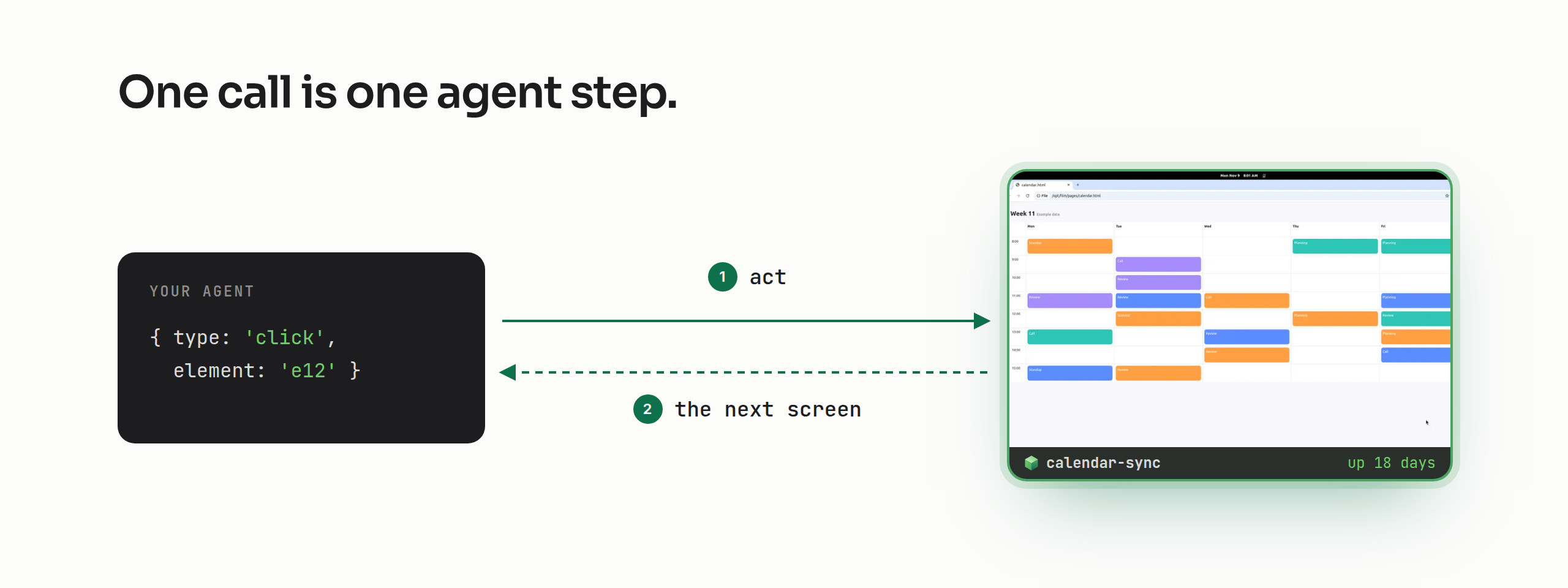
Pass the screenshot_id your model looked at, and the API refuses the action if the screen changed since (a person
typing included). With screenshot: 'after' the reply carries the next screen, so the loop makes one call per step.
const screen = kubi.screen('scr_...')
let shot = await screen.screenshot() // shot.data is the image, base64

for (let step = 0; step < 20; step++) {
  const action = { type: 'click' as const, x: 640, y: 360 } // what your model decided from shot.data
  const r = await screen.act([action], { screenshot_id: shot.screenshot_id, screenshot: 'after' })
  if (r.status !== 'completed') break // a batch stops at its first failure
  if (r.screenshot) shot = r.screenshot
}
act takes 1 to 20 actions in one batch: click, move, drag, scroll, type, key, wait, settle, zoom and more. Each has
its own method too (click, type, press, scroll, drag, move). How each model's computer-use actions map to
these: Claude, OpenAI and Gemini.
Read the accessibility tree, act on an element by its id instead of guessing pixels, and check the result in the same call.
const tree = await screen.tree({ query: 'Save' }) // tree.text is the same tree as rows for a model
const save = tree.elements.find((e) => e.role === 'push button' && e.id)

if (save?.id) {
  const r = await screen.act([{ type: 'click', element: save.id }], {
    screenshot_id: tree.screenshot_id,
    expect: { conditions: [{ window_title: 'Saved' }], timeout_ms: 3000 },
    tree: 'after', // the next tree, its ids ready for the next call
  })
  console.log(r.expectation?.result) // satisfied, unsatisfied or unknown; unknown is never success
}
set_value fills a field and invoke runs an element's own action (it reaches items in a closed menu), both
without the pointer; focus brings a window to the front.
await screen.files.upload('/home/user/data.csv', 'id,total\n1,42\n')

const run = await screen.exec({ command: './build-report.sh data.csv', cwd: '/home/user', timeout_s: 3600 })
const done = run.status === 'running' ? await screen.waitForExec(run.id) : run // reading never reruns it
console.log(done.exit_code, done.stdout)

const pdf = await screen.files.download('/home/user/report.pdf') // Uint8Array
Short commands answer finished; long ones answer running and waitForExec follows them. More:
Commands and files.
const { url } = await screen.viewerLink() // a live view: open within 60 s, single use; agents' links are view-only

for await (const row of screen.followHistory()) console.log(row.at, row.summary) // every call, as it happens
From the dashboard a person can press Take control and use the desktop themselves; the agent's calls are refused until they press Release or 5 minutes pass with no input. More: People and agents.
const snap = await screen.snapshots.create({ name: 'before-upgrade' }) // an undo point, restored with screen.reset()
await kubi.operations.wait(snap.id)

const saved = await kubi.operations.wait((await kubi.templates.create({ screen_id: screen.id, name: 'logged-in-crm' })).id)
const op = await kubi.screens.create({ kind: 'disposable', template_id: saved.template_id ?? undefined, ends_in_s: 3600 })
const { screen_id } = await kubi.operations.wait(op.id) // a fresh copy for one run, deleted after an hour
Power, create, delete, snapshots and templates answer with an operation; operations.wait follows it to the end.
More: Screens.
import { KubiError } from '@trykubi/sdk'

try {
  await screen.click({ x: 640, y: 360, screenshot_id: shot.screenshot_id })
} catch (e) {
  if (e instanceof KubiError && e.code === 'STALE_OBSERVATION') {
    // the screen changed since that screenshot: look again, never repeat the click blind
  } else throw e
}
Every error code, what it means and what to do: Errors.
| Option | Default | What it does |
|---|---|---|
apiKey |
KUBI_API_KEY |
The API key every call sends |
baseUrl |
https://api.trykubi.com/v1 |
Where the API is |
run |
KUBI_RUN, CLAUDE_CODE_SESSION_ID or one id |
Labels every call with Kubi-Run |
maxRetries |
2 |
Retries of calls the API marks retryable |
fetch |
the global fetch |
Your own fetch, for proxies or tests |
const kubi = new Kubi({ apiKey: process.env.MY_KUBI_KEY, run: 'nightly-eval-42' })kubi.screens(list, all, create, get),kubi.templates,kubi.operations(get, wait),kubi.secrets,kubi.me(),kubi.openApi(), andkubi.raw, the typed client for every path in the spec.kubi.screen(id): get, update, delete, start, stop, restart, convert, reset,snapshots,operations; screenshot, screenshotImage, zoom, tree; act and the single actions (click, type, press, scroll, drag, move); exec,execs(get, kill), waitForExec;files(upload, download, list, all);clipboard(get, set); viewerLink;history(list, all, screenshot) and followHistory.- Method names follow the TypeScript samples in the spec. Every
allis an async iterator overnext. - The helpers wrap the long polls (
wait_s, at most 25 s a call):operations.wait,waitForExec,followHistory, and on the screenwait(split into 20 s waits) andsettle. A wait that runs out of time throwsKubiTimeoutErrorwith the last reply; the work goes on. - A failed call throws
KubiErrorwithstatus,code,retryable,outcome,retryAfterandrequestId.
Every method next to its API call: TypeScript SDK.
- Types come from the public API spec:
spec/screens-v1.public.openapi.yaml, taken from kubi-platform byscripts/gen.sh, which writessrc/types.gen.ts. Never edit either by hand. - The client is written by hand, so a click is never retried as new work: every changing call carries an
Idempotency-Key, a retry reuses it, only failures the API marksretryableare retried, and never a 504. A retry waits forRetry-After(else the body'sretry_after); a wait over 30 s goes back to the caller. - Every call carries
Kubi-Run: fromrun, elseKUBI_RUN, elseCLAUDE_CODE_SESSION_ID, else one id per client. - The SDK reports nothing of its own.
- The tests run the SDK against a fake API built from the spec (
test/fake-api.ts): every request must match its operation (path, method, parameters, body schema) and every reply is the spec's example or validated against it. One test calls every operation in the spec.
Node 26 and pnpm 12 (corepack) for development; the package itself runs on Node 20 or newer.
./check.sh          # spec and types current, types, lint, unit tests, the packed package
scripts/gen.sh      # after the public spec changes in kubi-platform
pnpm build # dist/, what npm shipsBump version in package.json and VERSION in src/index.ts together, commit, and push a tag v<version>.
.github/workflows/publish.yml waits for a maintainer's approval in the npm environment, runs ./check.sh from
the frozen lockfile and publishes through npm's trusted publishing, with no token and with a provenance attestation.
To check that a release was built from this repository: npm audit signatures in a project that installs it.
Please don't report vulnerabilities in public issues. Email security@trykubi.com; what we cover and how we answer: vulnerability policy. How Kubi keeps screens and data safe: trykubi.com/security.