


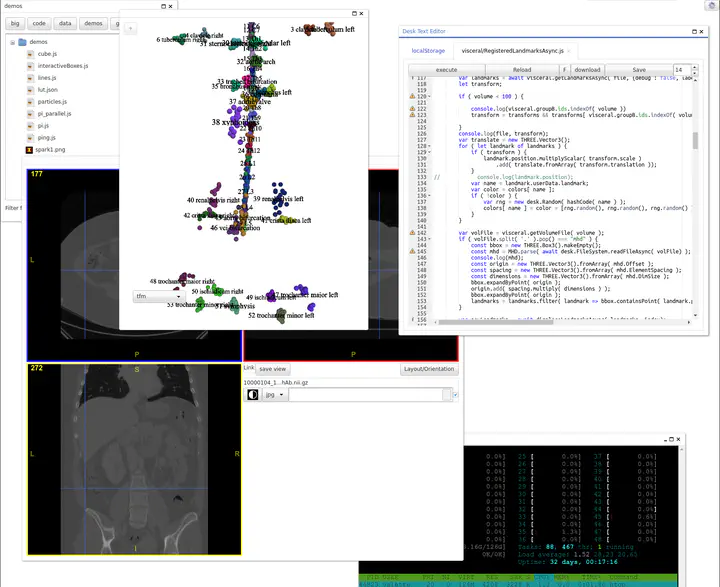
DESK is a remote desktop environment, originally developed for visualization and processing of medical images. It currently works under Linux or macOS, but patches for other platforms are welcome.
This repository contains the Node.js server component. The frontend UI source code is available at: https://github.com/valette/desk-ui
- Web-based IDE: Full development environment accessible through any modern browser
- 3D Visualization: Integration with THREE.js and qooxdoo for advanced 3D rendering
- Command-line Tools: Execute server-side programs through a web interface
- Remote Terminal: Web-based terminal access with full PTY support
- Action Framework: Register command-line tools as reusable actions
- File Management: Upload/download files and manage directories
- Real-time Collaboration: Live updates and communication through WebSockets
DESK is just a server framework. Custom code execution is defined via actions definitions, which syntax should follow the desk-base module. More information here : https://github.com/valette/desk-base
Two local versions are also available for running on your computer:
- desk-electron - Desktop application using Electron
- desk-nw - Desktop application using NW.js
The primary goal is to enable efficient visualization tools such as THREE.js and qooxdoo on top of existing server-side command-line programs.
Each server-side program is registered as an 'action' using a JSON configuration file. See the ACVD.json file in the ACVD repository as an example.
DESK can also generate static content suitable for web deployment. An example of static content served by a classic Apache server is visible here.
A live demo is available at: https://desk.creatis.insa-lyon.fr/demo/
More information: http://www.creatis.insa-lyon.fr/~valette/desk.html
BSD-3-Clause. See LICENSE. For academic use, please cite:
H. Jacinto, R. Kéchichan, M. Desvignes, R. Prost, and S. Valette, "A Web Interface for 3D Visualization and Interactive Segmentation of Medical Images", 17th International Conference on 3D Web Technology (Web 3D 2012), Los Angeles, USA, pp. 51-58, 2012
// The desk-base library doesn't have a start() method. // It's meant to be used as a module that exports action execution functions. // The actual server is started by the parent application.
Actions are defined through JSON configuration files. These files describe executable commands or JavaScript modules along with their parameters. Actions are loaded from:
lib/includes/base.json- Base system actionslib/includes/testing/testing.json- Test actions- User-defined files in the extensions directory
For detailed information about all base actions and their parameters, please refer to the desk-base module : https://github.com/valette/desk-base
For a practical example of action definitions in use, see the ACVD.json file from the ACVD project, which demonstrates how to define complex mesh processing actions.
Each action definition has the following fields:
{
  "parameters": [
    {
      "name": "parameter_name",
      "type": "parameter_type",
      "required": true,
      "defaultValue": "default_value",
      "prefix": "--option ",
      "suffix": " postfix",
      "min": 0,
      "max": 100
    }
  ],
  "command": "command_to_execute",
  "executable": "/path/to/executable",
  "js": "module_name",
  "voidAction": true,
  "noCache": true,
  "dependencies": ["dependency1", "dependency2"],
  "permissions": 1
}| Type | Description |
|---|---|
string |
Simple string parameter |
int |
Integer value |
float |
Floating-point number |
file |
File path parameter |
directory |
Directory path parameter |
fileArray |
Array of file paths |
intArray |
Array of integers |
floatArray |
Array of floating-point numbers |
stringArray |
Array of strings |
base64data |
Base64 encoded binary data |
flag |
Boolean flag parameter |
To install DESK on your computer:
- Git
- Node.js (version 8.0.0 or higher)
For 3D data visualization (meshes, volumes):
- VTK with headers
- CMake
git clone https://github.com/valette/desk.git
cd desk
npm install
To install binary addons for 3D data visualization (requires VTK and CMake):
npm run buildAddonsnode desk.jsThen point your browser to http://localhost:8080
Default login:
- Username: your Linux username
- Password: "password"
DESK is configured through environment variables:
| Variable | Description | Default |
|---|---|---|
DESK_ROOTDIR |
Absolute path of the server root directory (where all data lives) | ~/desk |
PORT |
HTTP port the server listens on | 8080 |
DESK_PREFIX |
URL path prefix (e.g. desk → served under /desk/) |
/ |
DESK_SINGLE |
Disable the IPC server and cron cache cleaner | unset |
DESK_ROOTDIR (default ~/desk) is the base directory holding all server-side
data. It is created automatically on first launch. The server only exposes a
set of allowed sub-directories inside it; any path requested by an action
must resolve inside one of them. The directories exposed by default are:
| Exposed name | Directory | Notes |
|---|---|---|
data |
<root>/data |
main user data directory |
code |
<root>/code |
user code / scripts directory |
home |
$HOME |
the machine's home directory |
cache |
<root>/cache |
action result cache (hidden) |
actions |
<root>/actions |
generated action output (hidden) |
File and directory paths sent to the server (via actions such as write_string,
read_string, ls, mkdirp, ...) are relative to the root directory, and
must start with an exposed directory name (e.g. data/test.txt, code/foo.js).
Writing to the root itself (/) or to arbitrary absolute paths is not
allowed and results in a path ... not allowed error.
For example, using a throwaway root for testing:
DESK_ROOTDIR=$(mktemp -d) PORT=8080 node desk.jsA minimal isolation run, using a temporary root with a custom data file:
mkdir -p /tmp/my-desk/data /tmp/my-desk/code
DESK_ROOTDIR=/tmp/my-desk node desk.js
# now write/read e.g. "data/test.txt" from the web UIThe server can serve the small desk-web
test pages (connect and run actions, use the filesystem, stream + kill) at
/web/... — no express route or extra dependency needed. The pages are
ordinary static files served through an exposed dataDir:
- Build
desk-web:cd ../desk-web && npm run build(copiesexamples/*.htmlintodist/alongsidedesk-web.mjs). extensions/desk-web.jsondeclares awebdataDir pointing at../desk-web/dist, whichdesk.jsresolves and serves under the root as/web/...(behind the usual Basic auth).- Open e.g.
http://localhost:8080/web/example-01-actions.html?username=...&password=....
The web dir is marked listed:false/hidden:true so it doesn't clutter the
desk-ui Files menu.
The proxy/ directory is a deployment layer for hosting many
isolated DESK instances on a single machine behind one HTTPS endpoint. It uses
PM2 to run per-user DESK servers (each under its
own Unix account via a setuid launcher) and a reverse proxy that routes
https://<host>/<user>/ to each instance. See proxy/README.md
and proxy/docs/ for setup, configuration, and architecture.
Building the debug version:
cd node_modules/desk-ui
git clone https://github.com/qooxdoo/qooxdoo
npm install
npm run build
The debug version will be available at: http://localhost:8080/ui/source
This software benefits from several open-source contributions: