
A web UI interface for policy development.
Built for the Maker Arm, the Metal Arm, and the SO-101. Every robot in LeRobot. Single or Bimanual.

MakerMods Lab puts the full workflow for robotic policy development into one browser tab. Plug in an arm, open the app, and go. Calibrate, teleoperate, record, curate, train, deploy, evaluate, then go around again.
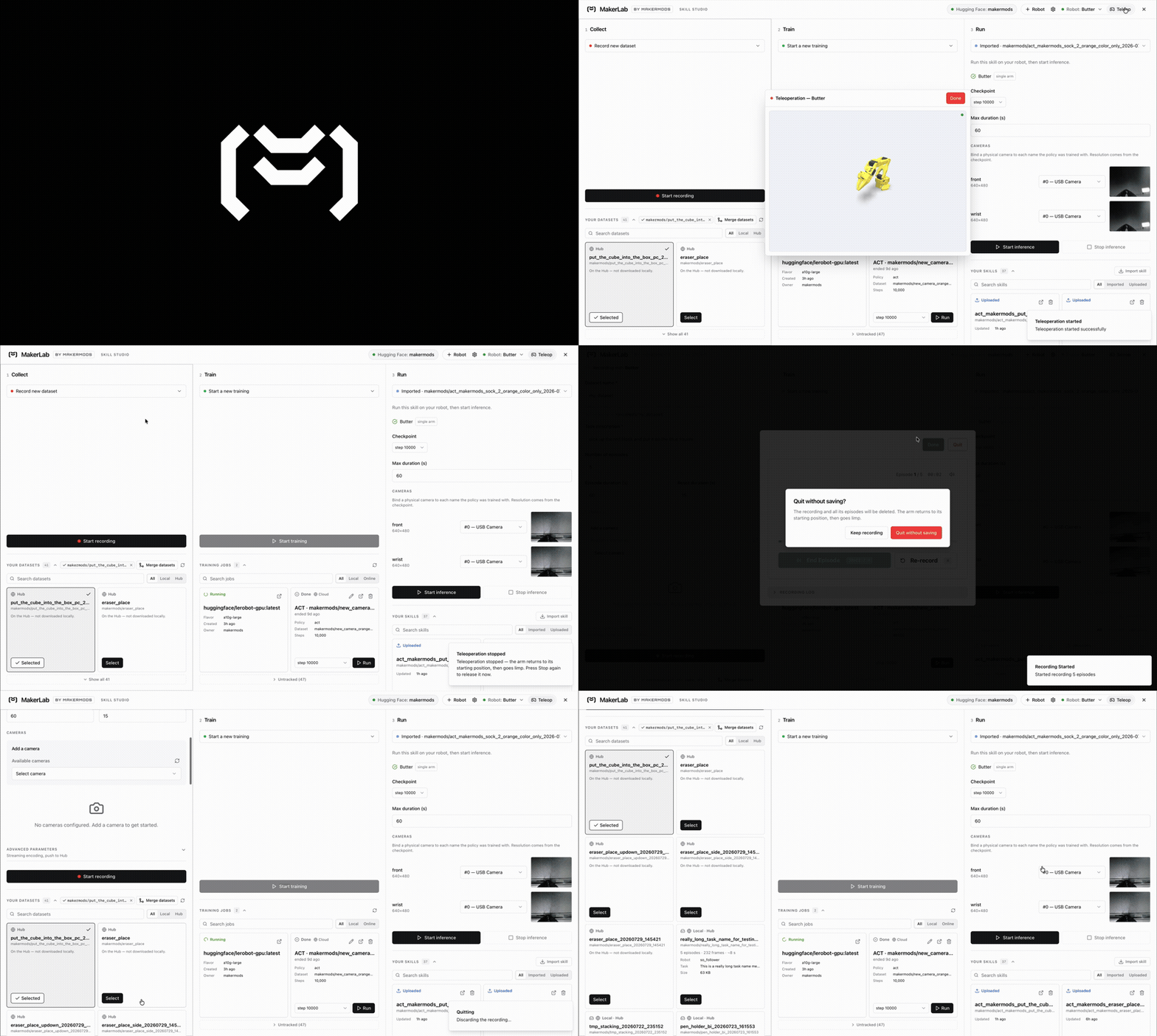
A policy is never right the first time. You record demos, you train, you watch the robot fumble, you work out which demos caused it, you collect more, you merge, you fine-tune, you run it again. That loop is the job.
Most tools make the first pass easy and the tenth pass miserable. One CLI invocation per step, a dataset directory you edit by hand, a checkpoint path you paste between five terminals. We built for the tenth pass.
The whole loop lives in one tab. Record into a dataset, curate it, launch training, watch the loss chart, deploy the checkpoint to the arm, evaluate it, and fine-tune from the result. No terminal, no re-deriving a path.
Correct the policy while it is running. DAgger hands control back to the leader arm mid-rollout, so you drive the robot through the exact motion it just failed. Those corrections land in the training set, and the evaluation summary offers to merge them and fine-tune from the same screen.
Curate before you spend a GPU on it. Open any dataset, watch the episodes and deselect the bad ones for training. Nothing is ever deleted. Merge datasets from the UI when you want the combined set instead.
Fine-tune from where you stopped. Continue any run from a checkpoint, and also fine tune any public policies
Powered by LeRobot and Huggingface.
Training jobs on any node in your tailnet. Point a run at this machine, at a peer node, or at a Hugging Face Jobs GPU, from the same picker.
Remote teleoperation over LiveKit. Teleop any follower arm and view cameras over internet with livekit
Remote inference on Modal GPUs. Run bigger models with cloud GPUs
Requires Python 3.12 or newer, and uv.
Just want to use it? One line, no clone:
uv tool install "git+https://github.com/makermods-robotics/makermodslab"
makermodslab            # serves the UI + API on :8000, opens your browser
Want to change the code? Clone and install editable. Your edits take effect on the next run, with no reinstall:
git clone https://github.com/makermods-robotics/makermodslab
cd makermodslab
uv venv --python 3.12
uv pip install -e .
.venv/bin/makermodslab   # first launch also links `makermodslab` onto your PATH
That first launch symlinks the command into ~/.local/bin, so from then on:
makermodslab            # run the app: built UI + API on :8000
makermodslab --dev # hack on it: Vite hot reload on :8080 + auto-reloading API on :8000Same binary whether it is your laptop or a headless station in the corner of the lab wired to the arms.
makermodslab --lan                    # bind 0.0.0.0, no browser, serve the whole LAN
makermodslab --bind tailscale0        # or bind one interface, tailnet only
makermodslab --no-ui                  # pure API node, no frontend
makermodslab --discover-tailscale     # find peer nodes over Tailscale
makermodslab --sfu                    # also run a LiveKit SFU for remote teleop / inference peers
Once a station is up, any client on the same tailnet can drive it from a browser, and any node can hand a training job to any other.
--sfu runs LiveKit next to the API. Remote teleoperation and remote inference stream cameras,
joint state and actions through a LiveKit server, and --sfu
runs one alongside, bound wherever the API is bound (so --sfu --bind tailscale0 serves the tailnet).
It needs the livekit-server binary on your PATH — brew install livekit on macOS,
curl -sSL https://get.livekit.io | bash on Linux, the release zip on Windows — and exits with that
hint if it is missing. Peers fetch short-lived room tokens from POST /api/v1/sfu/token; the signing
secret stays in a 0600 file on the station. Open 7880/tcp, 7881/tcp and 7882/udp for remote peers.
Remote teleoperation. Supports SO-101, Maker, and Metal, with single or bimanual layouts. Maker and Metal use a Star Arm 102 leader configured for the same follower family on the operator machine. Both ends must select the same arm family and layout. Their seven joint angles and cameras appear on both the station and operator screens. Place the follower in a supported resting pose before hosting; Home and Stop hosting return it there before releasing torque. CAN targets are limited to 30 degrees per second, so a large initial alignment can take longer than one second.
Start the station in station mode — makermodslab --sfu --host (or
makermodslab-station --sfu --host headless; add a robot name to pick one from the command line): the
station hosts its saved robot — the remembered choice, the only hostable one, or the one you pick in the
station's UI — with its follower and cameras joining the room parked (torque off, streaming, listening).
You can change the hosted robot from the station's UI at any time an operator isn't driving. On your laptop, plug in the leader arm, pick the station in Remote,
and drive: the arm engages with a one-second soft start, Home parks it again, and ending your session
parks it at once. One operator at a time; a brief network blip is tolerated (15 s) and a reconnect resumes
your seat. Anything you start at the station itself takes the arm back from a parked, idle hosting session
and hosting re-arms when you are done. Both machines need the remote extra — uv pip install -e '.[remote]' in a checkout, or
uv tool install 'makermodslab[remote] @ git+https://github.com/makermods-robotics/makermodslab' for the
one-line flavor (Python 3.12; Linux x86_64/aarch64 or Apple Silicon) — and the station must be a
registered peer node. A bare uv pip install 'makermodslab[remote]' does NOT work: uv refuses the
lerobot git pin as a transitive URL dependency.
Remote inference. Same SFU, other direction: the policy runs on a Modal GPU and
streams action chunks to the arm. In the studio's Deploy panel pick the robot and checkpoint, choose Run it
remotely, press Start GPU (the Lab launches and stops the Modal app itself, with the modal CLI logged
in on this machine) and then Start; the arm is only energized once the policy is in the room, and Stop
returns it to rest before releasing torque. The GPU joins the room with a short-lived token from this
machine — no LiveKit credentials to configure — but its media cannot ride the tailnet, so start the station
with --sfu --sfu-external-ip and let UDP 7882 through. Works on a station in --host mode too: a parked
host yields to the run and re-arms after. Needs the remote extra on the station; SO-101 single arm in this
release.
Peer nodes are verified, not trusted. A node is only added once its /api/v1/health identity
document checks out, and a discovered peer gets re-verified every time.
One browser drives the robot at a time. The tab that started a session checks in every twenty seconds. Go quiet for a minute, because the tab closed or the laptop shut, and the server stops the session and releases the arm by itself.
Three families, and the app knows the difference. Bus protocol, calibration flow, port detection, joint count and safe-stop behaviour all branch on the arm type, so you never hand-configure it.
| Arm | Follower | Leader | Joints |
|---|---|---|---|
| SO-101 | Feetech STS3215 over USB serial | SO-101 leader | 6 per arm |
| Maker Arm v1 | RobStride over CAN | Star Arm 102 | 7 per arm |
| Metal Arm | Damiao over CAN | Star Arm 102 | 7 per arm |
Every family runs single or bimanual: two leader/follower pairs, four-arm calibration, dual-arm teleoperation and bimanual recording.
Guided calibration. Manual step by step or fully automatic for the SO-101, zero-pose calibration for the CAN arms. Save calibrations under names instead of overwriting them.
Episode viewer. Synced camera grid, transport controls, and a joint-position chart tied to the playhead. Works on Hub-only datasets too, streaming chunk by chunk with no full download.
Replay. Play a recorded episode's motion back on the real robot.
Import and upload. Pull a dataset or policy from the Hugging Face Hub or your disk, push your dataset back up in one click.
English and Simplified Chinese, throughout.
A versioned API. Everything the UI does is a documented /api/v1 endpoint, with a committed
OpenAPI snapshot in docs/api/openapi.json. That snapshot is also why you
can point Claude Code or Codex at this repo and let an agent drive the robot: start a recording
session, launch a training run, deploy a checkpoint, all through the same endpoints the browser uses.
Or write your own client.
We are early. Expect bugs, expect the UI to move, and expect staging to be ahead of main. Feature
branches land on staging and get promoted to main in batches.
If you are running real hardware, start with the arm unclamped and clear of anything you care about.
- CONTRIBUTING.md covers setup, the dev loop, and the checks a PR has to pass.
- CLAUDE.md is the architecture rundown. Written for coding agents, useful for humans.
- docs/api/openapi.json is the committed API snapshot.
- frontend/docs/localization.md is required reading before you touch a user-facing string.
- Discord for chat with the LeRobot community.
- GitHub Issues for bugs and feature requests.
PRs welcome. Branch off staging and open your PR against staging.
uv pip install -e ".[dev]"   # ruff, pre-commit, pytest
pre-commit install           # wires the git hook, please don't skip this
makermodslab --dev           # Vite on :8080, uvicorn --reload on :8000
The full version, including the two frontend typecheck projects that a bare tsc skips without
complaint, is in CONTRIBUTING.md.
Apache 2.0. See LICENSE.
MakerMods Lab is maintained by makermods-robotics. It began as a fork of Hugging Face's leLab, also Apache 2.0, and it is built on LeRobot. Go there for everything beneath the UI.